Teaching Snowflake CoCo (and myself) New Tricks: Building a Custom AI Skill for Certification Prep
If you tuned into Snowflake Summit 2026 last week, you already know the headline: Cortex Code has officially evolved into Snowflake CoCo, a…
Teaching Snowflake CoCo (and myself) New Tricks: Building a Custom AI Skill for Certification Prep
If you tuned into Snowflake Summit 2026 last week, you already know the headline: Cortex Code has officially evolved into Snowflake CoCo, a data-native AI coding agent built to accelerate enterprise workflows right inside the AI Data Cloud.
What makes CoCo special isn’t just that it understands schemas, RBAC policies, and data lineage out of the box — it’s that CoCo is completely extensible. Through the use of Skills, developers can encapsulate complex, repetitive workflows and patterns to teach CoCo exactly how to execute them, turning generative AI into Agentic AI. But this is not limited to just improving data pipelines and AI agents; why not improve ourselves too?
On top of taking some time to unwind, I love using my summers to catch up on technical reading and certifications. So I leveraged CoCo to help build a skill to study and prepare for a couple SnowPro Certifications. Namely, the SnowPro Advanced Architecture and SnowPro Gen AI Specialty. This snowpro-study skill is now available to you all through the Snowflake-Labs community GitHub, in the coco-skills repository.
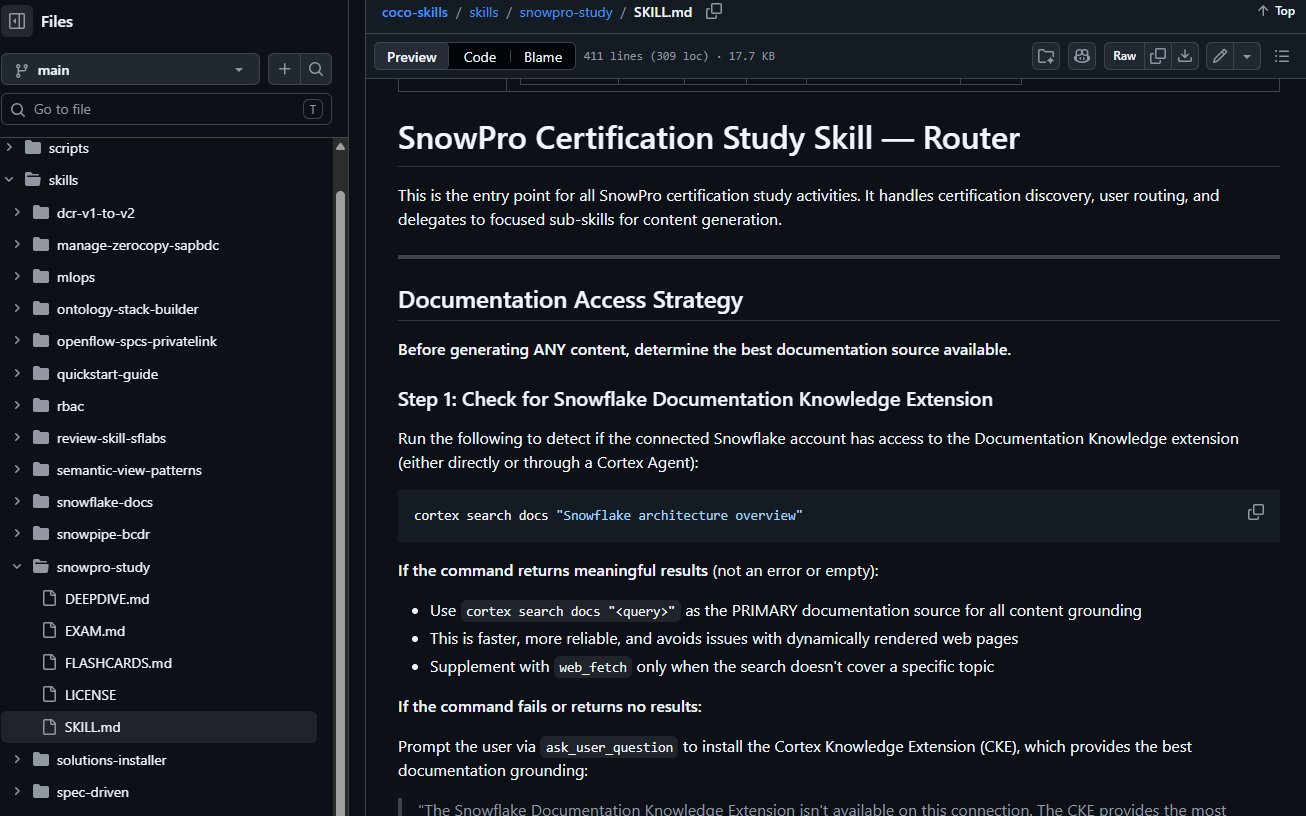
What does the snowpro-study skill do?
Instead of flipping through endless documentation pages, the skill turns your CoCo CLI or CoCo Desktop client into a targeted study engine:
- Quick Reference Overviews: Provides an instant breakdown of each certification, including domain weightings, exam costs, and direct sign-up links.
- Domain Deep-Dives: Generates structured technical summaries broken out by specific exam domains for easier, modular consumption.
- Flashcard Mode: Pulls up rapid-fire questions and answers directly in your workflow, supporting standard review formats or Anki-style study prep.
- Generative Exam Simulator: Dynamically creates test questions, multiple-choice answers, and comprehensive explanations for why each option is correct or incorrect. These follow the exact professional standards that Snowflake uses to design actual test questions (meaning no confusing double-negatives or “almost-right” answers). It’s fully customizable by domain, tracks your live score, and measures your progress.
How to install and use the snowpro-study skill?
The snowpro-study skill is best used via CoCo Desktop or **CoCo CLI*. Then simply ask CoCo: “Add this skill from github: Snowflake-Labs/coco-skills/skills/snowpro-study” or use the terminal command: cortex skill add Snowflake-Labs/coco-skills/skills/snowpro-study*
By default, the skill will be added as a remote skill. This means it will cache locally and work across all of your projects (similar to global skills), but is managed via the remote reference. If desired, you can request it to be added as a project skill (stored in a specific project folder or repository and only referenceable when using that project) or as a global skill (also stored locally, but part of your local profile).
Once installed, you can simply invoke it to see what options are available:
> $snowpro-study
> [Skill Attached: snowpro-study]
* I'll help you with SnowPro certification study materials. Let me first discover the available certifications and determine what you'd like to study.
...
* I have the certification catalog. Now let me ask which certification you'd like to study for.
╭──────────────────────────────────────────────────────────────────────────────╮
│ ○ ○ │ ✓                                                                      │
│ Certification                                                                │
│ Which SnowPro certification would you like to study for?                     │
│                                                                              │
│ ❯ ○ Core (COF-C03) (tab to add more info)                                    │
│      Validates practical experience with Snowflake AI Data Cloud. Cost: $175 │
│   ○ Specialty: Gen AI (GES-C02)                                              │
│   ○ Specialty: Snowpark (SPS-C01)                                            │
│   ○ Specialty: Native Apps (NAS-C02)                                         │
│   ○ Advanced: Data Engineer (DEA-C02)                                        │
│   ○ Advanced: Architect (ARA-C01)                                            │
│   ○ Something else                                                           │
│   ○ I need clarification, let's chat about this                              │
│ ↑↓ ←→ enter esc                                                              │
╰──────────────────────────────────────────────────────────────────────────────╯
You can create content for a whole certification:
> $snowpro-study Gen AI deep dive
> [Skill Attached: snowpro-study]
...
* Based on the certification catalog I already fetched, the GES-C02 exam covers Gen AI capabilities in
  Snowflake. Let me now gather the actual technical documentation for Snowflake's Gen AI features to build a comprehensive deep-dive.
╭──────────────────────────────────────────────────────────────────────────────────────────────────╮
│ Domain                                                                                           │
│ Which Gen AI domain(s) would you like a deep-dive on? The GES-C02 exam covers these major areas: │
│                                                                                                  │
│   ○ LLM Functions & Cortex AI                                                                    │
│   ○ Search & Retrieval (RAG)                                                                     │
│   ○ Fine-Tuning                                                                                  │
│   ○ Cortex Analyst                                                                               │
│ ❯ ○ All Domains (tab to add more info)                                                           │
│      All domains — generate a deep-dive for every domain                                         │
│   ○ Something else                                                                               │
│   ○ I need clarification, let's chat about this                                                  │
│ ↑↓ enter esc                                                                                     │
╰──────────────────────────────────────────────────────────────────────────────────────────────────╯
...
...
* I'll generate deep-dive files for the following domains in ********\git\scripts:

  ┌───┬───────────────────────────────────┬───────────────────────────────────────────────────────────────────────────┐
  │ # │ File                              │ Content                                                                   │
  ├───┼───────────────────────────────────┼───────────────────────────────────────────────────────────────────────────┤
  │ 1 │ SnowPro_GenAI_Domain1_DeepDive.md │ Cortex AI Functions (AI_COMPLETE, AI_CLASSIFY, AI_FILTER, AI_EMBED, etc.) │
  ├───┼───────────────────────────────────┼───────────────────────────────────────────────────────────────────────────┤
  │ 2 │ SnowPro_GenAI_Domain2_DeepDive.md │ Cortex Search & RAG (hybrid search, service creation, querying)           │
  ├───┼───────────────────────────────────┼───────────────────────────────────────────────────────────────────────────┤
  │ 3 │ SnowPro_GenAI_Domain3_DeepDive.md │ Fine-Tuning (PEFT, base models, data prep, job management)                │
  ├───┼───────────────────────────────────┼───────────────────────────────────────────────────────────────────────────┤
  │ 4 │ SnowPro_GenAI_Domain4_DeepDive.md │ Cortex Analyst & Semantic Models (text-to-SQL, VQR, semantic views)       │
  ├───┼───────────────────────────────────┼───────────────────────────────────────────────────────────────────────────┤
  │ 5 │ SnowPro_GenAI_Domain5_DeepDive.md │ Cortex Agents (agentic orchestration, tools, threads, monitoring)         │
  └───┴───────────────────────────────────┴───────────────────────────────────────────────────────────────────────────┘
Or simply for one domain:
>$snowpro-study Gen AI Domain 3 Flashcards
> [Skill Attached: snowpro-study] Gen AI Domain 3 Flashcards

* I'll generate flashcards for Domain 3 (Fine-Tuning). Let me first read the flashcards sub-skill instructions.
...
╭───────────────────────────────────────────────────────────────────╮
│ Format                                                            │
│ Which flashcard format would you like for Domain 3 (Fine-Tuning)? │
│                                                                   │
│ ❯ ○ Markdown Q/A (tab to add more info)                           │
│      Readable Q/A pairs in a .md file, good for on-screen review  │
│   ○ Anki CSV                                                      │
│   ○ Both                                                          │
│   ○ Something else                                                │
│   ○ I need clarification, let's chat about this                   │
│ ↑↓ enter esc                                                      │
╰───────────────────────────────────────────────────────────────────╯
...
* Done. Written SnowPro_GenAI_Flashcards_Domain3.md with 20 flashcards covering:

  • Exact defaults & limits (epochs, row limits, context windows, token formula)
  • Syntax & function signatures (FINETUNE CREATE/DESCRIBE/CANCEL, AI_COMPLETE with tuned model)
  • Feature distinctions (PEFT vs full training, fine-tuning vs RAG)
  • Required privileges & roles (CREATE MODEL, CORTEX_USER)
  • Behavioral facts (background job, silent truncation, validation optional)

  All facts are grounded in the documentation fetched earlier. You can review the cards and use $snowpro-study Gen AI flashcards for other domains or $snowpro-study Gen AI exam to take a practice quiz.
You can even create a practice exam, or take one interactively (it can cache your score for trending too)!
>$snowpro-study Gen AI exam
> [Skill Attached: snowpro-study] Gen AI exam
...
╭───────────────────────────────────────────────────────────────────────────────────────╮
│ ○ ○ │ ✓                                                                               │
│ Exam Mode                                                                             │
│ Which interactive exam mode would you like?                                           │
│                                                                                       │
│ ❯ ○ Instant feedback (tab to add more info)                                           │
│      See if you're right/wrong immediately after each question, with full explanation │
│   ○ Results at end                                                                    │
│   ○ Batched (5-10)                                                                    │
│   ○ Something else                                                                    │
│   ○ I need clarification, let's chat about this                                       │
│ ↑↓ ←→ enter esc                                                                       │
╰───────────────────────────────────────────────────────────────────────────────────────╯
Key Takeaways & Lessons Learned
1. Token Cost Optimization
Generating deep technical content and running recursive interactive quizzes consumes LLM tokens. I highly recommend using a more capable model like claude-opus-4.6 or better for the core content generation, and then leveraging a lower-cost, faster model like claude-sonnet-4.6 to run the interactive chat quizzes and work with content you’ve already generated.
2. Built for Community Collaboration
Because this skill is officially part of the Snowflake-Labs community GitHub, anyone can contribute to its improvement! If you see gaps or want to enhance the logic, you can submit a Pull Request. Personally, I’d love to see someone fork the repo and build an e-reader format export feature for the deep-dive guides.
3. Scaling Beyond Snowflake
The architectural blueprint of this skill is highly portable. This isn’t just a Snowflake trick (although the Document Knowledge Extension is quite cool); it’s an AI scaffolding pattern. Whether you are studying for AWS, Microsoft, Algebra II, Anatomy, or even hands-on trades like Welding — if the exam descriptions and supporting documentation are accessible online or via some form of electronic source (PDF, ePub, etc.), you can adapt these exact building blocks to customize agents like Claude Desktop or Perplexity for any subject imaginable.
Check out the implementation and explore other community workflows over at the official Snowflake-Labs/coco-skills repository. What certifications or skills are you teaching your AI assistants to help you tackle this summer? Let me know in the comments!
메타데이터
- post_id
- 4c02a3dcb94d
- slug
- teaching-snowflake-coco-and-myself-new-tricks-building-a-custom-ai-skill-for-certification-prep-4c02a3dcb94d
- url
- https://medium.com/@corvair64/teaching-snowflake-coco-and-myself-new-tricks-building-a-custom-ai-skill-for-certification-prep-4c02a3dcb94d
- canonical_url
- https://medium.com/@corvair64/teaching-snowflake-coco-and-myself-new-tricks-building-a-custom-ai-skill-for-certification-prep-4c02a3dcb94d
- author_url
- https://medium.com/@corvair64
- status
- ok
- fetched_at
- 2026-06-16 19:09:56




