Your GPU Is Full. llama.cpp Has No “Unload All” Button. Here’s the Fix.
You load three models into llama-server router mode. Then you want them gone.
Your GPU Is Full. llama.cpp Has No “Unload All” Button. Here’s the Fix.
You load three models into llama-server router mode. Then you want them gone.
You search the API docs. There’s /models/unload — but it takes one model at a time. There's no /models/unload-all. There's no --kill-everything flag. There's just you, your VRAM, and a router that won't let you clean up in one shot.
If you’ve been running llama.cpp router mode long enough, this moment feels familiar. Models pile up. Memory fills. And the only “solution” everyone defaults to is killing the server and starting over.
That’s not how you run inference infrastructure.

Why This Matters
When you’re managing local LLM workloads, VRAM is your scarcest resource. Every loaded model is GPU memory that another model can’t use. If you’ve got a 16 GB card and three 7B models sitting in memory from a morning benchmark session, you can’t load anything meaningful without clearing them first.
Restarting llama-server works, but it's slow, loses router state, and breaks any clients that depend on a stable endpoint. The right approach is to unload models through the API — explicitly, programmatically, and without touching the server process.
TL;DR
- llama.cpp router mode has no bulk unload endpoint — it’s by design, not an oversight
- The fix is a one-line pattern: list models, filter loaded ones, call
/models/unloadper model - A curl + jq pipeline handles the entire operation in under five lines of shell
- Models can reload automatically if a client sends a new request — stop traffic first if VRAM needs to stay free
- The same pattern works from cron, SSH, systemd hooks, or CI jobs
The Problem: One Model at a Time
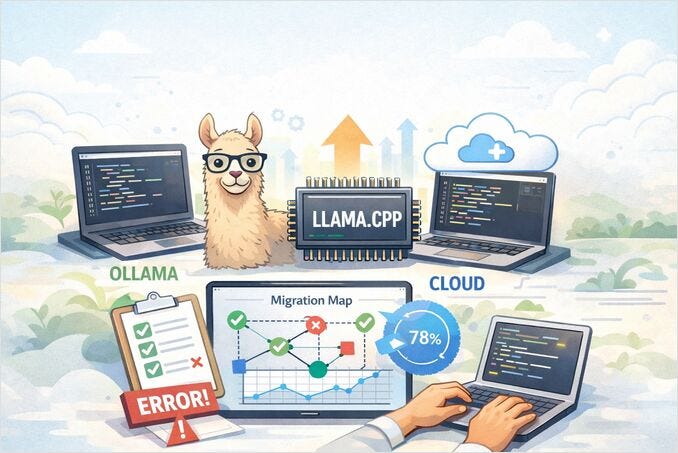
llama.cpp router mode is one of the most practical features added to llama-server in recent years. Instead of binding to a single GGUF file, the router coordinates multiple models. It loads them on demand, routes requests to the right one, and evicts models when --models-max is reached.
It’s close to what Ollama offers, but with the raw performance and control that make llama.cpp worth using in the first place.
But there’s a sharp edge in the API.
The router can list models. It can load a model. It can unload a model. It cannot unload all models with a single call.
That’s the gap this article closes.
The Root Cause: Per-Model Safety
The missing unload-all endpoint is intentional. llama.cpp's API is deliberately per-model. You pass a model identifier to /models/unload, and it unloads exactly that model.
This is safer design. A bulk operation could accidentally kill every warm model being used by other clients. On a multi-user inference box, explicit loops are better than a single destructive call.
The trade-off is that you need to build the loop yourself. That’s what the fix does.
If you’re new to running local LLMs and want to understand where llama.cpp fits in the broader landscape of hosting options — Ollama, vLLM, cloud providers, and the rest — the LLM hosting guide covers the full comparison.
The Fix: Three Steps
The pattern is simple and explicit. That’s a feature, not a limitation.
Step 1: Ask the router which models exist.
curl -s http://localhost:8080/models | jqYou’ll get back a JSON array with model IDs and their status. A typical response looks like this:
{
  "data": [
    {
      "id": "qwen3-8b",
      "status": "loaded"
    },
    {
      "id": "llama-3.2-3b",
      "status": "unloaded"
    }
  ]
}
Step 2: Filter for models whose status is loaded.
Step 3: Call /models/unload once per loaded model.
The entire operation in one pipeline:
curl -s http://localhost:8080/models \
| jq -r '.data[] | select(.status == "loaded") | .id' \
| while IFS= read -r model; do
    echo "Unloading: $model"
    curl -s -X POST http://localhost:8080/models/unload \
      -H "Content-Type: application/json" \
      -d "{\"model\":\"$model\"}" \
      | jq
  done
That’s it. No server restart. No lost connections. No guessing.
Verification
After running the unload loop, confirm the models are actually unloaded:
curl -s http://localhost:8080/models | jqEvery model should show "status": "unloaded". If one still shows "loaded", check the model identifier — router aliases, GGUF filenames, and model IDs are often not the same string.
Quick Fix
- Do: Use the curl + jq pipeline above to unload all loaded models
- Avoid: Assuming an
unload-allendpoint exists — it doesn't - Check: That your model IDs match exactly what
/modelsreturns, not the filenames you expect
What Makes This Approach Better Than Restarting
The loop-based unload has four advantages over killing and restarting the server:
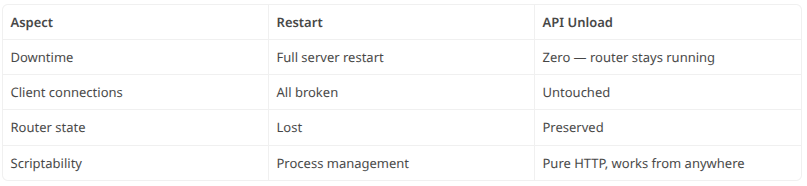
The API approach is auditable, repeatable, and works over SSH. You can drop it into a cron job, a systemd service hook, or a CI pipeline. It’s the kind of boring control surface you want when managing GPU memory.
Common Failure: Models Reload Themselves
This is the most confusing part for people who try this pattern for the first time.
You unload every model. You check — they’re all unloaded. Five minutes later, your GPU is full again.
What happened? Router mode supports on-demand loading. If any client sends a request for a model — Open WebUI, a benchmark script, an agent, even a health check that accidentally performs a real inference request — the router loads it again automatically.
Unloading is not a firewall. If clients keep asking for models, the router serves them.
The fix is operational, not technical. Stop client traffic before you unload if your goal is to keep VRAM free:
- Stop benchmark scripts
- Pause agents and cron jobs
- Disconnect Open WebUI sessions
- Disable health checks that trigger real model requests
Then run the unload loop. The memory stays free because no one is asking for models anymore.
When to Use This Pattern
Unloading every loaded model is the right move when you need to:
- Free GPU memory before loading a larger model
- Reset a development box without restarting the server
- Prepare for a benchmark run with a clean memory state
- Drain inference workloads before maintenance
- Recover from a session where too many models were warmed
It is not the right tool when active users depend on warm models. In that case, tune --models-max, use deliberate routing, and let LRU eviction handle the pressure.
When to Look Elsewhere
If you need timeout-based unloading, per-model lifecycle control, or smarter eviction policies, llama.cpp router mode alone won’t give you that. Look at llama-swap — it’s a purpose-built proxy that layers exactly those capabilities on top of any llama-server setup.
My rule: use LRU for normal memory pressure. Use explicit unload for operator intent.
Troubleshooting
The /models endpoint returns 404. You may not be running a router-capable build, or you're hitting the wrong port. Test both /models and /v1/models — they are different endpoints. The /v1/models path is the OpenAI-compatible model list, not the router management endpoint.
The unload call errors. Most failures come from passing the wrong model identifier. Use the exact ID returned by /models. If your model names contain unusual characters, build the POST body with jq instead of hand-escaping JSON:
body="$(jq -n --arg model "$model" '{model: $model}')"
curl -s -X POST http://localhost:8080/models/unload \
  -H "Content-Type: application/json" \
  -d "$body"
VRAM doesn’t drop immediately. Confirm the model status changed first. Then check whether another request reloaded it. GPU memory tools can lag or report allocator behavior rather than instant application-level intent.
The Takeaway
llama.cpp router mode is a significant improvement for local LLM operations. It gives you dynamic loading, model switching, and memory-aware eviction. But it expects you to manage lifecycle explicitly.
There’s no magic button. There’s a three-step pattern: list, filter, unload. It’s scriptable. It’s safe. And it frees VRAM without touching the server process.
For local AI infrastructure, that’s exactly the kind of control you want.
메타데이터
- post_id
- 4c1951d391c1
- slug
- your-gpu-is-full-llama-cpp-has-no-unload-all-button-heres-the-fix-4c1951d391c1
- url
- https://medium.com/practical-llm-systems/your-gpu-is-full-llama-cpp-has-no-unload-all-button-heres-the-fix-4c1951d391c1
- canonical_url
- https://medium.com/practical-llm-systems/your-gpu-is-full-llama-cpp-has-no-unload-all-button-heres-the-fix-4c1951d391c1
- author_url
- https://medium.com/@rosgluk
- status
- ok
- fetched_at
- 2026-06-14 17:09:17