SvelteKit Routing Architecture Explained
Modern web applications require fast navigation, clean URL structures, and maintainable routing logic. SvelteKit, the official framework…
SvelteKit Routing Architecture Explained
Modern web applications require fast navigation, clean URL structures, and maintainable routing logic. SvelteKit, the official framework built around Svelte, provides a powerful filesystem-based routing architecture that simplifies how developers structure pages, layouts, and APIs.
Unlike traditional frameworks where routes are defined manually in configuration files, SvelteKit automatically generates routes based on the project’s folder structure. This approach reduces boilerplate code and improves scalability for large applications.
In this article, we will explore:
- How SvelteKit routing works
- File-based routing fundamentals
- Layouts and nested routing
- Dynamic routes
- Route parameters and loading data
- API endpoints
- Route groups and advanced routing techniques
By the end of this article, even beginners will clearly understand how routing works internally in SvelteKit.
1. Understanding SvelteKit Routing
At the heart of SvelteKit lies a filesystem-based router.
This means:
src/routes/is the root directory for all application routes.
Every file or folder inside this directory automatically becomes a route in your application.
Example
src
 └ routes
    ├ +page.svelte
    ├ about
    │  └ +page.svelte
    └ contact
       └ +page.svelte
Generated Routes:
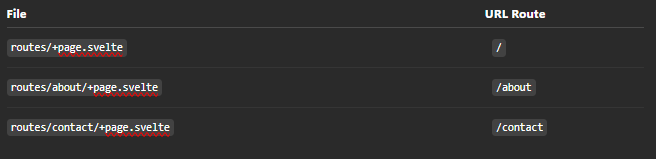
Routing Flow Diagram
User Request
     |
     v
Browser URL
     |
     v
SvelteKit Router
     |
     v
Match Route Folder
     |
     v
Load +page.svelte
     |
     v
Render Component
     |
     v
Send HTML to Browser
The router inspects the URL and determines which file inside the routes directory should render the page.
2. Key Routing Files in SvelteKit
SvelteKit uses special convention-based files to control routing behavior.
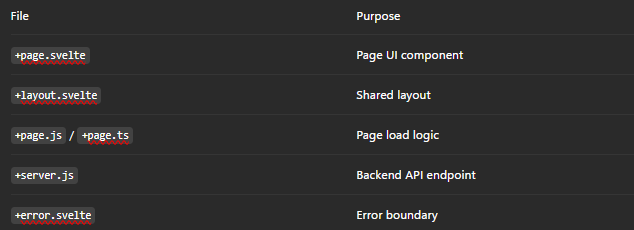
These files work together to create a structured routing architecture.
3. Basic Page Routing
Let’s start with the simplest route.
Project Structure
src/routes/
 ├ +page.svelte
 └ about/
    └ +page.svelte
Home Page Example
src/routes/+page.svelte
<script>
  let title = "Welcome to SvelteKit";
</script>

<h1>{title}</h1>
<p>This is the home page.</p>
About Page
src/routes/about/+page.svelte
<script>
  let message = "About Our Application";
</script>

<h1>{message}</h1>
<p>This page explains what our app does.</p>
Explanation
When a user navigates to:
http://localhost:5173/aboutSvelteKit:
- Detects the
aboutfolder - Loads
+page.svelte - Renders it into the application layout
This eliminates manual route definitions.
4. Layout-Based Routing
Layouts allow you to share UI components across multiple routes.
Typical examples include:
- Navigation bars
- Footers
- Sidebars
- Global UI wrappers
Folder Structure
src/routes
 ├ +layout.svelte
 ├ +page.svelte
 ├ dashboard
 │  └ +page.svelte
 └ settings
    └ +page.svelte
Layout Example
+layout.svelte
<script>
  export let data;
</script>

<header>
  <nav>
    <a href="/">Home</a>
    <a href="/dashboard">Dashboard</a>
    <a href="/settings">Settings</a>
  </nav>
</header>
<main>
  <slot />
</main>
<footer>
  <p>© 2026 My App</p>
</footer>
Explanation
The <slot /> acts as a placeholder where page content is injected.
When the user visits /dashboard:
- Layout loads first
- Then the page component loads
- The page is injected into
<slot />
Layout Rendering Flow
User visits /dashboard
        |
        v
Load +layout.svelte
        |
        v
Load dashboard/+page.svelte
        |
        v
Insert page inside <slot>
        |
        v
Render final HTML
This ensures consistent UI across all routes.
5. Nested Routing
SvelteKit allows nested layouts and pages, enabling complex UI hierarchies.
Folder Structure
src/routes
 └ dashboard
    ├ +layout.svelte
    ├ +page.svelte
    ├ analytics
    │  └ +page.svelte
    └ users
       └ +page.svelte
Generated routes:
/dashboard
/dashboard/analytics
/dashboard/users
Nested Layout Example
dashboard/+layout.svelte
<h2>Dashboard Panel</h2>

<nav>
  <a href="/dashboard/analytics">Analytics</a>
  <a href="/dashboard/users">Users</a>
</nav>
<slot />
Why Nested Layouts Matter
They enable:
- Modular UI
- Large application structure
- Component reuse
6. Dynamic Routes
Dynamic routes allow URLs with variable parameters.
Example:
/blog/hello-world
/blog/svelte-routing
Folder Structure
src/routes/blog/[slug]/+page.svelteCode Example
<script>
  export let data;
</script>

<h1>Blog Post</h1>
<p>Slug: {data.slug}</p>
Data Loading Logic
+page.js
export function load({ params }) {
  return {
    slug: params.slug
  };
}
URL Example
/blog/my-first-postThe router extracts:
params.slug = "my-first-post"Dynamic Routing Flow
User visits /blog/my-first-post
           |
           v
Match folder [slug]
           |
           v
Extract parameter
           |
           v
Load page component
           |
           v
Render content
7. Loading Data with +page.js
SvelteKit allows server-side or client-side data loading.
Example
src/routes/products/[id]/+page.jsexport async function load({ params, fetch }) {
const res = await fetch(`/api/products/${params.id}`);
const product = await res.json();
return {
product
};
}Page Component
<script>
  export let data;
</script>

<h1>{data.product.name}</h1>
<p>{data.product.description}</p>
Explanation
load() runs before the page renders and provides data hydration for the page component.
8. API Endpoints with +server.js
SvelteKit also allows backend API routes.
Folder Structure
src/routes/api/users/+server.jsExample
export async function GET() {
  return new Response(
    JSON.stringify({
      users: ["Alice", "Bob", "Charlie"]
    }),
    {
      headers: {
        "Content-Type": "application/json"
      }
    }
  );
}
API Endpoint
GET /api/usersResponse:
{
  "users": ["Alice", "Bob", "Charlie"]
}
API Request Flow
Client Request
      |
      v
/api/users
      |
      v
+server.js handler
      |
      v
Process logic
      |
      v
Return JSON Response
9. Route Groups (Advanced)
Route groups allow organizing routes without affecting the URL path.
Structure
src/routes
 ├ (auth)
 │  ├ login/+page.svelte
 │  └ register/+page.svelte
 └ (app)
    ├ dashboard/+page.svelte
    └ settings/+page.svelte
URLs remain:
/login
/register
/dashboard
/settings
Route groups help structure large codebases.
10. Complete Routing Lifecycle
Browser Request
      |
      v
SvelteKit Router
      |
      v
Match Folder Structure
      |
      v
Load Layouts
      |
      v
Run Load Functions
      |
      v
Fetch Data
      |
      v
Render +page.svelte
      |
      v
Hydrate Client
Conclusion
SvelteKit’s routing architecture is designed around simplicity, scalability, and convention over configuration.
Key takeaways:
- Routing is filesystem based
- Pages are defined with
+page.svelte - Layouts enable shared UI structures
- Dynamic routes support parameterized URLs
load()functions handle data fetching+server.jsenables backend APIs- Route groups help organize large applications
By leveraging these concepts, developers can build highly scalable applications with minimal routing configuration.
SvelteKit’s routing model removes much of the complexity found in traditional frameworks while still offering advanced capabilities such as nested layouts, SSR, and API endpoints.
For modern frontend architectures, especially when building fast and maintainable web apps, understanding the routing system is essential — and SvelteKit provides one of the cleanest implementations available today.
메타데이터
- post_id
- 4c4fd54843c1
- slug
- sveltekit-routing-architecture-explained-4c4fd54843c1
- url
- https://medium.com/@vasanthancomrads/sveltekit-routing-architecture-explained-4c4fd54843c1
- canonical_url
- https://medium.com/@vasanthancomrads/sveltekit-routing-architecture-explained-4c4fd54843c1
- author_url
- https://medium.com/@vasanthancomrads
- status
- ok
- fetched_at
- 2026-07-26 02:44:51