I tried designing with Claude and Figma for 3 days — here’s what I learned
A summary on my key take-aways what I have learned with Claude and Figma
I tried designing with Claude and Figma for 3 days — here’s what I learned
A summary on my key take-aways what I have learned with Claude and Figma

Claude, Terminal and Figma — The tools used for this process
NOTE: For context, I’m a UX/Product designer rather than a developer, so this experiment focused on how AI tools might fit into a designers workflow.
Intro:
With AI becoming as common as having “second breakfast” (Lord of the rings joke 💍), I decided to do some research and experimenting with the tool I tend to hear most used nowadays for UX designers — Claude
Over three days, I walked through the following tasks:
- Set up Claude via terminal
- Make a workflow where Claude generates Figma files and allowed me to push changes back to Claude
- Exploring designing with terminal and the Claude desktop app
While the results weren’t perfect, I learned a lot creating websites and digital art this way and found the process insightful.
Curious what I discovered? Then keep reading below!
✅ Copy/paste from browser → Figma is a game changer
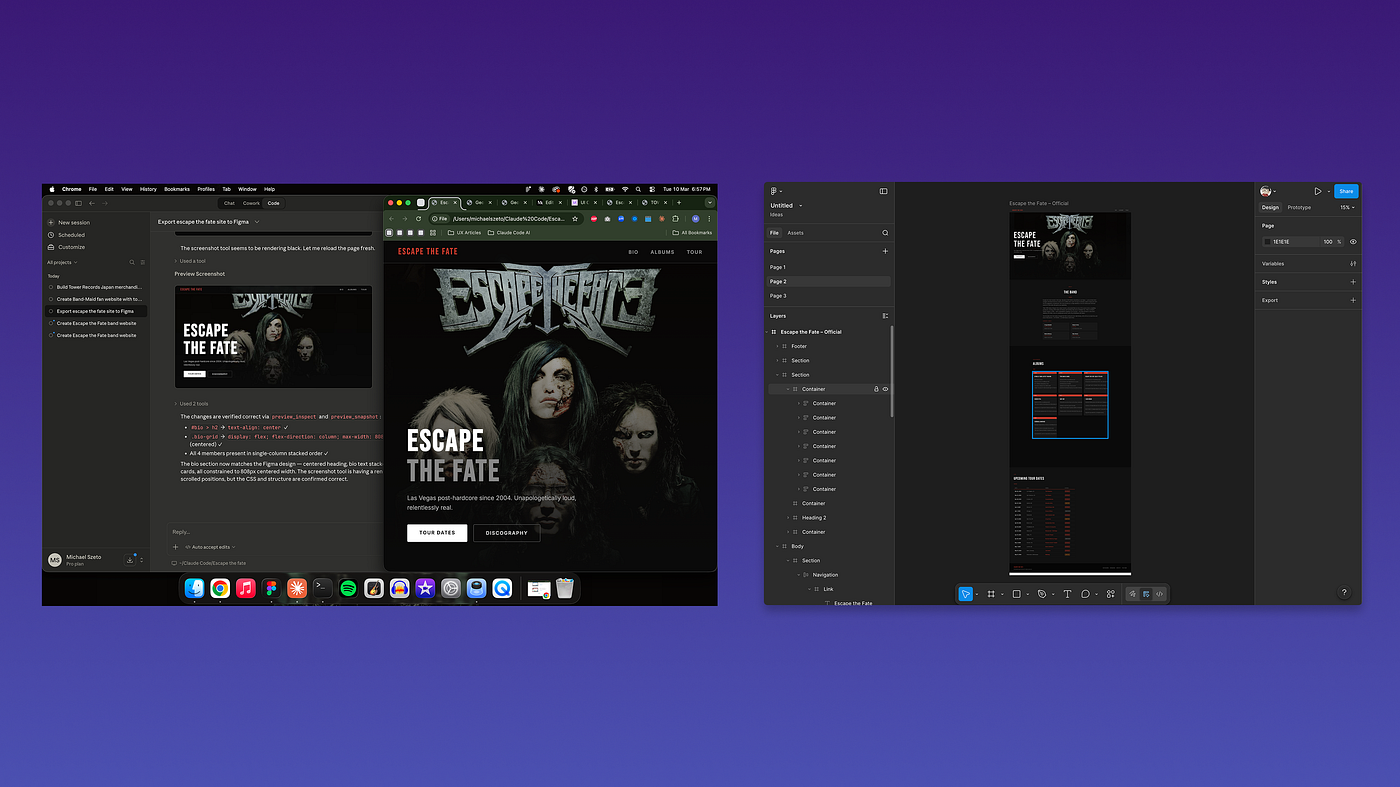
Website I generated with Claude for my favourite band Escape the fate and brought to Figma as an editable file
Once the desktop app for Claude was installed and linked to the right folders, it was easy to bring screens into Figma. However the real power for me came when I saw you can copy/paste designs and components from the generated website to Figma and push changes back and forth.
Being able to create, edit and build designs this way felt more efficient. It cuts down on the Figma file management headache — fewer out-of-sync artboards, less hunting across multiple files.
Other ways this workflow could help designers include:
- Making prototyping for research activities like interviews and testing feel more realistic with web pages
- Improve stakeholder communication with an in-app view of where a concept is going
- Help designers concept in teams with better interactive controls than static images
- Reduce the need to have as many people working on internal design systems from both a design and dev perspective
After finishing some visual changes to one of the websites I made, I decided to try feeding the changes from Figma back to Claude in a quick prompt with a Figma link. After watching it work through its rendering scripts, the end result was immediate — Claude understood the visual changes I had done with ease and with minimal additional instructions in the prompt too.
✅ Making filters and finding stock images has become so much easier!
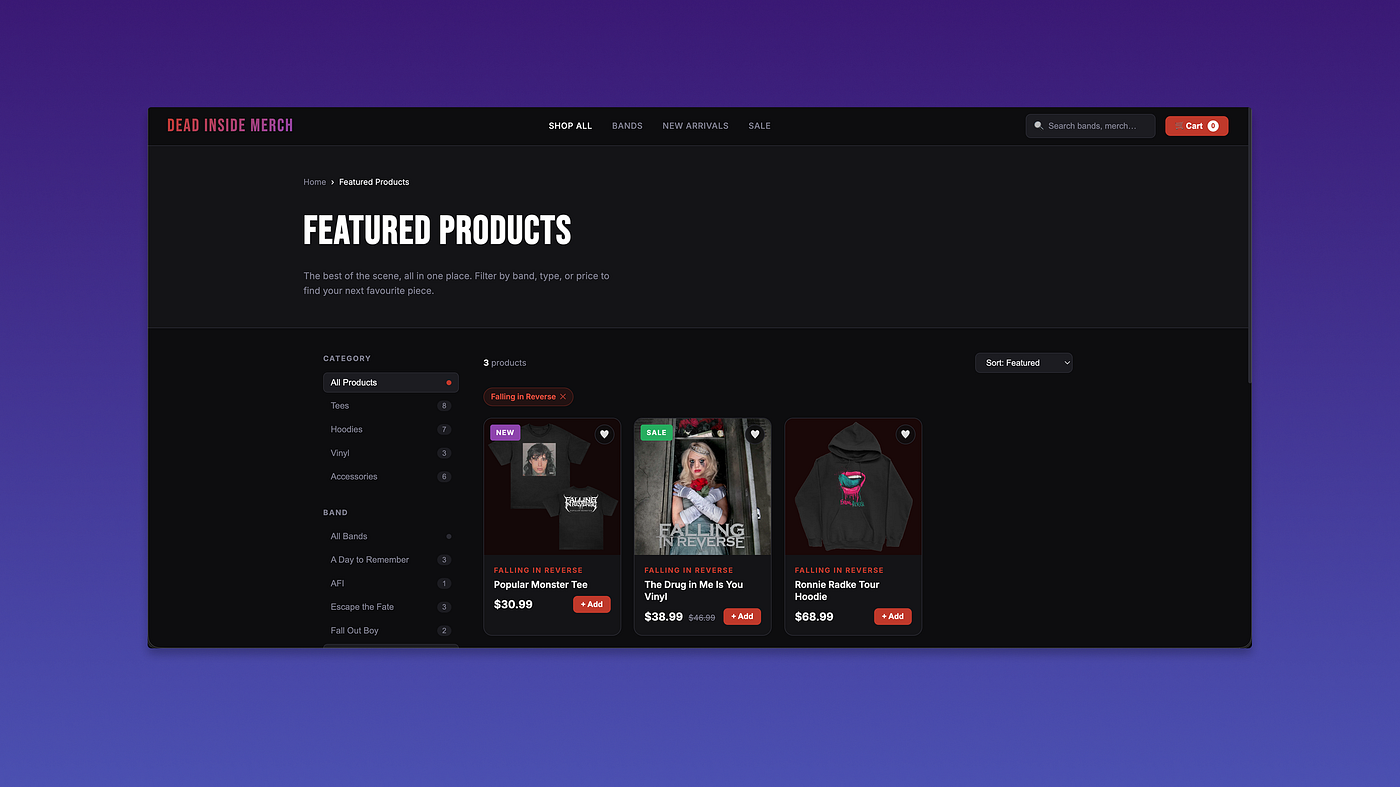
Filters and stock images pulled in on my e-commerce store concept
When designing and prototyping, having realistic data and proper interactions is key. But can become very time consuming to build and communicate when the experience get more complex.
When testing my e-commerce prototype, a simple terminal prompt allowed Claude to pull in images from various sources and automatically select ones that matched my components. For example, if a component referenced a t-shirt, Claude automatically pulled in relevant product images.
I also tried building filters for the prototype, which turned out to be even easier. Claude took the existing layout and generated a set of standard filters that fit the concept surprisingly well for a first attempt.
These workflow capabilities with Claude stood out as another practical win I can see being applied to the tech industry in the near future. Tasks that previously took a long time — like sourcing good stock images or explaining filter interactions — can now be demonstrated quickly through a working prototype.
✅ Setting up the terminal wasn’t overwhelming
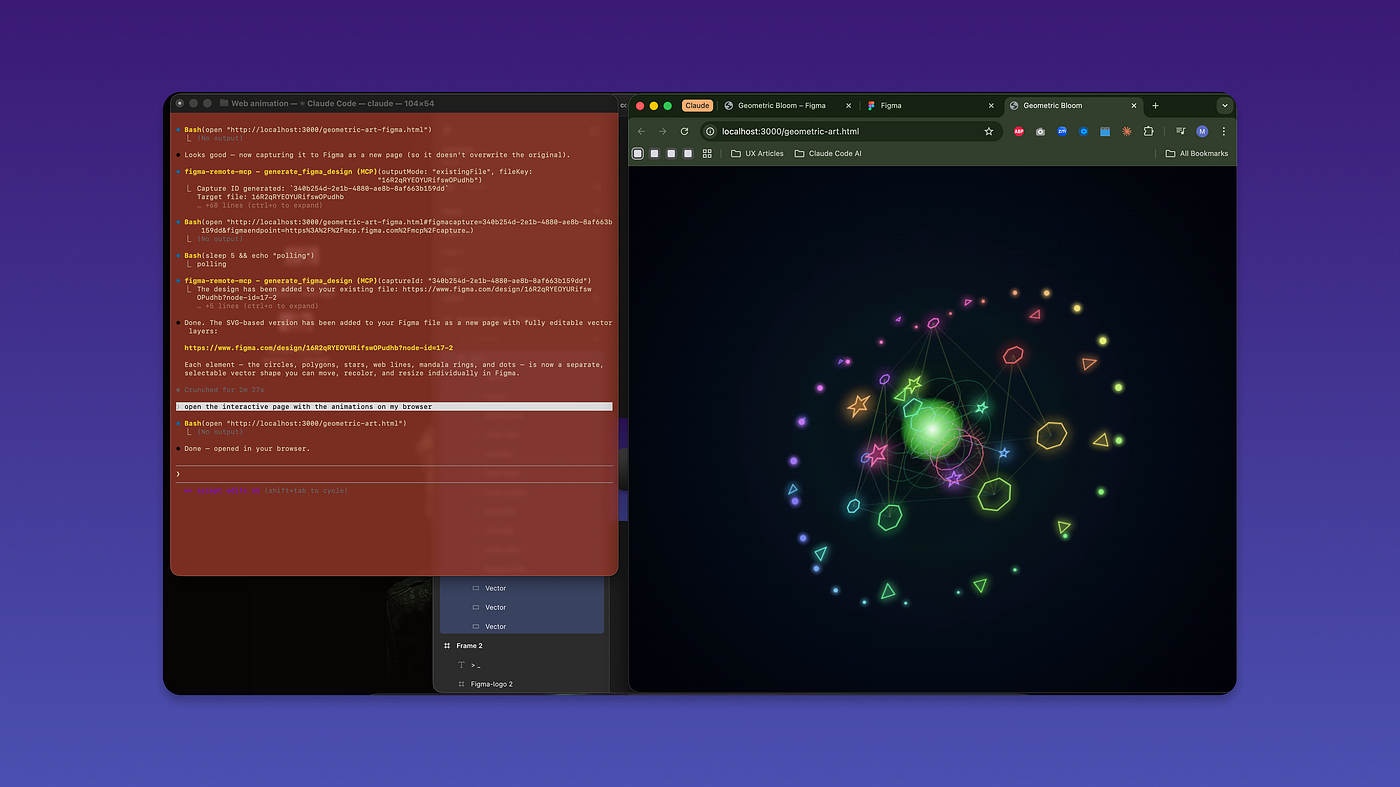
The 3D generative art I made via Claude after getting terminal going
From past coding projects, I expected to have a number of plugins to install via terminal like Node or Webpack. However, as I worked through this video tutorial, it became clear that the setup process was much easier than expected. The key challenges I ran into were:
- Getting around the “claude command not found” error in the command line
- Continuously changing directories when wanting to edit different projects (use the cd command for this)
- Setting up the Claude file to open in Figma via the Chrome plugin which makes it much easier
- Remembering what key commands did and their purpose (main ones listed 👇 )
1- /exit (to leave claude)
2- claude (to activate)
3- /plugins (to view plugins I have installed)
4- ? (for a bigger list of commands to try)
5- cd (change directory to load another claude code file to edit.
NOTE: once you type cd in the command line, you can drag your file in to save time
After a couple of attempts, I was able to create a piece of digital art via Claude and even make it 3D and interactive with the mouse. Building this via Figma or even CSS code would have taken me way too long and Claude managed to do it in 30 minutes making a massive difference!
✅ Generating mobile designs is much easier from the browser
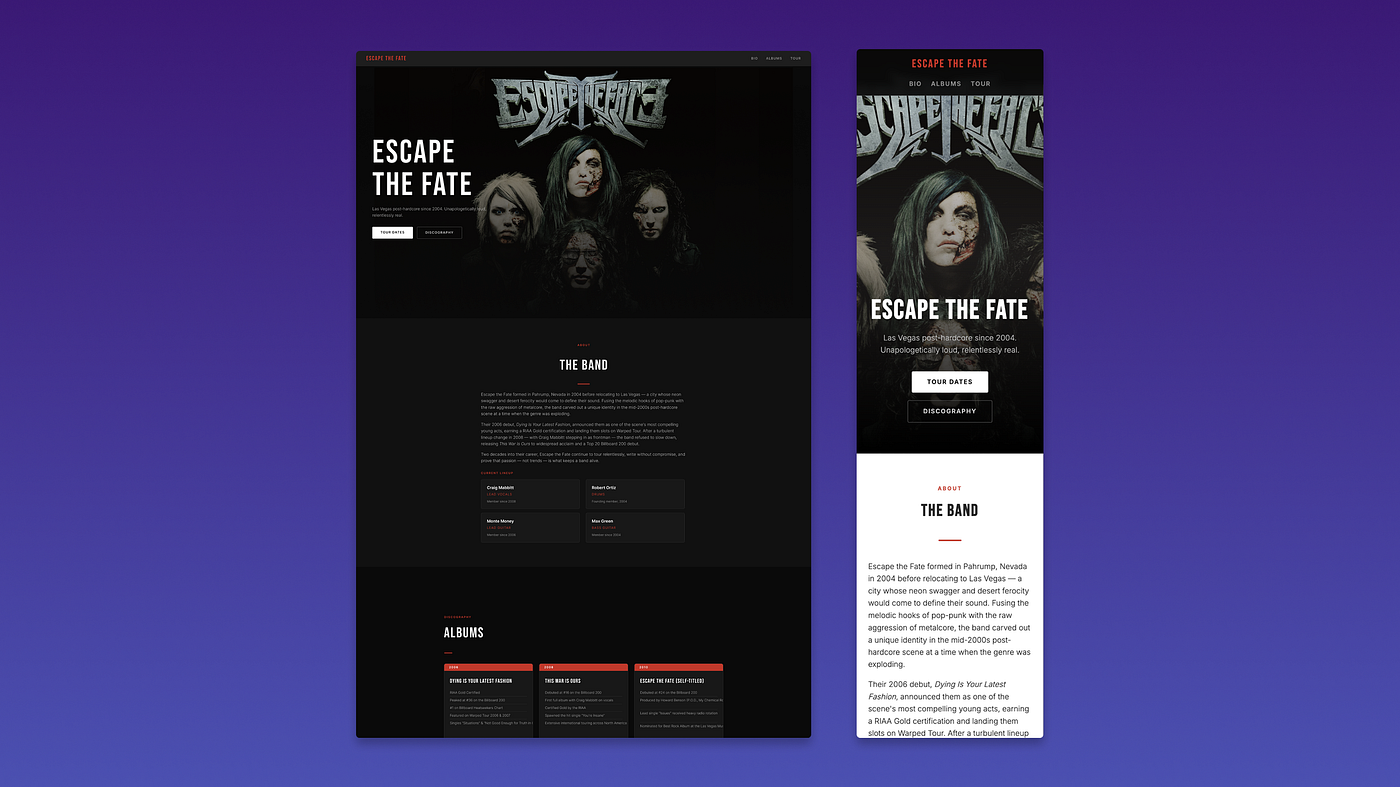
Desktop and mobile designs for a website I made in Claude
Responsive design should be standard in modern UX. However, many tech companies still leave this off due to time spent designing here.
But now Claude has helped make this much easier. When I scaled my browser to a mobile size, I found I could prompt Claude to send it to Figma, make edits there, then prompt it back — the whole loop was surprisingly quick. When I tested this myself, it handled the responsive layout far better than I expected for a first attempt.
This stood out as one of the more practical wins from this experience. In future, I can see responsive states being much quicker to build and seeing designs in the browser helps reinforce this is not just a plus to have — having a responsive view is an even higher expectation now that it’s less time consuming to identify where designs don’t scale or break in smaller views.
⚠️ First designs came out very “cookie cutter” and only made one page at a time
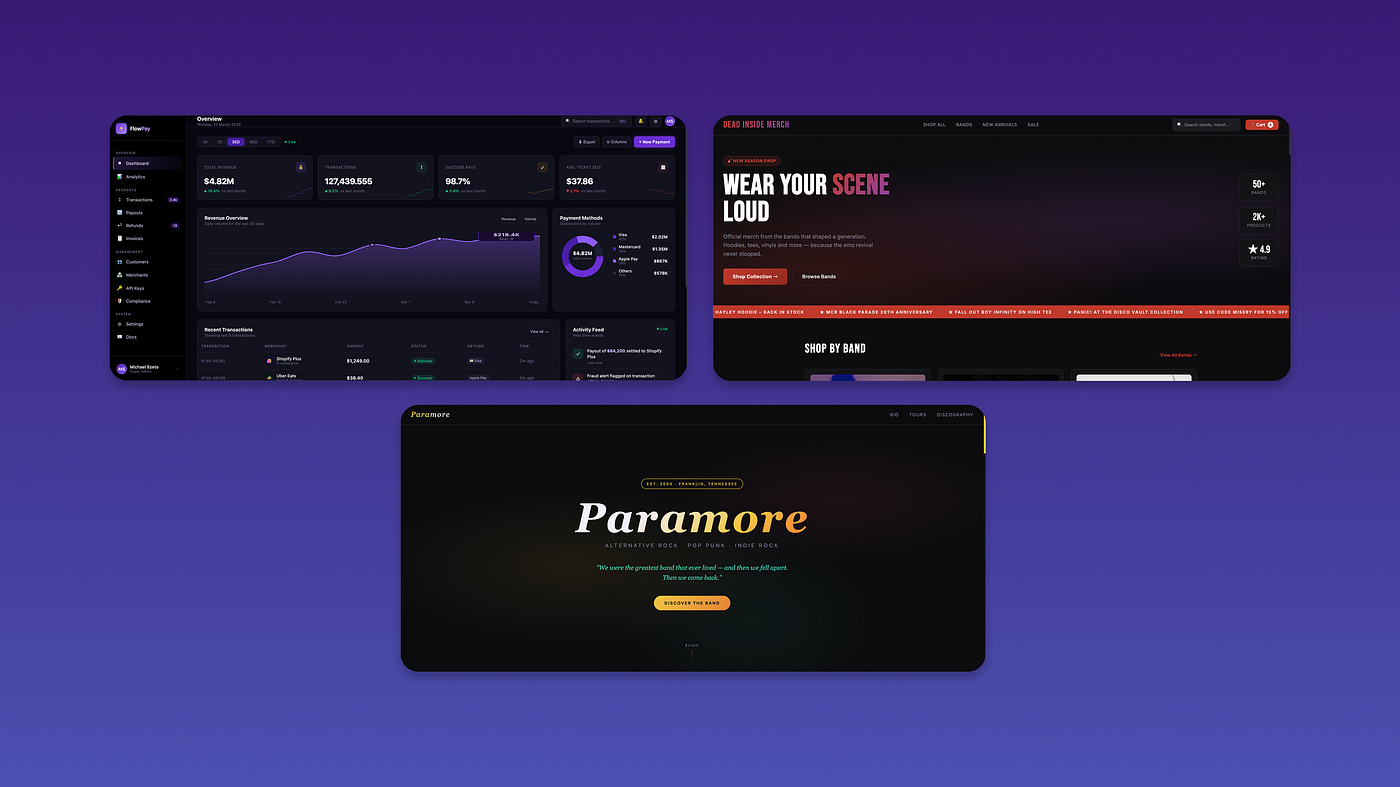
All first concepts came out with dark aesthetics despite being different concepts (one dashboard, one e-commerce store and one static site)
Based on my initial prompts, it felt like Claude hadn’t reached the stage where styling choices are great on a first build attempt. When trying out different designs for a dashboard, e-commerce stores or static sites, all of the concepts initially came out with dark aesthetics and minimal visual differences to help differentiate them for different needs.
I also asked Claude in the terminal to make new pages for my e-commerce store concept. Here it also struggled to understand and make new pages that were supposed to be linked from the nav in the generated design. Instead it originally assumed that these changes needed to be applied to the home page despite prompts articulating to make new pages.
For me, this highlighted that even though AI sped up outputs in the design-to-code process, first build attempts don’t produce great styling choices — this part still required a designer to direct and quality check the output and honestly, that’s where being a designer still matters. If we relied solely on AI to produce results, it would degrade not only a designer’s role but also mean products are more at risk of shipping subpar experiences for target users and the business.
⚠️ Rendering changes in the browser takes a fair amount of time
Uploading from Figma back to Claude when all changes are done felt like the better workflow
Producing my design to code with Claude definitely felt faster compared to before when relying on someone else to make it, but when it came to focusing on designing in the browser with Terminal or Claude’s desktop app, I definitely felt like I was slowing down.
When prompting changes, it takes a fair amount of time re-confirming prompt commands and waiting for Claude to complete changes. This slowed the process down a lot when trying to even do simple changes like colour updates or changing text inline compared to how you can easily tweak changes in Figma.
Following this, I ended up relying much more on Figma to make all my visual and aesthetic changes, and only came back to Claude when I felt I was done on updates and ready to view the design in the browser. This brought my efficiency back up much more easily when keeping these tools separate until I needed to merge back designs.
🤔 Overall thoughts?
After three days with Claude, I left with more wins than frustrations — and a clearer picture of where I feel AI fits into a designer’s workflow.
AI can accelerate the messy middle between design and code. But designers still need to guide what the experience should be. What’s changing quickly are the tools we use to build those experiences.
Other key things I took away were:
- Prototyping will start to become more realistic again compared to our old bias of trying to prototype in low fi
- Designing in the terminal can feel technical and time consuming if you focus on adding design updates there without Figma
- Quality in experience does not come with AI yet. UX and Product Designers will still help lead here
- Mobile responsive states will now be much easier to preview compared to before
🚀 What’s next?
The next things I want to explore deeper now with this Claude and Figma workflow includes
- Make a complete workflow of one design and push it live
- Continue to push more complex design changes (esp for responsive states or filters)
- Build out a list of AI tutorials and references that helped me (you can find a small list here for now>)
- Document the next learnings in another article
메타데이터
- post_id
- 4cc9ca5e39a7
- slug
- my-experience-with-claude-code-terminal-and-figma-so-far-4cc9ca5e39a7
- url
- https://medium.com/design-bootcamp/my-experience-with-claude-code-terminal-and-figma-so-far-4cc9ca5e39a7
- canonical_url
- https://medium.com/design-bootcamp/my-experience-with-claude-code-terminal-and-figma-so-far-4cc9ca5e39a7
- author_url
- https://medium.com/@xyzeto
- status
- ok
- fetched_at
- 2026-06-12 07:40:50