Scalability in .NET Backend Systems: Design Decisions That Matter Before Infrastructure
How to identify bottlenecks, reduce hotspots, protect databases, and scale backend systems intentionally
Scalability in .NET Backend Systems: Design Decisions That Matter Before Infrastructure
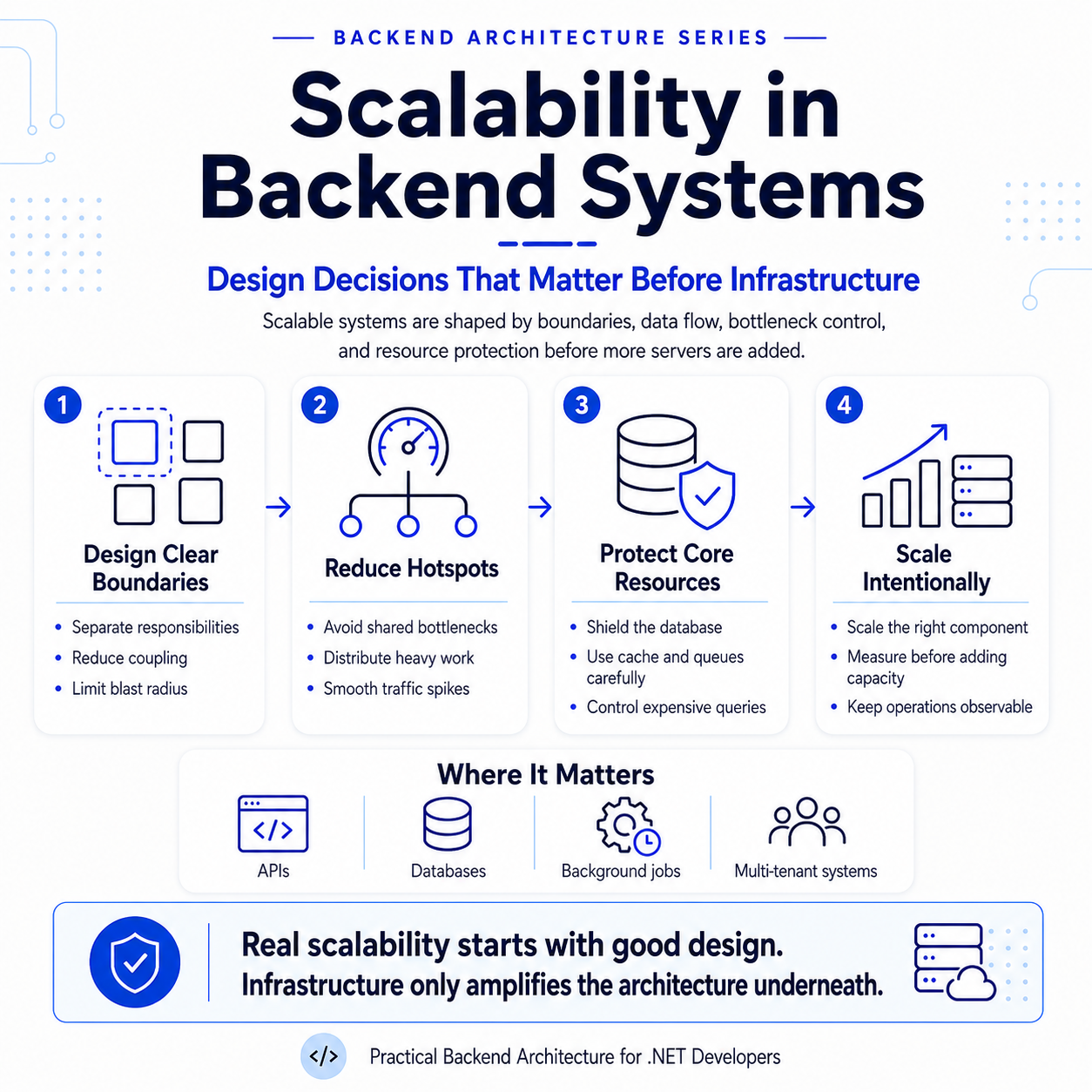
How to identify bottlenecks, reduce hotspots, protect databases, and scale backend systems intentionally
In Part 1, I wrote about boundaries. In Part 2, I wrote about aggregates and invariants. In Part 3, I wrote about domain events. In Part 4, I wrote about commands and queries. In Part 5, I wrote about modular monoliths and microservices. In Part 6, I wrote about synchronous vs asynchronous communication. In Part 7, I wrote about HTTP, messaging, and gRPC. In Part 8, I wrote about resiliency in backend systems. In Part 9, I wrote about observability. In Part 10, I wrote about transactions and eventual consistency. In Part 11, I wrote about idempotency. In Part 12, I wrote about caching. In Part 13, I wrote about security boundaries.
Now we come to another major backend architecture topic:
scalability.
Many teams think scalability starts with infrastructure:
- Add more servers
- Increase CPU
- Increase memory
- Add Kubernetes
- Add Redis
- Add queues
- Add replicas
- Move to microservices
Sometimes those things help.
But they are not the starting point.
A system that is poorly designed will not automatically become scalable just because more infrastructure is added.
If the database queries are inefficient, creating more API instances may only exacerbate database pressure.
If one table becomes a hotspot, more servers may only send more traffic to the same bottleneck.
If every request makes unnecessary external calls, horizontal scaling may increase costs without addressing the real issue.
So the real idea is this:
Scalability starts with design before infrastructure.
The practical scenario
Let’s continue with a telemedicine backend.
The system supports:
- patients searching for doctors
- patients booking consultations
- doctors accepting requests
- payments
- notifications
- video sessions
- prescriptions
- dashboards
- reporting
At first, the system works well.
Then traffic grows.
Now the team starts seeing problems:
- Doctor search becomes slow
- Dashboard APIs timeout
- Database CPU increases
- Booking requests create lock contention
- Notification processing falls behind
- Payment callbacks spike during busy hours
- Reporting queries slow down transactional APIs
- One popular doctor creates heavy booking traffic
- Cache misses overload the database
This is where scalability becomes real.
The question is not only:
How do we add more servers?
The better question is:
Where is the actual bottleneck, and what design change removes or reduces it?
Scalability is not only about traffic volume
Scalability is the system’s ability to handle growth.
That growth can appear in different forms:
- More users
- More requests
- More data
- More tenants
- More integrations
- More background jobs
- More concurrent workflows
- More reporting needs
- More geographic usage
- More real-time interactions
A system may handle 10,000 users but fail when one query scans a large table.
Another system may handle many reads but fail when writes concentrate on one hot record.
So scalability is not only about the total request count.
It is about how load moves through the system.
First principle: measure before scaling
Do not guess.
Before making scalability changes, observe the system.
You need to know:
- Which APIs are slow?
- Which queries are expensive?
- Which tables are growing fast?
- Which endpoints are called most often?
- Which background jobs are delayed?
- Which external dependencies are slow?
- Where are retries increasing?
- Where locks or deadlocks happen?
- Is the bottleneck CPU, memory, database, network, or external providers?
This connects directly to observability.
Without measurements, scalability work becomes guesswork.
And guesswork can lead to expensive but ineffective infrastructure changes.
Useful scalability signals
For a backend system, useful signals include:
- API latency
- request throughput
- error rate
- database query duration
- database CPU and memory
- connection pool usage
- queue length
- background job processing time
- cache hit/miss rate
- lock wait time
- retry count
- timeout count
- external provider latency
For a telemedicine system, useful business-level signals include:
- consultation bookings per minute
- failed booking attempts
- payment confirmations per minute
- pending notifications
- active video sessions
- prescription generation failures
- dashboard load time
- doctor search latency
Technical metrics tell you the system's health.
Business metrics tell you workflow health.
You need both.
Scaling reads and writes are different problems
This connects back to CQRS.
Reads and writes usually scale differently.
Reads
Reads often need:
- pagination
- filtering
- projections
- caching
- indexes
- read replicas
- denormalized read models
- search indexes
Writes
Writes often need:
- transaction control
- concurrency protection
- idempotency
- shorter transactions
- queue-based smoothing
- avoiding hotspots
- careful aggregate design
Trying to scale reads and writes the same way usually creates confusion.
A doctor search API has different scaling needs from a consultation booking command.
Example: avoid returning too much data
A common scalability mistake is returning too much data.
For example, a doctor search endpoint returns every matching doctor without pagination.
That may work with 100 doctors.
It will not work well with 100,000 doctors.
Use pagination from the beginning.
public sealed record SearchDoctorsQuery(
    string? Specialty,
    string? City,
    int Page,
    int PageSize
) : IQuery<PagedResult<DoctorSearchResultDto>>;
A simple paged result:
public sealed record PagedResult<T>(
    IReadOnlyList<T> Items,
    int Page,
    int PageSize,
    int TotalCount);
The query handler should return only what the UI needs.
public sealed class SearchDoctorsHandler
    : IQueryHandler<SearchDoctorsQuery, PagedResult<DoctorSearchResultDto>>
{
    private readonly DoctorReadDbContext _dbContext;

    public SearchDoctorsHandler(DoctorReadDbContext dbContext)
    {
        _dbContext = dbContext;
    }

    public async Task<PagedResult<DoctorSearchResultDto>> Handle(
        SearchDoctorsQuery query,
        CancellationToken cancellationToken)
    {
        var doctorsQuery = _dbContext.Doctors
            .AsNoTracking()
            .Where(x => x.IsActive);

        if (!string.IsNullOrWhiteSpace(query.Specialty))
            doctorsQuery = doctorsQuery.Where(x => x.Specialty == query.Specialty);

        if (!string.IsNullOrWhiteSpace(query.City))
            doctorsQuery = doctorsQuery.Where(x => x.City == query.City);

        var totalCount = await doctorsQuery.CountAsync(cancellationToken);

        var doctors = await doctorsQuery
            .OrderBy(x => x.DisplayName)
            .Skip((query.Page - 1) * query.PageSize)
            .Take(query.PageSize)
            .Select(x => new DoctorSearchResultDto(
                x.Id,
                x.DisplayName,
                x.Specialty,
                x.City,
                x.Rating))
            .ToListAsync(cancellationToken);

        return new PagedResult<DoctorSearchResultDto>(
            doctors,
            query.Page,
            query.PageSize,
            totalCount);
    }
}
The important design choices are:
- Use pagination
- Use
AsNoTrackingfor read-only queries - Project into DTOs
- Avoid loading full domain entities for search results
- Avoid returning unbounded data
This is scalability through design, not infrastructure.
Indexes are architecture decisions, too
Indexes are not just database details.
They support access patterns.
If users commonly search for doctors by specialty and city, the database should support that.
public sealed class DoctorConfiguration
    : IEntityTypeConfiguration<Doctor>
{
    public void Configure(EntityTypeBuilder<Doctor> builder)
    {
        builder.ToTable("Doctors");

        builder.HasKey(x => x.Id);

        builder.Property(x => x.DisplayName)
            .HasMaxLength(200)
            .IsRequired();

        builder.Property(x => x.Specialty)
            .HasMaxLength(100)
            .IsRequired();

        builder.Property(x => x.City)
            .HasMaxLength(100)
            .IsRequired();

        builder.HasIndex(x => new { x.Specialty, x.City, x.IsActive });
    }
}
This index supports the query pattern.
But indexes are not free.
They improve reads but add overhead to writes.
So index design should follow real usage patterns, not guesses.
Protect the database
In most backend systems, the database becomes the first serious bottleneck.
Why?
API servers can often be scaled horizontally.
But the database is harder to scale.
A common mistake is adding more API instances, while every instance sends more inefficient queries to the same database.
That does not solve the bottleneck.
It amplifies it.
To protect the database:
- Avoid unbounded queries
- Use indexes intentionally
- Avoid N+1 queries
- Project into DTOs
- Cache safe read models
- Move heavy reporting away from transactional tables
- Keep transactions short
- Avoid unnecessary writes
- Batch background processing carefully
- Monitor slow queries
The database should be treated as a critical shared resource.
Avoid N+1 queries
N+1 queries happen when the application loads one list, then separately loads related data for each item.
Example:
- Load 50 consultations
- For each consultation, load the doctor separately
- For each consultation, load the patient separately
This can quickly become hundreds of queries.
A better approach is to project the data in one query.
public async Task<IReadOnlyList<UpcomingConsultationDto>> GetUpcomingAsync(
    Guid patientId,
    CancellationToken cancellationToken)
{
    return await _dbContext.Consultations
        .AsNoTracking()
        .Where(x => x.PatientId == patientId &&
                    x.ScheduledAtUtc >= DateTime.UtcNow)
        .OrderBy(x => x.ScheduledAtUtc)
        .Select(x => new UpcomingConsultationDto(
            x.Id,
            x.Doctor.DisplayName,
            x.ScheduledAtUtc,
            x.Status.ToString()))
        .ToListAsync(cancellationToken);
}
For read scenarios, projection is often better than loading full object graphs.
This improves performance and reduces memory usage.
Keep write transactions short
Write transactions should protect business consistency.
But they should not do unnecessary work.
Bad transaction:
Begin transaction
    Update consultation
    Call notification provider
    Update reporting
    Call analytics API
    Generate PDF
Commit transaction
Better transaction:
Begin transaction
    Update consultation
    Store outbox message
Commit transaction

Process notifications, reporting, and PDF later
The second design reduces lock time, improves throughput, and makes failures easier to handle.
This connects directly to eventual consistency and outbox processing.
Use async processing to smooth load
Some work does not need to happen inside the user request.
Examples:
- sending notifications
- generating PDFs
- updating reports
- sending integration events
- processing analytics
- sending reminders
Move these into background processing.
public sealed class NotificationOutboxProcessor : BackgroundService
{
    private readonly IServiceScopeFactory _scopeFactory;
    private readonly ILogger<NotificationOutboxProcessor> _logger;

    public NotificationOutboxProcessor(
        IServiceScopeFactory scopeFactory,
        ILogger<NotificationOutboxProcessor> logger)
    {
        _scopeFactory = scopeFactory;
        _logger = logger;
    }

    protected override async Task ExecuteAsync(CancellationToken stoppingToken)
    {
        while (!stoppingToken.IsCancellationRequested)
        {
            using var scope = _scopeFactory.CreateScope();

            var processor = scope.ServiceProvider
                .GetRequiredService<INotificationProcessor>();

            await processor.ProcessBatchAsync(
                batchSize: 50,
                stoppingToken);

            await Task.Delay(TimeSpan.FromSeconds(5), stoppingToken);
        }
    }
}
The batch size matters.
If it is too small, processing falls behind.
If it is too large, the worker may overload the database or notification provider.
Scalability is about controlled flow, not just parallelism.
Backpressure matters
Backpressure means the system avoids accepting or processing more work than it can safely handle.
Without backpressure:
- queues grow endlessly
- workers overload dependencies
- retries multiply
- database pressure increases
- downstream systems fail harder
A simple example is limiting the batch size in background processing.
public async Task ProcessBatchAsync(
    int batchSize,
    CancellationToken cancellationToken)
{
    var messages = await _dbContext.OutboxMessages
        .Where(x => x.ProcessedAtUtc == null)
        .OrderBy(x => x.OccurredAtUtc)
        .Take(batchSize)
        .ToListAsync(cancellationToken);

    foreach (var message in messages)
    {
        await ProcessMessageAsync(message, cancellationToken);
    }

    await _dbContext.SaveChangesAsync(cancellationToken);
}
This prevents the worker from trying to process unlimited messages at once.
In larger systems, backpressure may also involve:
- queue length monitoring
- rate limits
- worker concurrency limits
- circuit breakers
- priority queues
- rejecting or delaying non-critical work
Rate limiting protects the system
Rate limiting prevents one user, tenant, or client from overwhelming the system.
This is especially important for:
- public APIs
- search endpoints
- login endpoints
- payment callbacks
- tenant-heavy SaaS systems
- expensive report APIs
In ASP.NET Core, rate limiting can be configured centrally.
builder.Services.AddRateLimiter(options =>
{
    options.AddFixedWindowLimiter("SearchPolicy", limiterOptions =>
    {
        limiterOptions.PermitLimit = 100;
        limiterOptions.Window = TimeSpan.FromMinutes(1);
        limiterOptions.QueueLimit = 0;
    });
});
Apply it to an endpoint:
app.MapGet("/api/v1/doctors/search",
    async (
        [AsParameters] SearchDoctorsRequest request,
        IRequestDispatcher dispatcher,
        CancellationToken cancellationToken) =>
    {
        var query = new SearchDoctorsQuery(
            request.Specialty,
            request.City,
            request.Page,
            request.PageSize);

        var result = await dispatcher.Send(query, cancellationToken);

        return Results.Ok(result);
    })
    .RequireRateLimiting("SearchPolicy");
Rate limiting is not only a security feature.
It is also a scalability protection.
Hotspots are often hidden
A hotspot is a part of the system that receives a concentrated load.
Examples:
- One popular doctor’s availability
- One tenant with heavy usage
- One payment provider callback endpoint
- One dashboard query used by everyone
- One table storing all outbox messages
- One cache key is requested by thousands of users
- One aggregate is updated too frequently
Hotspots are dangerous because they create an uneven load.
The system may look fine overall, but one part becomes overloaded.
Example: popular doctor booking hotspot
Imagine a famous specialist opens availability for tomorrow.
Many patients try to book the same slots at the same time.
The system must protect against:
- double-booking
- lock contention
- slow booking attempts
- user frustration
- retry storms
The booking aggregate should protect the business rule.
The database should enforce uniqueness.
public sealed class BookedSlotConfiguration
    : IEntityTypeConfiguration<BookedSlot>
{
    public void Configure(EntityTypeBuilder<BookedSlot> builder)
    {
        builder.ToTable("BookedSlots");

        builder.HasKey(x => x.Id);

        builder.Property(x => x.DoctorId)
            .IsRequired();

        builder.Property(x => x.ScheduledAtUtc)
            .IsRequired();

        builder.HasIndex(x => new { x.DoctorId, x.ScheduledAtUtc })
            .IsUnique();
    }
}
The unique constraint becomes a final defense against race conditions.
The application should still handle the duplicate booking error gracefully and return a clear response.
Cache carefully around hotspots
Caching can reduce load, but it can also create consistency problems.
For example, doctor availability can be cached for display.
But the final booking must validate against the source of truth.
Availability preview: cache allowed for short duration
Final booking decision: source of truth required
This is an important distinction.
Caching can improve browsing performance.
But it should not weaken business correctness.
Scale background workers intentionally
Adding more workers can improve throughput.
But it can also overload dependencies.
For example, if each worker processes 100 notifications at a time, and you run 20 workers, the notification provider may receive 2,000 requests quickly.
That may trigger throttling or failures.
A better design includes controlled concurrency.
public sealed class NotificationProcessor
{
    private readonly SemaphoreSlim _semaphore = new(5);

    public async Task ProcessAsync(
        IReadOnlyList<NotificationMessage> messages,
        CancellationToken cancellationToken)
    {
        var tasks = messages.Select(async message =>
        {
            await _semaphore.WaitAsync(cancellationToken);

            try
            {
                await SendNotificationAsync(message, cancellationToken);
            }
            finally
            {
                _semaphore.Release();
            }
        });

        await Task.WhenAll(tasks);
    }
}
This limits concurrent notification sends.
Scaling is not always about doing more at once.
Sometimes it is about doing work at a safe rate.
Read replicas and read models
As traffic grows, read load may become too heavy for the primary database.
Options include:
- query optimization
- caching
- read replicas
- denormalized read models
- search indexes
- reporting databases
For example:
- Transactional database handles booking and payment writes
- The read model supports doctor search
- Reporting database supports dashboards
- Search index supports advanced filtering
This prevents every workload from competing for the same database resources.
But do not introduce these too early.
Start with simple optimized queries.
Add specialized read models when real pressure appears.
Separate reporting from transactional workflows
Reporting queries can be expensive.
They often scan large amounts of data and aggregate results.
If reporting runs on the same tables used for booking and payments, it can hurt transactional performance.
A better approach is to maintain reporting read models asynchronously.
ConsultationCompleted event
        |
        v
Update reporting table
        |
        v
Dashboard reads from reporting model
This allows dashboards to be fast without overloading transactional tables.
The trade-off is eventual consistency.
The report may be updated a little later.
That is often acceptable.
Tenant-level scalability
In SaaS systems, tenants do not always behave equally.
One tenant may have 100 users.
Another tenant may have 100,000 users.
One tenant may generate most of the traffic.
That means scalability should consider tenant-level load.
Useful tenant-level metrics:
- requests per tenant
- database usage per tenant
- storage per tenant
- background jobs per tenant
- failure rate per tenant
- cache usage per tenant
Tenant-aware design helps you decide when to:
- move a large tenant to a separate database
- apply tenant-level rate limits
- isolate noisy tenants
- scale-specific tenant workloads
- apply different caching strategies
This is much better than treating all tenants as equal forever.
Vertical scaling vs horizontal scaling
Vertical scaling
Increase the capacity of one server.
Examples:
- more CPU
- more memory
- faster disk
- larger database instance
This is simple but has limits.
Horizontal scaling
Add more instances.
Examples:
- more API instances
- more workers
- more read replicas
- more service instances
This can support more growth, but only if the system design allows it.
For example, horizontal scaling works better when:
- Application instances are stateless
- Sessions are not stored in memory
- Cache is distributed if needed
- Background jobs are coordinated
- Database bottlenecks are controlled
- Idempotency protects repeated processing
Horizontal scaling is not magic.
The architecture must support it.
Keep API servers stateless
Stateless API servers are easier to scale horizontally.
That means avoid storing important user/session/workflow state in process memory.
Bad:
Store active consultation state only in API server memoryBetter:
Store state in database, distributed cache, or external session providerIf API servers are stateless, you can add more instances behind a load balancer.
If they are stateful, scaling becomes harder.
This is a design decision.
External dependencies can become scalability limits
Sometimes your system is ready to scale, but an external dependency is not.
Examples:
- payment provider rate limits
- SMS provider throughput limits
- email provider throttling
- video provider API latency
- identity provider limits
Protect external calls with:
- timeouts
- retries with backoff
- circuit breakers
- rate limits
- queues
- controlled worker concurrency
Do not allow external dependency problems to bring down the whole backend.
Observability for scalability
Scalability without observability is guesswork.
You should monitor:
- slowest endpoints
- highest traffic endpoints
- database slow queries
- cache hit rate
- queue backlog
- worker throughput
- retry count
- timeout count
- rate-limit rejections
- tenant-level usage
- external provider latency
Example log:
logger.LogInformation(
    "Doctor search completed. Specialty: {Specialty}, City: {City}, Page: {Page}, PageSize: {PageSize}, DurationMs: {DurationMs}",
    query.Specialty,
    query.City,
    query.Page,
    query.PageSize,
    elapsedMilliseconds);
Metrics are even better for trends.
Logs help investigate.
Metrics help detect patterns.
Traces help find where time is spent.
Common mistakes
Mistake 1: Scaling infrastructure before fixing design
More servers will not fix bad queries, unbounded responses, or database hotspots.
Mistake 2: No pagination
Returning unlimited data eventually becomes a production problem.
Mistake 3: Loading full entities for read screens
Use DTO projections for read models.
Mistake 4: Doing too many inside transactions
Keep transactions focused on immediate business consistency.
Mistake 5: Making background workers too aggressive
More workers can overload databases and external providers.
Mistake 6: Using cache for correctness
Cache can improve reads, but commands should protect correctness from the source of truth.
Mistake 7: Ignoring tenant-level load
One heavy tenant can affect everyone if the system has no isolation strategy.
Mistake 8: No observability
If you cannot see bottlenecks, you cannot scale intentionally.
Practical checklist
Before scaling a backend system, ask:
- Which endpoint is slow?
- Which workflow is under pressure?
- Is the bottleneck API, database, cache, queue, or external provider?
- Are queries paginated?
- Are queries using proper indexes?
- Are read models projected into DTOs?
- Are transactions short?
- Is non-critical work asynchronous?
- Are background jobs controlled?
- Are queues growing?
- Is cache helping or hiding a problem?
- Is one tenant creating most of the load?
- Are we measuring the right technical and business metrics?
- Will adding more instances increase pressure on the database?
These questions create better scaling decisions.
Telemedicine scalability summary
| Area                | Scalability concern           | Design response                                    |
| ------------------- | ----------------------------- | -------------------------------------------------- |
| Doctor search       | High read volume              | Pagination, indexes, caching, read models          |
| Doctor availability | Hot slots and race conditions | Source-of-truth validation, uniqueness constraints |
| Booking             | Concurrent writes             | Short transactions, aggregate rules, idempotency   |
| Payments            | Callback spikes               | Idempotency, queueing, controlled processing       |
| Notifications       | Provider limits               | Async workers, rate limits, retries                |
| Dashboards          | Expensive aggregation         | Reporting read models                              |
| Multi-tenancy       | Noisy tenants                 | Tenant metrics, tenant isolation strategy          |
| External APIs       | Latency/throttling            | Timeouts, circuit breakers, controlled concurrency |
This is the real scalability mindset.
Do not scale everything blindly.
Identify the pressure point and apply the right design response.
Final thought
Scalability does not start with Kubernetes, microservices, or bigger servers.
It starts with design.
A scalable backend uses clear boundaries, efficient queries, short transactions, safe asynchronous processing, careful caching, strong observability, and intentional protection around shared resources.
Infrastructure matters.
But infrastructure works best when the architecture gives it something healthy to scale.
If the system has unbounded queries, long transactions, database hotspots, uncontrolled workers, and no observability, adding more infrastructure may only make the problem more expensive.
The goal is not to scale blindly.
The goal is to scale intentionally.
That means finding the bottleneck, understanding the workflow, protecting the critical path, and choosing the smallest design change that creates the biggest improvement.
That is how backend systems grow without becoming fragile.
Coming next
In Part 15, I will cover:
How Backend Systems Evolve Over Time From monolith to modular monolith to microservices, and how to know when the architecture should change.
메타데이터
- post_id
- 4cdca7456a3f
- slug
- scalability-in-net-backend-systems-design-decisions-that-matter-before-infrastructure-4cdca7456a3f
- url
- https://medium.com/@oshadhaj/scalability-in-net-backend-systems-design-decisions-that-matter-before-infrastructure-4cdca7456a3f
- canonical_url
- https://medium.com/@oshadhaj/scalability-in-net-backend-systems-design-decisions-that-matter-before-infrastructure-4cdca7456a3f
- author_url
- https://medium.com/@oshadhaj
- status
- ok
- fetched_at
- 2026-06-24 16:30:55






