How Datagaps Text-to-SQL Helps Data Testing Teams Write SQL Faster
Writing SQL queries using prompts for data testing within Datagaps!
How Datagaps Text-to-SQL Helps Data Testing Teams Write SQL Faster
Writing SQL queries using prompts for data testing within Datagaps!
Note — Stuck behind medium paywall? Click Here to read this blog for free.
If you have read my previous blogs around data observability and data quality testing, you know that I was working on Datagaps and trying to cover all the aspects of the data testing journey while integrating Fabric with Datagaps. This blog is going to be very specific to how the text-to-SQL AI capabilities of Datagaps actually work.
Writing SQL during data testing is painful, especially when you are new to a dataset, dealing with hundreds of tables, or validating transformation logic across source and target systems. Teams either spend hours understanding metadata or rely on ChatGPT/Claude, where schema context is missing and enterprise data cannot be shared externally.
Nowadays, almost all tools have inbuilt AI copilots in some form. Datagaps is no different, but what exactly does it offer when it comes to an AI assistant? Is it just a simple wrapper? Is it just a chatbot on one of your selected tables? Is it an enterprise-ready chat assistant that can also scale well as the data increases? What about the operational data that sits within Datagaps itself? For example, data related to dataflows? Can we query that too?
In this blog, we’ll see a few of these aspects of using the text-to-SQL capability of Datagaps and analyze where it stands. The blog will test a few scenarios and then end with a few best practices, especially when you are using Datagaps as part of your data testing journey.
Understanding the two AI assistant experiences in Datagaps
Before we talk about how to do that, I want to start with WHY. Do we even need text-to-SQL systems here, especially during testing? Well, yes. And it’s because of multiple reasons. There are multiple scenarios in this whole process where you won’t realize it immediately, but this type of chat assistant helps right away.

Think about onboarding testers faster, understanding unfamiliar schemas, writing validation queries faster, BI migration testing, source-target reconciliation, transformation testing, and reducing dependency on SMEs. In order to do any of this, you’ll require this kind of solution that helps you immediately, and in 2026, AI is the key to solving all of them together.
Think about it once. Mostly, either you’ll need AI as soon as you land on the platform to maybe get some insights into what all has been done or how you can do something. Or the other case might be when you are someone who’s actually working and creating artifacts within Datagaps like dataflows or pipelines. You might have to write some SQL queries in order to test different scenarios and test cases, or you might have to create different pipelines, which would require you to go through the complete dataset and then write queries. That’s again where AI can help you. Datagaps helps with both by using an AI assistant within the platform.
The first case is when you want to know about services being created and queries related to platform data that is stored in your current environment. You can use the chat assistant on the home page itself.
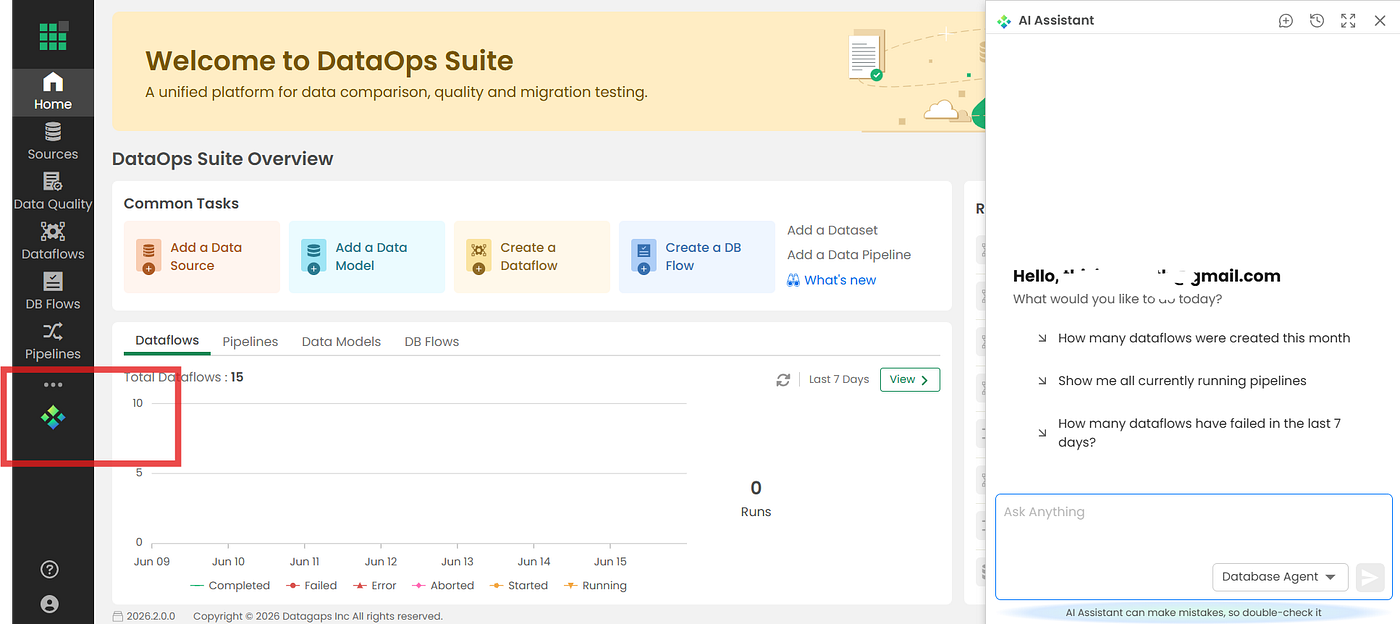
This chatbot also has the capability to answer every platform-related query. When you use the AI Assistant from the home page itself, it will not only give you the query but also show you the confidence score of the response generated, execute it, and show you the results. The idea behind this is that you don’t have to run it manually. On the home page, you want results, not queries. Queries are for your validation.
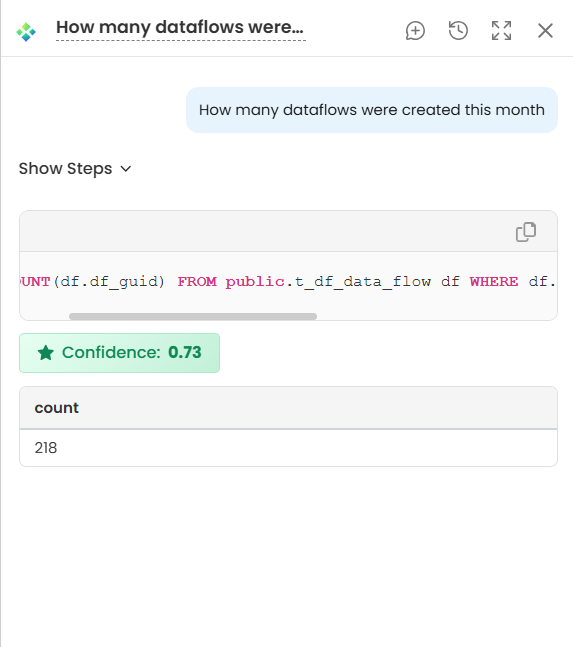
And then comes the second case where you’ll be using AI to get to know everything about the data that is coming from your data source, and you want to query that data in order to write better queries. While almost all parts of the testing are anyways automated by the platform itself, places where we need to define our own business logic can also be assisted using AI now.
When you think of using AI for writing queries, there could be N number of scenarios possible, but the most common part among all of them is during data ingestion and transformation testing.
In Datagaps, you create dataflows to set up your whole data testing and observability logic. In order to do so, we add multiple components available in dataflows, connect them to a data source, write some queries based on our data that we want to ingest/prepare for testing, and then publish that dataflow.
You need an AI assistant exactly at this step, where you are writing queries. When someone joins the testing team, it is obvious that if they are not aware of the dataset, they might have to spend hours understanding what the data is all about, its metadata, data model, etc. This AI assistant within Datagaps can save hours in this case, and testers can do the same thing within minutes now, irrespective of where the data comes from within the platform.
Testing Datagaps Text-to-SQL capability on real scenarios
In order to start using this text-to-SQL assistant within Datagaps, the first thing that you need to be very sure of is that you have completed the initial RAG setup, which actually helps AI in understanding the metadata of all your data sources. It reads all the associated metadata.
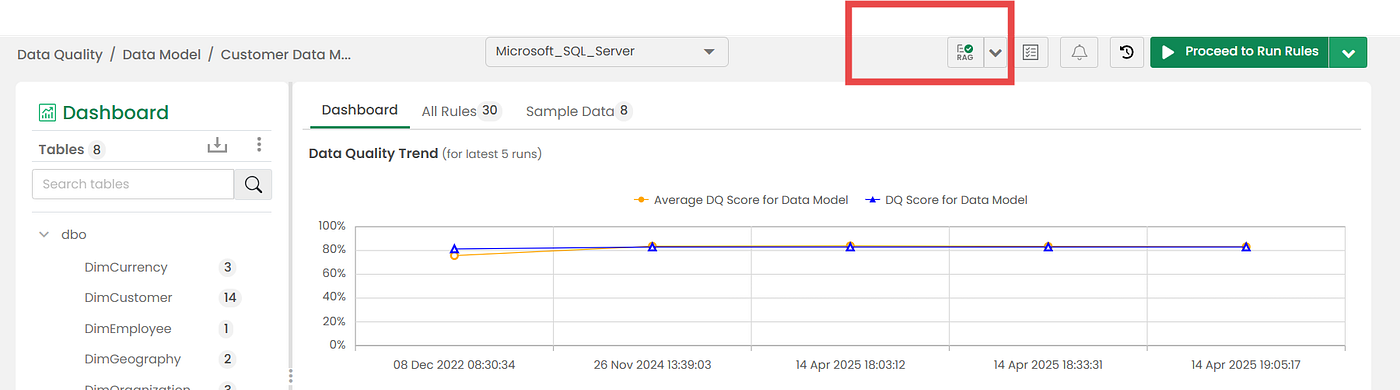
In order to test these AI capabilities within Datagaps, I connected my data source with a few tables in it. While the schema was still small, it will help us validate two major problems that we generally come across.
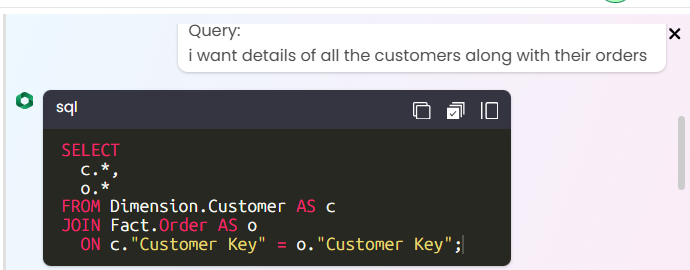
Can it write simpler queries involving only 1–2 tables? — Of course. And this is the bare minimum that we should expect from the tool. Even if you have 100’s of tables and you have defined your prompt clearly, the queries that require no complex logic should be returned immediately. I had sales data with multiple dimension and fact tables in it. I tried asking a simpler question, and it did well. For example, look at this screenshot.
What about CTEs and queries involving multiple joins and complex relationships? — This is the part that actually tests whether an AI tool is built for enterprises or if it’s just an MVP trying to position itself as a production-ready tool. I changed my question, made it a bit complex, and asked again. To my surprise, it worked decently. It created a CTE, 2 CTEs in fact, joined 4 tables, identified all the relevant columns required for joins, and then finally wrote a SELECT query using them. In the screenshot below, notice how Datagaps automatically identified the join path between fact and dimension tables without explicitly telling it the schema relationships.
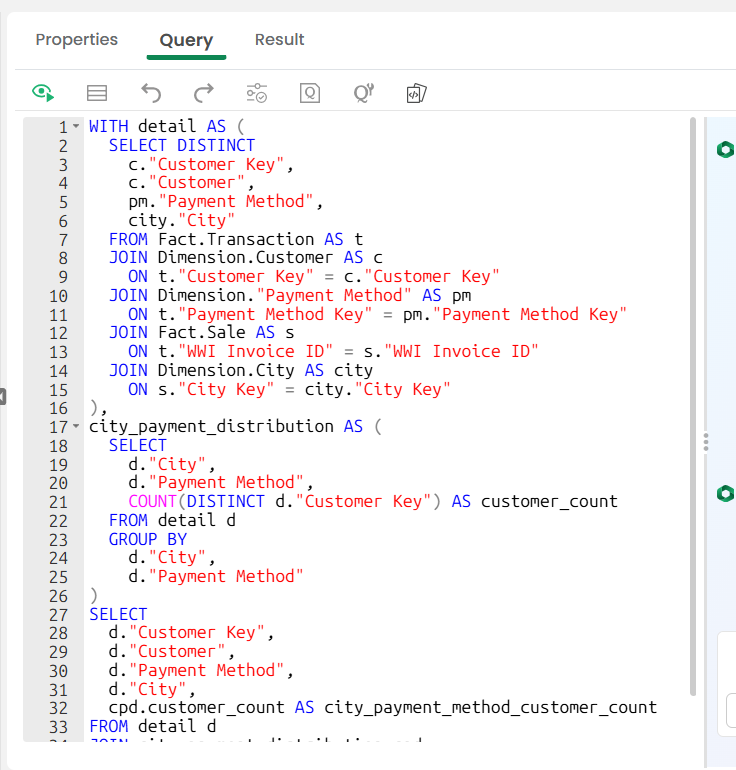
This part comes as a surprise because I really did not do anything other than just connecting my data source and then directly coming to my AI Assistant to write a query.
How is it different from ChatGPT/Claude? — Imagine if you had to do that otherwise, you might end up explaining everything to ChatGPT or Claude and then go through 4–5 back-and-forth conversations, after which you would end up getting a template that you can use to test. There too, you won’t get the direct query that you can paste since the schema and your dataset details cannot be shared outside. Data privacy is a big concern, and you cannot directly use these public tools on your dataset.
This is the advantage of using an enterprise-friendly solution. You never share anything outside your environment, and everything can be secured while still serving the purpose.
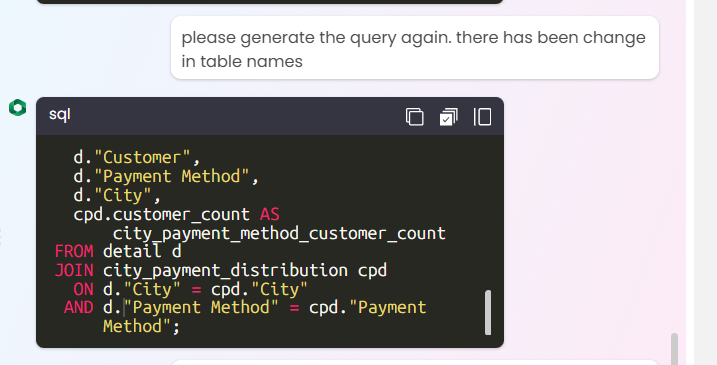
I also tested whether I could go back to the previous conversation and ask it to change something. With every query, your context from previous conversations is also being sent for a better user experience.
Where else can you use it? — If you are doing BI report validation during migration or some analytical validation, you might have to write some of the queries by yourself. You can use this AI assistant to define those insights and get the queries, or you can let it figure out some of the relevant insights, and then it will automatically give you a few queries that you can use as part of analytics validation.
For example, I very generically asked it to find something from my dataset. Ideally, it is best to have the scope clear in mind, but if you do not, you can take help here and ask it to generate some unique insights from your dataset, which you can use to validate between source and target. So the comparison becomes not just of the data but of the related outputs as well.
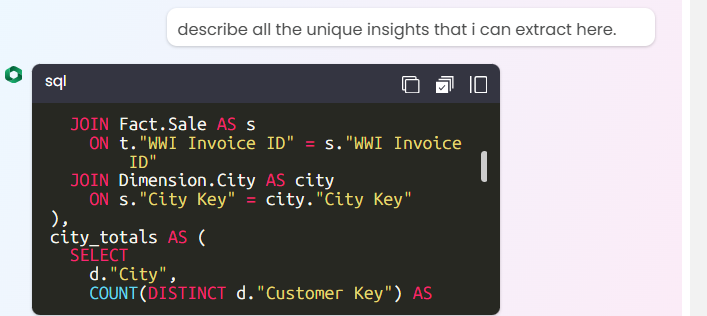
Look at this query, which was generated in one-shot prompting using the Datagaps AI Assistant. The way it is written, the level of complexity that the tool can handle, and generating such long queries without wasting a minute essentially shows that an enterprise can use it when it comes to validating data between source and target. Automatically finding relevant and correct columns, tables, and then using accurate window functions, that too when you did not really do anything other than just connecting your data source — that’s what the tool offers. Everything is handled at the backend automatically. You just have to define it.
WITH detail AS (
  SELECT DISTINCT
    c."Customer Key",
    c."Customer",
    pm."Payment Method",
    city."City"
  FROM Fact.Transactions_Table AS t
  JOIN Dimension.Customer AS c
    ON t."Customer Key" = c."Customer Key"
  JOIN Dimension."Payment Method" AS pm
    ON t."Payment Method Key" = pm."Payment Method Key"
  JOIN Fact.Sale AS s
    ON t."WWI Invoice ID" = s."WWI Invoice ID"
  JOIN Dimension.City AS city
    ON s."City Key" = city."City Key"
),
city_totals AS (
  SELECT
    d."City",
    COUNT(DISTINCT d."Customer Key") AS city_total_customers
  FROM detail d
  GROUP BY d."City"
),
city_method AS (
  SELECT
    d."City",
    d."Payment Method",
    COUNT(DISTINCT d."Customer Key") AS customer_count
  FROM detail d
  GROUP BY
    d."City",
    d."Payment Method"
),
city_method_rank AS (
  SELECT
    cm."City",
    cm."Payment Method",
    cm.customer_count,
    ct.city_total_customers,
    1.0 * cm.customer_count / NULLIF(ct.city_total_customers, 0) AS method_share_in_city,
    RANK() OVER (PARTITION BY cm."City" ORDER BY cm.customer_count DESC) AS method_rank_in_city
  FROM city_method cm
  JOIN city_totals ct
    ON cm."City" = ct."City"
)
SELECT
  "City",
  "Payment Method",
  customer_count,
  city_total_customers,
  method_share_in_city,
  method_rank_in_city
FROM city_method_rank;
Best practices for getting better SQL generation results in Text to SQL
There are a few things that are obvious enough, but sometimes people miss out on them and end up getting errors.
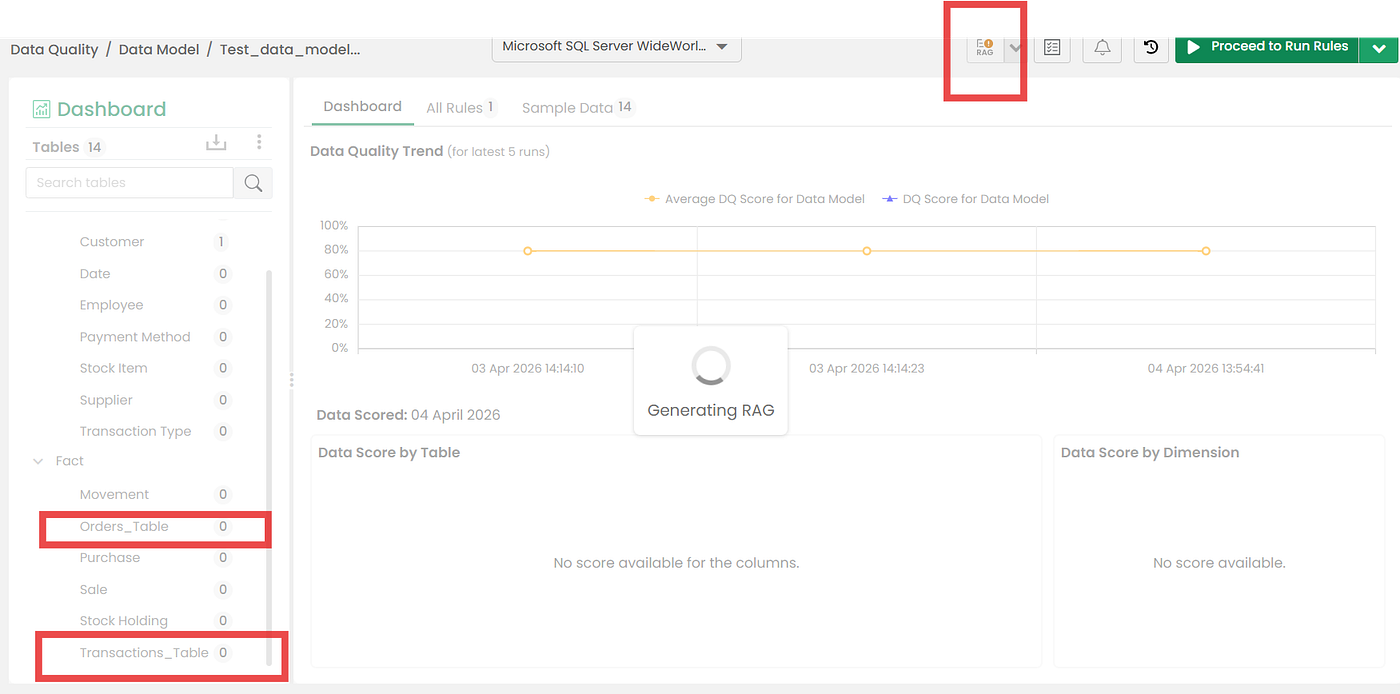
While naming tables, never name your tables based on keywords. You might get an error in Datagaps. Try to make sure that you have renamed your tables in such a way that they are not keywords.
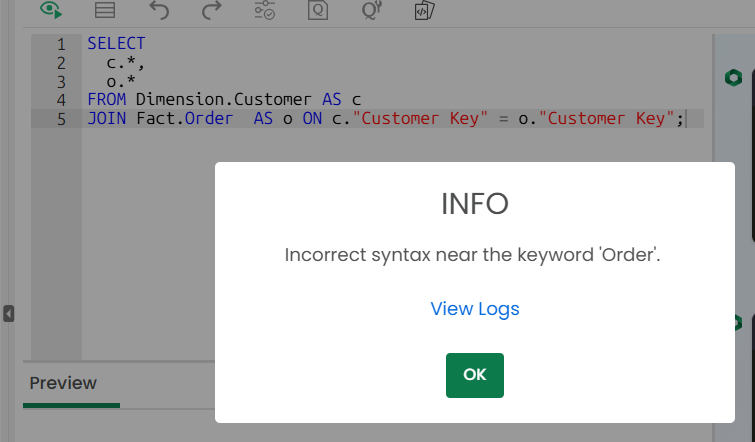
Fix this by going back to your data model, renaming your tables, and then updating the RAG again.
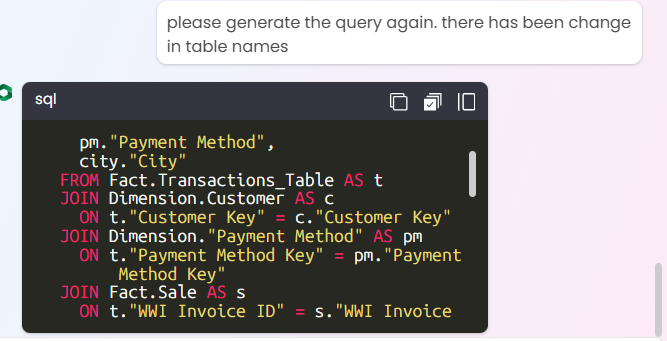
Now, you can ask it to generate a new and updated query with the correct table names, and it will do that, assuming you have updated the RAG as well.
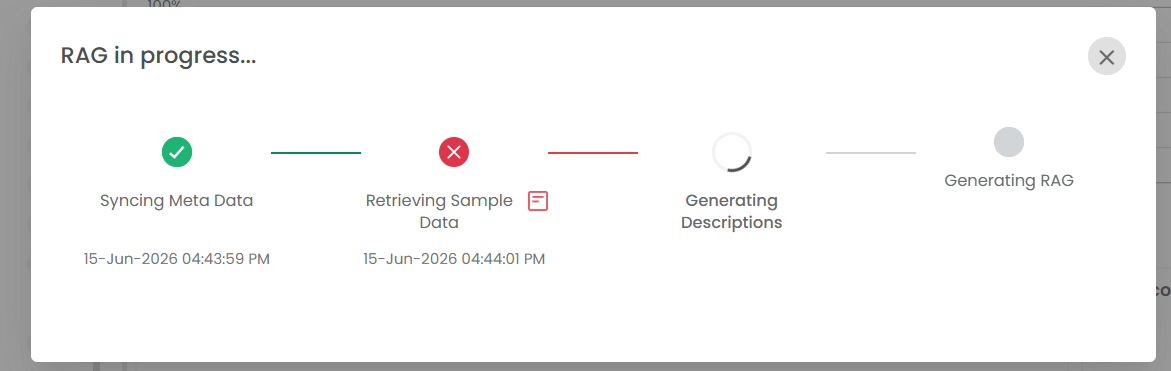
While simple metadata extraction helps, if you are creating your data model for the first time, do a Full RAG to teach the system in detail. Not only does this help further in other use cases like rule generation using AI, but it also helps in getting to know your dataset better. When you sync metadata, you also get a few relevant samples from your data and then store that information to let AI use it.
If you plan to write a few logics by yourself or even validate whether the query written by AI is correct or not, you still need to know all the details about your tables and columns. The AI assistant will help you with that as well. It can generate code to get all the details about your tables that you can run in order to write better and custom queries, which AI might get wrong sometimes. You can never fully trust AI solutions, and human validation becomes important, especially when you move this setup to production.
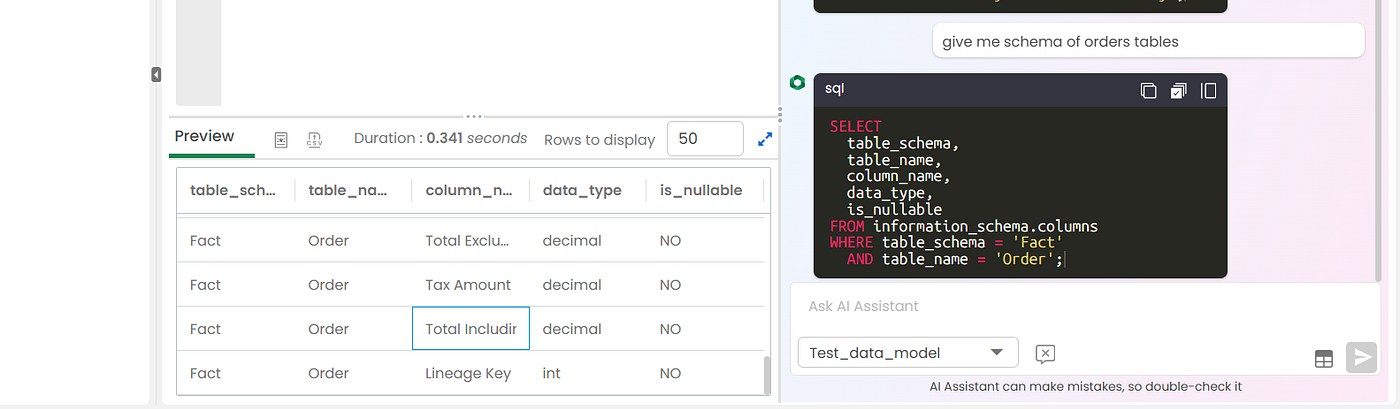
Where can it still improve? — When I was trying the AI Copilot, while it generated the query correctly, there should be a way to automatically run it as well and get the results along with the query. Right now, with each query, I need to copy-paste it and run it manually to verify the data. I see this more as an enhancement than a limitation, though.
Additionally, while this is an enterprise solution, if we had transparency over how exactly the company’s data is being used at each level, that would make it top the list. Data governance is still a concern, and if it is a testing stage, it would be best to show how and what data is being sent to AI in order to generate the query. It would be helpful. Just to let you know, this still happens, but at the backend and in a more developer-friendly version. If we build the same thing for non-developers too, it’d be awesome.
Overall, the tool serves the purpose perfectly, and the text-to-SQL capabilities within Datagaps work smoothly without any issues. If you are involved in the testing phase of your data layer, Datagaps might be one of the few solutions that are actually solving for that exact same purpose. See you all in another blog. Till then, cheers. Subscribe to get more of these in your mails directly :)
메타데이터
- post_id
- 4cdcd05de859
- slug
- how-datagaps-text-to-sql-helps-data-testing-teams-write-sql-faster-4cdcd05de859
- url
- https://uselessai.in/how-datagaps-text-to-sql-helps-data-testing-teams-write-sql-faster-4cdcd05de859
- canonical_url
- https://uselessai.in/how-datagaps-text-to-sql-helps-data-testing-teams-write-sql-faster-4cdcd05de859
- author_url
- https://medium.com/@theshresthshukla
- status
- ok
- fetched_at
- 2026-06-23 03:48:11