From Monolith to Model-Level Control: How We Migrated dbt Orchestration to Airflow with Cosmos…
Outgrowing the One-Size-Fits-All Approach
From Monolith to Model-Level Control: How We Migrated dbt Orchestration to Airflow with Cosmos (Part I)
Outgrowing the One-Size-Fits-All Approach
This blog was written by Richard Cheung, Senior Data Engineer at Justworks.
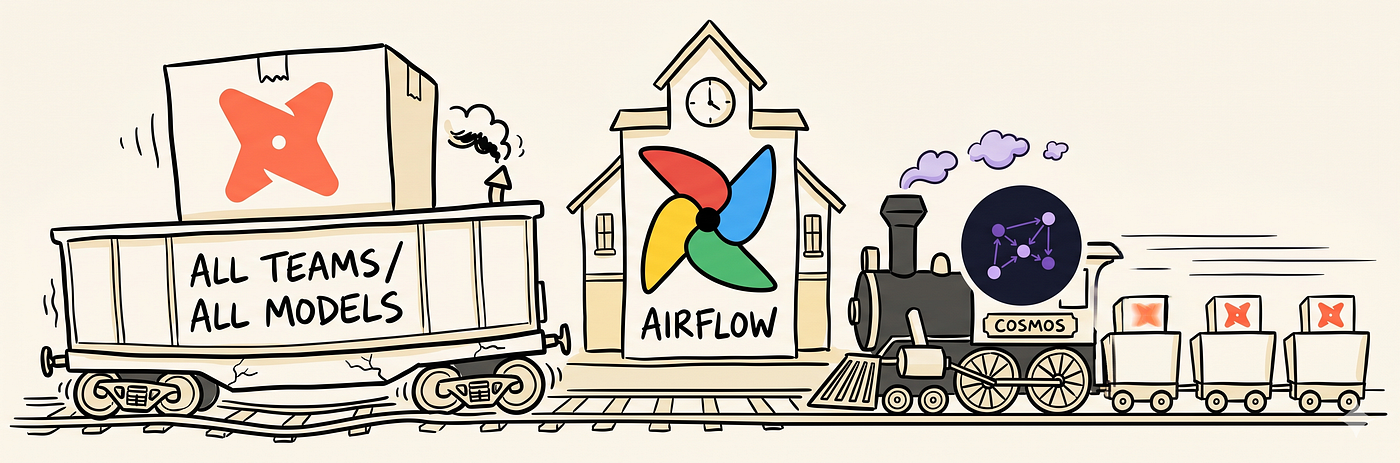
We migrated our dbt orchestration from a shared Airflow instance (single monolithic task, 60+ min runtime) to our own Airflow with Astronomer Cosmos (model-level tasks, ~30 min runtime). This gave us independence, faster iteration, and granular observability. Here’s how we did it.
The Starting Point
At Justworks, we build the platform that handles payroll, benefits, and compliance for thousands of small businesses — which means accurate, timely tax reporting isn’t optional. Our data team started out using a centralized dbt repository with thousands of models shared across multiple business units. Separately, our platform team owned how those models were orchestrated through their own Airflow instance, while our team’s Airflow deployment (running on EKS) was limited to domain-specific workflows and could not control dbt runs. As a result, we had no direct say in how or when our dbt models executed — if a single model failed, the platform-managed orchestration required rerunning an entire hour-long batch covering models from five different teams.
The limitations of this architecture became clear as our team prioritized a set of high-stakes initiatives to extract long-running, error-prone data generation processes from a legacy monolithic application and rebuild them on a modern stack (dbt, Snowflake, and Airflow). These pipelines were mission-critical and customer-facing, so we needed fast feedback, reliable operations, and fine-grained control. It was clear that the shared orchestration layer no longer matched our needs.
When Our Needs Outgrew Shared Infrastructure
At the time, our small team developed dbt models in a shared repository managed by a platform team. This repository housed thousands of dbt models from multiple teams across the company.
(For those unfamiliar: dbt is a transformation tool that lets data teams write SQL models with built-in testing and documentation. It’s become the standard for modern data transformation.)
While shared infrastructure has its benefits, over time our requirements evolved in ways the shared repository wasn’t designed to accommodate — a natural outcome when domain-specific needs mature.
Our workflow looked like this:
- Write dbt models in the shared repository
- Models get orchestrated by the platform team’s Airflow instance (running on ECS)
- Our Airflow instance (running on EKS) operated independently — by design, but without direct control over dbt execution
- Any dbt job changes require coordination with another team

Where Our Needs Diverged
As we dove deeper into our data migration projects, several challenges became increasingly painful:
Divergent Dependencies
Our dbt development had specific requirements that weren’t shared with other teams. We maintained our own prep and intermediate model layers with conventions tailored to our domain — a setup that worked for our use case but diverged from the shared repository’s standards. The shared conventions made sense for the broader organization; our domain had simply grown specialized enough that maintaining alignment had become a friction point.
The Need for a Dedicated Dev Environment
The shared environment served its purpose well for the broader organization, but it wasn’t designed to give individual teams isolated dev environments. As our testing requirements grew, we needed an isolated environment where we could run end-to-end integration tests against our full model graph — without affecting, or being affected by, other teams’ work. Owning our own environment would let us iterate faster and validate changes with confidence.
Breaking the Mold with Unit Tests
We were the first team to adopt dbt’s newly released unit testing feature. While exciting from an innovation standpoint, it introduced dependency conflicts in the shared environment. Adopting new features at the leading edge of a shared environment inevitably creates compatibility tension — shared infrastructure must move at a pace that works for everyone.
The Limits of Single-Task Orchestration
The shared orchestration used a single-task approach that worked well for the broader setup:
# The old orchestration approach
dbt_hourly_task = BashOperator(
    task_id='dbt_run',
    bash_command='dbt run --select tag:hourly',
    ...
)
This single task would:
- Run all dbt models tagged with
hourlyacross all teams - Take over an hour (sometimes hours) to complete
- It wasn’t designed to offer the per-model granularity and observability our team specifically needed — if one model failed, there was no way to re-trigger just that model

For a shared job running many teams’ models, this is an expected tradeoff — but for our team, the inability to selectively rerun individual models had become a bottleneck we needed to solve.
Event-Driven Architecture Dreams Deferred
We had plans to build event-triggered workflows between dbt models and Airflow DAGs. With dbt orchestration living in a completely different Airflow instance, this integration was architecturally complex, if not impossible.
Enter Cosmos
During a team discussion, we started exploring Astronomer’s Cosmos — an open-source tool that provides seamless dbt integration with Airflow.
What is Cosmos? https://astronomer.github.io/astronomer-cosmos/ is an open-source package that automatically converts your dbt project into Airflow DAGs. Instead of running dbt as a single black-box task, Cosmos creates individual Airflow tasks for each dbt model, preserving all the dependency relationships you've defined.
The promise was compelling:
- Model-level visibility: Each dbt model becomes an individual Airflow task
- Native Airflow integration: No more external orchestration
- Automatic DAG generation: Define once, render automatically
- Full data lineage: Visual representation of model dependencies
This looked like it could address the orchestration challenges we’d outgrown. But could we make it work?
The POC Journey
I decided to tackle a proof-of-concept with a key architectural decision: adopt a monorepo approach. Instead of maintaining dbt files separately from our Airflow DAGs, we’d bring everything into a single repository. We migrated from a multi-tenant, centralized dbt repository to a domain-driven monorepo where dbt and Airflow live together.
This would give us:
- Complete control over dependencies
- Simplified CI/CD pipelines
- Co-located dbt and Airflow development
Step 1: The Migration Script
The first challenge was extracting the files we needed from the massive shared repository. I couldn’t copy everything — that would bring in 4,000+ models we didn’t need.
I wrote a bash script to surgically copy only our team’s models and their dependencies:
#!/bin/bash
# Sync script - run repeatedly as teammates push changes
SOURCE_REPO="<path_to_shared_repo>"
TARGET_REPO="<path_to_monorepo>/dags/dbt"
# Simplified for illustration — actual script uses additional
# include/exclude patterns to surgically copy ~100 models
rsync -av --include='*our_domain*' --include='*shared_sources*' \
  --exclude='*' "$SOURCE_REPO"/models/ "$TARGET_REPO"/models/
# Copy dbt project configuration
cp "$SOURCE_REPO"/dbt_project.yml "$TARGET_REPO"/
cp "$SOURCE_REPO"/packages.yml "$TARGET_REPO"/
This script became essential over the next few weeks. Every time our team pushed changes to the shared repo, I’d run it to sync the latest updates.
Step 2: Snowflake Authentication
The shared repository used simple username/password authentication for Snowflake. For our monorepo, I implemented private key authentication — more secure, no password rotation headaches, and keys can be rotated programmatically.
dbt uses connection profiles to manage connection targets for different environments — local development, CI, staging, and production can each point to different Snowflake databases and warehouses. By owning our own profiles, we could configure environment-specific targets that matched our workflow: developers could run models against a dev database locally, while CI and production pointed to their respective environments.
Working with the platform team, we configured:
- RSA key pair generation
- Public key upload to Snowflake
- Private key storage in our Airflow environment
# profiles.yml
snowflake_transformations:
  target: "{{ env_var('DBT_TARGET') }}"
  outputs:
    dev:
      type: snowflake
      account: "{{ env_var('SNOWFLAKE_ACCOUNT') }}"
      user: "{{ env_var('SNOWFLAKE_USER') }}"
      private_key_path: "{{ env_var('SNOWFLAKE_PRIVATE_KEY_PATH') }}"
      role: "{{ env_var('SNOWFLAKE_ROLE') }}"
      database: "{{ env_var('SNOWFLAKE_DATABASE') }}"
      warehouse: "{{ env_var('SNOWFLAKE_WAREHOUSE') }}"
      schema: "{{ env_var('SNOWFLAKE_SCHEMA') }}"
Step 3: Cosmos Configuration
With authentication sorted, I configured Cosmos to dynamically generate DAGs based on dbt tags:
# cosmos_dbt_job_config.yml
dbt-jobs:
  domain_models:
    dag_name: 'domain_models'
    description: 'dbt models tagged with our domain'
    selector:
      type: 'tag'
      identifier: 'domain_models'
    schedule:
      production: '@hourly'
      default: '0 9 * * *'
And the DAG generator:
# Simplified DAG generator
from cosmos import DbtDag, ProjectConfig, ProfileConfig
import yaml
def create_dbt_dag(dag_id: str, **kwargs) -> DbtDag:
    return DbtDag(
        project_config=get_project_config(),
        profile_config=get_profile_config(),
        render_config=get_render_config(selector=kwargs.get("selector")),
        schedule=kwargs.get("schedule"),
        dag_id=dag_id,
        catchup=False,
        tags=["cosmos", "dbt"],
    )
def generate_all_dags():
    """Dynamically generate dbt DAGs from config file"""
    with open(DBT_JOBS_CONFIG) as f:
        jobs_dict = yaml.safe_load(f)
        for job_name, config in jobs_dict["dbt-jobs"].items():
            dag_id = f"dbt_{config['dag_name']}_dag"
            globals()[dag_id] = create_dbt_dag(dag_id=dag_id, **config)
generate_all_dags()
The “Aha!” Moment
After several iterations — shuffling files, tweaking permissions, adjusting configuration — I finally had something to show the team.
I opened our Airflow UI and there it was: a beautifully rendered DAG showing each dbt model as an individual Airflow task, connected by their dependencies.

Not an actual representation of our cosmos dag due to privacy reasons. This is just to illustrate what Cosmos DAG would look like
When we queried Snowflake, our models appeared in the database we managed, refreshed by our own Airflow instance.
We had done it.
Development Phase: The Real Challenges
With a working POC, we entered the development phase. This is where the complexity deepened.
The Synchronization Dance
Our team was still actively developing in the shared repository while I built out the Cosmos integration. Every PR merge meant running the sync script:
# My daily routine
$ ./scripts/sync_models.sh
$ git status
# Review changes, commit, push
Manual and repetitive, but necessary to stay aligned with the source of truth.
Environment Parity
Ensuring all Snowflake access controls and environment variables were consistently configured between nonprod and production became critical. I created a checklist:
- Service role created in production
- Private key authentication configured
- Database permissions granted
- Warehouse access verified
- Environment variables set in Airflow Connections
Comparing Old vs. New
One silver lining: because our nonprod models read from the same production source tables, we could easily validate outputs:
-- Validate Cosmos-generated models match production
SELECT * FROM dev_db.schema.model_name
EXCEPT ALL
SELECT * FROM prod_db.schema.model_name;
Any differences would be due to our logic changes, not data discrepancies. This made QA significantly easier.
D-Day: Production Deployment
After weeks of development and testing, we were ready. The deployment plan was tight:
Deployment Checklist:
- Coordinate with the platform team to disable our models in their Airflow
- Communicate code freeze — no PRs to the shared repository
- Run sync script one final time
- Merge PR to our monorepo’s main branch
- Verify all Cosmos DAGs render in Airflow UI
- Manually trigger DAGs and monitor
- Run QA queries to validate results
- Monitor Slack alerts
What could have been a multi-day, anxiety-filled migration was executed in a single business day — August 2024. Weeks of nonprod validation and a clear rollback path (re-enabling the platform team’s orchestration) gave us the confidence to move fast. The team was on high alert, ready to rollback if anything went wrong.
As each DAG completed successfully and QA queries came back clean, relief washed over the team.
The Impact

The migration transformed our development workflow:
Velocity Unlocked
We could iterate on dbt models without waiting for other teams or coordinating deployments. Need to add a new model? Add it, tag it, and Cosmos automatically picks it up. Our iteration speed increased dramatically — crucial for meeting aggressive project deadlines.
Isolation and Independence
We no longer needed to account for cross-team dependency changes affecting our models. Our dependencies were explicit and version-controlled.
Testing Without Friction
We could freely use dbt features like unit tests without dependency conflicts. Our development standards became our own.
Granular Control and Observability
Instead of a single monolithic task:

Ownership
We owned our dbt development lifecycle end-to-end — empowered to make decisions quickly and set our own standards.
What’s Next: Performance at Scale (Part II)
As our project grew to 20+ dynamically generated DAGs, we encountered new performance challenges:
- dbt build vs. separate run/test: Combining operations to reduce overhead
- Manifest-based rendering: Optimizing DAG rendering from 5–10 minutes down to seconds
- Task concurrency tuning: Balancing parallel execution with resource constraints
These optimizations will be covered in Part II, where we dive deep into solving the performance overhead of dynamic DAG rendering. Stay tuned!
Key Takeaways
If you’re considering a similar migration:
- Communication is critical: Coordinate with all stakeholders before production deployment
- Test thoroughly in nonprod: Being able to compare old vs. new outputs was invaluable
- Invest in synchronization tooling early: Our bash scripts saved countless hours
- Security matters: Private key auth > password auth
- Monorepos can work: Co-locating dbt and Airflow simplified dependency management and gave us full control
- Cosmos is production-ready: Despite being relatively new, it handled our workload reliably
Have you migrated dbt orchestration to Airflow? What challenges did you face? We’d love to hear about your experience in the comments.
This is Part I of a two-part series. Part II will cover performance optimizations including dbt build operations and manifest-based DAG rendering.
Special thanks to our team and the platform team for their collaboration on this migration.
Do you want to build products that help entrepreneurs and small businesses grow with confidence? We’re hiring across our Technology teams. Come build with us! Check out our Careers page.
메타데이터
- post_id
- 4cdeb4b5deb1
- slug
- from-monolith-to-model-level-control-how-we-migrated-dbt-orchestration-to-airflow-with-cosmos-4cdeb4b5deb1
- url
- https://technology.justworks.com/from-monolith-to-model-level-control-how-we-migrated-dbt-orchestration-to-airflow-with-cosmos-4cdeb4b5deb1
- canonical_url
- https://technology.justworks.com/from-monolith-to-model-level-control-how-we-migrated-dbt-orchestration-to-airflow-with-cosmos-4cdeb4b5deb1
- author_url
- https://medium.com/@justworks-technology
- status
- ok
- fetched_at
- 2026-06-20 20:29:01



