Linux- Penguin that beats Windows
by Mihirsanghvi, co -authored by Kedar
Linux- Penguin that beats Windows
by Mihirsanghvi, co -authored by Kedar
“If your laptop is slow or running old, just switch to Linux”. Almost everyone in the tech industry have heard this advice at least once and surprisingly it actually works.
Kernel vs Operating System
Most of the beginners confuse Linux with an OS like that of a windows or mac, which is not entirely true. Linux is not a full operating system, but a kernel. To understand the difference between a kernel and an operating system we can think of a computer like a car. The engine is the most important part it controls how the car moves and uses fuel. However, an engine alone is not a complete car. You also need a steering wheel, brakes, a dashboard, and a body to actually drive it. In this analogy, the engine is the kernel, and the complete car is the operating system.
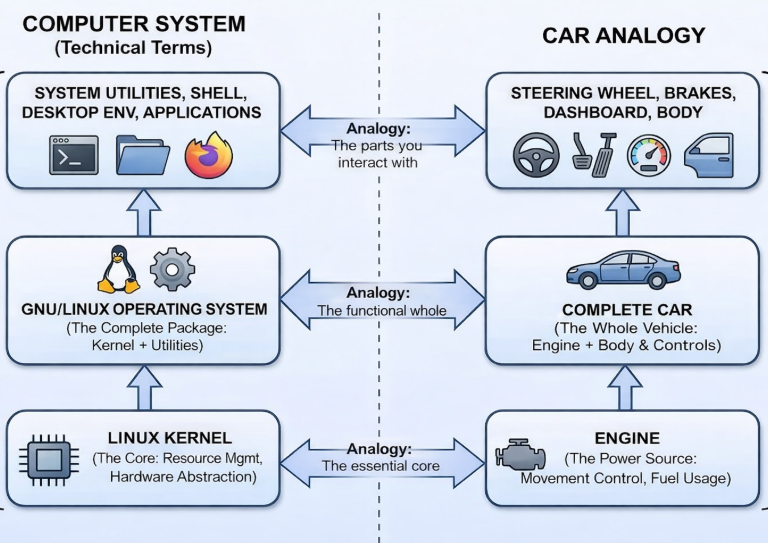
So the term Linux based Operating systems is just a collection of the Linux kernel and the components build around the Linux kernel, such as system tools, libraries that developers build to make the kernel useable for everyday tasks. one common example being Ubuntu which adds a graphical interface with Linux Kernel at it’s core.
Thus, Linux is not limited to a single experience and is reused across multiple operating systems, each designed for a specific purpose
But, Why does this work?
Press ctrl + shift + Esc, or open the task manager on a your system. You’ll see a list of background process running, these might be system updates or indexing process, the point being they use a portion of the CPU’s Ram and memory. On lower or low spec hardware these process significantly impact performance leading to slower responsiveness.
Linux-based operating systems run fewer background services by default and give users control over what starts and runs in the background. This results in lower idle resource usage and allows the system to allocate more processing power and memory to active applications.
Since you are now aware, that the Linux kernel gives you a free hand and doesn’t enforce a single way of using the system, different companies build operating systems around them, each designed for a specific user. The complete operating systems are known as Linux distributions.
Distro
Well that’s what a Linux distribution is often referred to as, a complete OS build around a Linux kernel, combining it with additional components such as system utilities, libraries, package managers, desktop environments.
WSL
For users who want to experience Linux without completely replacing Windows, you have Windows Subsystem for Linux or WSL. Internally, WSL uses a lightweight virtualization layer that integrates closely with the Windows kernel, making Linux tools feel like a natural extension of the Windows environment.
This makes WSL especially useful for students, developers, and beginners who want to learn Linux or use Linux-based development tools while still relying on Windows for everyday tasks. It lowers the entry barrier to Linux by removing the risks and complexity associated with full system installation.
Once a Linux distribution is installed using WSL, users are introduced to a different way of interacting with the system. Unlike traditional operating systems that rely heavily on graphical interfaces, Linux encourages users to work directly with the system through the command-line interface.
Command Line Interface
The Command Line Interface, referred to as the CLI, is a text-based way of interacting with an operating system, users type commands into a terminal to instruct the system to perform specific tasks. It focuses on precision and control. The CLI is also lightweight. It consumes significantly fewer system resources compared to graphical interfaces, which is one of the reasons Linux performs well on low-spec hardware and servers. In fact, many Linux servers operate entirely without a graphical interface and are managed exclusively through the command line.
Terminal, Shell and GUI
While working with Linux, Terminal, Shell , and GUI are a few terms you’ll hear often, sometimes used interchangeably. The Graphical User Interface (GUI) is the visual layer of the operating system. It allows users to interact with the system using windows, icons, menus, and a mouse or touchpad. Desktop environments such as GNOME or KDE provide this graphical experience, making Linux easier to use for everyday tasks.
The terminal is an application that provides a text-based interface to interact with the system. Instead of clicking buttons, users type commands. The terminal itself does not execute commands; it simply acts as a medium where commands are entered and results are displayed.
Inside the terminal runs the shell, which is the program that actually interprets the commands typed by the user and communicates with the Linux kernel. The shell processes user input, executes commands, and returns output. Popular Linux shells include Bash and Zsh.
In simple terms, the GUI is what you see and click, the terminal is where you type commands, and the shell is what understands and executes those commands.
Basic Linux Commands
Yeah, the part you all are waiting for “Coding”. It is essential to understand a few basic commands that allow users to navigate the system and interact with files and directories.
pwd – Print Working Directory (used to display the current library)
ls – List Directory Contents (used to list files/directories present in pwd)
cd – Change Directory (used to navigate between directories)
mkdir – Make Directory (used to make a new directory)
mv – Move or Rename Files (used to move or rename files)
clear – Clear Terminal ( cleans up the terminal screen)
With these basic commands, you can comfortably navigate and manage files in Linux.
To conclude, Linux comes in many distributions, each suited for different needs. Popular choices like Ubuntu, Linux Mint, Fedora, and Arch Linux offer different experiences while sharing the same Linux core. There’s a lot more you can explore with Linux, but if this sparked your interest, the workshop is the best place to dive in 🙂.
메타데이터
- post_id
- 4d09bcc30903
- slug
- linux-penguin-that-beat-windows-4d09bcc30903
- url
- https://medium.com/@dsc.muj/linux-penguin-that-beat-windows-4d09bcc30903
- canonical_url
- https://medium.com/@dsc.muj/linux-penguin-that-beat-windows-4d09bcc30903
- author_url
- https://medium.com/@dsc.muj
- status
- ok
- fetched_at
- 2026-07-13 06:23:13






