Zotero Alternatives That Work With AI Research Workflows
Most Zotero alternatives just give you a prettier reference manager. Here’s what actually fills the synthesis gap in 2026.
Zotero Alternatives That Work With AI Research Workflows
Most Zotero alternatives just give you a prettier reference manager. Here’s what actually fills the synthesis gap in 2026.
Photo by Patrick Robert Doyle on Unsplash
TL;DR
- Zotero is good at collecting and citing. It wasn’t built for AI-assisted reading and synthesis.
- The Zotero alternatives worth your time are the ones that close the synthesis gap. Not the ones copying Zotero’s feature list with a nicer UI.
- For most researchers, the right move isn’t replacing Zotero, but stacking an AI-native tool on top of it.
- Tools worth looking at: Elicit, Research Rabbit, Semantic Scholar, Paperpile, Readwise Reader, and Constella.
Why Zotero still works for most researchers
Zotero is free, open source, runs on every operating system, has a working browser clipper, exports to every citation style on Earth, and could integrate with Obsidian. If your workflow is collect, cite, and write, then using Zotero wouldn’t be a problem.
But that last part is worth underlining.
The Obsidian Zotero integration alone is the reason a lot of researchers stay. You clip a paper through the browser extension, it lands in Zotero, and it shows up in your Obsidian vault as a markdown note with the citation key, the author, the abstract, and a link back to the PDF. For people who think in notes, that pipeline is hard to beat.
Most of the alternatives I’m about to walk through, however, don’t do this part better than Zotero. Some don’t do it at all.
So before we go further, an honest filter.
You probably don’t need to leave Zotero if:
- You write papers with proper bibliographies and need niche citation styles
- Your university paid for a Zotero plugin and your advisor wants citations exported a specific way
- You already have a working Obsidian Zotero integration and your reading workflow is fine
- You don’t actually have a synthesis problem, you have a “haven’t started writing yet” problem
Be honest with yourself about which one you’re dealing with. I’ve watched researchers spend three weekends migrating their library to a new tool when the actual issue was that they were avoiding the writing.
The case for looking at alternatives is different.
You probably do need something more than Zotero if:
- You’re doing literature reviews across 50+ papers and feeling buried
- You want to ask questions across your library, not just inside one paper at a time
- You’re already using AI tools for reading and they don’t talk to your reference manager
- You’ve left academia or moved into industry research and don’t need formal citation exports anymore
- You’re using Claude or another LLM as part of your research process and want it to actually see your sources
If you’re in that second group, keep reading.
What an AI research workflow actually looks like
Before we talk about tools, we need to agree on what we’re optimizing for. An AI research workflow isn’t “I have a reference manager and I use ChatGPT sometimes.” It’s a pipeline where AI does real work at specific stages, and your tools talk to each other.
Here’s what the pipeline usually has:
- Reading. You’re not reading every paper cover to cover. AI reads the methodology section while you skim the abstract and the discussion, then you decide whether the paper is worth a real read.
- Extraction. When you find something useful, you want it out of the PDF and into a place you can search later. The quote, the data point, the author’s argument. Tagged, attributed, linked back to the source.
- Synthesis. This is the real work. Across 30 or 80 papers, what positions exist? Where do they disagree? What hasn’t been studied? AI is genuinely useful here, but only if it can see all your sources at once.
- Writing. Your draft pulls from your sources without you copy-pasting from PDFs into a doc. Citations stay attached. Quotes don’t drift from their authors.
A real AI reference manager handles at least two of these natively. A regular reference manager handles zero.
That’s the frame. Now the tools.
Alternatives to Zotero worth considering in 2026
Each of these does something specific. None of them is a drop-in Zotero replacement, and that’s the point. The question isn’t “what’s most like Zotero?” It’s “what closes the gap that’s actually slowing you down?”
Elicit
Elicit is the closest thing to an AI-native literature review tool. You describe your research question in plain language, and it pulls relevant papers from Semantic Scholar’s corpus, extracts findings into a table, and lets you ask follow-up questions across the set.
- What it does well: surfacing what papers actually say without you reading all of them. The extraction columns are real. You can ask “what sample size did each study use” and get a clean table with citations.
- Where it fits: the front end of a literature review. The discovery and triage stage, before you commit to deep reads.
- The drawback: it’s not a reference manager. There’s no library you own. You can export citations, but you’re not building a long-term collection. Pair it with Zotero or something else for storage.
Pricing: free tier exists, paid tiers start around $12/month.
Research Rabbit
Research Rabbit is for the part of research where you’ve found one good paper and you want to know what it connects to. You drop in a seed paper, and it builds a visual graph of related work, citation chains, and authors who keep showing up in the same neighborhoods.
- What it does well: discovery through relationships. If you’re trying to map a field you don’t know yet, Research Rabbit is the fastest way I’ve found to see the shape of it.
- Where it fits: early-stage exploration. Finding the papers Zotero would never tell you to look at.
- The drawback: it’s not built for the rest of the workflow. Once you’ve found the papers, you still need somewhere to put them, read them, and write from them. Use it alongside Zotero, not instead of it.
Pricing: free.
Constella
This one is closer to what I do every day, so I’ll be specific about how it actually shows up in a research workflow.
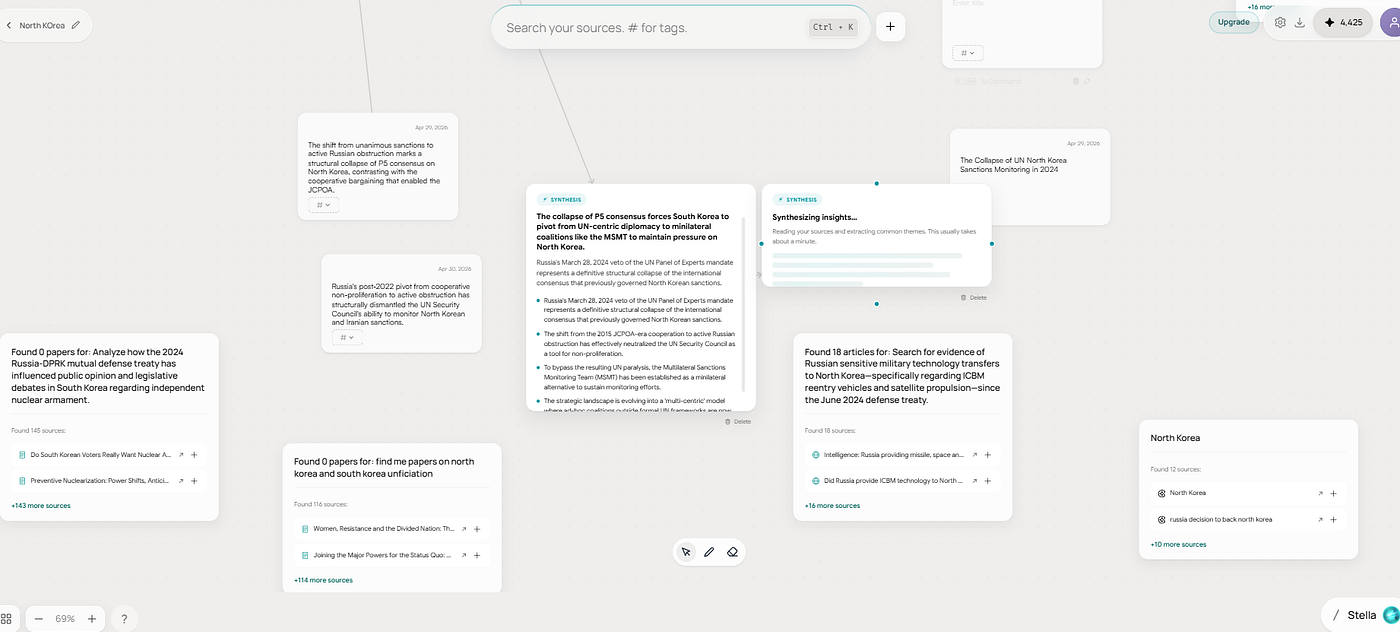
When I’m working through a literature review, I drop sources into a research canvas. Each paper becomes a node. Constella reads the source and pulls out the implications, methodology, claims, and gaps automatically. Then it surfaces where two papers disagree, where the field has converged, and what’s missing entirely. I can ask questions across the whole canvas and get answers with citations attached to specific sources.
It also connects to Zotero, Obsidian, Notion, Readwise, and Gmail, so the existing parts of your workflow keep working. You don’t have to migrate anything.

Constella recommending relevant papers to my research.
- Where it fits: the synthesis layer. Specifically the part of research that Zotero, Elicit, and Research Rabbit each touch but none of them own.
- The drawback: it’s a different category of tool, so the learning curve is real. If you just want a citation manager, this isn’t it.
Pricing: free tier available, paid plans start at around $20/month.
Semantic Scholar
Semantic Scholar isn’t a reference manager either, but it deserves a slot here because the corpus underneath most AI research tools is theirs. Over 200 million papers, free, with AI-powered recommendations and TL;DR summaries on most papers.
- What it does well: finding papers and getting fast summaries. The TL;DR feature alone saves hours during a triage pass.
- Where it fits: search and discovery. The free version of what Elicit charges for.
- The drawback: no library, no annotation tool, no real collection management. It’s a search engine with extras, not a replacement for Zotero.
Pricing: free.
Paperpile
Paperpile is the cleanest “Zotero but better looking” option, especially if you live in Google Docs. The browser-based interface is faster than Zotero’s desktop app, the Google Docs integration is genuinely seamless, and the PDF reader has actual annotation features that don’t feel like they were built in 2010.
- What it does well: collaborative reference management for teams. The shared library feature is better than Zotero’s groups.
- Where it fits: people who write in Google Docs and want a cleaner version of what Zotero does. Teams who need shared libraries that don’t break.
- The drawback: it’s still a reference manager. No AI synthesis, no question answering across your library. You’re paying $36/year for a prettier Zotero, not a different category of tool.
Pricing: $36/year for individuals, $99/year for academia plans with AI features.
Readwise Reader
Readwise Reader isn’t a reference manager at all. I’m including it because for a lot of researchers, the actual broken part of their workflow is reading and annotation, and Reader fixes that better than anything else.
- What it does well: it’s the best PDF and web article reader I’ve used. AI ghostreader summarizes long pieces. Highlights sync to your second brain. You can ask questions of any document and get sourced answers.
- Where it fits: the reading and annotation layer. Whatever you save here flows downstream into Obsidian, Notion, or wherever you write.
- The drawback: no citation export, no library structure, no academic features. Reader is a reading tool. Treat it as one.
Pricing: $9.99/month or $107.40/year.
What about Zotero MCP?
Worth a short section because people are searching for this specifically.
There’s a community-built Zotero MCP server that lets Claude and other LLMs read your Zotero library directly. You install it, point it at your local Zotero database, and your AI assistant can search your collection, pull citations, and reference your saved papers in conversation.
Is it good? It’s useful for spot work. Asking Claude “what did I save about transformer architectures last year” and getting a real answer with sources. It’s not a synthesis tool. It’s a connector that turns Zotero into something an AI can read, which is genuinely better than nothing.
The catch: it’s a community project, the setup is technical, and it’s not going to fix the core synthesis gap on its own. If you’re already deep in Zotero and you just want your existing library accessible to Claude, it’s a good weekend project. If you’re trying to actually rebuild your workflow, it’s a patch, not a solution.
Quick answers to the questions people keep asking
Is there a free Zotero alternative that’s any good?
Semantic Scholar and Research Rabbit are both free and both worth using, but neither replaces Zotero. They sit next to it. If you want a free standalone reference manager, Zotero is honestly still the best option. The paid alternatives are paid because they’re doing more than citation management.
What’s the best Zotero alternative for a literature review?
Elicit, easily. It’s built for the question “what does the literature say about X?” If your workflow is heavy on lit reviews, it’s the closest thing to a real time-saver in this space.
Can I keep using Zotero and add AI on top?
Yes, and most researchers should. The Zotero MCP server connects it to Claude. Constella imports from Zotero directly. Readwise Reader works alongside it. You don’t have to migrate to add an AI layer.
Does Obsidian Zotero integration still work in 2026?
Yes. Better BibTeX is still the standard, still actively maintained, and still the cleanest way to get Zotero references into Obsidian as markdown notes. If your workflow runs through Obsidian, this combo is hard to beat.
Is there an AI reference manager that just works out of the box?
Closest answer is Paperpile if you want a polished citation manager with light AI, or Constella if you want the synthesis layer with citation features. Nothing on the market is fully end-to-end, which is why most serious researchers stack two tools instead of betting on one.
What’s the one thing I should change first?
Figure out which layer is actually slowing you down. If it’s citation management, stay on Zotero, you’re fine. If it’s reading and annotation, try Readwise Reader for a month. If it’s synthesis across many papers, that’s where the AI-native tools earn their keep.
메타데이터
- post_id
- 4d1aa4380fc1
- slug
- zotero-alternatives-ai-research-workflows-4d1aa4380fc1
- url
- https://medium.com/below-the-abstract/zotero-alternatives-ai-research-workflows-4d1aa4380fc1
- canonical_url
- https://medium.com/below-the-abstract/zotero-alternatives-ai-research-workflows-4d1aa4380fc1
- author_url
- https://medium.com/@rfbryan
- status
- ok
- fetched_at
- 2026-06-14 11:28:49