How to transform your idea into a project. Day two: Svelte components
Using AI to build fast projects
How to transform your idea into a project. Day two: Svelte components
Using AI to build fast projects
This is the second part of a journey of building the svleter project in public through AI. You can visit the first part here. This is now outdated as I use KiloCode, Google Jules, Google Antigravity and Amazon Kiro to accomplish my code tasks.
Photo by Nathalia Segato on Unsplash
Decomposing the page components:
It is tedious repetitive and not much of a smart task to decompose a page into smaller components, and to create the DTOs that go with it. So that's a perfect job for AI. Below is the prompt I used.
I first described the project and asked ChatGPT to rephrase it (and pushed that in the previous blog post 🤓). So now I can be confident ChatGPT knows what the project is about because he rephrased it correctly.
I could have not been clear in my description, so the best way to verify that is to ask it to tell you what you just told him in his words, and see if it matches the image you have in your mind. So now I can build on top of that. This is how I prompted it to decompose my HTML screen into components:
Thank you! Now for that same idea, I have a complete screen that I would like to split into different components. Could you help me doing that, and create the typescript DTOs that will feed these screens with data? Here’s the first mobile page: <div id=”root” class=”bg-gray-50"> … (the rest of the huge page code)
That worked, but not as I expected: It generated dumb DTOs separating the WinningLibraryDto from the LibraryDto. It also created DTOs for the header and footer, which are good, but not exactly what I'm focusing on for now. You will often face this type of misunderstanding when using AI, you have to adjust what you expect in a followup prompt.
Keep in mind that by thanking ChatGPT, you are telling him that he is on the right path, and there are only some tweaks needed. Not thanking him, would make him think he had it all wrong, and rebuild from scratch.
Always remember to start by expressing your satisfaction with the part you are liked before digging into criticism 🤓 (it is not about being polite with themachine, but it gives amazing results and is a good way to maintain your good habits now that you will talk more and more often to machines 🤪)
So here's the adjusting prompt:
That is a great job! I need to specify a bit further my needs though: I’d like you to only focus on the dynamic parts of the data, even though, it is a good idea to extract the hero section data from the component, that is something I will focus on later. Also, the winning library is a library, so could you factorize a bit that data so that my services return more generic data types, for example merging WinnerCardDTO and LibraryCardDTO into a single data type, as the only difference is that it won (by the way, it can win multiple consecutive times, so adapt to that too please). Finally, could you decompose the svelte components and display them jest after or before the belonging DTO so that it is easier to handle for me?
And now results are amazing again:
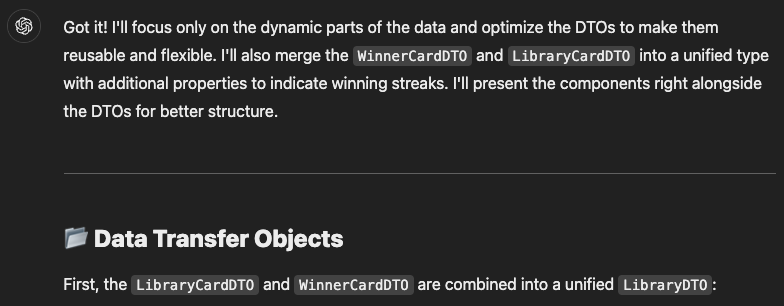
I got four atomic components and a DTO that I copied into my project. I only had to replace ../ by $lib. However, ChatGPT forgot to include the main page that uses these components, so instead of writing it manually, I prompted again and also asked it to start the automatic testing code. See the next section
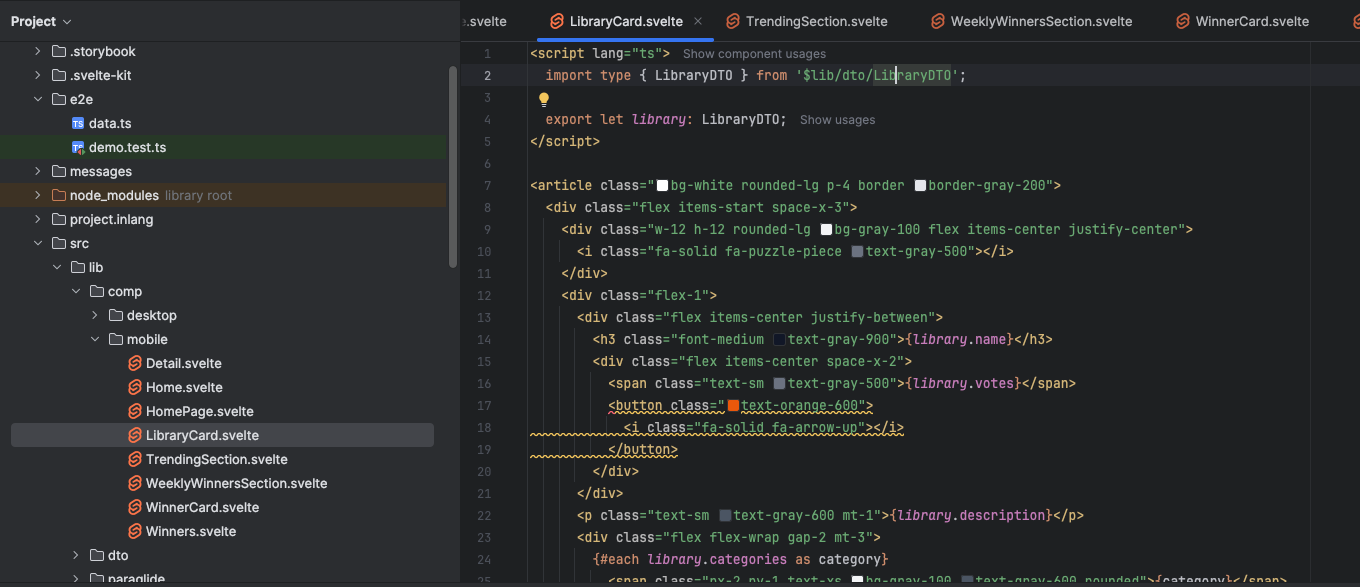
Components successfully created with ChatGPT
Testing the project so far:
It is a good habit to verify your advancement often to be able to react to errors before things become too complex.
So here is my finalizing prompt that asks ChatGPT to finish the work and write code to test what it just generated (as long as it remembers it)
That is awesome, I think you forgot to rebuild the original page with the components you created. Could you also use this mock data to verify everything is in place through playwright tests?
Results:
After some path adjustments, and addition of elements the AI missed generating. I can finally see the following screen 🥰:
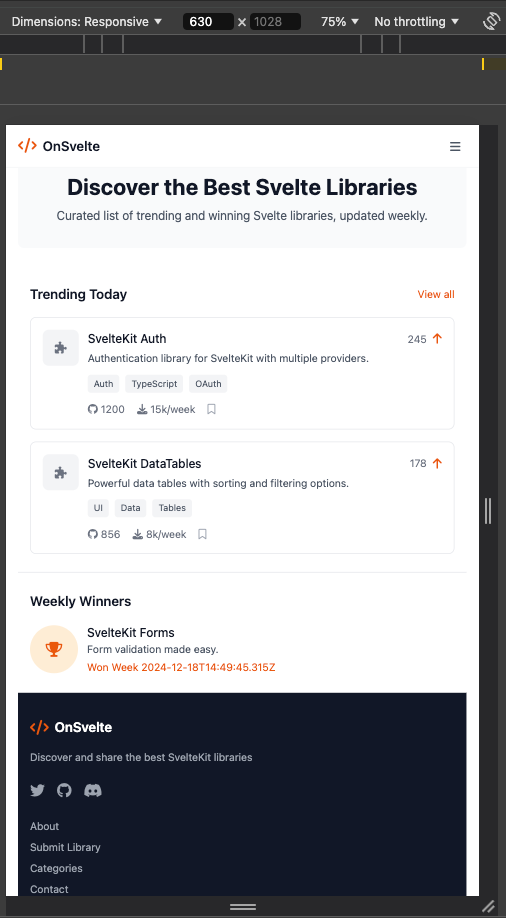
Four end-to-end tests were generated, two of which were immediately working, I fixed the two others and rapidly. I will iterate on improving tests later, but now I have a working structure I can build on top of. So I am confident leaving it like this for now. So it's time to put that all on GitHub, so that I can understand which changes broke my code later when it happens.
Also, accessibility errors are displayed in the console, I know I can get back to them later, as they couldn’t go unnoticed even if they tried. So no fears of missing that.

Run under WebStorm, my preferred IDE
Desktop version:
Before the AI forgets what we are speaking about, I asked it to decompose the desktop version of the HTML I generated with UX Pilot (see previous article).
It flawlessly generated four components along with the index files that use them. I adjusted the components paths and called the index file HomePage.svelte. For code readability, I named the desktop component files the same way they are on the mobile version.
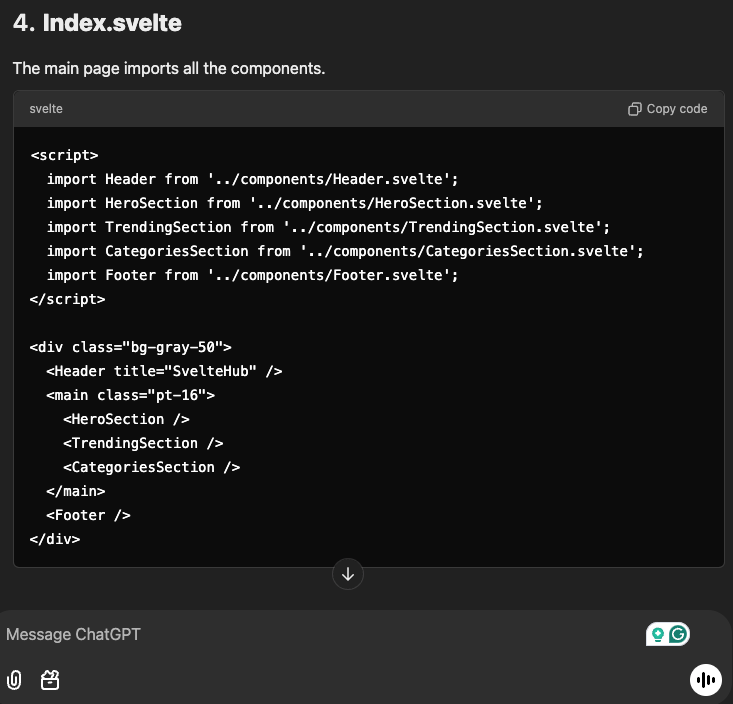
Finally, I compared the two visual. There were some missing parts, buttons and styles, but it was definitely worth it to get them generated, as I only had to compare and fill the blanks. Below is the index file using all desktop components:
Code extracts:
To rapidly see what results I've reached, I shortcut the app by mocking the server response, and worked on the central part that switches between the desktop and the mobile version. Let's start with the latter part.
Responsive Design: Handling Desktop and Mobile Views:
At the root of the project routes, the file src/routes/+layout.svelte will be loaded on any screen in the app before loading the actual page. So it is a good idea to put the screen size detection there.
ChatGPT wrote a non-working draft of the code below, it was setting the context on each method call. So a bit of Svelte stores and context knowledge was required here. But nothing that you coudn't find in the docs. I explain the details below the code sample.
<script lang="ts">
  import { writable } from 'svelte/store';
  import { i18n } from '$lib/i18n';
  import { ParaglideJS } from '@inlang/paraglide-sveltekit';
  import '../app.css';
  import '@fortawesome/fontawesome-free/css/all.min.css'

  import { onMount, setContext } from 'svelte';

  const isDesktop = writable(false);
  setContext('isDesktop', isDesktop);

  const screenSize = '(min-width: 640px)';

  function updateMedia() {
   isDesktop.set( window.matchMedia(screenSize).matches );
  }

  onMount(() => {
   // Set initial value
   updateMedia();

   // Add event listener for window resize
   const mediaQuery = window.matchMedia(screenSize);
   mediaQuery.addEventListener('change', updateMedia);

   // Clean up listener
   return () => mediaQuery.removeEventListener('change', updateMedia);
  });

  let { children } = $props();
</script>

<ParaglideJS {i18n}>
  {@render children()}
</ParaglideJS>
There are a few things to know here:
The context can only be set once, it is not designed to change after the page is displayed. But! We can put a store as the context value, and the content of that store can change over time, keeping the same pointer. Therefore, we set the context immediately after creating the writable. And we set its value on screen size changes.
The switch:
<script lang="ts">
  import { getContext, onMount } from 'svelte';
  import type { Writable } from 'svelte/store';
  import HomePageMobile from '$lib/comp/mobile/HomePage.svelte';
  import HomePageDesktop from '$lib/comp/desktop/HomePage.svelte';

  // Get the isDesktop value from root layout
  const isDesktopWritable = getContext('isDesktop') as Writable<boolean>;
  let isDesktop = $derived($isDesktopWritable);

</script>

{#if isDesktop}
  <HomePageDesktop {libraries} {weeklyWinners} {categories} />
{:else}
  <HomePageMobile {libraries} {weeklyWinners} />
{/if}
We derive the store value of isDesktopWritable to make the page react to its changes. Specifically, we access the proxy value (with the $ operator) and make a derived variable from it: $derived($isDesktopWritable)
Again, having a non-working code from ChatGPT was worth it, as it set the media query, know it was the window width we have to react to, and not the document, the kind of things you have to research before writing such code.
This pattern will be in any page in the application. I intentionally made two different versions of the graphical components of the application to be able to evolve each of them separately instead of having a bunch of #if :else blocs on each.
Mocking the API endpoints:
As you might already know, +server.js(or .ts) files are only run server side. So I added the files below, that will later serve real data, but for now I just used the mocked DTO values generated by ChatGPT (see prompt above).
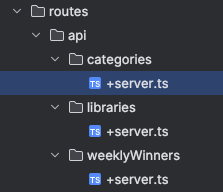
For example, this is how the /api/libraries endpoint returns the mocked values:
import { json } from '@sveltejs/kit';

export function GET() {

  return json([
   {
    id: '1',
    name: 'SvelteKit Auth',
    description: 'Authentication library for SvelteKit with multiple providers.',
    categories: ['Auth', 'TypeScript', 'OAuth'],
    votes: 245,
    githubStars: 1200,
    downloads: '15k/week',
   },
   {
    id: '2',
    name: 'SvelteKit DataTables',
    description: 'Powerful data tables with sorting and filtering options.',
    categories: ['UI', 'Data', 'Tables'],
    votes: 178,
    githubStars: 856,
    downloads: '8k/week',
   },
  ]);
}
These display in the app (desktop version) like follows:
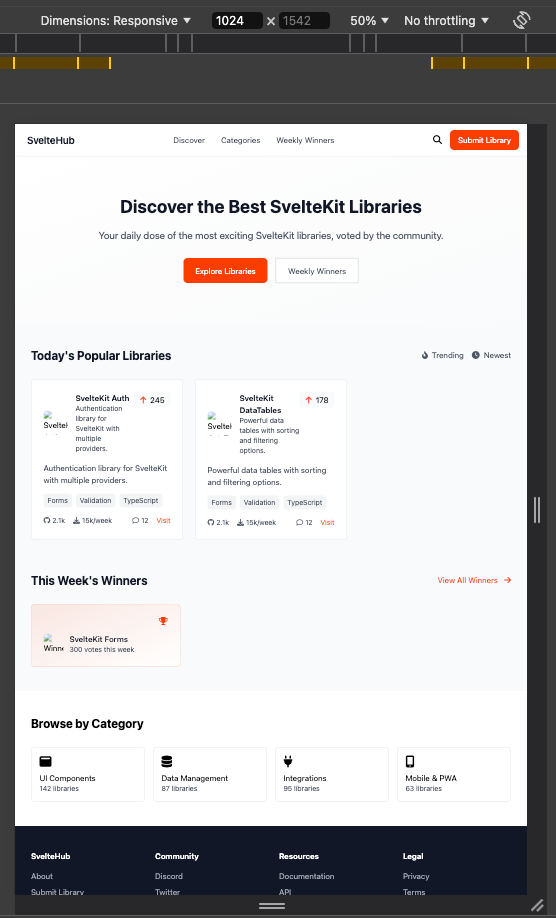
The endpoint calls happen in the +page.svlete root route (I stripped out part of the code when I was explaining how responsiveness works, so here is the complete file code)
<script lang="ts">
  import { getContext, onMount } from 'svelte';
  import type { Writable } from 'svelte/store';
  import type { LibraryDTO } from '$lib/dto/LibraryDTO';
  import HomePageMobile from '$lib/comp/mobile/HomePage.svelte';
  import HomePageDesktop from '$lib/comp/desktop/HomePage.svelte';
  import type { CategoryDTO } from '$lib/dto/CategoryDTO';

  let libraries: LibraryDTO[] = $state([]), weeklyWinners: LibraryDTO[] = $state([]), categories: CategoryDTO[] = $state([]);

  async function loadData() {
   const endpoints = [
    { url: '/api/libraries', variable: 'libraries' },
    { url: '/api/weeklyWinners', variable: 'weeklyWinners' },
    { url: '/api/categories', variable: 'categories' },
   ] as const;

   const results: {libraries:LibraryDTO[], weeklyWinners:LibraryDTO[], categories:CategoryDTO[]} = {libraries:[], weeklyWinners: [], categories: []};

   for (const { url, variable } of endpoints) {
    const res = await fetch(url);
    if (res.ok) {
     results[variable] = await res.json();
    }
   }

   return results;
  }

  // Get the isDesktop value from root layout
  const isDesktopWritable = getContext('isDesktop') as Writable<boolean>;
  let isDesktop = $derived($isDesktopWritable);
  onMount(async () => {
   // Fetch the data
   const results = await loadData();

   // Destructure and assign the result to the reactive variables
   ({ libraries, weeklyWinners, categories } = results);
  });
</script>

{#if isDesktop}
  <HomePageDesktop {libraries} {weeklyWinners} {categories} />
{:else}
  <HomePageMobile {libraries} {weeklyWinners} />
{/if}
It might be optimized by parallelizing the load calls, but will do it for now.
End-to-end Tests code:
Even though the tests could cover a lot more, having a working testing code makes it easier to iterate later on it.
Here's what ChatGPT generated the first time I asked it to do it:
import { test, expect } from '@playwright/test';
import { libraries, weeklyWinners } from './data';

test.describe('Home Page', () => {
  test.beforeEach(async ({ page }) => {
   await page.route('/api/libraries.json', async (route) => {
    await route.fulfill({
     status: 200,
     contentType: 'application/json',
     body: JSON.stringify(libraries)
    });
   });

   await page.route('/api/winners.json', async (route) => {
    await route.fulfill({
     status: 200,
     contentType: 'application/json',
     body: JSON.stringify(weeklyWinners)
    });
   });
   // Navigate to the home page
   await page.goto('/');
  });

  test('should display the hero section', async ({ page }) => {
   const heroTitle = page.locator('h1', { hasText: 'Discover the Best Svelte Libraries' });
   const heroSubtitle = page.locator('p', { hasText: 'Curated list of trending' });

   await expect(heroTitle).toBeVisible();
   await expect(heroSubtitle).toBeVisible();
  });

  test('should render trending libraries section with correct data', async ({ page }) => {
   const sectionTitle = page.locator('h2', { hasText: 'Trending Today' });
   await expect(sectionTitle).toBeVisible();

   const firstCardTitle = page.locator('h3', { hasText: 'SvelteKit Auth' });
   const secondCardTitle = page.locator('h3', { hasText: 'SvelteKit DataTables' });

   await expect(firstCardTitle).toBeVisible();
   await expect(secondCardTitle).toBeVisible();

   const voteCount = page.locator('span', { hasText: '245' });
   await expect(voteCount).toBeVisible();
  });

  test('should render weekly winners with winning weeks', async ({ page }) => {
   const sectionTitle = page.locator('h2', { hasText: 'Weekly Winners' });
   await expect(sectionTitle).toBeVisible();

   const winnerTitle = page.locator('h3', { hasText: 'SvelteKit Forms' });
   await expect(winnerTitle).toBeVisible();

   const wonWeeksText = page.locator('p', { hasText: 'Won Week ' });
   await expect(wonWeeksText).toBeVisible();
  });

  test('should verify buttons and links are interactive', async ({ page }) => {
   const upvoteButtons = page.locator('button', { has: page.locator('i.fa-arrow-up') }).first();
   //expect(await upvoteButtons.count()).toBeGreaterThan(0);
   await expect(upvoteButtons).toBeVisible();

   const githubLink = page.locator('a', { hasText: '1200' }).first();
   await expect(githubLink).toHaveAttribute('href', '/');
  });
});
Summary
The day two of creating the app was pretty satisfactory too, I now can confidently add the missing information for these welcome screens and decompose the other ones I created with UX Pilot. I will not talk about that other routes as there will be no interesting information for you on how to do that effectively. So I hope to see you in a few days when my other screens will be ready
메타데이터
- post_id
- 4dc53ec30e5c
- slug
- how-to-transform-your-idea-into-a-project-day-two-svelte-components-4dc53ec30e5c
- url
- https://medium.com/@zhamdi/how-to-transform-your-idea-into-a-project-day-two-svelte-components-4dc53ec30e5c
- canonical_url
- https://medium.com/@zhamdi/how-to-transform-your-idea-into-a-project-day-two-svelte-components-4dc53ec30e5c
- author_url
- https://medium.com/@zhamdi
- status
- ok
- fetched_at
- 2026-07-21 14:54:35