Supercharging SMB Pentest with Invoke-SMBScan
Supercharging Pentests with Invoke-SMBScan: My First-Hand Experience
Supercharging SMB Pentest with Invoke-SMBScan
Supercharging Pentests with Invoke-SMBScan: My First-Hand Experience
When you’re dropped into a fresh internal network during a penetration test, time is everything. You want quick wins — fast enumeration, actionable findings, and a clear picture of what the client’s environment looks like. For me, one of the most painful bottlenecks used to be SMB share enumeration on Windows. Tools like smbmap were fantastic — but they were Linux-only. On Windows footholds, I often found myself either manually mapping drives or jumping through hoops with WSL.
That’s why I wrote **Invoke-SMBScan — a pure PowerShell SMB share scanner** that runs natively on Windows, directly in your initial foothold or test environment. [https://github.com/mynksh/Invoke-SMBScan]
Why this?
During a client pentest, I had an early Windows foothold but couldn’t transfer my usual toolkit. net view worked in a pinch, but it’s clunky, slow, and doesn’t export nicely. I needed:
- Automation — scan entire subnets, not one host at a time
- Context — see which shares were readable/writable
- Samples — quickly preview directory and file names for data exposure
- Output — results saved in CSV for reports
And I wanted it all without leaving PowerShell.
What Invoke-SMBScan Does
Invoke-SMBScan:
- Takes CIDR ranges, comma-separated targets, or a host list file
- Probes if TCP/445 is open (skips wasted scans)
- Enumerates shares (excluding admin shares)
- Tests read access and pulls sample folders/files
- Optionally tests write access (creates and deletes a temp file)
- Logs everything into a CSV report
Example Run
On my pentest, I dropped into PowerShell on a compromised host and ran:
powershell -ExecutionPolicy Bypass -File .\Invoke-SMBScan.ps1 -Targets "10.7.1.0/24" -ListDepth 1 -OutCsv .\shares.csvA few minutes later, I had a clean CSV with:
IP,Share,UNC,Readable,Writable,Status,Error,SampleDirs,SampleFiles
10.7.1.6,Public,\\10.7.1.6\Public,True,False,ok,,"Docs;Finance","report1.docx;data.csv"
10.7.1.15,,,False,False,no_smb_listener,tcp/445 closed or filtered,,
Instead of fumbling with net view, I instantly knew which hosts had shares, whether I could read them, and what kind of data lived inside.
Screenshot Walkthrough
1. Launching the scan
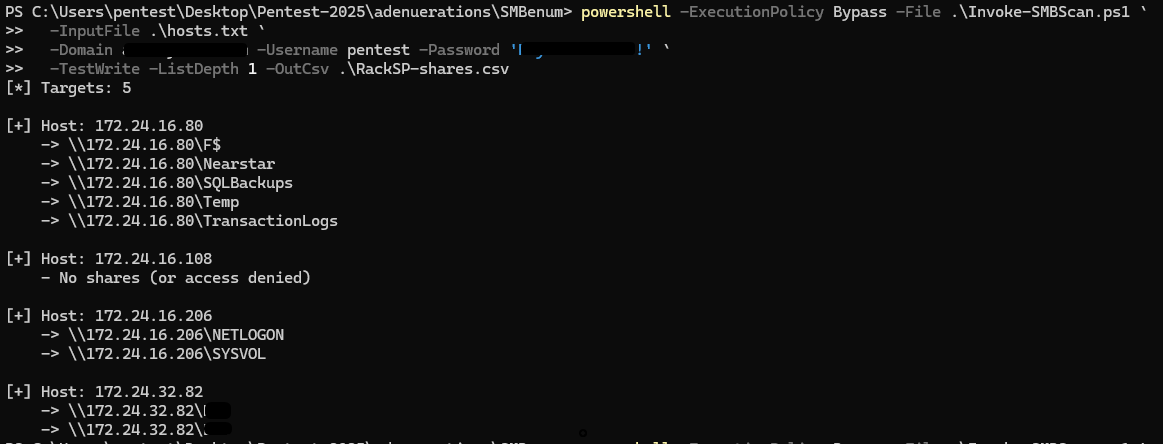
Command to run
2. Results exported

Sample output
Why This Saves Time
- Skip dead hosts — 445 probe prevents hours of wasted retries
- No copy-paste hell — direct CSV output is reporting-ready
- Preview data — sample files/folders mean faster risk validation
- Native — works out-of-the-box in Windows, no extra installs
On my first use, I saved at least 1–2 hours of manual enumeration and got higher-quality evidence for the client report.
Lessons Learned
- Having domain creds or a valid foothold gives much better results — otherwise, most shares will come back as access denied.
- Always sanitize write tests (temp file is auto-deleted).
- Easy to analyse results in CSV instead of screenshots of
net view.
Try It Yourself
👉 Grab the script on GitHub: Invoke-SMBScan
If you’re a pentester working from WindowsOS, this tool will shave hours off your workflow and help you focus on what really matters — finding and reporting impactful issues. [https://github.com/mynksh/Invoke-SMBScan]
Author: Mayank Sahu
메타데이터
- post_id
- 4dc7777a5f99
- slug
- supercharging-pentests-with-invoke-smbscan-4dc7777a5f99
- url
- https://medium.com/@mayanksahu_22156/supercharging-pentests-with-invoke-smbscan-4dc7777a5f99
- canonical_url
- https://medium.com/@mayanksahu_22156/supercharging-pentests-with-invoke-smbscan-4dc7777a5f99
- author_url
- https://medium.com/@mayanksahu_22156
- status
- ok
- fetched_at
- 2026-07-17 15:03:03


