Serverful vs Serverless: The Compute Concept Every Developer Should Understand
If you’ve ever deployed an application to AWS, Cloudflare, Azure, or Vercel, you’ve probably heard terms like EC2, Lambda, Cloud Functions…
Serverful vs Serverless: The Compute Concept Every Developer Should Understand
If you’ve ever deployed an application to AWS, Cloudflare, Azure, or Vercel, you’ve probably heard terms like EC2, Lambda, Cloud Functions, or Cloudflare Workers.
People often summarize the difference as:
“One is serverful, the other is serverless.”
But what does that actually mean?
And more importantly…
Why would you choose one over the other?
After spending time understanding how cloud providers actually execute code behind the scenes, I realized that the difference isn’t just about “managing servers.” It’s about how compute is allocated, how applications scale, and what trade-offs you’re making.
Let’s build the concept from the ground up.
First, what is Compute?
At its simplest, compute is the act of taking some code, executing it on a machine, and producing an output.
For example:
- A user sends an HTTP request.
- Your application processes the request.
- Your code performs calculations, queries a database, or calls another API.
- The application returns a response.
Some machine has to execute those instructions.
That execution is what cloud providers call compute.
Why don’t developers simply use their own computers?
Technically, you can.
You can run a Node.js server on your laptop and expose it to the internet.
But production applications need things that laptops aren’t designed for:
- 24/7 availability
- Stable internet connectivity
- High bandwidth
- Redundant hardware
- Reliable power
- Security
- Automatic backups
- Geographic availability
Instead of building all of that yourself, you rent compute from cloud providers.
There are generally three ways to do that.
1. On-Premise Infrastructure
- You purchase physical machines.
- You install the operating system.
- You maintain networking.
- You replace failed hardware.
- You handle everything yourself.
Large enterprises sometimes choose this because they want complete control.
2. Managed Cloud Services
Sometimes you don’t even rent a server.
Instead, you consume a managed service.
Examples include:
- Amazon S3 for object storage
- Managed databases
- Message queues
- CDN services
The cloud provider manages the infrastructure while you simply use the service.
3. Cloud Compute
This is where most web applications live today.
Cloud compute itself has two major execution models:
- Serverful
- Serverless
Although both execute your code, they do it very differently.
Understanding Serverful Compute
Imagine renting an apartment.
Once it’s yours, it’s always there.
You keep your furniture inside.
Nothing changes unless you change it.
A serverful virtual machine works almost exactly like that.
When you launch an EC2 instance, AWS creates a virtual computer for you inside one of its data centers.
That machine remains allocated to you until you shut it down.
What does this look like in practice?
You receive an IP address.
For example:
1.2.3.4Requests sent to that IP always reach your virtual machine.
You can SSH into it just like any Linux computer.
ssh ubuntu@1.2.3.4Once connected, deploying your application feels surprisingly familiar.
git pullnpm installnpm startYour application continues running until you stop it.
Nothing magically appears or disappears.
The process simply lives in memory.
Why is serverful so fast?
Because your application is already running.
When a request arrives:
- Node is already running.
- Your application is already loaded.
- Memory is already allocated.
The server immediately begins processing.
There is no startup delay.
This is why traditional servers provide very predictable latency.
But serverful has responsibilities
Owning the server also means maintaining it.
If your application crashes…
You restart it.
If Linux requires updates…
You install them.
If the disk fills up…
You clean it.
If traffic suddenly increases from:
100 users
to
1 million users
your single machine eventually becomes overwhelmed.
At that point you must introduce additional infrastructure like:
- Load Balancers
- Auto Scaling Groups
- Multiple EC2 instances
- Health checks
Scaling becomes your responsibility.
Understanding Serverless Compute
Now imagine a different model.
Instead of renting an apartment…
You rent a hotel room only when you need it.
Once you’re done, the room disappears.
The next time you visit, you might receive a completely different room.
That’s essentially how serverless works.
Instead of permanently reserving a machine, your code is executed only when someone requests it.
What actually happens?
When someone invokes your function:
- AWS finds available compute resources.
- A lightweight execution environment is prepared.
- Your code is loaded.
- The function executes.
- The environment may be reused for later requests — or eventually discarded.
Unlike EC2, there is no dedicated machine waiting just for you.
Cloud providers dynamically schedule your code wherever capacity is available.
Why don’t we receive a server IP?
Because there isn’t one permanent server.
Instead, AWS exposes an endpoint like:
https://abc123.execute-api.ap-south-1.amazonaws.comBehind that endpoint could be hundreds or even thousands of execution environments.
Your code simply runs wherever AWS decides.
Why is serverless so good at scaling?
Imagine one million users suddenly hit your API.
With EC2:
One server cannot handle that traffic alone.
You must provision more servers.
With Lambda:
AWS simply starts many execution environments in parallel.
Instead of scaling one machine vertically…
It scales horizontally across many machines.
That’s why serverless can absorb huge traffic spikes with very little operational work from developers.
The catch: Cold Starts
There is one trade-off.
If nobody has called your function for a while, the execution environment may no longer exist.
The next request has to create a fresh runtime before your code begins executing.
That initialization delay is known as a cold start.
Depending on the runtime and configuration, it can add noticeable latency to the first request.
After that, subsequent requests often reuse the existing environment, resulting in much faster responses until it becomes idle again.
Another trade-off: Limited environments
Serverless platforms intentionally restrict what developers can access.
- You don’t SSH into Lambda.
- You don’t manage Linux packages.
- You don’t configure the operating system.
- You simply upload code.
Some edge platforms go even further.
Cloudflare Workers, for example, don’t expose the full Node.js runtime. Instead, they execute JavaScript inside lightweight V8 isolates to reduce startup time and improve global performance.
The more abstraction you gain, the less infrastructure control you have.
What about static IP addresses?
One limitation surprises many developers.
Serverless functions don’t naturally have a fixed outbound IP address.
Because each execution can run on different infrastructure, outgoing requests may originate from different IPs.
This becomes a problem when third-party systems require IP whitelisting.
Fortunately, there are several common solutions.
Option 1: VPC + NAT Gateway
Run your Lambda inside a private subnet and route outbound traffic through a NAT Gateway with an attached Elastic IP.
Every external request then appears to come from the same static IP.
Option 2: Forward Proxy
Deploy a small EC2 instance (or use a managed proxy service) with a static IP. Configure your serverless application to route only the required outbound requests through that proxy.
Option 3: Database Proxies
When the issue is maintaining efficient database connections rather than IP whitelisting, services such as RDS Proxy provide a managed layer that pools and reuses database connections for rapidly scaling serverless functions.
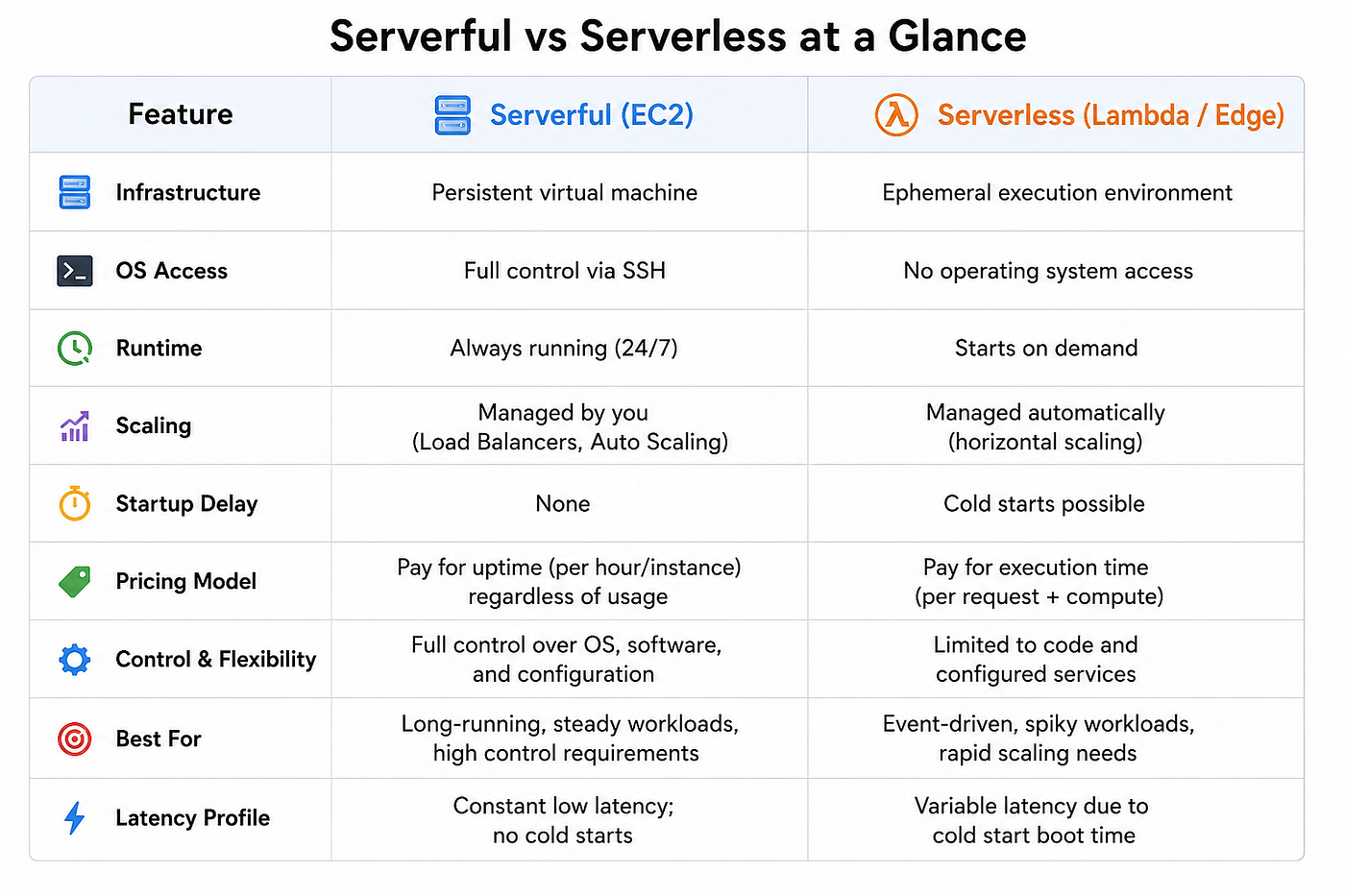
Serverful vs Serverless at a Glance
Final Thoughts
Serverful and serverless are not competing technologies.
They’re different execution models built for different problems.
If you need full control over the operating system, predictable performance, or continuously running workloads, serverful infrastructure remains a strong choice.
If you want to focus on writing code while the cloud provider handles provisioning, scaling, and much of the operational complexity, serverless can significantly simplify development.
Understanding how each model works — not just how to deploy it — helps you make better architectural decisions.
The best architecture isn’t about choosing one over the other.
It’s about knowing when each approach fits the problem you’re trying to solve.
메타데이터
- post_id
- 4e1151f69a04
- slug
- serverful-vs-serverless-the-compute-concept-every-developer-should-understand-4e1151f69a04
- url
- https://medium.com/@kanagalavnrajasekhar/serverful-vs-serverless-the-compute-concept-every-developer-should-understand-4e1151f69a04
- canonical_url
- https://medium.com/@kanagalavnrajasekhar/serverful-vs-serverless-the-compute-concept-every-developer-should-understand-4e1151f69a04
- author_url
- https://medium.com/@kanagalavnrajasekhar
- status
- ok
- fetched_at
- 2026-08-05 15:49:43




