Husky makes Git hooks easy to setup — Integrate pre-commit + run unit test cases in Angular
Before going into the deep to understand Husky, let’s understand the Git hooks first.
Husky makes Git hooks easy to setup — Integrate pre-commit + run unit test cases in Angular
Before going into the deep to understand Husky, let’s understand the Git hooks first.
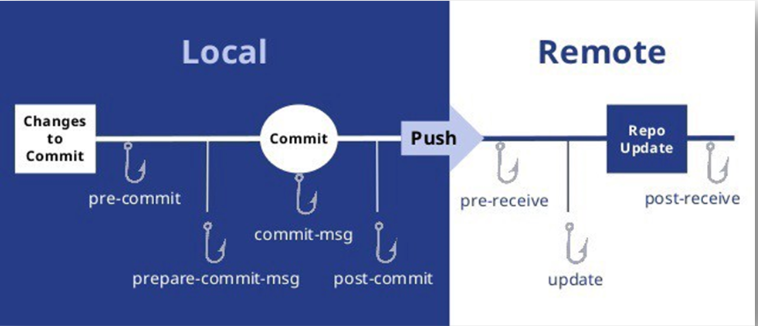
Git hooks are scripts that developers can set to run when certain events occur in the Git lifecycle. There are some popular ways to utilize Git hooks to streamline workflows with automation.
It can be useful for developers to run script for custom code tasks and enforce standards with the help of automation because it streamlines operations. Certain stages of a commit, like before and after for example, are a great way to start using Git hooks.
How to Get Started with Husky and Git Hooks
Git hooks are an accommodating solution for organizations that seek to implement consistent policies and procedures across their teams. First and foremost, they enable teams to run custom scripts according to certain Git operations. Building automation into your Git client helps remove the possibility of human error and improves workflows with little effort.
**Husky** describes itself as “Git hooks made easy”. It provides pre-commit and pre-push hooks.
Pre-push/Pre-commit hooks are nothing but commands which you would want to run every time you push/commit something.
Many developers that use Git hooks also use Husky to help manage scripts. Husky is a tool that helps developers work with Git hooks more efficiently and run all the scripts that need to work at various stages.
By simplifying the process of setting up Git hooks, developers can create effective solutions faster. Husky works within the package.json file by including an object that configures Husky to run certain scripts, and then Husky manages the script at specific points in the Git lifecycle.
In this tutorial, we are going to configure husky and configure pre-commit hook to run unit test cases before making git commit in an Angular application to standardize and automatize code task.
Step 1: Create an Angular project using CLI
ng new angularAppStep 2: How to install Husky to a project To install Husky, we can use yarn or npm.
yarn add husky
# or
npm install husky
Step 3: How to configure Husky to run Git hooks
Next, we’re going to set up Husky so we can use it for our Git hooks.
Inside of our package.json file, create a new property called husky with an empty object. You can also run husky-init command to create husky script in package.json
So now to run test cases before commit we need to add pre-commit hook, to do that npx husky add .husky/pre-commit “npm run test” command.
"hooks": {
    "pre-commit": "npm run test"
 }
What this will do is tell Husky that at every single commit run angular test cases and if it is successfully executed then commit changes to your local. If npm test command fails, your commit will be automatically aborted.
메타데이터
- post_id
- 4e23bfbae423
- slug
- husky-makes-git-hooks-easy-to-setup-integrate-pre-commit-run-unit-test-cases-in-angular-4e23bfbae423
- url
- https://medium.com/@mayur.mathurkar7/husky-makes-git-hooks-easy-to-setup-integrate-pre-commit-run-unit-test-cases-in-angular-4e23bfbae423
- canonical_url
- https://medium.com/@mayur.mathurkar7/husky-makes-git-hooks-easy-to-setup-integrate-pre-commit-run-unit-test-cases-in-angular-4e23bfbae423
- author_url
- https://medium.com/@mayur.mathurkar7
- status
- ok
- fetched_at
- 2026-07-25 09:32:35




