Add Ko-fi simple Payments to Your Website: Simple Setup Guide
Ko-Fi is a simple but powerful way to accept support from your community. Whether you run an analytics dashboard, a prediction platform, or…
Add Ko-fi simple Payments to Your Website: Simple Setup Guide
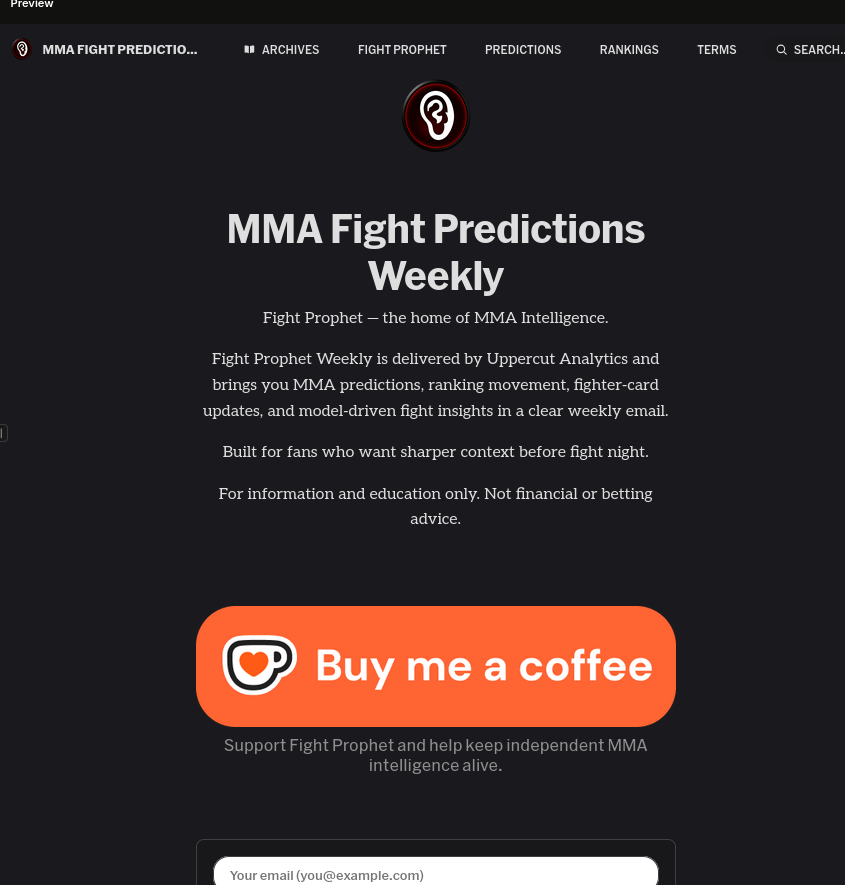
Figure 0: Newsletter in button down with html button embedded from Ko-Fi
Ko-Fi is a simple but powerful way to accept support from your community. Whether you run an analytics dashboard, a prediction platform, or a content hub, Ko-Fi lets visitors support your work without the complexity of traditional payment processing.
This guide walks you through implementing Ko-Fi in both your front ent frame work using Astro marketing site as example and also with Streamlit as analytics dashboard, using my own projectFight Prophet implementation as a real-world example.
What is Ko-Fi?
Ko-Fi is a creator support platform that lets users:
- Buy you a “coffee” (small one-time donations)
- Set up recurring memberships
- Make custom donations
- Browse your content while supporting you
Why it matters: Ko-Fi requires zero setup fees, minimal transaction costs (~5%), and handles all payment processing. Unlike ads, it creates direct supporter relationships.
Implementation Overview
Fight Prophet uses three Ko-Fi integration patterns:
- Floating Chat Widget —> On both Astro and Streamlit (always visible)
- Embedded Widget—> On the Terms page (dedicated support section)
- Account Setup →Ko-Fi username:
fightprophet
Part 1: Adding Ko-Fi to Your Astro Site
Step 1: Load the Ko-Fi Script
In your main layout file (e.g., src/layouts/BaseLayout.astro), add the Ko-Fi script before the closing </body> tag:
<! - Ko-fi floating support widget →
<script src='https://storage.ko-fi.com/cdn/scripts/overlay-widget.js' is:inline></script>
<script is:inline>
 kofiWidgetOverlay.draw('YOUR_KOFI_USERNAME', {
 'type': 'floating-chat',
 'floating-chat.donateButton.text': 'Support Us',
 'floating-chat.donateButton.background-color': '#d9534f',
 'floating-chat.donateButton.text-color': '#fff'
 });
</script>
Key parameters:
YOUR_KOFI_USERNAME— Replace with your Ko-Fi usernametype: 'floating-chat'— Creates a floating button in the corner- background-color — Button color (hex code)
- text-color — Button text color

Figure 1: Astro embedded Ko-Fi tip widget
Step 2: Customize the Button
The example uses Fight Prophet’s brand color (#d9534f — a red/burgundy):
‘floating-chat.donateButton.text’: ‘Support Us’, // Button text ‘floating-chat.donateButton.background-color’: ‘#d9534f’, // Match your brand ‘floating-chat.donateButton.text-color’: ‘#fff’ // White text
Step 3: Add an Embedded Ko-Fi Page (Optional)
For a dedicated support page (like Fight Prophet’s Terms page), embed the full Ko-Fi widget:
<div style="margin-top:1.5rem;border-radius:0.9rem;overflow:hidden;border:1px solid rgba(220,38,38,0.2);">
  <iframe
    id="kofiframe"
    src="https://ko-fi.com/YOUR_KOFI_USERNAME/?hidefeed=true&widget=true&embed=true&preview=true"
    style="border:none;width:100%;padding:0;background:transparent;display:block;"
    height="712"
    title="Support Your Project on Ko-fi"
    loading="lazy"
  ></iframe>
</div>
URL parameters:
hidefeed=true— Hides the supporter feedwidget=true— Enables widget modeembed=true— Optimizes for iframe embeddingpreview=true— Shows preview in editor (remove in production)
Part 2: Adding Ko-Fi to Streamlit
Streamlit doesn’t support script tags directly, so you need to use st.components.html() to inject the Ko-Fi script dynamically:
import streamlit.components.v1 as _st_components

# Ko-Fi floating widget for Streamlit
_st_components.html(
    """
<script>
  (function() {
    var s = window.parent.document.createElement('script');
    s.src = 'https://storage.ko-fi.com/cdn/scripts/overlay-widget.js';
    s.onload = function() {
      window.parent.kofiWidgetOverlay.draw('fightprophet', {
        'type': 'floating-chat',
        'floating-chat.donateButton.text': 'Support Us',
        'floating-chat.donateButton.background-color': '#d9534f',
        'floating-chat.donateButton.text-color': '#fff'
      });
    };
    window.parent.document.body.appendChild(s);
  })();
</script>
""",
    height=0,
    unsafe_allow_html=True,
)
Why the extra wrapper?
- Streamlit runs in an iframe, so you must manipulate
window.parent.document - The
s.onloadcallback ensures Ko-Fi loads after the script is ready - height=0 prevents wasted space (it’s just a script injection)
This is how it looks in streamlit

Figure 2: Streamlit: Ko-Fi tip widget
Part 3: Getting Started with Ko-Fi
Create Your Account
- Go to ko-fi.com
- Sign up with email or social login
- Customize your username (used in all implementations)
- Set up your profile photo and bio
Customize Your Ko-Fi Page
- Gallery — Upload images from your project
- Shop — Sell digital/physical products (optional)
- Memberships — Recurring support tiers
- Donation Goals — Show progress toward funding milestones
- Social Links — Connect your Twitter, Discord, etc.

Figure 1: Ko-fi page
Get Your Username
Your username appears in:
- Your Ko-Fi URL:
ko-fi.com/YOUR_USERNAME - All implementation code shown above
Why Ko-Fi is Beneficial for Your Project
1. Zero Setup Cost
No merchant account, no developer fees. Just sign up and start receiving support.
2. Low Transaction Fees
Ko-Fi’s 5% platform fee is competitive:
- Stripe alone charges 2.7% + $0.30 per transaction
- Ko-Fi’s all-in pricing is simpler and more transparent
3. Community Connection
Unlike ads or sponsors, Ko-Fi creates direct relationships with supporters:
- Donors feel directly connected to your work
- You can thank them personally
- Builds a loyal audience over time
4. Flexible Support Options
- One-time donations (coffee = $3 minimum)
- Recurring memberships
- Custom amounts
- No pressure if visitors don’t support
5. Non-Intrusive
The floating widget:
- Appears as a small button (not a banner)
- Can be dismissed
- Doesn’t block content
- Visitors see it only if interested
6. Supports International Creators
Ko-Fi processes payments for creators worldwide, unlike some platforms limited to specific regions.
7. Analytics & Dashboard
Ko-Fi provides:
- Donation history
- Supporter names (if public)
- Recurring member tracking
- Revenue reports
Best Practices
Placement Strategy
Fight Prophet uses two placements:
- Floating button — Always visible on every page
- Reaches all visitors
- Non-intrusive
- Cost: minimal screen real estate
- Dedicated page — Full embedded widget on Terms/Support page
- For visitors actively interested in supporting
- Shows your full Ko-Fi page experience
- Opportunity to explain your mission
Messaging
Keep it simple:
- ✅ “Support Us”
- ✅ “Buy Us a Coffee”
- ❌ “Donate Now or We’ll Shut Down” (too aggressive)
- ❌ “Help Pay Our Bills” (too personal)
Branding
- Use brand colors for the button (Fight Prophet uses
#d9534f) - Keep text short and action-oriented
- Match the overall site aesthetic
When to Show Ko-Fi
Good times:
- After providing value (predictions, analysis, rankings)
- On dedicated pages (About, Support, Terms)
- After a user has engaged for several pages
Avoid:
- Pop-ups that interrupt content
- Multiple buttons competing for attention
- Showing Ko-Fi before delivering value
Troubleshooting
Widget Not Showing?
In Astro:
- Verify Ko-Fi username is correct
- Check browser console for JavaScript errors
- Ensure
is:inlinedirective is present
In Streamlit:
- Verify window.parent access is allowed
- Check that unsafe_allow_html=True is set
- Ensure the script loads before the iframe renders
Styling Issues?
- Ko-Fi’s CSS might conflict with your theme
- Use CSS specificity to override if needed
- Test on mobile (widget positioning is critical)
No Donations?
- Make sure your Ko-Fi page is complete (profile, avatar, bio)
- Create content that resonates with supporters
- Share your Ko-Fi link on social media
- Be patient — donations build over time
Example: Fight Prophet’s Implementation
Marketing Site (Astro):
- Floating widget on all pages
- Embedded widget on Terms page
- Brand color integration (
#d9534f)
Analytics Dashboard (Streamlit):
- Floating widget on all pages
- Same branding for consistency
- No performance impact (lightweight script injection)
This dual-channel approach ensures supporters can contribute regardless of where they enter your platform.
Next Steps
- Sign up at ko-fi.com
- Customize your profile and Ko-Fi page
- Implement the floating widget on your Astro site
- Add the Streamlit integration if you have a dashboard
- Test on desktop and mobile
- Share your Ko-Fi link on social media and in your content
- Monitor the Ko-Fi dashboard for donations and feedback
Resources
Supporting your creators helps them build better tools, content, and analysis. Ko-Fi makes it simple.
[embed]Support fightprophet Support fightprophetko-fi.com
☕ Support Fight Prophet on Ko-fi Help keep independent MMA data, machine learning, and fight intelligence coming.
메타데이터
- post_id
- 4e2eb116f908
- slug
- adding-ko-fi-to-your-own-platform-a-complete-guide-4e2eb116f908
- url
- https://medium.com/@datatomas/adding-ko-fi-to-your-own-platform-a-complete-guide-4e2eb116f908
- canonical_url
- https://medium.com/@datatomas/adding-ko-fi-to-your-own-platform-a-complete-guide-4e2eb116f908
- author_url
- https://medium.com/@datatomas
- status
- ok
- fetched_at
- 2026-07-10 21:44:25