Your Backlinks Aren’t Working. It’s Not About the Links
You bought links. You built links. You begged for links. Rankings didn’t move. Before you spend another dollar, read this.
Your Backlinks Aren’t Working. It’s Not About the Links
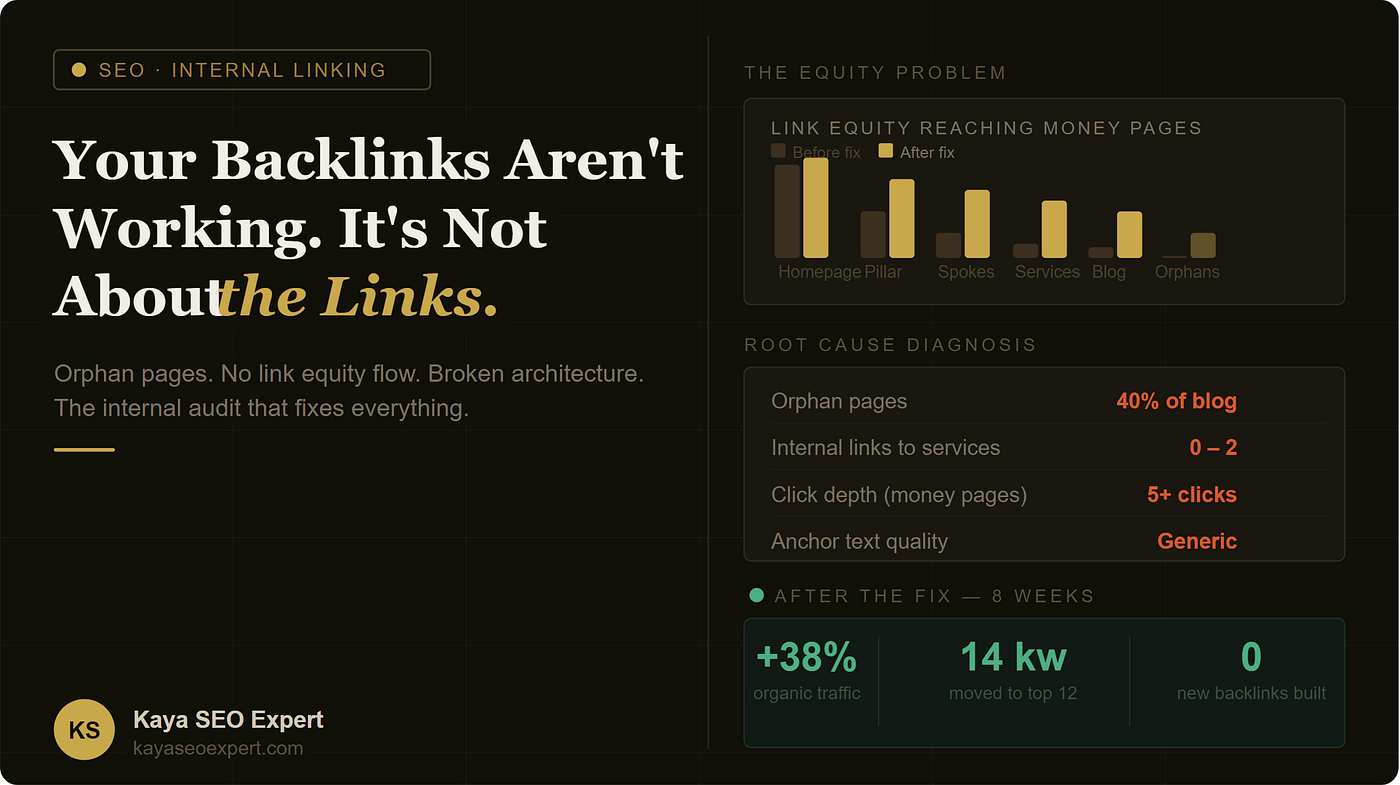
You bought links. You built links. You begged for links. Rankings didn’t move. Before you spend another dollar, read this.
I want to start with a number: 40%.
That’s the average percentage of blog posts I find as orphan pages when I audit a site that “doesn’t understand why backlinks aren’t working.”
Not orphan pages on a neglected site. On sites where the owner is actively building backlinks, publishing content regularly, doing everything the YouTube tutorials say to do.
Forty percent of their content — invisible to Google. Not because Google is ignoring it. Because the site’s own architecture is blocking it.
This is the real reason your backlinks aren’t converting into rankings. And fixing it costs you nothing except a few hours and a clear framework.
First: Understand How Link Equity Actually Moves
Link equity is not a static property of a page. It flows.
When a backlink points to your homepage, that page gains ranking power from an external source. But that power doesn’t teleport to your service pages, your category pages, your pillar content. It has to travel — through internal links — before it reaches anything useful.
Think of your site as a city’s water system. The reservoir (backlinks from external sites) fills up at the top. The pipes (internal links) carry the water through the city. Your money pages are the buildings that need water to function.
If the pipes are missing, broken, or going nowhere — the buildings dry out. Doesn’t matter how full the reservoir is.
This is exactly what’s happening on most sites I audit.
And here’s what makes it worse: if you’re already struggling to get traffic from backlinks, you may have a deeper visibility problem that starts before the link even gets credit. Orphan pages are just one layer of it.
The Three Structural Failures That Kill Link Equity
Failure #1 — Orphan Pages (The Silent Traffic Drain)
An orphan page is a URL that exists in your sitemap but has zero internal links pointing to it from other pages on your site.
Google discovers pages in two ways: your sitemap submission, and by following links. Sitemap discovery gets a page indexed — but it doesn’t get it ranked. Ranking comes from authority flowing through link equity. If no internal links point to a page, that page sits in Google’s index like a shop in a city with no roads leading to it.
How to find yours right now:
Open Screaming Frog (free up to 500 URLs). Crawl your site. Filter the “Inlinks” column for 0. Every URL with zero inlinks is an orphan.
If you don’t have Screaming Frog, use Google Search Console. Go to Pages → select “Not indexed” and cross-reference with your sitemap. Any page in the sitemap that’s not indexed after 60+ days is almost certainly an orphan.
The fix: For each orphan, find 2–3 existing articles on your site that discuss a related topic. Add one contextual, in-body link from each of those articles to the orphan. That’s it. No new content needed. Just connections.
Failure #2 — Footer and Navigation Link Bloat
Here’s something most people don’t know: Google does not treat all internal links equally.
A link in your footer that appears on every single page of your site passes less ranking value per instance than a single contextual link inside a blog post body. Why? Because Google’s algorithm weights link context and scarcity. A link that appears 300 times across your site (once in the footer on every page) is treated as a navigation signal — not an editorial endorsement.
The real damage: footers with 40+ links are bleeding equity from every page on your site simultaneously.
I regularly see sites where the “About Us” page has more internal link equity pointing to it than the services page — purely because it’s in the footer. That’s backwards.
The fix: Audit your footer. Keep it to 8–12 links maximum. The rest of your pages should earn their authority through contextual, in-body editorial links — not navigation shortcuts.
Failure #3 — Click Depth Burying Your Best Pages
Click depth is the number of clicks required to reach a page starting from your homepage.
- Homepage = 0 clicks
- Category page linked from homepage = 1 click
- Blog post linked from category = 2 clicks
- Blog post linked only from another blog post = 3–4 clicks
Google’s crawl budget is finite. The deeper a page is buried in your architecture, the less frequently Google’s crawler visits it — and the less equity it receives from the pages above it.
Here’s the problem: most sites have their highest-value content sitting 4–5 clicks deep, while their homepage and nav pages sit at 0–1 clicks and accumulate most of the authority.
Service pages should never be more than 2 clicks from your homepage. Key pillar content should be 2–3 clicks max.
The Hub-and-Spoke Model: How Equity Should Flow
Here is the architecture I implement for every client before we touch backlinks:
Level 1 — The Pillar Page (Hub) One comprehensive page on your core topic. This is the page that accumulates the most internal link equity from all your supporting content pointing up at it. It targets your broadest, highest-volume keyword.
Level 2 — Spoke Articles These are deep-dive pieces on specific sub-topics. Each spoke links back to the pillar (reinforcing topical authority), and the pillar links out to all spokes (distributing equity downward). This bidirectional linking is what creates topical clusters.
Level 3 — Money Pages Every spoke article that’s relevant to a service should include one contextual link to that service page. Not at the end. Not in a sidebar. Inside the body copy, in a sentence where it genuinely makes sense.
When a backlink arrives at your homepage, the equity flows: Homepage → Pillar → Spokes → Money Pages. That’s the complete pipeline.
The Internal Linking Audit: Do This Before Building Any More Links
This process takes about 3 hours for a site with 30–80 pages.
Step 1 — List your 5 money pages. These are the pages that generate revenue: service pages, product category pages, contact/booking page, pricing page. Write them down.
Step 2 — Count inbound internal links for each. Use Screaming Frog or Ahrefs Site Audit (filter for internal links per page). If any money page has fewer than 5 internal links pointing to it, it’s starved.
Step 3 — Find your highest-traffic blog posts. In Google Search Console, go to Performance → filter by page → sort by clicks. Identify your top 10–15 most-visited blog posts.
Step 4 — Create the linking matrix. For each high-traffic blog post, identify which money page it’s most relevant to. Add one contextual, in-body link from that post to that money page. Use descriptive anchor text that includes a target keyword — not “click here,” not “learn more.”
Step 5 — Fix your orphans. Go back to your orphan page list. For each orphan, add links from 2–3 topically related pages.
Step 6 — Flatten your click depth. For any service page sitting 3+ clicks deep, find a way to link to it from a page that’s 1–2 clicks from the homepage. A “Related Services” section on your pillar pages works well for this.
The Anchor Text Layer Most People Get Wrong
Internal links aren’t just about where you link. They’re about how you describe the destination.
Anchor text is one of the clearest signals Google uses to understand what a linked page is about. When 80% of your internal links say “read more,” “click here,” or “this article” — you’re wasting the signal.
Descriptive anchor text using relevant keyword phrases tells Google exactly what the destination page covers. For example, if you’re linking to your local SEO service page, the anchor text “local SEO services for brick-and-mortar businesses” is infinitely more useful than “check out our services.”
But there’s a balance. Over-optimizing anchor text creates a different problem — exact-match anchors on every single link looks manipulative. I covered this in detail in my breakdown of anchor text mistakes that quietly kill rankings — it’s the most overlooked technical issue I see across client audits.
The rule of thumb: vary your anchors. Use the target keyword phrase, a partial match, a branded mention, and a natural contextual phrase — rotating across different pages that link to the same destination.
What This Looks Like for Different Business Types
The internal linking fix isn’t one-size-fits-all. Implementation changes depending on your business model.
For Service Businesses (Local and National)
Your money pages are service pages. The most important internal links are the ones that connect your informational blog content to those service pages.
If you’re a local business, your blog post about “why you need X service” should always link to your “X service in [city]” page — not a generic service overview. That local targeting in the internal link context reinforces geographic relevance.
I wrote a full playbook on how this works specifically for local businesses in the local business link building guide — the internal architecture section applies even before you touch off-page.
For E-Commerce Sites
E-commerce has a unique challenge: category pages are the money pages, but most internal links go to product pages.
The fix: your category pages need to be linked from your blog content, your homepage featured sections, and your top-level navigation. Product pages can be linked from category pages. But don’t build blog content that links directly to individual product pages and skips the category — you’re bypassing the page that actually drives ranking.
If you’re running an online store, the equity flow should go: Blog Posts → Category Pages → Product Pages. Not Blog → Product, and not Homepage → Product alone.
The ecommerce link building guide covers the full architecture, but the internal linking hierarchy above is the foundation. And if you’re specifically working on scaling your backlink operation for a store, the ecommerce backlink strategy for 2026 gives the off-page layer that sits on top of this internal structure.
The Case Study That Shows Why This Works
I audited a client earlier this year — a service business, 9 years old, decent content, 60+ backlinks from real sites.
The diagnosis:
- 21 out of 34 blog posts were orphan pages
- All 4 service pages had 0–2 internal links pointing to them
- Their homepage linked out to 52 different pages in the footer
- The contact page was 4 clicks deep from the homepage
- Every internal link used either “here” or “read more” as anchor text
What we did over 6 weeks:
- Removed 38 footer links (kept only 8 essential ones)
- Added contextual body links from top 12 blog posts to the 4 service pages
- Fixed all 21 orphan pages with 2–3 contextual links each
- Created one pillar page that linked to the 8 most relevant blog posts
- Moved the contact page to 2 clicks from the homepage
- Updated anchor text on all internal links to use descriptive keyword phrases
The results (8 weeks, zero new backlinks built):
- 14 keywords moved from positions 18–35 to positions 5–14
- Organic sessions up 38% month-over-month
- 3 service pages hit page 1 for the first time
- Contact form submissions doubled
The backlinks that had been “not working” for 18 months started working the moment the equity had somewhere to flow.
The Connection Between Internal Linking and Getting Clients
There’s one more layer to this that most SEO guides skip entirely.
Internal linking doesn’t just affect rankings. It affects the user journey that leads someone from a blog post to becoming a client.
When someone reads your article about link building and there’s no link to your link building service page — you’ve lost them. They got value from your content. They left. You got traffic. You got no clients.
This is one of the core reasons high-traffic sites convert at almost zero. The content is attracting the right audience, but the internal paths to conversion don’t exist. I see this so often that it has its own dedicated breakdown in this article about getting traffic but no clients — because it’s not just an SEO problem, it’s an architecture and intent-matching problem.
Every piece of content on your site should have a clear “next step” link — either to a deeper piece of content that continues the journey, or directly to a conversion page when the intent is right.
The Pre-Backlink Checklist
Before you spend one more dollar on link building, verify these 6 things:
✓ No orphan pages — every URL in your sitemap has at least 2 internal links pointing to it
✓ Money pages have 5+ inbound internal links — from relevant, high-traffic pages
✓ Footer has fewer than 12 links — no link equity bleeding through site-wide navigation bloat
✓ All money pages are 2 clicks or fewer from the homepage
✓ Anchor text is descriptive and varied — no generic “click here” or “read more”
✓ Every blog post links to at least one money page — the path to conversion exists
If all six of these are true, your site is ready for backlinks. If any of them are false, fix them first. The links you’ve already built will start performing better once the pipes are fixed.
One More Thing on Backlinks
If you’ve verified your internal structure is solid and backlinks still aren’t moving the needle — the question shifts to whether backlinks as a strategy are being executed correctly in the first place.
There’s a lot of noise in 2026 about whether links still matter at all. The short answer: yes, backlinks still work in 2026 — but the type of link and the context it appears in has changed significantly. A link from a relevant, topically-aligned site in an editorial paragraph is worth 20x a link from a random directory.
But that’s the next level of optimization. The internal linking foundation comes first. Always.
This article is part of an ongoing SEO series covering what actually works in 2026. Follow for weekly breakdowns — no fluff, no affiliate links, just the framework.
Full guides, audits, and tools at kayaseoexpert.com
메타데이터
- post_id
- 4e3273fb61da
- slug
- your-backlinks-arent-working-it-s-not-about-the-links-4e3273fb61da
- url
- https://medium.com/@kayaseoexpert/your-backlinks-arent-working-it-s-not-about-the-links-4e3273fb61da
- canonical_url
- https://medium.com/@kayaseoexpert/your-backlinks-arent-working-it-s-not-about-the-links-4e3273fb61da
- author_url
- https://medium.com/@kayaseoexpert
- status
- ok
- fetched_at
- 2026-07-25 12:44:45






