I Built a Browser-Based Rive Player to Speed Up Animation Testing for Developers and Rive Animators
If you work with Rive animations in Flutter, React Native, or web apps, you probably know this workflow pain:
I Built a Browser-Based Rive Player to Speed Up Animation Testing for Developers and Rive Animators
If you work with Rive animations in Flutter, React Native, or web apps, you probably know this workflow pain:
Change one tiny .riv animation → rebuild app → wait → test → repeat again.
It sounds small until you do it 50 times a day.
That workflow was slowing me down constantly while building UI-heavy products with interactive animations.
So instead of rebuilding full apps every time, I built a browser-based Rive Player for my own workflow first.
Now it’s available publicly on UIAnimation Studio:
👉 https://uianimation.com/riveplayer/
What Is the Rive Player?
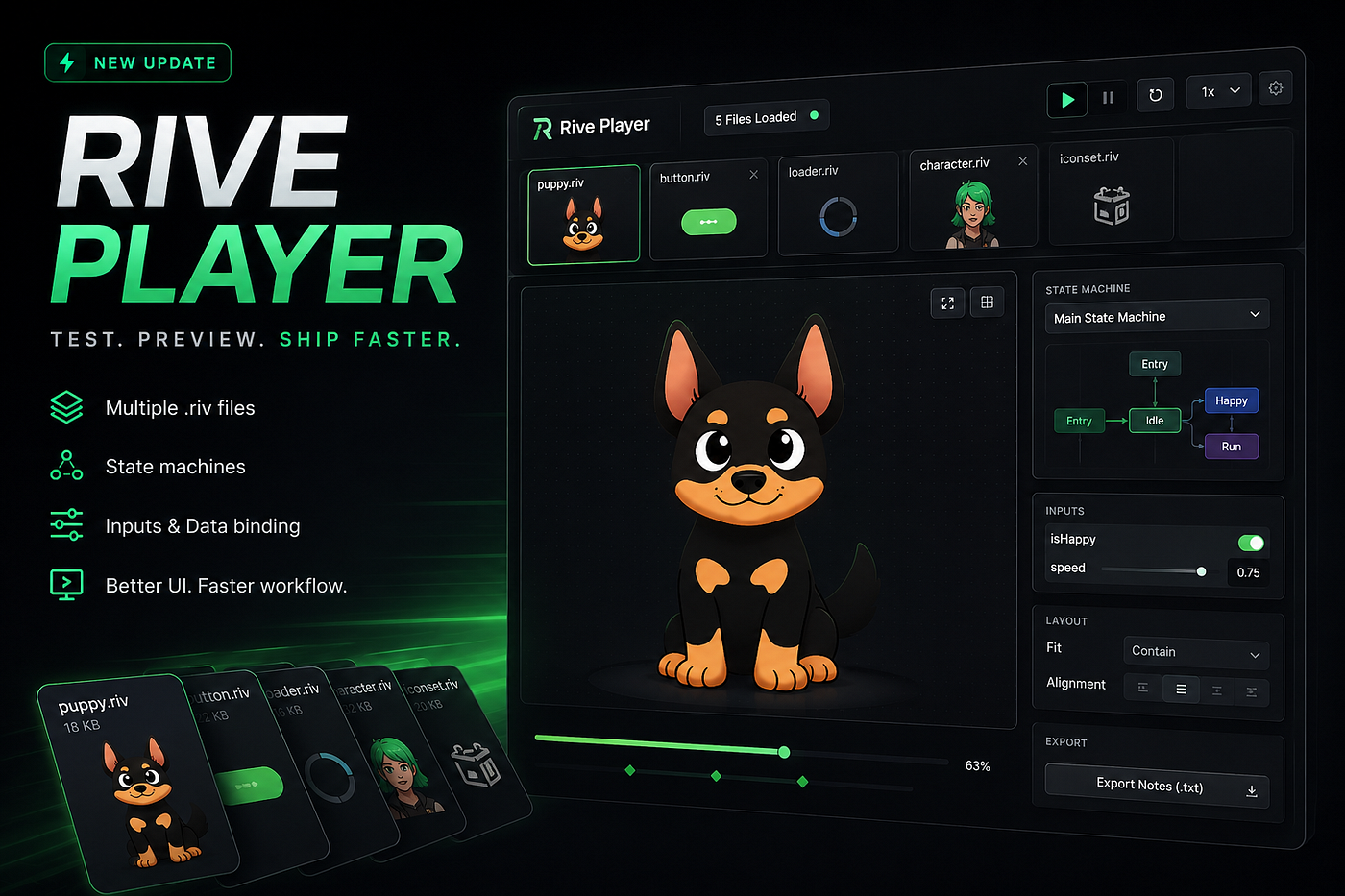
The Rive Player is an online runtime testing tool for .riv animation files.
You can upload, preview, inspect, and test Rive animations directly in the browser without rebuilding your Flutter or React Native application.
The goal is simple:
Make testing Rive animations faster for developers and Rive animators.
Why I Built It
Most animation testing workflows feel unnecessarily slow.
Especially when:
- testing state machines
- checking layout fit issues
- previewing multiple animations
- debugging runtime inputs
- validating motion before shipping
In production apps, animation is not just decoration anymore.
Interactive motion is now deeply connected with:
- onboarding flows
- buttons
- navigation
- game UI
- micro interactions
- loading states
- AI interfaces
- product feedback systems
That means iteration speed matters a lot.
I wanted a workflow where I could:
Upload → Preview → Test → Ship
without constantly reopening apps.
Features Inside the Rive Player
Multiple .riv Files Support
One of the biggest updates:
You can now load and preview 3+ .riv files together.
This is extremely useful when testing:
- animation systems
- icon packs
- loaders
- character states
- UI animation collections
instead of opening files one by one.
State Machine Testing
You can inspect and test Rive state machines directly from the browser UI.
Useful for:
- interaction debugging
- trigger testing
- animation flow validation
- runtime behavior previews
Especially helpful for developers integrating animations into production apps.
Inputs + Data Binding
The tool also supports:
- boolean inputs
- number inputs
- trigger inputs
- exposed state machine controls
This helps simulate real runtime behavior without needing app rebuilds.
Layout + Fit Preview Controls
One annoying issue with Rive integration is checking:
- contain
- cover
- fill
- alignment
- responsive layout behavior
This player allows quick fit/layout inspection directly inside the browser preview.
Better Workflow for Flutter and React Native Developers
If you build apps using:
- Flutter
- React Native
- Next.js
- React
- Web apps
- Game UI systems
this workflow can save a surprising amount of iteration time.
Especially when working closely with designers or motion teams.
Built for Developers and Rive Animators
This tool is mainly for:
- frontend developers
- Flutter developers
- React Native developers
- motion designers
- Rive animators
- UI engineers
- interactive product teams
Basically anyone shipping motion-heavy interfaces.
Not an Official Rive Product
Just to clarify:
This is not affiliated with Rive officially.
It’s an independent tool built by UIAnimation Studio for the community.
I mainly built it because I genuinely wanted a faster animation workflow for my own projects.
Try the Rive Player
If you work with .riv animations regularly, you can try the tool here:
👉 https://uianimation.com/riveplayer/
Would genuinely love feedback from developers and animators using Rive in production workflows.
Especially ideas for:
- debugging tools
- export features
- animation inspection
- performance testing
- multi-artboard workflows
Always improving it based on real-world usage.
rive #flutter #reactnative #webdev #frontend #motiondesign #animation #uiux #gamedev
메타데이터
- post_id
- 4e7cb43f6c70
- slug
- i-built-a-browser-based-rive-player-to-speed-up-animation-testing-for-developers-and-rive-animators-4e7cb43f6c70
- url
- https://medium.com/@uianimation/i-built-a-browser-based-rive-player-to-speed-up-animation-testing-for-developers-and-rive-animators-4e7cb43f6c70
- canonical_url
- https://medium.com/@uianimation/i-built-a-browser-based-rive-player-to-speed-up-animation-testing-for-developers-and-rive-animators-4e7cb43f6c70
- author_url
- https://medium.com/@uianimation
- status
- ok
- fetched_at
- 2026-06-09 15:37:30





