Throughput in Azure CosmosDB
As developers what is the most prominent expectation from application? Think for a while and check whether my answer is align with it. I…
Throughput in Azure CosmosDB
As developers what is the most prominent expectation from application? Think for a while and check whether my answer is align with it. I would say, its better performance. For any business, may be a retail or restaurant or software, we need to cater the consumer expectations. That’s where the survival exists in business perspective. Neither me nor any other user like to wait for minutes to see to watch a full page load. Database calls plays a main role in this with regard to web applications. So, every database service have given their concern to it. In this article we are going to see how can achieve a better performance in Azure CosmosDB. Let the party begins.
What is throughput?
Throughput is a measure how many database operations can process Azure CosmosDB in a given time period. That is a processing power which we set when creating a new database. It could be based on CPU power, available memory and etc. Azure is a cloud service provider, meaning there needs to be a measurement of what they offer. But how they do that in Azure CosmosDB?
That is the place where Request Units AKA RU come on to stage. It is the currency which measure cost of all CRUD operations in Azure CosmosDB. All the read operations does not costs same amount of RUs. According to Azure official documentation, it will vary based on following factors.
Item size Item indexing Item property count Indexed properties Data consistency Type of reads Query patterns Script usage
Lets understand this with real world example. There is a poor student who is far away from his school. He use public transportation which take hell a lot of time which make him more tired as well as miss to do some home works. But if student has more money, he/she will take a cab, come home early and will have enough time to do all the home-works. Amount of home-works that can be done in a day is the throughput. Money is the RU.
Throughput Provisioning Granularities
- By container: This is most frequently used, predictable and recommended option. Here we specifically set throughput to a particular container. With the most accurate partition key, the user defined throughput value of a container is evenly distribute across all the physical partitions as well as the logical partitions in it. As stated in my partition key article, there is a maximum limit to scale for a logical partition which is the RU/s value of its physical partition. There can be situation where logical partition cannot full-fill the demand AKA “Hot partition”.
- By database
If you don’t want to specifically provision throughput to specific container and want to easily set RU/s to database and let them evenly distribute across all its containers, then this is the ideal way of doing that. But you cannot predict and guarantee throughput for given container in database since it will differ on following factors.
Number of containers in database Selected partition keys of containers Workload distribution
Throughput modes
There are three throughput modes. You can follow any as your preference and application type.
- Provisioned throughput(Manual): This is where we as Azure CosmosDB users manually set fixed throughput value for each and every container in our database.
- Provisioned throughput(Auto-scale) Manual work always cumbersome right? For your development/testing, infrequently used applications with unpredictable workloads you have to give more focus on handling complexities and pay more rather than focusing on main fact. What do you think if you could automate process of scaling by without affecting performance, availability of data, latency of workload? That is awesome. So in this mode, database or container automatically scale with the demand. What you have to do is set maximum throughput value. Then database will scale down when it is idle. Billing will be done for per hour basis, as in maximum RU/s machine scale up to in a given hour.
- Serverless Based on the consumption model, this mode does not need to set any fixed or max throughput. You have to pay considering the total RU consumption for billing period. Since there’s no prior capacity planning required it is very easy and it can scale up to any level.
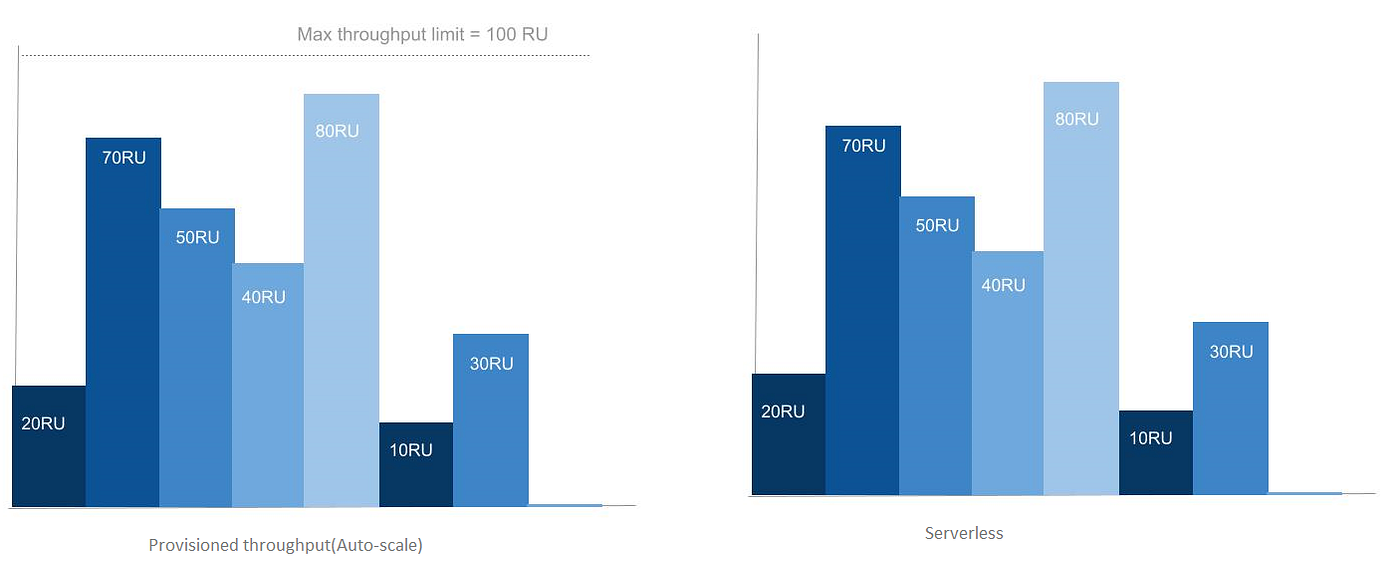
Please note that RUs in this image are RU/s
Please refer official documentation for Azure CosmosDB throughput for further references. Hope everything is clear. Thanks for reading!
Bye till the next article ! 😊
메타데이터
- post_id
- 4e8b6309a092
- slug
- throughput-in-azure-cosmosdb-4e8b6309a092
- url
- https://medium.com/@banuriwickramarathna/throughput-in-azure-cosmosdb-4e8b6309a092
- canonical_url
- https://medium.com/@banuriwickramarathna/throughput-in-azure-cosmosdb-4e8b6309a092
- author_url
- https://medium.com/@banuriwickramarathna
- status
- ok
- fetched_at
- 2026-08-07 02:37:33



