Logical Tables in Apache Pinot
Not a Medium member? Click here to read the blog for free.
Logical Tables in Apache Pinot
Not a Medium member? Click here to read the blog for free.
Apache Pinot is a powerful real-time distributed OLAP datastore designed to answer queries with low latency. As the volume and complexity of data grow, managing the underlying data structures can become a significant operational challenge. This is where the concept of Logical Tables comes into play, introducing a powerful layer of abstraction that revolutionizes how you interact with your data in Pinot.
This blog post will take you through the journey of understanding, implementing, and leveraging Logical Tables in Apache Pinot.
Logical Tables in Apache Pinot
Note that this feature is introduced in Apache Pinot 4.0.0. And hence, you should be on Apache Pinot 4.0.0+ to work with Logical Tables.
Introduction: The Evolution of Data Organization in Pinot
At its core, Apache Pinot organizes data into tables, which are composed of schemas (defining columns and data types) and segments (the actual data files). You have different types of tables, primarily:
- Offline Tables: For batch data ingested from sources like HDFS or S3.
- Real-time Tables: For streaming data from sources like Apache Kafka.
- Hybrid Tables: A combination of both, allowing you to query historical and real-time data seamlessly.
Traditionally, the table name used in a query was directly tied to a specific physical table (or a pair of offline/real-time tables in the hybrid model). While straightforward, this tight coupling presents challenges in a dynamic, large-scale environment. What if you need to change a table’s configuration, re-partition your data, or evolve your schema without any downtime? This is the problem that Logical Tables aim to solve.
The Challenge
Relying solely on the physical table model can lead to several operational hurdles:
Difficult Schema Evolution: Modifying a schema, especially with breaking changes, often requires a complex and risky migration process. You might have to create a new table and coordinate a switch-over at the application level, which is prone to errors.
Inflexible Table Configurations: Imagine your data volume grows, and you need to change your partitioning scheme or indexing strategy. Rebuilding a large table and swapping it into production without affecting live queries is a significant challenge.
Complex Data Lifecycle Management: As data ages, you might want to move it between different storage tiers or apply different retention policies. Managing this across multiple physical tables that logically represent the same dataset can be cumbersome.
Inability to Query Across Related Tables: Sometimes, you might have data for the same logical entity split across multiple physical tables (e.g., active sessions in one table, closed sessions in another). Querying across them requires application-side logic to issue and combine results from multiple queries.
These limitations highlight the need for a more flexible way to manage and query data in Pinot, leading to the introduction of Logical Tables.
Introducing Logical Tables
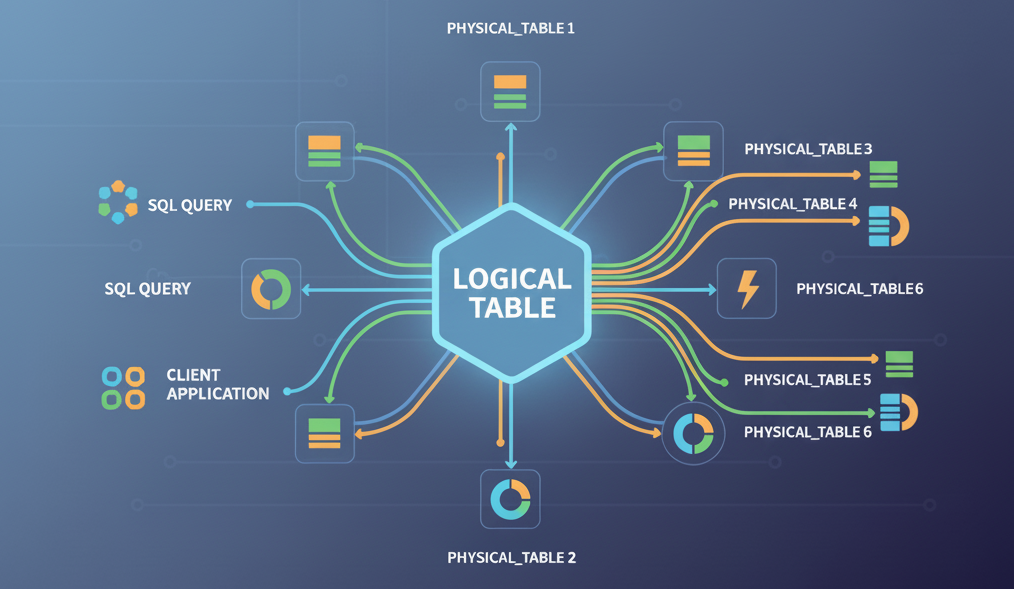
A Logical Table is an abstraction layer that decouples the table name used in queries from the underlying physical tables. Think of it as an alias or a pointer that can be dynamically remapped to different physical tables without any changes to your application’s queries.
With Logical Tables, your application queries the logical table name (e.g., SELECT * FROM myLogicalTable). Pinot, in turn, consults a mapping to determine which physical table (or tables) should actually serve the query. This simple yet powerful concept opens up a world of possibilities for seamless data management and operations.
How Logical Tables Work
The magic behind Logical Tables is a centralized mapping system, typically managed within Apache ZooKeeper, that keeps track of which physical tables correspond to a logical name. This ensures that the mapping is consistent across the entire Pinot cluster and can be updated atomically.
The whole process is transparent to the end-user and happens in milliseconds. When a query for a logical table arrives at a Pinot Broker, the broker first consults its cached version of this mapping to identify the correct physical table or tables that hold the data. Once the physical target is identified, the broker seamlessly rewrites the query to point to the actual physical table(s). This rewritten query is then executed as usual, with requests fanning out to the appropriate Pinot Servers. Finally, the results from all the underlying physical tables are gathered, aggregated, and returned to the client as a single, unified result set. The user, who simply queried the logical table name, remains completely unaware of the intricate routing and rewriting that just happened behind the scenes.
Use Cases for Logical Tables
Logical Tables are not just a theoretical concept; they solve real-world problems. Here are some of the most impactful use cases:
a. Seamless Schema Evolution
With Logical Tables, you can achieve zero-downtime migrations. The process is simple:
- Create a New Version: Create a new physical table (
myEvents_v2) with the new schema or configuration. - Backfill Data: Ingest data into the new table.
- Flip the Switch: Atomically update the logical table mapping to point from
myEvents_v1tomyEvents_v2.
Live traffic will now seamlessly be served by the new table. If anything goes wrong, you can just as easily roll back by flipping the mapping back to the old table.
b. Querying Across Multiple Tables
Imagine you have partitioned your time-series data by year into separate physical tables (events_2023, events_2024, etc.). With Logical Tables, you can map a single logical table, all_events, to all of these physical tables. Now, a single query to all_events will return results from all years, without your application needing to know about the underlying physical partitioning.
The same could be applied for querying data across multiple topics. Each topic gets written into separate physical table, but the data across all these physical tables can be queried using one logical table, thus providing us the capability to query for the data coming from multiple topics.
c. Conditionally Fetching Data Based on Filters
Logical Tables can act as a smart routing layer for physically partitioned data, such as tables separated by region (events_US, events_EU). This enables highly efficient filter-based table pruning. When a query with a filter like WHERE region = 'US' is sent to the logical table, the system intelligently inspects the clause. It then routes the query only to the relevant physical table, events_US, completely skipping the others. This avoids unnecessary data scanning, significantly boosting query speed and reducing cluster load, all while the user queries a single table name.
d. User-Managed Time Partitioning
For very large time-series datasets, you might want to manage data in time-based chunks (e.g., monthly tables). Logical Tables allow you to have a “sliding window” view. For example, a logical table last_30_days_events could be programmatically updated daily to point to the relevant set of physical tables.
Practicals with Logical Tables
Managing Logical Tables would typically involve a new set of REST APIs exposed by the Pinot Controller. When you are on Apache Pinot 4.0.0+, you should be able to see the following section on Logical Tables in the Swagger REST API:
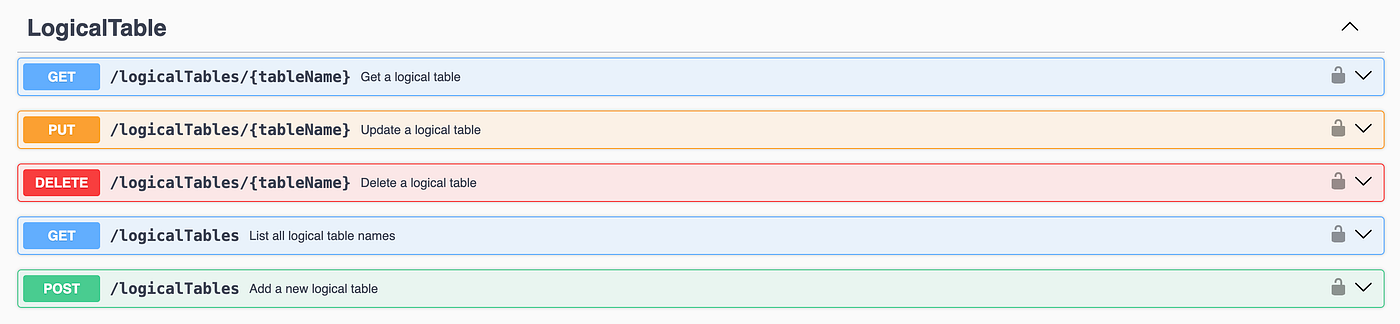
We will now see how we can create a logical table, list all the logical tables, get data about one particular logical table, and delete the logical table via these APIs.
Pre-Setup (Optional)
Follow the batch ingestion example detailed on this page, and create two tables with similar schema. Also, create an equivalent schema say, transcriptLogical that we will be using for our logical table.
Creating a Logical Table Mapping
You would start by defining a mapping between a logical table and a physical table. This can be done via a POST request to the controller.
curl -X POST -H "Content-Type: application/json" -d '{
  "tableName": "transcriptLogical",
  "physicalTableConfigMap": {
     "transcript1_OFFLINE": {},
     "transcript2_OFFLINE": {}
   },
   "refOfflineTableName": "transcript1_OFFLINE"
}' http://localhost:9000/logicalTables
Note that you need to specify refOfflineTableName and/or refRealtimeTableName depending on whether you have used offline tables and/or realtime tables respectively. The table mentioned under these configurations will be picked for the configs during the query planning phase.
In the above example, we have mapped two physical tables to the logical table. You can also have a single table in the physicalTableConfigMap , or even have multiple tables. These tables can be a combination of offline, realtime or hybrid tables.
Querying the Logical Table
Your queries remain unchanged. You simply use the logical table name in your SQL queries.
SELECT * FROM transcriptLogical LIMTI 10;Pinot will automatically route this query to both the physical tables transcript1_OFFLINE and transcript2_OFFLINE , and fetch the data from both.
Listing the Logical Tables
You can now try out listing the logical tables using the following GET curl request:
curl -X GET 'http://localhost:9000/logicalTables' -H 'accept: application/json'The output will be the list of logical tables, in our case ["transcriptLogical"] .
Getting the Logical Table config
You can get the config of any logical table using the GET curl request as shown:
curl -X 'GET' \
  'http://localhost:9000/logicalTables/transcriptLogical' \
  -H 'accept: application/json'
You can replace the transcriptLogical in the URL with the logical table name whose config you want to retrieve. This curl request will provide you the logical table config corresponding to that logical table.
Updating the Mapping (Blue-Green Deploy)
Now, let’s say you’ve created transcriptUpdated_OFFLINE and are ready to switch over. You would update the mapping using a PUT request. This operation is atomic. You can use the config retrieved from the earlier curl request, and make the changes as per your requirements. In this case, we are changing the physicalTableConfigMap to use the new physical table transcriptUpdated_OFFLINE .
curl -X PUT -H "Content-Type: application/json" -d '{
  "tableName": "transcriptLogical",
  "physicalTableConfigMap": {
     "transcriptUpdated_OFFLINE": {},
   },
   "refOfflineTableName": "transcriptUpdated_OFFLINE"
}' http://localhost:9000/logicalTables
Instantly, all new queries to transcriptLogical will be served by transcriptUpdated_OFFLINE.
Deleting the Logical Table
You can use the DELETE curl request to delete the logical table.
curl -X DELETE 'http://localhost:9000/logicalTables/transcriptLogical' -H 'accept: application/json'Conclusion
Logical Tables represent a significant leap forward in the usability and operational efficiency of Apache Pinot. By providing a crucial layer of abstraction, they empower you to manage your data more dynamically and perform complex operations like schema migrations and table reconfigurations with confidence and without downtime.
As Pinot continues to be adopted for a wider range of real-time analytics use cases, features like Logical Tables will be essential for managing large, complex, and ever-evolving datasets. The future of data management in Pinot is flexible, scalable, and logical.
메타데이터
- post_id
- 4e9e08065143
- slug
- logical-tables-in-apache-pinot-4e9e08065143
- url
- https://medium.com/@shruti1810/logical-tables-in-apache-pinot-4e9e08065143
- canonical_url
- https://medium.com/@shruti1810/logical-tables-in-apache-pinot-4e9e08065143
- author_url
- https://medium.com/@shruti1810
- status
- ok
- fetched_at
- 2026-06-28 04:42:08