Android AppFunctions: Your App Is Now an AI Tool
Google’s new platform API turns any Android app into an on-device MCP server — so agents like Gemini can act inside your app without the…

Android AppFunctions: Your App Is Now an AI Tool
Google’s new platform API turns any Android app into an on-device MCP server — so agents like Gemini can act inside your app without the user lifting a finger.
A user tells Gemini: “Find Lisa’s noodle recipe from her email and add the ingredients to my shopping list.” Two apps. Zero taps. No UI. That is the promise of AppFunctions — and it’s available to implement in your app today.
Google has been quietly building toward an agentic Android for a while. The puzzle piece that makes it real landed with Android 16: a platform API called AppFunctions. If you’re an Android developer, this deserves your full attention — it fundamentally changes what your app means to users who interact through AI agents.
⚗️ Experimental AppFunctions is in experimental preview and the API surface may change. Integration with Gemini is in a private preview with trusted testers as of May 2026.
What Is AppFunctions?
AppFunctions is an Android platform API — introduced in Android 16 (API level 36) — paired with a Jetpack library that simplifies integration. The core idea: your app declares annotated Kotlin functions, the Android OS indexes them, and authorized AI agents like Gemini can discover and execute them on behalf of users.
“AppFunctions serve as the mobile equivalent of tools within the Model Context Protocol (MCP). While MCP traditionally standardizes how agents connect to server-side tools, AppFunctions provide the same mechanism for Android apps.”
Think of it this way. MCP lets a server-side agent call tools hosted in the cloud. AppFunctions lets that same agent call tools that live inside your installed Android app — running entirely on-device, against your existing repositories, databases, and business logic. No new server. No API layer. Just Kotlin and a well-written KDoc.
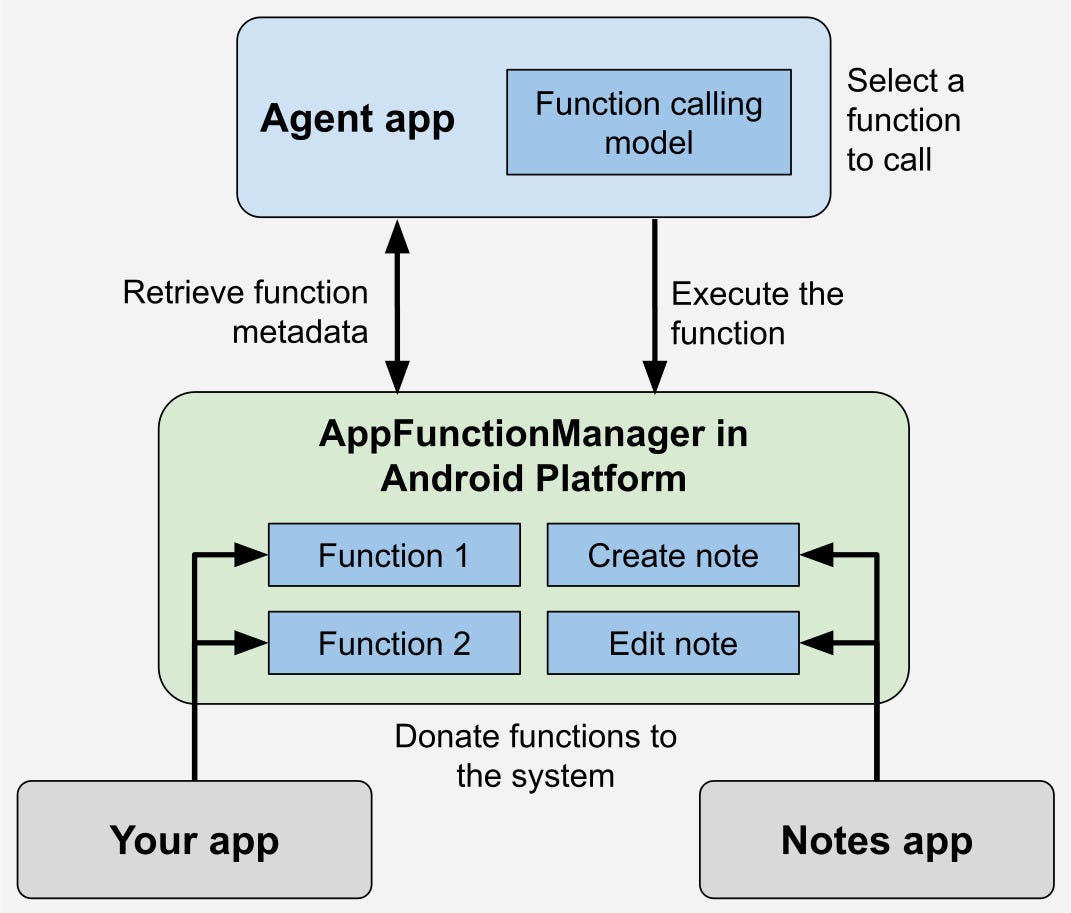
Figure 1: The typical flow of how AppFunctions are exposed and executed by an agent.
AppFunctions vs. MCP — What’s Actually Different?
Both allow AI agents to orchestrate tools, but their architecture, latency, and developer effort differ significantly.
📱 AppFunctions
- Android 16+ only
- Runs completely on-device
- Uses your existing Kotlin code
- No server required
☁️ Standard MCP Server
- Platform agnostic
- Cloud-based execution
- Requires infrastructure
- More flexibility but more overhead
In practice, agents will use both together. Remote MCP servers for cloud-hosted capabilities; AppFunctions for on-device actions. Apps that support both will be far more useful across a wider range of agentic workflows.
How the Whole Thing Works
The flow from code to agent execution has four clear stages:
① Declare function → ② Schema generated → ③ OS indexes it → ④ Agent executes
When you build your app, the AppFunctions Jetpack annotation processor generates an XML schema listing every declared function. The Android OS indexes that file. When an agent needs to fulfil a user intent, it queries this index, selects the right function, and executes it via AppFunctionManager — no UI, no user intervention required.
Before invoking, callers verify device support by retrieving an AppFunctionManager instance and confirm a specific function is enabled via isAppFunctionEnabled(packageName, functionId). Crucially, your app itself doesn't need to handle this check — the Jetpack library manages it automatically.
Writing Your First AppFunction
The implementation overhead is lower than you’d expect. Annotate a suspend function, write a thorough KDoc, and you are most of the way there. Here is a complete note-taking example directly from the official Android documentation:
/** A note app's AppFunctions. */
class NoteFunctions(
    private val noteRepository: NoteRepository
) {
    /**
     * Lists all available notes.
     * @param appFunctionContext The context in which the AppFunction is executed.
     */
    @AppFunction(isDescribedByKDoc = true)
    suspend fun listNotes(
        appFunctionContext: AppFunctionContext
    ): List<Note>? {
        return noteRepository.appNotes.ifEmpty { null }?.toList()
    }

    /**
     * Adds a new note to the app.
     * @param appFunctionContext The context in which the AppFunction is executed.
     * @param title The title of the note.
     * @param content The note's content.
     */
    @AppFunction(isDescribedByKDoc = true)
    suspend fun createNote(
        appFunctionContext: AppFunctionContext,
        title: String,
        content: String
    ): Note {
        return noteRepository.createNote(title, content)
    }

    /**
     * Edits a single note.
     * @param appFunctionContext The context in which the AppFunction is executed.
     * @param noteId The target note's ID.
     * @param title The note's updated title, if changing.
     * @param content The note's updated content, if changing.
     */
    @AppFunction(isDescribedByKDoc = true)
    suspend fun editNote(
        appFunctionContext: AppFunctionContext,
        noteId: Int,
        title: String?,
        content: String?
    ): Note? {
        return noteRepository.updateNote(noteId, title, content)
    }
}
Notice isDescribedByKDoc = true. That KDoc is not decoration — it is the function's tool description. The AI agent reads it to decide when and how to invoke the function. Write it as if you're explaining the function to an intelligent colleague who has never seen your codebase. Precision here directly affects how well agents use your app.
Any custom return type must also be annotated with @AppFunctionSerializable so the library can generate a schema for it:
@AppFunctionSerializable(isDescribedByKDoc = true)
data class Note(
    /** The note's unique identifier */
    val id: Int,
    /** The note's title */
    val title: String,
    /** The note's content */
    val content: String
)
Real Use Cases Worth Building Toward
✅ Task & Productivity
“Remind me to pick up my package at work at 5 PM”
Agent invokes createTask() with title, dueDateTime, and location auto-populated from the user's prompt.
🎵 Media & Entertainment
“Create a jazz playlist from this year’s top albums”
Agent calls createPlaylistFromQuery(query) — playlist generated instantly, app never opened.
🔀 Cross-App Workflows
“Find Lisa’s noodle recipe and add ingredients to my shopping list”
Agent chains searchEmails() from one app, then addItemsToShoppingList() from another — seamlessly.
📅 Calendar & Scheduling
“Find Lisa’s noodle recipe and add ingredients to my shopping list”
Agent calls createCalendarEvent(), parses the relative date, creates the entry silently.
The cross-app workflow case is the most powerful. AppFunctions lets a single agent chain actions across multiple apps in one user request — something that previously required dedicated automation platforms or complex integrations. When your app participates in that chain, it becomes exponentially more useful without a single UI change.
What You Can Do Right Now
-
Set
compileSdkto API 36 in your Gradle config -
Add the AppFunctions Jetpack library dependency
-
Annotate key suspend functions with
@AppFunction -
Write KDocs as if an AI will read them — because one will
-
Verify on device with:
adb shell cmd app_function list-app-functions- Register for the EAP for full Gemini end-to-end testing
New: AppFunctions AI Skill — Google released an official agent skill that analyzes your app’s workflows, generates the required Kotlin code, optimizes your KDocs for AI agents, and provides ADB commands for testing. Find it at the AppFunctions skill repository on GitHub
FAQ
Can I implement AppFunctions in my app today? Yes. You can implement and test locally right now. End-to-end execution via Gemini requires EAP access, but local testing via ADB and the sample agent app is fully available.
Why can’t my system agent access my AppFunctions yet? AppFunctions is still experimental. Only a limited number of apps and system agents can access the full pipeline during this phase. Register for the EAP to get in the queue.
Do I need to build a backend or API server?? No. AppFunctions run directly inside your app using your existing Kotlin code and repositories. There is no server to spin up or maintain outside your Android app.
What Android version is required?
Android 16 (API level 36) or higher. Your project’s compileSdk must also be set to 36.
How do I verify my functions are registered on the device?
Run adb shell cmd app_function list-app-functions. If your functions appear in the output, the OS has indexed them correctly.
Resources
메타데이터
- post_id
- 4f136fb537db
- slug
- android-appfunctions-your-app-is-now-an-ai-tool-4f136fb537db
- url
- https://medium.com/@harsh.trivedi/android-appfunctions-your-app-is-now-an-ai-tool-4f136fb537db
- canonical_url
- https://medium.com/@harsh.trivedi/android-appfunctions-your-app-is-now-an-ai-tool-4f136fb537db
- author_url
- https://medium.com/@harsh.trivedi
- status
- ok
- fetched_at
- 2026-06-09 15:37:30





