The Non-Developer’s Guide to Claude Cowork
Turn the desktop app into a sandboxed, self-scheduling administrative assistant in 30 minutes.
The Non-Developer’s Guide to Claude Cowork
Turn the desktop app into a sandboxed, self-scheduling administrative assistant in 30 minutes.
The Non-Developer’s Guide to Claude Cowork
Few professionals realize that their desktop AI application is no longer just a text box. We log in, type a question, and copy the generated prose, treating the software as a passive calculator. But the leap from a conversational assistant to an autonomous office worker requires establishing local workspace folders, wiring application connectors, and configuring managed schedules before sending the first prompt.
Hiring a new chief of staff to manage an estate is a disaster if you hand them the house keys without defining their boundaries. If you expect them to coordinate vendors, schedule maintenance, sort through incoming mail, and file bills on their first morning without showing them where the filing cabinet sits, they will either stand idle or misplace important documents. A professional estate manager starts by establishing a structured front office, indexing key contact lists, and specifying which gates require homeowner approval before entry. Only when the operational handbook is written and the communication protocols are aligned can the assistant act as a reliable extension of the owner’s authority.
Configuring a desktop assistant to act as a coworker in your daily operations follows the same administrative rules. If you download a workspace agent and immediately start asking it to manage your inbox without setting up directory boundaries and connectors, the model will output generic responses or overwrite important files. Over the last four months of helping consulting clients optimize their routines, I have seen that the difference between an unpredictable tool and a production-grade workspace comes down to thirty minutes of structured setup.
Workspace Scaffolding and Context Boundaries
Why do we allow terminal assistants to guess our communication style when we can program their memories directly? When you initialize a fresh coworker session, the model starts in a blank slate, having no information about your name, industry, or output preferences. Rather than spending thousands of tokens re-explaining your brand voice in every prompt, you can import your historical parameters in under two minutes by transferring your accumulated AI memory files. Under Settings, go to Capabilities and select the memory import tool, which packages your past chat parameters into a single structured summary.
Once the initial parameters are imported, you must construct a local directory structure to act as the agent’s workspace:
mkdir -p My-Cowork-Workspace/{context,current-projects,successful-examples}This scaffolding establishes strict context boundaries. In the context/ folder, you store text files detailing your role and working preferences, which the model reads at session start. The current-projects/ directory houses active files, preventing the agent from scanning unrelated paths. The successful-examples/ folder is the most critical: by storing past proposals or newsletters in this directory, you allow the model to reverse-engineer your brand voice, eliminating generic AI templates.
Deterministic Planning Gates: Plan Mode
How do you protect your local system directories from an autonomous agent executing destructive file operations? In a default configuration, the model runs prompts immediately, modifying files and writing code without pausing for confirmation. This behavior is dangerous because the agent holds real read-write access to your system. We can enforce safety gates by modifying the global instructions in settings:
{
  "safetyGates": {
    "alwaysPlanBeforeExecute": true,
    "requireManualConfirmation": true
  }
}
These parameters enforce Plan Mode, which restricts the model from executing any action until it presents a step-by-step proposal and waits for your confirmation.
By setting up a manual approval gate, you turn the agent from a rogue subprocess into a predictable administrative partner.
Application Integration: Chat-to-Slack Operations
Would you let an employee manage team communication without setting up a structured integration channel? A desktop agent cannot help you coordinate projects if it is isolated from your active communication channels. We bridge this gap by configuring a connector, which is a software bridge that links an AI model to an external application API. An API, or application programming interface, is a software intermediary that allows two applications to talk to each other:
# Connect Slack API to Cowork scope
cowork connect slack --scope read,write
Once connected, the model can query active channels, summarize long threads, and draft replies.
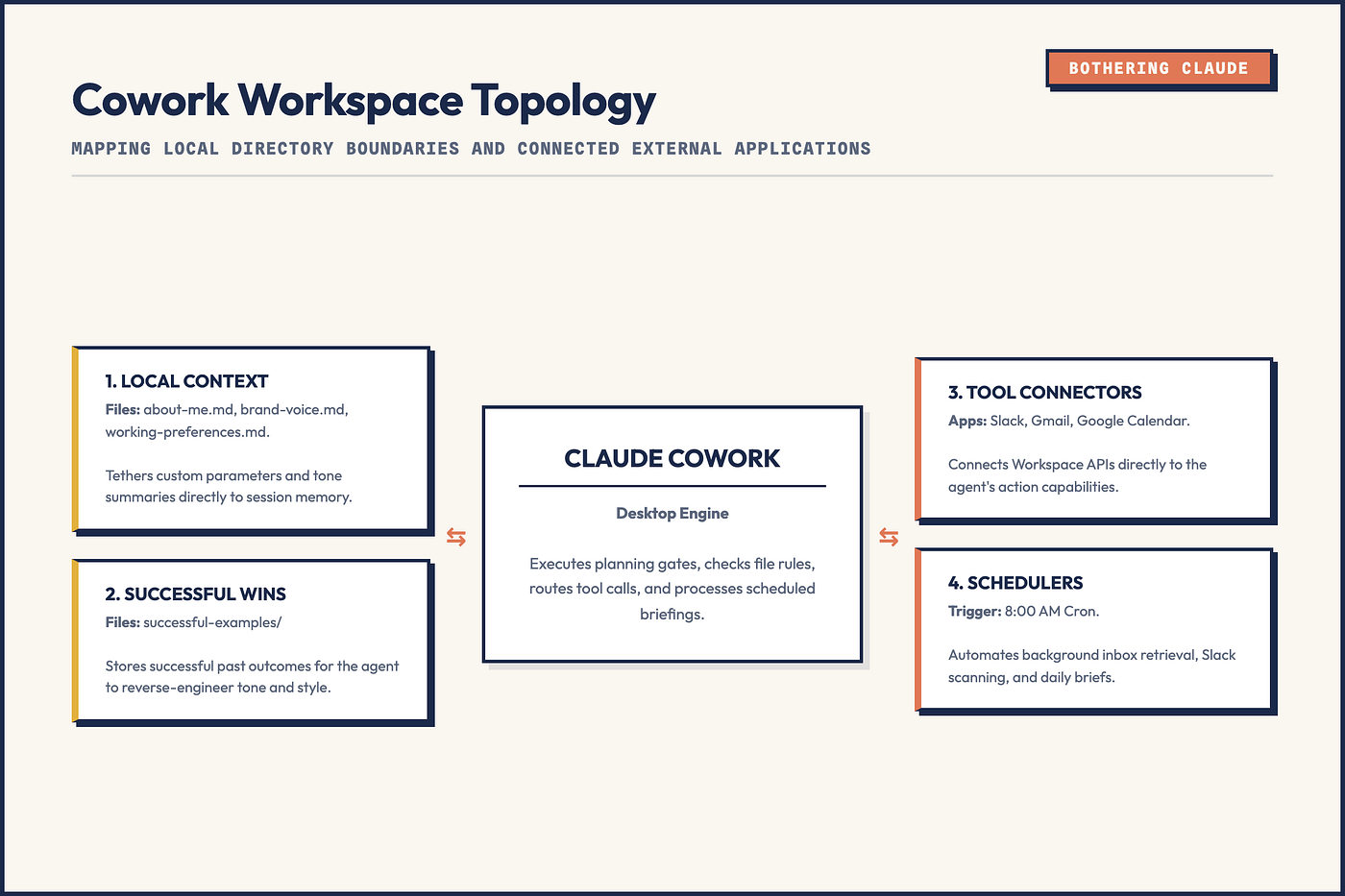
System Schema: Cowork Integration Architecture
This integration is where context containment pays off. Because the coordinator agent has access to your local context files, it does not draft generic corporate responses when replying to Slack messages. It reads your brand voice, checks the active project file in your directory, and writes a response that sounds like you. You review the draft in Plan Mode and authorize the send, keeping you in the loop while removing the time spent typing.
But here’s the thing: autonomous write access is a liability. If you configure a desktop agent with full system permissions but omit a plan-and-approval gate, a single ambiguous prompt can cause the model to recursively traverse your root folder, overwrite active templates, and draft a response that deletes your project archive before you can hit the terminal cancel key.
The model’s intelligence is rarely the bottleneck. The structure of the workspace you feed it is.
Schedule Orchestration: Gmail and Calendar Connectors
Why should you waste cognitive energy scanning multiple dashboards when an agent can coordinate your schedule? Managing calendar conflicts and checking inboxes consumes hours of daily focus, which is a major bottleneck for business operations. We can automate this coordination by connecting Google Calendar and Gmail:
# Connect calendar and email connectors
cowork connect google-calendar
cowork connect gmail
Once authorized, the model can search calendar slots, schedule client meetings, and scan your inbox for urgent messages.
To optimize email drafts, you should create an email profile file in your context folder:
# context/email-style.md
- Tone: Direct, warm, no conversational filler.
- Signature: "Best, [Name]".
- Rule: Limit drafts to four sentences max.
The model reads this markdown file to format its drafts. When a client requests a meeting, the calendar connector finds open slots, the model drafts a reply incorporating those times, and you approve the send with a single keystroke.
Unified Context: Scheduled Daily Briefings
How do you eliminate the daily noise of incoming messages before you even sit down at your desk? The real leverage of having connected tools is combining them into a unified context. Rather than checking Slack, Gmail, and your calendar individually, you can configure a scheduled task that runs automatically:
# Schedule a daily briefing run every weekday at 8:00 AM
cowork schedule create --name daily-brief --cron "0 8 * * 1-5" --prompt "./prompts/brief.txt"
A cron is a time-based job scheduler used to run tasks automatically at fixed intervals.
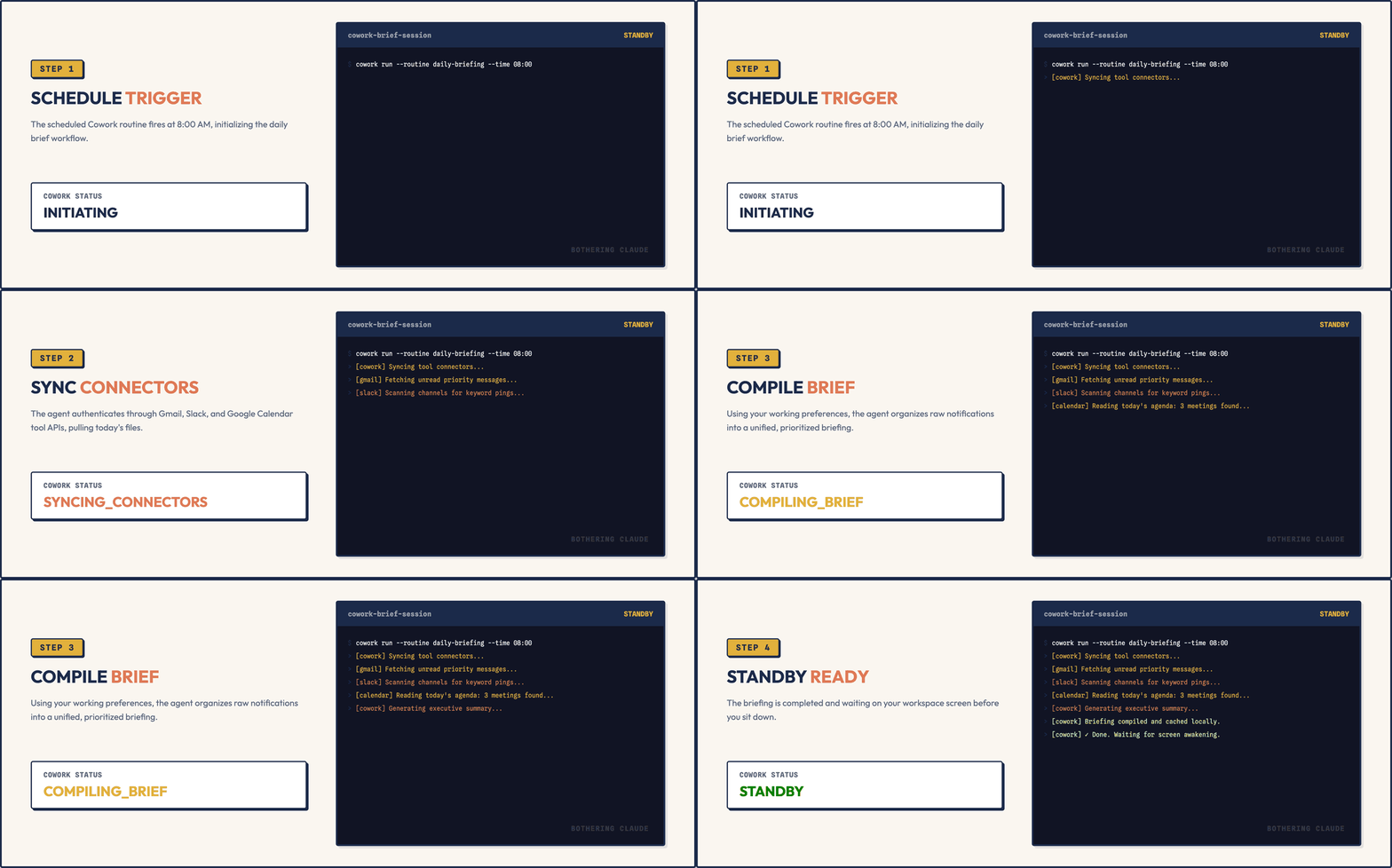
Animated Loop: Morning Briefing Execution Log
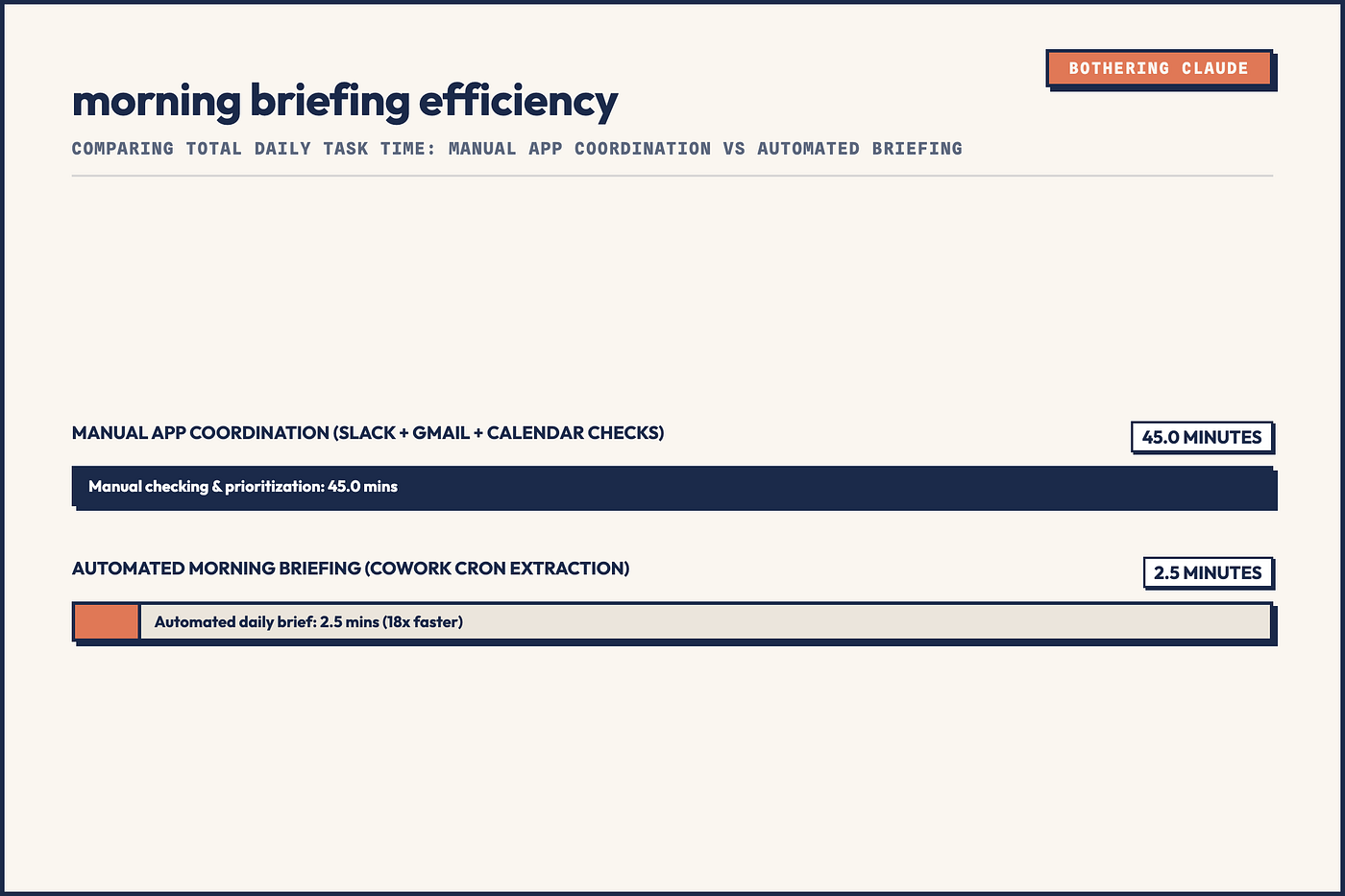
At 8:00 AM, the routine wakes up, scans your inbox for messages requiring response, checks your calendar for today’s meetings, and pulls Slack updates. It compresses this raw metadata into a single prioritized text file. When you open your laptop, you do not scan notification logs. You read a single briefing that summarizes your day and lists draft replies for your approval, reducing forty-five minutes of manual checking down to a two-minute review.
Data Chart: Workplace Briefing Time Savings
Commercializing the Office: Turnkey Administrative Services
What is the commercial value of a perfect technical implementation if it fails to solve a business problem? Most non-technical business owners want the benefits of AI automation but have no interest in configuring folders, connecting APIs, or writing global instructions. They want their time back. This is where you can monetize your setup skills by packaging your configurations into turnkey administrative services.
Instead of offering vague AI consulting, you package the configuration as a turnkey administrative service. You build the local context directories on the client’s machine, establish the Slack and Gmail connectors, and configure the morning briefing routines. By saving skills for their specific business workflows, you can license, deploy, and scale these systems across their operations.
You charge for the time saved, not the model tokens. A business owner will gladly pay a monthly retainer for a system that recovers ten hours of administrative work every week. By mastering the setup, you turn a desktop application into a reliable administrative engine that you can license, deploy, and scale across client operations.
Until then…
— Sage 🍓
PS: I once ran a workspace index scan on an open repository and forgot to exclude my .env configuration file from the agent's target scope. The model dutifully read the database connection keys, included them in its workspace summary file, and staged them in a public git commit before my pre-push validation script could flag the diff. I now store all local secret tokens in an encrypted keychain manager.
Related Reading
- 11 Claude Code Settings to Customize in Minutes: Turn the CLI agent from a noisy chatbot into a silent, self-formatting terminal partner.
- 32 Claude Code Hacks: Beginner to Pro: Advanced terminal tips, hidden shortcuts, and prompt patterns for daily developer workflows.
메타데이터
- post_id
- 4f620191b396
- slug
- the-non-developers-guide-to-claude-cowork-4f620191b396
- url
- https://medium.com/@sageholloway/the-non-developers-guide-to-claude-cowork-4f620191b396
- canonical_url
- https://medium.com/@sageholloway/the-non-developers-guide-to-claude-cowork-4f620191b396
- author_url
- https://medium.com/@sageholloway
- status
- ok
- fetched_at
- 2026-06-17 19:05:49