Cyberhaze | Phishing Investigation: Wallet Verification Scam
You are a SOC analyst investigating a suspicious email reported by a user. Your task is to perform a complete phishing and email forensics…
Cyberhaze | Phishing Investigation: Wallet Verification Scam
You are a SOC analyst investigating a suspicious email reported by a user. Your task is to perform a complete phishing and email forensics analysis by examining email headers, identifying the real sender, tracing malicious redirects, checking SPF/DKIM/DMARC authentication results, analyzing IP and domain intelligence, and mapping the attack to the MITRE ATT&CK framework. Determine whether the email is a true positive phishing attempt and document your findings as a real incident responder.
Step 1: Extracting the Email Headers
After downloading the email file, you can open it using any text editor, such as Notepad. Once opened, copy either the entire header section or the full raw content of the email message.
Step 2: Parsing and Analyzing the Headers
To perform a deeper and easier analysis of the extracted headers, we will use an online tool called MXToolbox.
- Navigate to the MXToolbox website.
- Select the Analyze Headers tool from the menu.
- Paste the copied header content into the provided input box to begin the analysis.
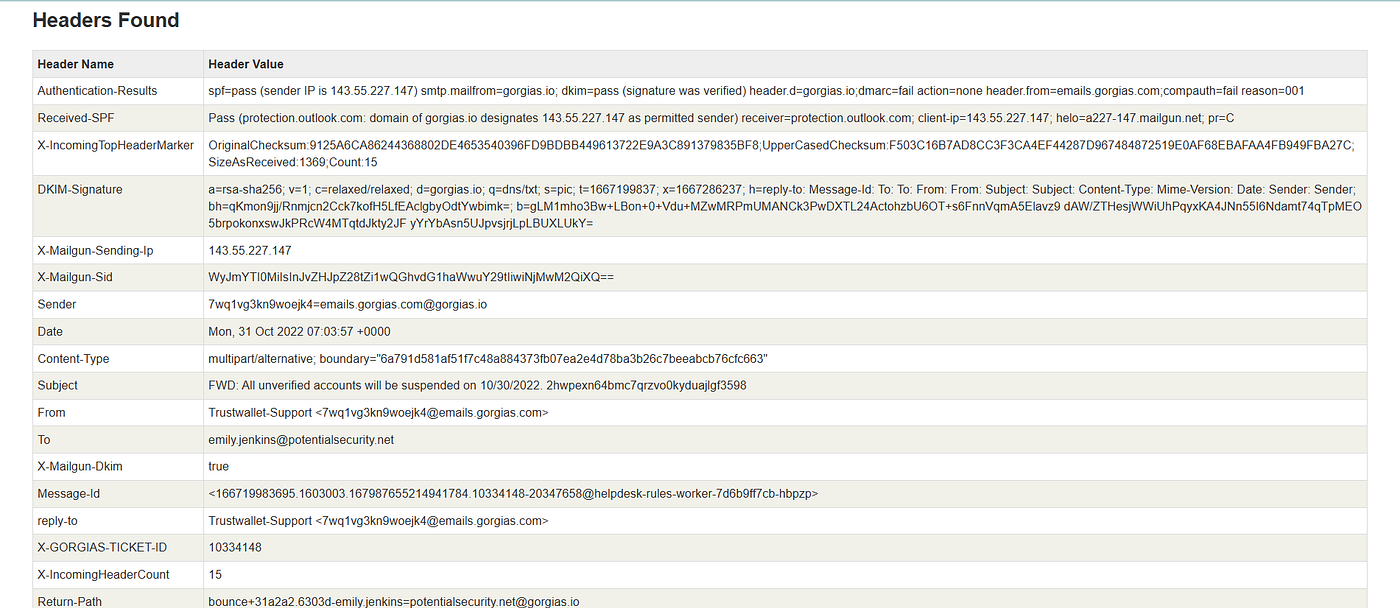
Now we can begin….
Q1: What is the subject of the email?
Once the header is analyzed, look for the Subject field.
Answer : FWD: All unverified accounts will be suspended on 10/30/2022. 2hwpexn64bmc7qrzvo0kyduajlgf3598
Q2: What is the sender email address shown to the recipient?
The question here asks for the sender’s address that appears to the recipient, and this is located in the From field.
Answer : 7wq1vg3kn9woejk4@emails.gorgias.com
Note:
The From field contains the email address that appears to the recipient, which can be easily spoofed and altered. On the other hand, the Sender field contains the actual email address or server that sent the email.
Q3: What is the actual Return-Path email address?
look for the Return-Path field.
Answer : bounce+31a2a2.6303d-emily.jenkins=potentialsecurity.net@gorgias.io
Note:
The Return-Path is the email address that determines where error messages should be sent if the email fails to deliver. This is also the domain that SPF checks against, and it is usually or normally close to the email address found in the Sender field.
Q4: What is the sending IP address?
look for the X-Mailgun-Sending-Ip field.
Answer : 143.55.227.147
Q5: What is the Country of this IP ?
We can also utilize VirusTotal to assist with the investigation.

Answer : United States
Q6: What is ASN of this IP ?
In the same screenshot above, the AS Number (ASN) is also visible to us.
Answer : 396479
Q7: What is actual domain of the sender ?
As mentioned earlier, the real domain required here is the one found in the sender field.

Answer : gorgias.io
Q8: Did the SPF check pass or fail?
look for the Authentication-Results field.
In this field, we will find that SPF is PASS, and DKIM is also PASS, while DMARC is FAIL. These status results provide the answers for the next two questions.
Answer : pass
Note:
In short, SPF is responsible for verifying whether the sending IP address is authorized to send emails on behalf of that specific domain.
Q9: Did the DKIM check pass or fail?
Answer : pass
Note:
In short, DKIM is responsible for ensuring that the content of the email has not been altered or tampered with in transit.
Q10: Did the DMARC check pass or fail?
Answer : fail
In short, DMARC acts as the mastermind or decision-maker; its role is to determine what action should be taken if SPF and DKIM fail. Additionally, it performs an alignment check between the email domain verified by SPF (the Return-Path) and the domain found in the From field. If the domains do not match, it results in a FAIL — which is exactly our case here with gorgias.com and gorgias.io.
Q11: When this email was sent ? format: yyyy/mm/dd hh:mm:ss
look for the Date field.
Answer : 2022/10/31 07:03:57
Q12: When sender domain will be expired ? format: yyyy/mm/dd
Now, we need to gather information about the domain, so we can use the WHOIS website.

Answer : 2030/11/20
Q13: What is the DNS MX record for their domain?
To find information about the DNS, we can return to the MXToolbox website, but this time navigate to DNS Lookup and search for our domain, gorgias.io.

From the drop-down menu, we select MX Lookup.

Answer : aspmx.l.google.com
Q14: When sender domain was Registered On? format: yyyy/mm/dd
The answer to this question is visible to us in the screenshot from Question 12, specifically under the created field.
Answer : 2014/11/20
Q15: Clicking on “Confirm my wallet” phrase take you to a URL, what is that ?
The question here states that the attacker created a button named “confirm my wallet”. When the victim clicks on it, it redirects them to a specific URL.
To view this, we need to go back and open the downloaded file using Notepad. However, I chose to open it with VS Code because it is easier for me to read; you can use whichever tool you prefer.

Here, we noticed the presence of the button mentioned in the question, which contains the website link where the victim will be redirected after clicking.
메타데이터
- post_id
- 4f758c75e5d3
- slug
- cyberhaze-phishing-investigation-wallet-verification-scam-4f758c75e5d3
- url
- https://medium.com/@yousefelzeiny231/cyberhaze-phishing-investigation-wallet-verification-scam-4f758c75e5d3
- canonical_url
- https://medium.com/@yousefelzeiny231/cyberhaze-phishing-investigation-wallet-verification-scam-4f758c75e5d3
- author_url
- https://medium.com/@yousefelzeiny231
- status
- ok
- fetched_at
- 2026-06-09 15:37:30


