Secure Azure Landing Zone: My Journey with VWAN and Hub-and-Spoke
Over the past few months, I had the opportunity to design and implement a complete Azure landing zone network architecture for a…
Secure Azure Landing Zone: My Journey with VWAN and Hub-and-Spoke
Over the past few months, I had the opportunity to design and implement a complete Azure landing zone network architecture for a large-scale enterprise workload. The goal was to create a secure, scalable, and resilient network foundation that could support critical business applications while integrating seamlessly with on-premises infrastructure.
This wasn’t just about deploying VNets or connecting a VPN. It was about building a cloud backbone that could handle east-west traffic (workload to workload), north-south traffic (Azure ↔️ on-premises), and secure internet egress — all while keeping governance, security, and operations in mind.
Architecture Overview: The Big Picture
I designed a Hub-and-Spoke topology with Azure Virtual WAN (VWAN) as the central orchestrator. Here’s the lineup of components I used:
- VWAN Hub: Centralized routing, VPN termination, and firewall inspection.
- Spoke VNets: Isolated VNets for hosting workloads.
- Azure Firewall: The gatekeeper inspecting all traffic flows.
- VPN Gateway: Encrypted site-to-site (S2S) VPN to on-premises.
- Azure DNS Private Resolver: Seamless name resolution for Azure and on-prem.
- Azure Bastion: Secure RDP/SSH access without public IPs.

The hub acted like a traffic conductor, directing flows between spokes, on-prem, and the internet, with the firewall enforcing rules. This gave me centralized control while keeping workloads flexible and secure.
How the VWAN Hub Orchestrates Connectivity
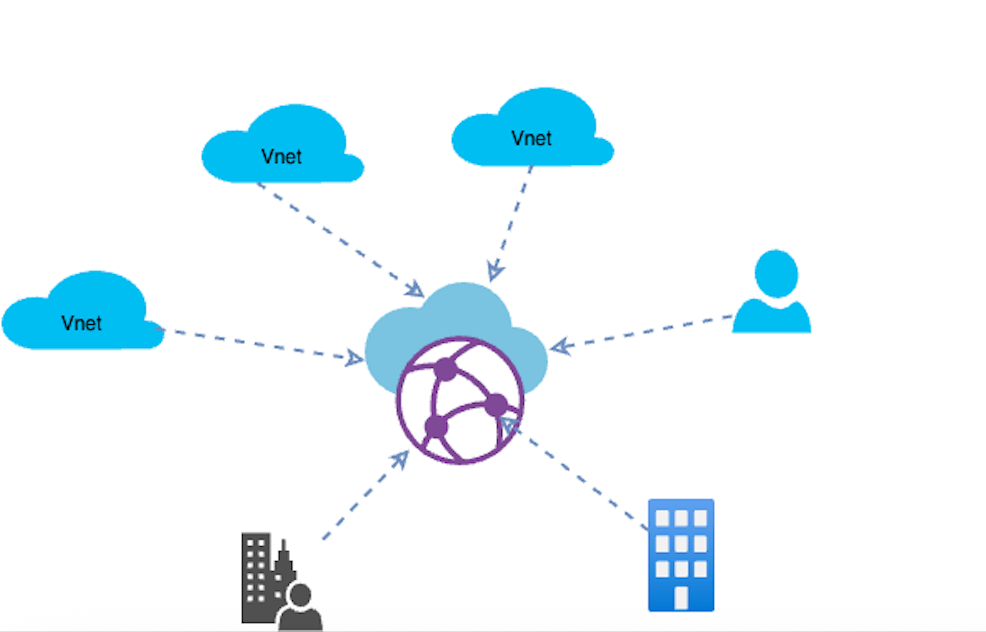
One of the most powerful parts of this design was leveraging the Azure Virtual WAN Hub (vHub) as the central brain of the landing zone.
Instead of managing route tables manually in every spoke, the vHub automatically learns and advertises routes across all connected networks — whether they’re VNets, on-prem sites, or remote users.
Click here to learn more about VWAN
Spoke ↔ Spoke (East-West Traffic)
- Each spoke VNet connects to the VWAN Hub via a VNet connection.
- The hub learns each spoke’s CIDR range (e.g., 10.112.0.0/16) automatically.
- Traffic between spokes routes through the hub, where Routing Intent forces it through Azure Firewall for inspection.
- Network Rules in the firewall define allowed ports/protocols between CIDR blocks.

Testing this was a thrill — I spun up VMs in two spoke VNets, ran a ping test, and watched the traffic hit the firewall rules in the Azure Portal. Seeing those packets flow correctly was a small victory after hours of tweaking.
Spoke ↔ On-Prem (North-South Traffic)
- VPN Gateway in the VWAN Hub handles S2S VPN tunnels.
- Traffic from a spoke to on-prem (or vice versa) flows through the hub, inspected by the firewall via Routing Intent.
- The hub advertises on-prem prefixes (e.g., 172.29.43.0/24) to spokes for seamless routing.

I simulated an on-prem outage during testing, and the failover was smooth as butter — thanks to VWAN’s PaaS resilience. Firewall rules ensured only approved traffic crossed the VPN.
On-Prem ↔ Internet
- On-prem users accessing cloud apps with internet egress follow this path: On-Prem → VPN Gateway → VWAN Hub → Azure Firewall → Internet.
- Application Rules in the firewall allow specific FQDNs over HTTPS.

This was critical for compliance. I spent hours debating rule granularity with the team — too strict, and devs would revolt; too loose, and security would suffer.
Branch Offices & Remote Users
- VWAN supports Point-to-Site (P2S) VPNs and ExpressRoute, integrated like S2S connections.
- Their prefixes are learned by the hub, enabling communication with spokes or the internet via the firewall.
Routing Intent:
Routing Intent policies were my secret weapon:
- Internet Routing Policy: Advertises a default route (0.0.0.0/0) to spokes, forcing internet traffic through the firewall.
- Private Routing Policy: Routes all private traffic (VNet-to-VNet, VNet-to-on-prem, branch-to-branch) through the firewall.
Here’s the routing table I configured:
| Prefix         | Next Hop Type  | Next Hop                | Origin                  |
| -------------- | -------------- | ----------------------- | ----------------------- |
| 10.0.0.0/8     | Azure Firewall | Fw-PLT-core-prd-eus-001 | Default Hub Route Table |
| 172.16.0.0/12  | Azure Firewall | Fw-PLT-core-prd-eus-001 | Default Hub Route Table |
| 192.168.0.0/16 | Azure Firewall | Fw-PLT-core-prd-eus-001 | Default Hub Route Table |
| 0.0.0.0/0      | Azure Firewall | Fw-PLT-core-prd-eus-001 | Default Hub Route Table |
This centralized approach saved me from route table chaos — a lesson from a past project where manual routing became a maintenance nightmare.
Traffic Flows: Mapping the Journey
Here’s how the traffic flows came together:
- East-West (Workload ↔ Workload): Spoke-to-spoke traffic hits the VWAN Hub, gets inspected by the firewall, and reaches its destination.
- North-South (Azure ↔ On-Prem): VPN Gateway ensures encrypted connectivity, with the hub and firewall managing routing and security.
- Internet Egress: All outbound traffic from spokes flows through the firewall, with Application Rules controlling FQDN access.
Security Layers: Locking It Down
Security was my top priority, and I used multiple layers to keep things tight.
Azure Firewall: The Gatekeeper
I configured three types of firewall rules:
** Network Rules (Layer 4): Control traffic for: **
* Spoke-to-spoke (e.g., allowing traffic between Azure IP groups like 10.112.72.0/24).
* Spoke-to-on-prem and vice versa (e.g., on-prem IPs like 172.29.43.0/24).
Example rules:
| Source IP Prefix | Source Ports | Destination IP Prefix | Destination Ports | Comments                                  |
| ---------------- | ------------ | --------------------- | ----------------- | ----------------------------------------- |
| OnPrem IP Group  | \*           | Azure IP Group        | \*                | Traffic from Azure to On-Premises         |
| Azure IP Group   | \*           | OnPrem IP Group       | \*                | Traffic from On-Premises to Azure         |
| Azure IP Group   | \*           | Azure IP Group        | \*                | Traffic between spoke VNets               |

** Application Rules (Layer 4/7): Allow HTTPS/HTTP egress to approved FQDNs. **

| Action | Source IP Prefix | Target FQDNs | Protocol, Port | Comments                             |
| ------ | ---------------- | ------------ | -------------- | ------------------------------------ |
| Allow  | 10.112.0.0/16    | \*           | HTTPS, HTTP    | All egress traffic to internet table |

** NAT Rules: Not used, as no workloads required public inbound access. **
Tuning these rules was a balancing act. I recall a late-night session tweaking rules to allow a critical app while blocking risky traffic — coffee was my MVP.
Network Security Groups (NSGs):
NSGs added granularity at the subnet and NIC levels:
- East-West: Complemented firewall rules for VNet-to-VNet traffic.
- North-South: Restricted traffic like RDP/SSH to specific sources (e.g., Bastion subnet).
- Egress: Enforced additional outbound restrictions.
| Property    | Explanation                                          |
| ----------- | ---------------------------------------------------- |
| Name        | Unique within NSG                                    |
| Priority    | 100–4096, lower processed first                      |
| Source/Dest | IP, CIDR, service tag, or application security group |
| Protocol    | TCP, UDP, ICMP, ESP, AH, or Any                      |
| Direction   | Inbound/Outbound                                     |
| Port Range  | e.g., 80 or 10000–10005                              |
| Action      | Allow/Deny                                           |
Custom rules were prioritized over Azure’s defaults once workloads were live.
DNS Design: Seamless Name Resolution
DNS can make or break connectivity, so I used Azure DNS Private Resolver for resolution across Azure and on-prem:
- Inbound Endpoint: Resolved Azure private zones (e.g., privatelink.blob.core.windows.net).
- Outbound Endpoint: Forwarded corporate domain queries to on-prem DNS servers.
I deployed the resolver in a shared services VNet with dedicated subnets. Conditional forwarders were set up on on-prem DNS servers:
If Want to do DNS resolver configuration and architeture take a look here.
Testing DNS from a VM was a eureka moment — names resolved instantly across hybrid boundaries.
Testing DNS from a VM was a eureka moment — names resolved instantly across hybrid boundaries.
Azure Bastion: Secure Access, No Hassle
Azure Bastion was my go-to for secure VM access — no public IPs, no jump hosts. Deployed in a shared services VNet, it routed traffic through the VWAN Hub with firewall oversight. Steps to connect:
- Navigate to Bastion in the Azure Portal.
- Select the VM’s private IP.
- Enter credentials (username/password or SSH key).
- Click Connect for a secure session.
This reduced the attack surface and made admin life simpler.
Challenges: The Real-World Hurdles
Every project has its bumps:
- DNS Resolver Complexity: Configuring outbound rules for corporate domains took trial and error — debugging at 2 a.m. taught me patience.
- Firewall Rule Tuning: Balancing strict security with dev flexibility was a tightrope. I iterated with stakeholders to find the sweet spot.
- VPN Performance: Tuning the VPN Gateway for stability under load required careful monitoring.
Each challenge was a chance to grow — figuring out DNS forwarding felt like cracking a puzzle.
Lessons Learned: What I’ll Carry Forward
This project shaped my approach to cloud architecture:
- Centralize for Simplicity: VWAN + Firewall in the hub cuts governance headaches.
- Automate Onboarding: Use Infrastructure-as-Code (Bicep/Terraform) for VNets, NSGs, and rules.
- Think Hybrid-First: On-prem integration is key — design for it.
- Layer Security: Firewall for broad policies, NSGs for micro-segmentation.
The most rewarding moment? Seeing a complex hybrid setup simplified into a clean, governed design — traffic flowing, workloads secure, admins happy.
Final Thoughts: Why This Matters
Building this Azure Landing Zone was about creating a foundation that scales and secures a business’s cloud journey. If you’re tackling a similar project:
- Start with clear traffic flow diagrams.
- Secure everything by default — assume breaches.
- Automate for repeatability.
For me, the thrill was in the details — watching VWAN orchestrate connectivity, firewall rules lock down risks, and Bastion simplify access. It’s a cloud backbone you can trust, built to grow.
메타데이터
- post_id
- 4f88aaa2bd85
- slug
- crafting-a-secure-azure-landing-zone-my-journey-with-vwan-and-hub-and-spoke-4f88aaa2bd85
- url
- https://medium.com/@veeryadav6731/crafting-a-secure-azure-landing-zone-my-journey-with-vwan-and-hub-and-spoke-4f88aaa2bd85
- canonical_url
- https://medium.com/@veeryadav6731/crafting-a-secure-azure-landing-zone-my-journey-with-vwan-and-hub-and-spoke-4f88aaa2bd85
- author_url
- https://medium.com/@veeryadav6731
- status
- ok
- fetched_at
- 2026-08-07 00:20:38






