Stop Loading Massive Services: Mastering injectAsync in Angular 22
Your main bundle is bloated with business logic your users aren’t even executing. Here is how to code-split heavy Angular services…
Stop Loading Massive Services: Mastering injectAsync in Angular 22
Your main bundle is bloated with business logic your users aren’t even executing. Here is how to code-split heavy Angular services dynamically using the new injectAsync API.
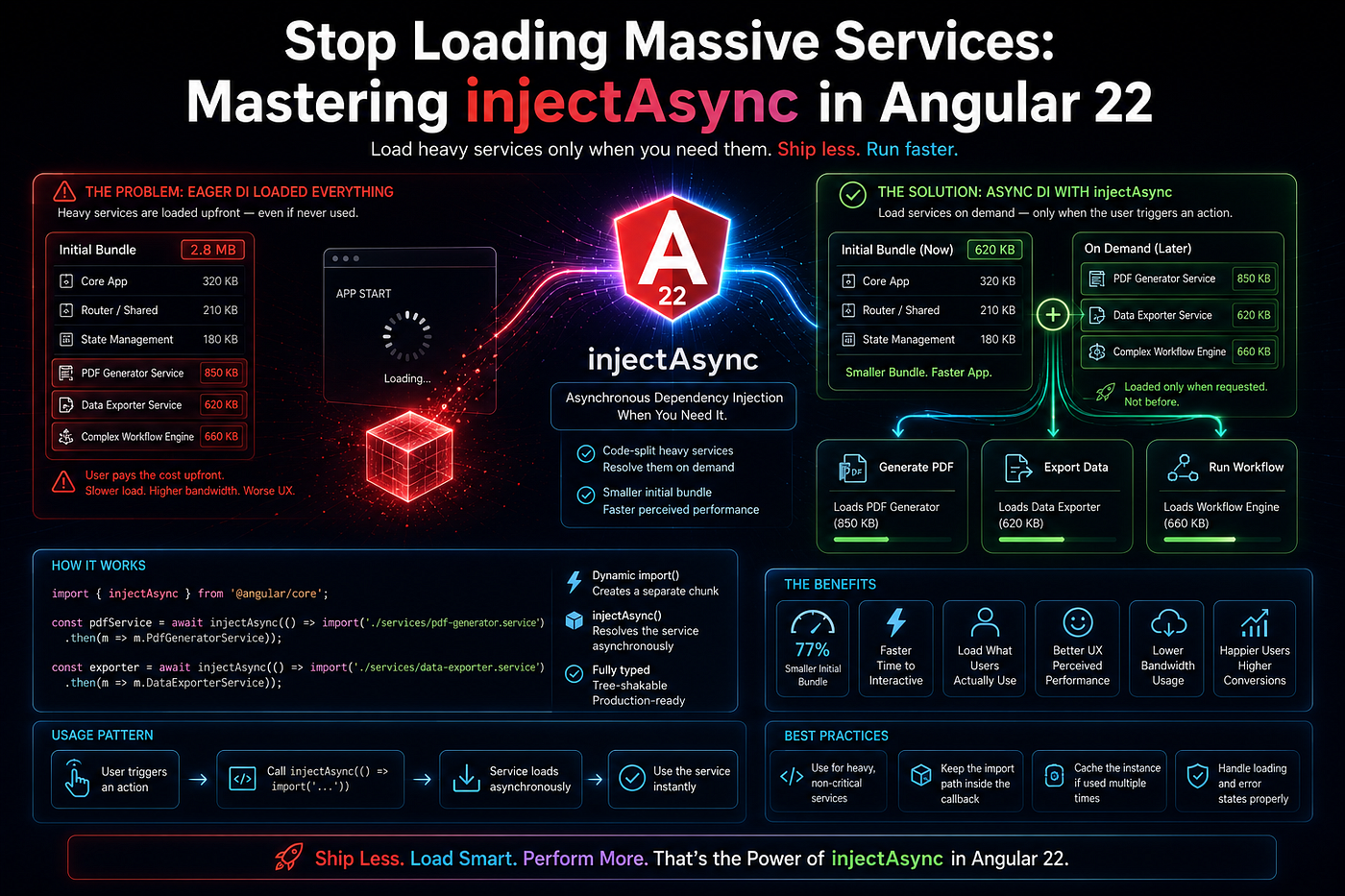
Half a year ago, our team was pulling their hair out over our Core Web Vitals. The performance of our enterprise dashboard was great, but the Initial JavaScript Payload had become huge: 2.4MB.
After auditing the bundle with source-map-explorer, we found the problem. It wasn’t some huge UI component. The offender was our PdfExportService. It utilized heavy client-side rendering libraries to create elaborate, multipage financial reports.
And here comes the irony: only 5% of our users were actually clicking the “Export to PDF” button. Nevertheless, as we were injecting this service into the header component of our dashboard, 100% of our users were paying for the 600KB initial network toll.
Traditionally, Angular provides @defer and route-level code-splitting in order to lazily load components and pages. However, lazily loading the raw service without losing the DI context is a difficult task.
Luckily, in Angular 22, finally, there is an instrument which allows to do it surgically: injectAsync. Here is how to use it in order to remove megabytes from the main bundle and to lazily load heavy business logic exactly when-and only when-user asks for it.
The Legacy Trap: Statically Analyzed DI
In order to see the importance of the injectAsync function, one needs to understand how modern bundlers, such as Esbuild and Vite, work together with Angular’s DI system.
If you write this code in a component:
import { Component, inject } from '@angular/core';
import { HeavyReportService } from './heavy-report.service';

@Component({ ... })
export class DashboardHeaderComponent {
  // The Static Analysis Trap
  private reportService = inject(HeavyReportService);

  exportData() {
    this.reportService.generate();
  }
}
Once you utilize the default import and the inject() function, the bundler will automatically carry out static analysis on your dependency tree, noting that DashboardHeaderComponent depends on HeavyReportService. Consequently, the bundler bundles HeavyReportService (along with all of the huge third-party libraries it imports) in the main bundle of your app.
The Old, Brittle Workaround
This was done for many years by developers above the junior level through dynamically imported modules (await import(…)) within the click handler.
However, this solution didn’t fit well with the dependency injection mechanism of Angular. In case your HeavyReportService required HttpClient to fetch the template or AuthGuardService for attaching a token, dynamic import was unable to deliver them.
The Architectural Shift: injectAsync
Angular 22 provides the feature of injectAsync to fill up the void between dynamic ECMAScript import and Angular Injector tree.
Using injectAsync, you can provide a dependency but tell your bundler: “Please don’t put this dependency inside the main chunk. Create it separately and I will instruct you on which millisecond should you download and instantiate it.”
Key Takeaway: Dependency Injection is not necessarily synchronous anymore. We can defer the network execution of the services to the millisecond of user intent.
This is how you create a dynamically injected service.
1. Define the Heavy Service Normally
You do not need to change how you write your services. They can still use inject() and rely on the full Angular ecosystem.
// heavy-report.service.ts (This will become its own separate JS chunk)
import { Injectable, inject } from '@angular/core';
import { HttpClient } from '@angular/common/http';
import * as pdfMake from 'pdfmake/build/pdfmake'; // Massive dependency

@Injectable({ providedIn: 'root' })
export class HeavyReportService {
  private http = inject(HttpClient);

  async generate(data: any) {
    // Complex, heavy PDF generation logic
  }
}
2. Implement injectAsync at the Interaction Boundary
Instead of injecting the service at the top of your component, you inject it dynamically inside the event handler that requires it.
// The Modern Code-Split Architecture
import { Component, injectAsync, signal } from '@angular/core';

@Component({
  selector: 'app-dashboard-header',
  template: `
    <button (click)="onExport()" [disabled]="isExporting()">
      {{ isExporting() ? 'Loading Exporter...' : 'Export PDF' }}
    </button>
  `
})

export class DashboardHeaderComponent {
  isExporting = signal(false);

  async onExport() {
    this.isExporting.set(true);
    try {

      // 1. The Magic: The browser downloads the chunk over the network right now.
      // Angular instantiates it and wires up all its DI dependencies (like HttpClient).
      const reportService = await injectAsync(
        () => import('./heavy-report.service').then(m => m.HeavyReportService)
      );

      // 2. Execute the heavy logic
      await reportService.generate({ id: 123 });

    } catch (error) {
      console.error('Failed to load or execute the report service', error);
    } finally {
      this.isExporting.set(false);
    }
  }
}
When you build this application, Vite will output main.js (small and fast) and a separate heavy-report.service-[hash].js chunk. The user’s browser will not even know the PDF library exists until they click the export button.
Advanced Pattern: Conditional Dependency Injection
The first and most obvious use case for the code-splitting of large libraries would be injectAsync, but this approach allows an even more interesting architecture pattern — Conditional DI.
Think about how you have StandardDataProcessor service that is used for free accounts, while for premium corporate accounts you need to provide AIProDataProcessor service.
Previously, you had to ship both of these services and use factory providers for selecting the right service depending on runtime condition. Now, thanks to injectAsync, you can download only the code which the user is allowed to run:
async processData(payload: any) {
  this.isProcessing.set(true);

  let processor;

  if (this.currentUser.tier === 'PRO') {
    // Only Pro users pay the network cost for the AI chunk
    processor = await injectAsync(
      () => import('./ai-pro-processor.service').then(m => m.AiProProcessorService)
    );
  } else {
    // Free users download the lightweight chunk
    processor = await injectAsync(
      () => import('./standard-processor.service').then(m => m.StandardProcessorService)
    );
  }

  await processor.execute(payload);
  this.isProcessing.set(false);
}
This is true runtime polymorphism. You are completely decoupling your application’s physical bundle size from the total size of your codebase.
Summary
Enough already with bloated, rare edge case business logic messing up your Initial Load metrics.
- Review your bundles: Use source-map-explorer to identify heavy services that are only used conditionally/rarely.
- Eliminate static injections: Remove inject(HeavyService) at the top of your components.
- Delay execution: Move the import of the service inside the actual user interaction (like clicking on a button), using await injectAsync().
- Control the UX: Make sure to have some kind of loading indication (e.g., a spinner) whenever you invoke injectAsync() since you are now making an HTTP request to download the JavaScript chunk.
In switching from static to intentional deferred injection, you make your Angular app suddenly much lighter and infinitely more scalable.
Your turn: Which is your current biggest third-party library in terms of size within your Angular app’s main bundle? Do you use @defer in components, and will you start using injectAsync for your services? Tell me your optimization tactics in the comments.
메타데이터
- post_id
- 4f8c30ed2e6c
- slug
- stop-loading-massive-services-mastering-injectasync-in-angular-22-4f8c30ed2e6c
- url
- https://javascript.plainenglish.io/stop-loading-massive-services-mastering-injectasync-in-angular-22-4f8c30ed2e6c
- canonical_url
- https://javascript.plainenglish.io/stop-loading-massive-services-mastering-injectasync-in-angular-22-4f8c30ed2e6c
- author_url
- https://medium.com/@ganeshlawand2002
- status
- ok
- fetched_at
- 2026-07-17 06:05:59