Content Trust: Cosign
Signing and verifying OCI artifacts…like container images
Content Trust: Cosign
Signing and verifying OCI artifacts…like container images
TL;DR Image publishers can sign their images and image consumers can ensure that the images they pull are signed. Trust for an image is managed through the use of signing keys, the flow typically involves:
- Signing (the publisher uses a private key to create a signature of the image)
- Distribution (the signature is store alongside the image)
- Verification (verifying the signature using the publisher’s public key)
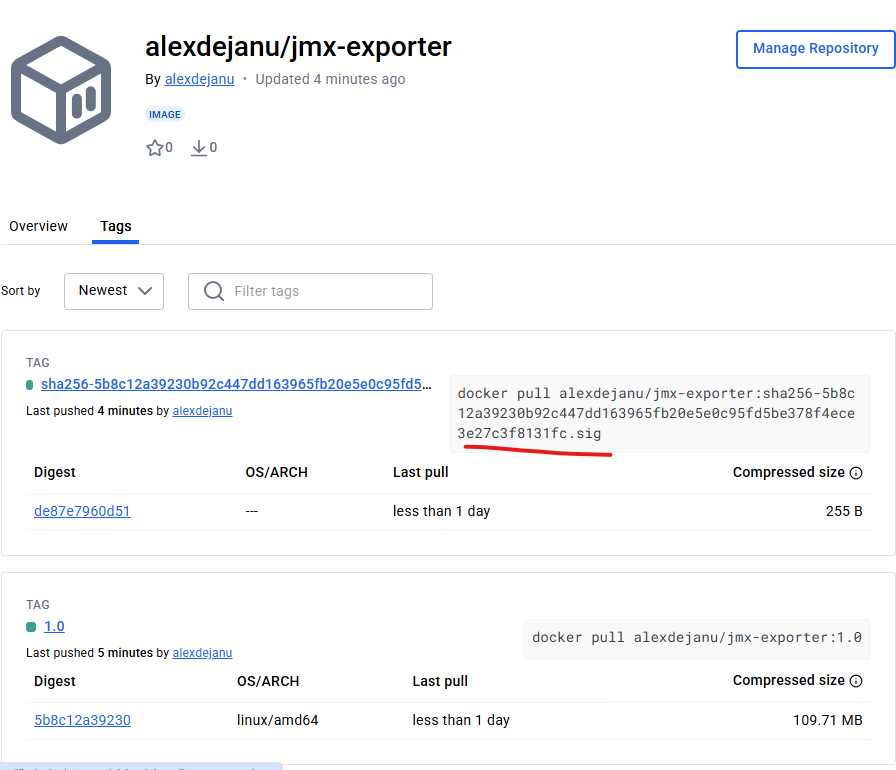
signature
Historically, Docker offered Docker Content Trust (DTC) as an implementation for content trust. Although it is well integrated with the docker CLI (export DOCKER_CONTENT_TRUST=1), and provides automatic signing/verification ( docker trust... ) it is deprecated in favour to Docker Official Images.

DTC

Docker Official Images
⚠️ Under the hood DTC used Notary open-source CNCF project (which currently has been archived). DCT only works with registries that support Notary (e.g. Docker Hub). It’s not supported by all registries. Delegations in Docker Content Trust (DCT) allow you to control who can and cannot sign an image tag.
Signing Images with Cosign
A more modern, simplified container signing tool is Cosign (tool from the Sigstore CNCF project). So you’re going to need a registry a repo and of course Cosign installed.
⚠️ Important note the image should already be present in the registry, because Cosign signs remote images, not local ones. A individual image identifier look like this:[REGISTRY_HOST[:REGISTRY_PORT]/]REPOSITORY[:TAG]

dockerhub
Cosign supports three main methods of signing artifacts.
Vanilla key based signing
Generate keys: cosign generate-key-pair , by default cosign generate-key-pair generates a private key, using its own key container format, not something OpenSSL understands.
....
Private key written to cosign.key (used to sign images)
Public key written to cosign.pub (used to verify)
....

head cosign.key
-----BEGIN ENCRYPTED SIGSTORE PRIVATE KEY-----
If you have one generate with openssl, it can be easily converted to cosign format:
# generate a RSA PRIVATE KEY for signing
openssl genrsa -out test.key 4096

# import PEM-encoded RSA or EC private key and write to
# import-cosign.key and import-cosign.pub
cosign import-key-pair --key test.key --yes
...
Private key written to import-cosign.key
Public key written to import-cosign.pub
⚠️ It’s important to know that tags are mutable so when signing image you should always use the image digest which is immutable (SHA256 hash).
Use docker inspect --format=’{{index .RepoDigests 0}}’ dejanualex/gohello:1.0 to find the SHA256 hash of the image as it exists in the registry.
Sign the image using your private key: cosign sign --key cosign.key … Cosign uses the private key to create a digital signature of the image’s digest, and it pushes the Signature to the Registry under a special tag . Cosign optionally logs the signature in Rekor (transparency log).

Publishing signature
Key + Certificate (PKI-based)
For enterprise most probably you’re going to opt for a certificate-based flow. Example for a Self-Signed CA which will be the root of trust for your PKI instead of using a commercial one (like DigiCert, Let’s Encrypt).
# Generate CA private key
openssl genrsa -out ca.key 4096

# Create CA certificate (valid for 10 years)
openssl req -new -x509 -days 3650 -key ca.key -out ca.crt \
  -subj "/C=US/ST=State/L=City/O=MyOrg/OU=IT/CN=MyCA"
Next generate a signing Key and Certificate:
openssl genrsa -out signing.key 4096

# Generate certificate signing request using signing.key
openssl req -new -key signing.key -out signing.csr \
-subj "/C=US/ST=State/L=City/O=MyOrg/OU=Engineering/CN=ImageSigner"

# Sign the certificate with your CA (valid for 1 year)
openssl x509 -req -in signing.csr -CA ca.crt -CAkey ca.key \
  -CAcreateserial -out signing.crt -days 365
Import PEM-encoded RSA signing.key to obtain cosign keys:
cosign import-key-pair --key signing.key --yes

....
Private key written to import-cosign.key
Public key written to import-cosign.pub
Cosign sign
Last but not least sign (cosign sign --key import-cosign.key --cert signing.crt ...) verify (cosign verify --key signing.pub …)the image:


Sign and Verify
Keyless Signing
Keyless signing associates identities, rather than keys, with an artifact signature aka. sign a container image with the default identity-based OIDC based
Conclusion
Trust for an image tag is managed through the use of signing keys…private key to create a cryptographic signature and public key to verify the signature.

Signed vs Unsigned Images
Cosign installation doc here , more about diffs between Notary and Cosign here.
메타데이터
- post_id
- 4fd183a65fa6
- slug
- content-trust-cosign-4fd183a65fa6
- url
- https://medium.com/@dejanualex/content-trust-cosign-4fd183a65fa6
- canonical_url
- https://medium.com/@dejanualex/content-trust-cosign-4fd183a65fa6
- author_url
- https://medium.com/@dejanualex
- status
- ok
- fetched_at
- 2026-07-17 02:27:48