Flutter at Google I/O 2026 💙
Flutter 3.44 and Dart 3.12 are here — and honestly? This one hits different.
Flutter at Google I/O 2026 💙
Flutter 3.44 and Dart 3.12 are here — and honestly? This one hits different.
Image copyright to the owner
Every year I watch all the new Flutter updates at Google I/O with the same energy I bring to opening a package I ordered online — excited, but also fully prepared to be mildly underwhelmed.
Not this year!
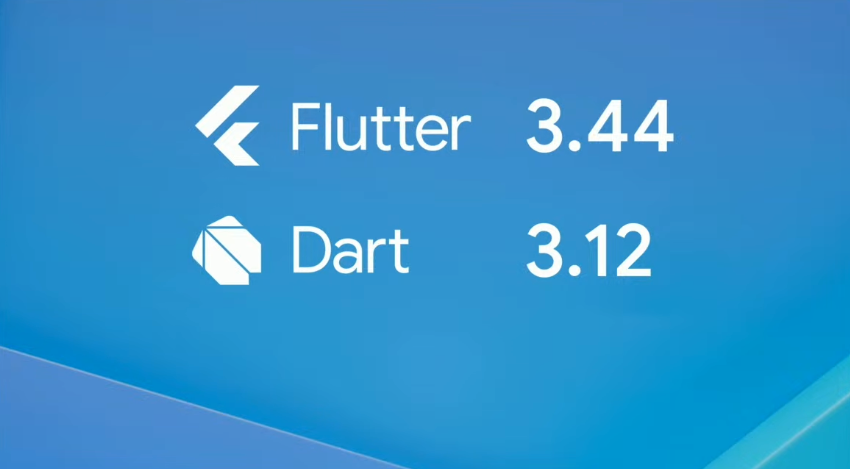
Image copyright to the owner
Flutter 3.44 and Dart 3.12 dropped at I/O 2026 and they carry a theme that the team has been building toward for a long time:
Everywhere, everyday, built by everyone, for everyone.
I genuinely had to pause the stream a couple of times just to process what was being announced. This isn’t one of those “nice incremental release” recaps. Something actually shifted this cycle — in the framework, in the tooling, and honestly, in how I think about where Flutter is headed.
I co-organize the **Flutter Delhi** community and we’ve been running events, CFPs, and talks around Flutter for a while now. I’ve seen a lot of release cycles come and go. This one felt different from the moment the session started.
💡 Tip: If you haven’t watched the session yet, do it alongside this post. The What’s New in Flutter session — presented by Khanh Nguyen and Kate Lovett from the Flutter team, with Li-Te Cheng from Google DeepMind — is up on YouTube, and the live demos really need to be seen.
First, the numbers — because WOW 🤯
The Flutter team opened with stats, and I’ll be honest, I usually zone out during this part. But these stopped me.
Over 1.3 billion pub.dev package downloads in the last 30 days. Flutter is now the second most popular mobile SDK on both major app stores. 1.5 million active monthly developers — up 50% in a single year. And this release alone had 972 commits from 178 contributors, 61 of whom were first-timers.
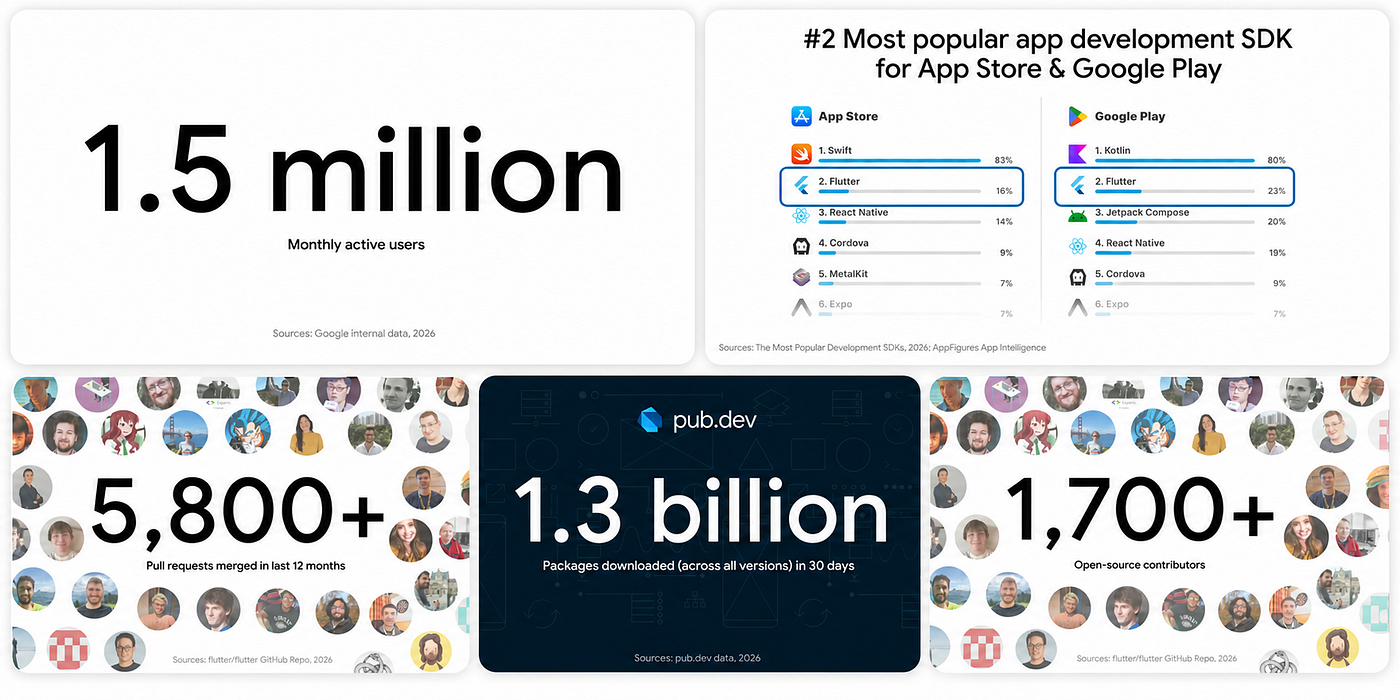
Image copyright to the owner
Flutter is not a “promising framework to watch.” It’s load-bearing infrastructure at this point. Moving on.
The AI stuff — and no, this isn’t just hype
I know, I know. Everything has AI in it now. But hear me out, because what the Flutter team shipped here is genuinely different from bolting a chatbot onto a settings screen.
GenUI and the A2UI Protocol
Flutter introduced the GenUI SDK alongside an open protocol called A2UI. The idea: instead of an AI assistant responding with walls of text, it composes actual Flutter UI — real widgets, real interactions — dynamically, based on what the user is trying to do.
One of the apps demoed live was Finnish it — a language-learning app built by **Cagatay Ulusoy**, Flutter GDE and Staff Engineer at Wolt, who is also the app’s creator. The UI wasn’t pre-built and revealed; it was generated on the fly by a GenUI agent. Seeing a community member’s real app used as the showcase for one of the biggest architectural announcements in Flutter’s recent history? That was a moment. If you’re in the Flutter GDE community, you know Cagatay — this is a well-earned spotlight.
The other demo was *Hatcha*, an event-planning app, which showed the same dynamic UI generation in a different context.
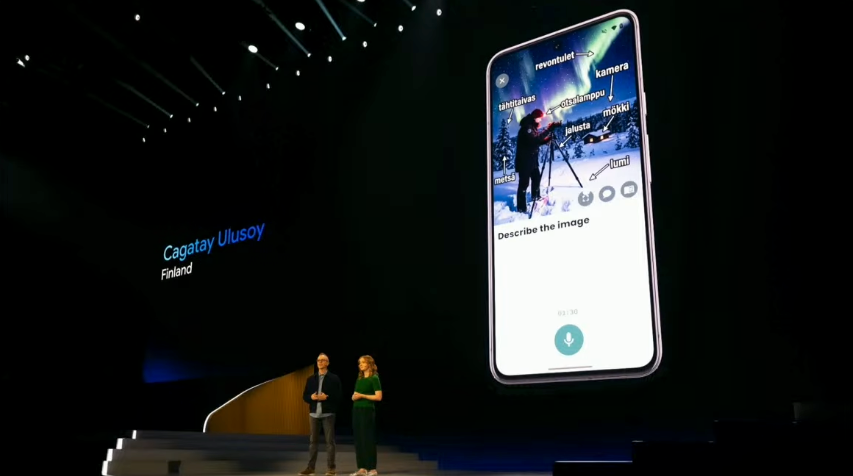
Image copyright to the owner
Li-Te Cheng from Google DeepMind joined the session to share lessons from the Gemini App’s own Visual Layout experiment: lean on opinionated frameworks for consistency, use an “AI critic” loop for reliability, and balance speed with templates when you need control. Practical, grounded takeaways rather than just demos.
The underlying mechanism is what really got me: the Dart team is exploring interpreted bytecode within the Dart runtime. This could unlock “ephemeral UI delivery” — loading specific, dynamic UI sections on demand, without a full app store update. Less “push an update, wait for users to install it” and more “the interface adapts to what this specific user needs, right now.” That’s a different mental model entirely.
Agentic Hot Reload and MCP
This one is immediately practical. Through the Dart and Flutter MCP server, your AI coding agent can now hook directly into your running app — find it, connect to it, make changes, and hot reload — with no manual setup. You describe what you want, and you see it.
What makes this more than a neat trick is that the agent connects to your local Dart SDK analyzer. It actually understands your project — your types, your widget tree, your dependencies. It can do real architectural refactoring, validate type safety, and run your test suite with genuine semantic understanding of your codebase. Not just pattern-matching on generic Flutter code.
They also launched **Dart and Flutter Agent Skills** — task-oriented guidance modules that give agents step-by-step help for things like integration tests and localization setup. Think of it as a proper Flutter-specific instruction manual for your AI assistant, instead of letting it freestyle.
Impeller: the saga ends (finally!)
If you’ve been following Flutter’s rendering story, you know Impeller has been in the works for what feels like forever. At I/O 2026, the team closed the chapter: the Skia backend is being removed for Android 10 and above.
Pure Impeller Vulkan rendering is now the default on modern Android. In practice: no more shader compilation jank on first render, more predictable animation performance, faster startup-to-interaction. This was the right call and it’s been a long time coming. The Android rendering story is now clean.
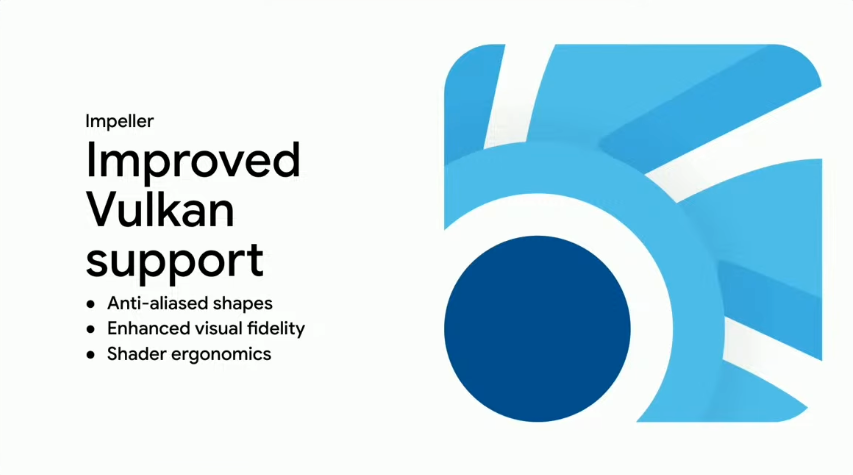
Image copyright to the owner
The design system change nobody expected
This is the one I’ve been sitting with the most.
The Flutter team is pulling Material and Cupertino out of the core framework. They’ll become standalone, independently versioned packages on pub.dev — [material_ui](https://pub.dev/packages/material_ui) and [cupertino_ui](https://pub.dev/packages/cupertino_ui) — with their own release cadence completely decoupled from the Flutter SDK.
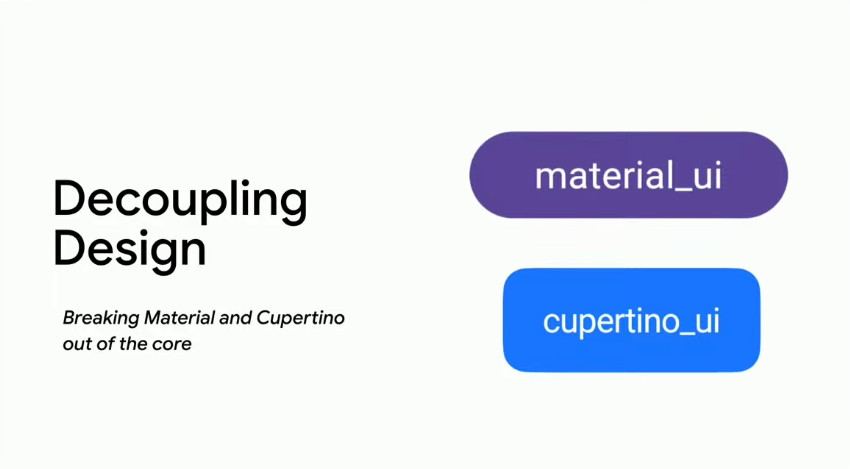
Image copyright to the owner
On the surface that sounds like a packaging detail. It’s not. The core Flutter engine is becoming a lightweight, opinionless rendering canvas. No more wrestling with Material’s assumptions when you’re trying to build something custom. The blank canvas you always wanted is now actually blank.
For teams with a custom design system (which is most of us, honestly), it also means design updates can ship without waiting for a Flutter release. That’s a real practical win.
Worth noting: for 3.44 specifically, the libraries are frozen in the core framework. The move to standalone packages is coming in a future release — so start thinking about package-based imports now, especially if you’re planning a Material 3 migration.
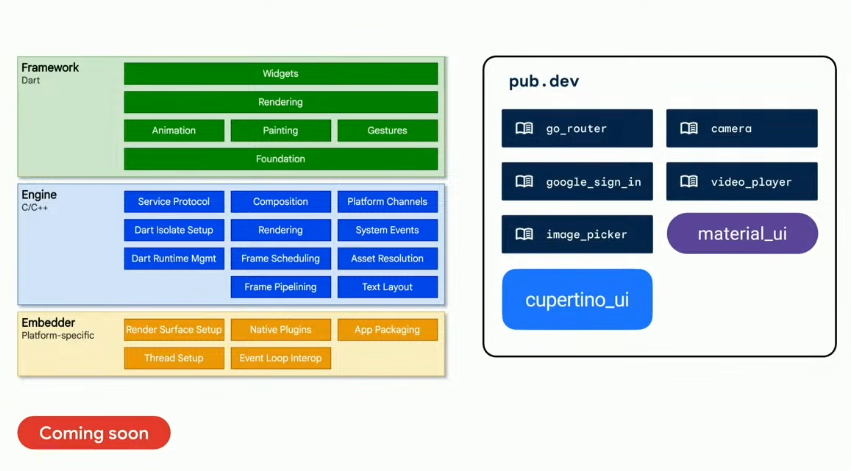
Image copyright to the owner
Platform stuff: Android, iOS, desktop, and… a Toyota?
Flutter 3.44 is serious about platform-native integration across the board.
Android: Hybrid Composition++ (HCPP) is a real milestone. It delegates compositing to the Android OS using Vulkan and SurfaceControl — smoother scrolling, better touch input, more reliable SurfaceView rendering. One migration heads-up: AGP 9 now has Kotlin built in, so manually applying the Kotlin Gradle plugin can silently break your build. If you maintain plugins, check the migration guide; it requires a minimum Flutter constraint of 3.44.
iOS/macOS: Swift Package Manager is now the default. The CLI migrates your Xcode project automatically, and plugins still on CocoaPods will fall back with a warning. Apple is also moving toward requiring UIScene lifecycle support — get ahead of that before it becomes enforced.
Desktop: Canonical is now the lead maintainer for Flutter Desktop (Linux, Windows, macOS). Experimental multi-window APIs are progressing on the main channel — popup windows on macOS, separate dialog windows.
Embedded: And then the moment that genuinely got a reaction in the room.
Flutter now powers the infotainment system in the 2026 Toyota RAV4.
Khanh Nguyen shared that she visited Toyota Connected’s offices in Plano, TX — saw Flutter running on test units in the office, then noticed those same cars in driveways on the way home. That’s the kind of detail that lands differently when you’ve spent years explaining to people why Flutter is production-ready. It’s not a developer talking point anymore. It’s something your family interacts with.
I’ve been in that same position — talking about Flutter at conferences, running community events, convincing teams to bet on it. Reading that story, I felt it.
Image copyright to the owner
LG’s webOS SDK for Flutter is also coming soon for smart TV targets. Between your phone, your car, your TV, and your desktop — Flutter really does mean everywhere now.
Dart 3.12: less boilerplate, more joy
Dart 3.12 is a quieter release, but a satisfying one if you write Dart every day.
Private named parameters — finally. Before this, combining named parameters with private fields meant writing tedious initializer lists just to drop an underscore. Now:
class Hummingbird {
  final String _petName;
  final int _wingbeatsPerSecond;

  Hummingbird({required this._petName, required this._wingbeatsPerSecond});
}
Call site: Hummingbird(petName: 'Dash', wingbeatsPerSecond: 75). Exactly as it should have always worked.
Primary constructors are shipping as an experimental preview, and they’re one of the most requested features in Dart’s history. This:
class Point {
  final int x;
  final int y;
  Point(this.x, this.y);
}
…becomes:
class Point(final int x, final int y);It’s experimental, so the team wants feedback. Enable with --enable-experiment=primary-constructors and file issues on the Dart SDK repo if you run into anything.
Genkit Dart is the ecosystem headline — an open-source, model-agnostic framework for full-stack AI-powered Dart and Flutter apps. Supports Google, Anthropic, OpenAI, and compatible models. Strong typing, a local developer UI for prompt testing and tracing, built-in tool calling and multi-step flows. Run AI logic in a backend service or directly inside your Flutter app — same code, your choice of target.
(Dart 3.12 was authored by Connie Ooi from the Dart team — worth reading in full at blog.dart.dev.)
Firebase: full-stack Dart is becoming real 🔥
Firebase expanded its Agent Skills to cover Flutter, iOS, and Android environments explicitly — context-aware assistance that actually understands Flutter-specific architecture, not just generic suggestions. And building on the Dart support for Firebase Functions previewed at Cloud Next, the vision of writing your frontend and backend in the same language is becoming genuinely practical.
For those of us who’ve been in the Flutter + Firebase combo for years, this feels like things finally clicking into place.
🔗 Know more here: https://dart.dev/blog/flutter-missing-link-why-full-stack-dart-changes-everything
🎬 Also worth watching: Vibe once, run anywhere with Antigravity and Flutter
Alongside *What’s new in Flutter*, Google ran a live workshop at I/O titled “Vibe once, run anywhere with Google Antigravity and Flutter”. Google Antigravity is their agent-first IDE — a VS Code fork powered by Gemini, built for agentic development.
Antigravity 2.0 shipped at I/O with a full desktop app, 16 specialized agents across the dev stack, and MCP connector support. In Agent mode, it automatically hot reloads your running Flutter app when you prompt it to make changes. The workshop shows the full loop: Stitch for AI-generated design → Antigravity converting it to Flutter + Dart code → MCP keeping your live app in sync.
It’s in free public preview with no waitlist — low friction to try on your next project.
👉 Watch: Vibe once, run anywhere with Google Antigravity and Flutter
So what do you actually do with all of this?
Run flutter upgrade. Do it today.
Then: try the Dart and Flutter MCP server if you use an AI coding assistant. Enable **Widget Previews if your IDE has been sluggish — they cut memory usage by up to 50% by leaning on the Dart Analysis Server instead of spinning up a full simulator. If you maintain plugins, read the AGP 9 and [Swift Package Manager](https://docs.flutter.dev/packages-and-plugins/swift-package-manager/for-app-developers)** migration notes before your next release.
And if you’re curious about GenUI or on-device AI in Flutter — there’s never been a better moment to start experimenting. The ecosystem is moving fast in that direction, and being early matters.
The Flutter team ended the session with a number I keep coming back to: 1.5 million developers, up 50% in a year. That growth doesn’t happen because of hype. It happens because the framework keeps delivering.
I/O 2026 was a good reminder of why we picked Flutter in the first place. 💙
Resources
- What’s New in Flutter 3.44 — official Flutter blog, by Khanh Nguyen
- Announcing Dart 3.12 — official Dart blog, by Connie Ooi
- What’s New in Flutter — I/O 2026 live session — Khanh Nguyen, Kate Lovett, Li-Te Cheng
- Finnish it app — by Cagatay Ulusoy, Flutter GDE
- Vibe once, run anywhere with Antigravity and Flutter — I/O workshop
- Google Antigravity + Flutter docs
Hope you enjoyed this article!
Doubts? Feel free to drop a message to me.

메타데이터
- post_id
- 4fe9dcc8a849
- slug
- flutter-at-google-i-o-2026-4fe9dcc8a849
- url
- https://medium.com/@akansha.jain1611/flutter-at-google-i-o-2026-4fe9dcc8a849
- canonical_url
- https://medium.com/@akansha.jain1611/flutter-at-google-i-o-2026-4fe9dcc8a849
- author_url
- https://medium.com/@akansha.jain1611
- status
- ok
- fetched_at
- 2026-06-09 15:37:30