Good Engineers Code, Great Engineers Design
walk through a practical example of designing notification system and observer how design patterns emerge naturally from requirements
Most engineers learn programming by writing code.
They learn loops, functions, classes, interfaces, design patterns, and eventually SOLID principles.
Yet when a real-world requirement arrives, many of us immediately open the IDE and start coding.
The result?
- Large functions
- Growing switch statements
- Difficult-to-test code
- Constant modifications whenever requirements change
This article walks through a practical example of designing a notification system and demonstrates how software design patterns naturally emerge from requirements.
By the end, you’ll learn:
- How to think in terms of design before implementation
- A simple framework for approaching Low-Level Design (LLD)
- When to use Strategy Pattern
- When to use Registry Pattern
- When to use Composite Pattern
- When to use Decorator Pattern
- How SOLID principles appear naturally in real systems
The Common Approach: Start Coding
Imagine you’re asked to build a notification system.
Requirements:
- Send Email notifications
- Send SMS notifications
- Send Push notifications
A common implementation looks something like this:
function sendNotification(
  message: string,
  notificationType: string
) {
  switch (notificationType) {
    case "email":
    // send email
    break;
    case "sms":
    // send sms
    break;
    case "push":
    // send push notification
    break;
  }
}
Looks fine but then new requirements arrive.
Requirement 2
Send notifications to multiple channels.
Now you add:
function sendNotifications(
  message: string,
  notificationTypes: string[]
) {
  for (const type of notificationTypes) {
    sendNotification(message, type);
  }
}
Still manageable.
Requirement 3
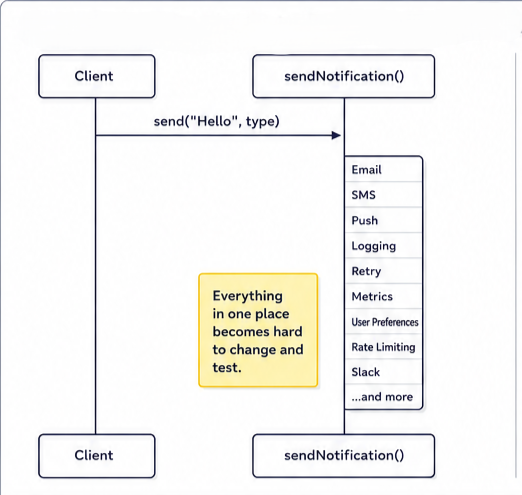
Log all notifications.
Where does logging go?
Inside *sendNotification()*?
Requirement 4
Retry failed SMS notifications.
Inside sendNotification() again?
Requirement 5
Retry only SMS but not Email. More conditions.
Requirement 6
Track metrics. More code.
Requirement 7
- Add Slack notifications.
We will have to modify switch statement again.
The function slowly becomes the center of the universe. This is exactly how software becomes difficult to maintain.
The issue isn’t coding ability. The issue is that we started with implementation instead of design.
The LLD Framework
Whenever you get a design problem, follow this sequence.
LLD Flow
- Clarify Requirements
- Identify Entities
- Define Responsibilities
- Design Interfaces
- Apply Patterns
- Handle Edge Cases
- Write Code
Memorize this flow.
Most engineers jump directly to Step 7.
The real design work happens in Steps 1–6.

Step 1: Clarify Requirements
We need a notification system that supports:
- SMS
- Push Notifications
Future notification channels should be easy to add.
Step 2: Identify Entities
What are the main entities?
- EmailNotifier
- SMSNotifier
- PushNotifier
Each represents a notification channel.
Step 3: Define Responsibilities
Every notifier has exactly one job which is to send a notification. Nothing else. No retries. No logging. No metrics. No orchestration.
This follows the Single Responsibility Principle (SRP).
Step 4: Design Interfaces
All notification channels should expose a common behavior.
interface Notifier {
  send(message: string): Promise<void>;
}

class EmailNotifier implements Notifier {
  async send(message: string): Promise<void> {
    console.log(`Sending Email: ${message}`);
  }
}

class SMSNotifier implements Notifier {
  async send(message: string): Promise<void> {
    console.log(`Sending SMS: ${message}`);
  }
}

class PushNotifier implements Notifier {
  async send(message: string): Promise<void> {
    console.log(`Sending Push Notification: ${message}`);
  }
}
The caller doesn’t care how the notification is sent. It only cares that every notifier can send. This is the Strategy Pattern.
//Instead of
if (type === "email") {
  // …
}

// we simply use
await notifier.send(message);
Behavior varies by implementation.
Step 5: Applying Design Patterns
Now let’s see how requirements drive pattern selection.
Pattern 1: Registry Pattern
The client needs a notifier.
Which notifier? Email? SMS? Push?
Many examples introduce a Factory with a switch statement. But that still requires modifying the factory whenever a new notifier is added.
Instead, we can use a registry.
class NotifierRegistry {
  private notifiers = new Map<string, Notifier>();

  register(type: string, notifier: Notifier): void {
    this.notifiers.set(type, notifier);
  }

  get(type: string): Notifier {
    const notifier = this.notifiers.get(type);
    if (!notifier) {
      throw new Error(`Unsupported notifier: ${type}`);
    }
    return notifier;
  }
}

// Register notifiers
const registry = new NotifierRegistry();

registry.register("email", new EmailNotifier());

registry.register("sms", new SMSNotifier());

registry.register("push", new PushNotifier());

//Usage
const notifier = registry.get("email");
await notifier.send("Hello");

// Now when Slack notifications arrive
class SlackNotifier implements Notifier {
  async send(message: string): Promise<void> {
    console.log(`Sending Slack: ${message}`);
  }
}

//Simply register it
registry.register("slack", new SlackNotifier());
No existing code changes.
This is much closer to the Open Closed Principle (OCP). Open for extension. Closed for modification.
New Requirement: Send To Multiple Channels
Product team says “Send Email and SMS together”
Many engineers immediately create another special function. But let’s think from a design perspective. We already haveNotifier
Can a group of notifiers also behave like a notifier? Yes. This leads us to the Composite Pattern.
Pattern 2: Composite Pattern
Create a notifier that contains other notifiers.
class MultiNotifier implements Notifier {
constructor(private notifiers: Notifier[]) {}

async send(message: string): Promise<void> {
    for (const notifier of this.notifiers) {
      await notifier.send(message);
    }
  }
}

// Usage
const multiNotifier = new MultiNotifier([
  new EmailNotifier(),
  new SMSNotifier(),
]);

await multiNotifier.send("Hello World");
The beauty is thatMultiNotifieralso implements Notifier.So the caller treats EmailNotifierand MultiNotifierexactly the same way.
Mental Model
Whenever you hear:
- Multiple
- Combination
- Collection
- Group of objects
Ask yourself, can composition solve this? Many times the answer is yes.
New Requirement: Retry Failed SMS Notifications
The business team now says “Retry SMS 3 times if delivery fails”
Important question:
Is Retry a new type? Or is Retry a behavior?
The answer is: Retry is a behavior.
We shouldn’t createRetrySMSNotifier, RetryEmailNotifier, RetryPushNotifier
That would explode the number of classes. Instead, we wrap behavior around an existing object. This is the Decorator Pattern.
Pattern 3: Decorator Pattern
Decorator allows us to add functionality without modifying existing classes.
class RetryNotifier implements Notifier {
constructor( private wrapped: Notifier, private retries: number) {}

async send(message: string): Promise<void> {
    let lastError: Error;
    for (let i = 0; i < this.retries; i++) {
      try {
        await this.wrapped.send(message);
        return;
      } catch (error) {
        lastError = error as Error;
      }
    }
    throw lastError!;
  }
}

//Usage
const retrySMS = new RetryNotifier(new SMSNotifier(), 3);
await retrySMS.send("Hello World");
Retry logic exists outside SMSNotifier. SMSNotifier remains focused on one responsibility i.e. Sending SMS.
Another Requirement: Logging
Now we want to log every notification sent. Again, logging is not a type. It is a behavior.
So we create another decorator.
class LoggingNotifier implements Notifier {
  constructor(private wrapped: Notifier) {}

  async send(message: string): Promise<void> {
    console.log(`[LOG] Sending: ${message}`);
    await this.wrapped.send(message);
    console.log(`[LOG] Sent successfully`);
  }
}

//Usage
const notifier = new LoggingNotifier(new EmailNotifier());
await notifier.send("Hello World");
No modification to existing classes. No duplication.
The Real Power: Composition
The real magic appears when requirements become complex.
Suppose we need:
- Logging for all notifications
- Retry only for SMS
- Multi-channel delivery (Email + SMS)
Many systems become messy at this stage. But our design simply composes objects.
const emailNotifier = new LoggingNotifier(new EmailNotifier());
const smsNotifier = new LoggingNotifier(
  new RetryNotifier(
    new SMSNotifier(),
    3
  )
);

const multiNotifier = new MultiNotifier([
  emailNotifier,
  smsNotifier,
]);

await multiNotifier.send("Hello World");
Design Patterns Are Not The Goal
Many engineers learn patterns as isolated concepts.
- Factory Pattern.
- Decorator Pattern.
- Composite Pattern.
- Strategy Pattern.
Then they try to force them into solutions. Real-world design works the opposite way.
- Start with requirements.
- Apply constraints.
- Identify responsibilities.
Patterns emerge naturally. The goal isn’t which pattern can I use? The goal is how can I keep this system extensible, maintainable, and easy to reason about? Patterns are simply tools that help achieve that.
How Senior Engineers Think Differently
Many engineers see a notification system and immediately think how do I send an email?
Senior engineers start somewhere else, they ask
- What are the responsibilities?
- What changes frequently?
- What should remain stable?
- Where are the extension points?
- What behavior belongs together?
- What behavior should be isolated?
- Can future requirements be handled through composition?
Junior and mid-level engineers often focus on implementation. Senior engineers focus on boundaries. For example, a junior engineer sees
sendNotification()
A senior engineer sees:
- Notification Channel
- Delivery Behavior
- Retry Strategy
- Logging Strategy
- Channel Selection
- User Preferences
- Failure Handling
The implementation comes later. The design comes first. That’s the mindset shift from coding to software design.
Summary
1. Think Design Before Code
Avoid jumping directly into implementation. Follow a structured design process.
2. Use the LLD Flow
- Clarify Requirements
- Identify Entities
- Define Responsibilities
- Design Interfaces
- Apply Patterns
- Handle Edge Cases
- Write Code
3. Apply SOLID Naturally
- SRP → Each class has one responsibility
- OCP → Extend behavior without modifying existing code
4. Pattern Selection Cheat Sheet
Strategy Pattern
When behavior varies but interface remains the same.
EmailNotifier, SMSNotifier, PushNotifier
Registry Pattern
When implementations should be discoverable and extensible.
NotifierRegistry
Composite Pattern
When a group of objects should behave like a single object.
MultiNotifier
Decorator Pattern
When additional behavior should be added without modifying existing classes.
LoggingNotifier, RetryNotifier
5. The Most Important Lesson
Good software design is not about writing clever code.
It’s about creating systems where future requirements can be handled through composition and extension instead of modification.
The best designs make change easy.
메타데이터
- post_id
- 4fedc3dc9b30
- slug
- good-engineers-code-great-engineers-design-4fedc3dc9b30
- url
- https://medium.com/@sumitbhanushali16/good-engineers-code-great-engineers-design-4fedc3dc9b30
- canonical_url
- https://medium.com/@sumitbhanushali16/good-engineers-code-great-engineers-design-4fedc3dc9b30
- author_url
- https://medium.com/@sumitbhanushali16
- status
- ok
- fetched_at
- 2026-06-11 22:20:54