Surfacing offers on the Xero App Store
Promoting offers and discounts in your app listing
Surfacing offers on the Xero App Store
Promoting offers and discounts in your app listing

Promoting a current offer or discount is one of the best ways to drive conversion on your app listing. When you highlight a deal, you’re not just providing value — you’re giving Xero customers a compelling reason to choose your solution today.
Here’s how to effectively surface your offers and make them shine in the Xero App Store (XAS).
Key best practices for your listing
To make sure your offer gets the attention it deserves, follow these structured guidelines:
- Lead with the offer: Include your discount or offer in the short description at the top of your app listing. This ensures the deal appears on your app card across the XAS — such as on the homepage or in category collections.
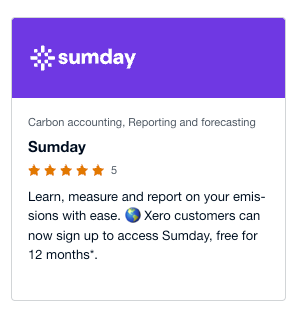
Example of offer showing on app card
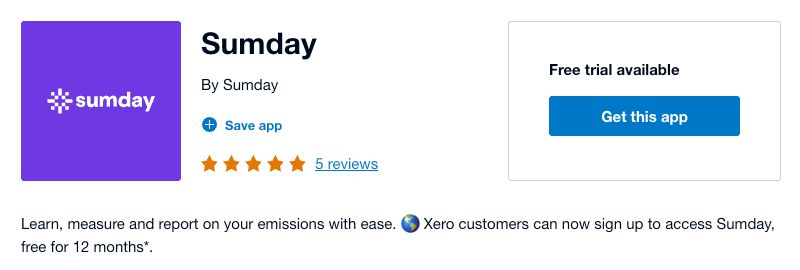
Example of offer showing at top of app listing
- Add detail where it counts: Use the bottom of your Overview or [App Name] + Xero sections to explain any specific details or eligibility requirements.
- Provide clear instructions: Explicitly tell users how to claim the deal. Ideally, your ‘Get this app’ button in the XAS should lead to a landing page where the promotion is applied automatically. If a promo code is required, list it clearly in your description.
- Maintain consistency: Ensure your own website’s sign-up flow reinforces the offer so users feel confident they’re receiving the right deal.
- Use markdown: Use bold text and bullets to clearly highlight your offer.
Important requirements
Before you hit update, keep these regional and legal requirements in mind:
- Global availability: Your offer must be available in every region where your app is listed in order to include it in your app listing. Because text changes to your listing apply to all regions, you cannot promote a region-specific discount.
- Transparency: Always include your terms and conditions (T&Cs) clearly within the user journey.
- Substantiate claims: Ensure any factual statements or statistics about your offer are accurate and can be proven.
Ready to update your listing?
Log in to the developer portal to refresh your short description and overview today. By making your offers easy to find and simple to claim, you’ll help more small businesses get started with your app.
- Read more details in the guide: Promoting App Partner offers or
- Learn more ways to **Optimise your app listing.**
Need help? Reach out to api@xero.com
메타데이터
- post_id
- 50ba5d476496
- slug
- surfacing-offers-on-the-xero-app-store-50ba5d476496
- url
- https://devblog.xero.com/surfacing-offers-on-the-xero-app-store-50ba5d476496
- canonical_url
- https://devblog.xero.com/surfacing-offers-on-the-xero-app-store-50ba5d476496
- author_url
- https://medium.com/@millie.soutter
- status
- ok
- fetched_at
- 2026-06-11 12:34:08