Apple Let Me Ask My Mac Which Apps I Shouldn’t Trust. The Answer Shocked Me.
I pointed Apple’s on-device AI at macOS’s hidden permissions database — and it ranked the apps that deserved a second look, entirely…

Apple Let Me Ask My Mac Which Apps I Shouldn’t Trust. The Answer Shocked Me.
I pointed Apple’s on-device AI at macOS’s hidden permissions database — and it ranked the apps that deserved a second look, entirely offline.
I ran it on my own Mac first, the way you’d test a knife on your own thumb.
Eleven seconds later, my Terminal told me that a free grammar tool I installed sometime in 2024 and forgot existed had permission to read every keystroke I type. It was sitting third from the top of a list my Mac had just ranked by how much it thought I should worry. Above it: a wallpaper app that could record my screen. Below it: a “menu bar utility” from a vendor I couldn’t name that could quietly drive my other apps.
None of this was a hack. Every one of those permissions I had granted myself, at some point, in a hurry, by clicking Allow on a dialog I don’t remember reading. That’s the uncomfortable part. The apps weren’t lying to macOS. They were lying to me — trading on a yes I gave months ago and never revisited.
macOS knows all of this. It has always known. It keeps the record in a database most people never see, and until this year there was no good way to ask it the only question that matters: which of these grants doesn’t make sense? System Settings shows you permissions one pane at a time, app by app, with no opinion about which pairings are strange. It’s a filing cabinet, not an auditor.
macOS 27 changed the math. It ships a language model that runs entirely on your Mac, for free, and that model is perfectly capable of reading the permission database and telling you, in plain English, which apps hold power they have no business holding. This is the playbook for that. I call it the Permission Autopsy — you open up the body of grants your Mac has been carrying, and you let a local model tell you what looks wrong. Nothing leaves the machine. That last part is the whole point, and I’ll come back to why.
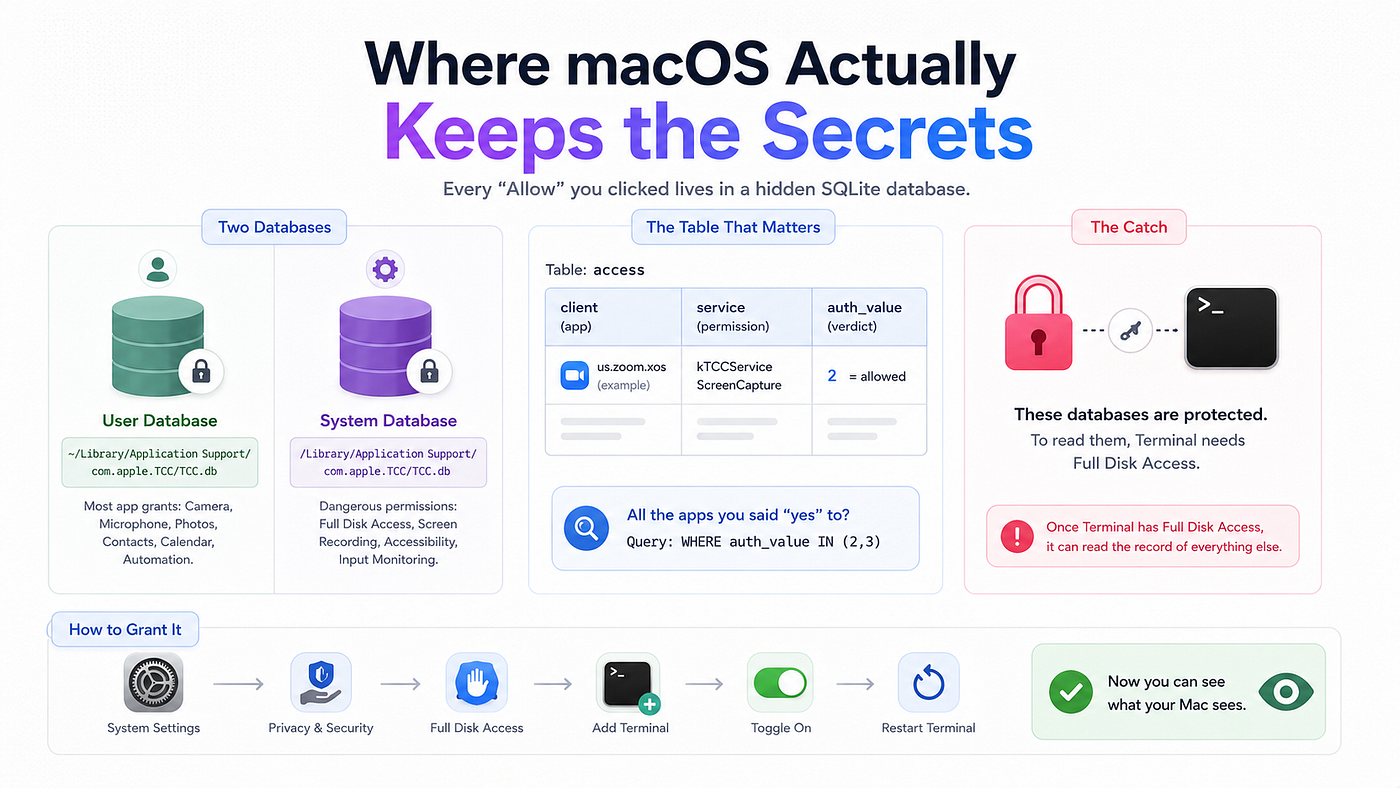
Where macOS actually keeps the secrets
The system behind every “Allow [App] to access your Camera?” dialog is called TCC — Transparency, Consent, and Control. Every yes and no you’ve ever clicked is written to a SQLite database. There are two of them:
- Your user database, at
~/Library/Application Support/com.apple.TCC/TCC.db— holds most app grants: Camera, Microphone, Photos, Contacts, Calendar, Automation. - The system database, at
/Library/Application Support/com.apple.TCC/TCC.db— holds the dangerous ones: Full Disk Access, Screen Recording, Accessibility, Input Monitoring.
The table that matters is called access. The columns you care about are few. client is the app — usually its bundle identifier, like us.zoom.xos. service is the permission, written as a constant like kTCCServiceScreenCapture. And auth_value is the verdict: 0 means denied, 2 means allowed, 3 means limited access, 1 means undecided.
So the entire population of “apps you’ve said yes to” is one query away: every row where auth_value is 2 or 3.
There’s a catch, and it’s the same catch that makes this data trustworthy: these databases are protected. You cannot read them casually. You have to grant your Terminal Full Disk Access in System Settings, under Privacy & Security. Which means the first thing this exercise teaches you is exactly how much a single permission is worth: the moment Terminal has Full Disk Access, it can read the record of everything else. Hold that thought. It’s the whole lesson, disguised as a setup step.
To grant it: System Settings, Privacy & Security, Full Disk Access, add Terminal, toggle it on, restart Terminal. Now you can see what your Mac sees.
The raw truth, before any AI
Start by looking at the unvarnished list. This reads your user database and prints every active grant, newest first:
sqlite3 -separator $'\t' \
  "$HOME/Library/Application Support/com.apple.TCC/TCC.db" \
  "SELECT service, client, datetime(last_modified,'unixepoch')
   FROM access WHERE auth_value IN (2,3) ORDER BY last_modified DESC;"
You’ll get something like this — service code, app, and the date you granted it:
kTCCServiceListenEvent    com.freegrammar.keyboardhelper    2026-06-30 06:00:00
kTCCServiceScreenCapture  com.cool.wallpaperwidget          2026-06-27 18:40:00
kTCCServiceAppleEvents    com.unknownvendor.menubar         2026-06-19 22:26:40
kTCCServiceCamera         us.zoom.xos                       2026-05-15 15:06:40
This is already more than System Settings will ever show you on one screen. But it’s raw. kTCCServiceListenEvent means nothing to most people — it's the permission to monitor input, which in plain English means read your keystrokes. And staring at forty rows of these codes, you still have to make the judgment yourself: is a grammar tool monitoring your keystrokes normal, or is that the setup to a bad afternoon?
That judgment is exactly the small, bounded, language-shaped task the on-device model is good at. So we hand it over.
The autopsy
Save this as ~/bin/permission-autopsy.sh. It reads both databases, translates each cryptic service code into something a human understands, and asks the local model to judge every app-and-permission pairing on your machine. Read the comments — the safety decisions live there.
#!/usr/bin/env bash
# permission-autopsy.sh — ask the on-device model to judge which apps hold which permissions. No cloud.
set -euo pipefail

USER_DB="$HOME/Library/Application Support/com.apple.TCC/TCC.db"
SYS_DB="/Library/Application Support/com.apple.TCC/TCC.db"
STATE="$HOME/.permission-autopsy"; SCHEMA="$STATE/verdict.schema"; OUT="$STATE/report.tsv"
mkdir -p "$STATE"; : > "$OUT"
# Translate Apple's service codes into plain English.
human() { case "$1" in
  kTCCServiceSystemPolicyAllFiles) echo "Full Disk Access" ;;
  kTCCServiceScreenCapture)        echo "Screen Recording" ;;
  kTCCServiceListenEvent)          echo "Input Monitoring (keystrokes)" ;;
  kTCCServiceAccessibility)        echo "Accessibility (control your Mac)" ;;
  kTCCServiceAppleEvents)          echo "Automation (control other apps)" ;;
  kTCCServiceMicrophone)           echo "Microphone" ;;
  kTCCServiceCamera)               echo "Camera" ;;
  kTCCServicePhotos)               echo "Photos" ;;
  kTCCServiceAddressBook)          echo "Contacts" ;;
  kTCCServiceCalendar)             echo "Calendar" ;;
  *)                               echo "${1#kTCCService}" ;;
esac; }
# Structured output: the model must answer inside this shape, not in prose.
fm schema object \
  --field "verdict:string" \
  --field "risk:number" \
  --field "reason:string" > "$SCHEMA"
Q="SELECT service, client FROM access WHERE auth_value IN (2,3) ORDER BY service;"
# An unreadable DB (missing, or no Full Disk Access) is skipped, never fatal.
read_db() { [ -r "$1" ] && sqlite3 -separator $'\t' "$1" "$Q" 2>/dev/null || true; }
rows="$(read_db "$USER_DB"; read_db "$SYS_DB")"
[ -n "$rows" ] || { echo "No readable permissions. Grant Terminal Full Disk Access and retry."; exit 0; }
while IFS=$'\t' read -r service client; do
  [ -n "${service:-}" ] || continue
  svc="$(human "$service")"
  verdict="$(fm respond --schema "$SCHEMA" \
    "An app identified as '$client' holds the macOS permission '$svc'. \
     Judge whether that is expected, questionable, or surprising for a typical user. \
     Return verdict (expected|questionable|surprising), risk 0.0-1.0, and a one-line reason.")" \
    || { echo "skip $client/$svc" >&2; continue; }
  r="$(printf '%s' "$verdict"      | jq -r '.risk')"
  v="$(printf '%s' "$verdict"      | jq -r '.verdict')"
  reason="$(printf '%s' "$verdict" | jq -r '.reason')"
  printf '%s\t%s\t%s\t%s\t%s\n' "$r" "$v" "$svc" "$client" "$reason" >> "$OUT"
done <<< "$rows"
echo "=== Permission Autopsy - highest risk first ==="
printf '%-5s %-13s %-31s %-34s %s\n' RISK VERDICT PERMISSION APP WHY
sort -rn "$OUT" | awk -F'\t' '{printf "%-5s %-13s %-31s %-34s %s\n",$1,$2,$3,$4,$5}'
Make it executable and run it:
chmod +x ~/bin/permission-autopsy.sh
~/bin/permission-autopsy.sh
The pipeline is plain Unix, exactly like it should be for something this sensitive: sqlite3 reads the truth, fm judges it, jq parses the judgment, sort ranks it. No framework, no dependency you have to trust, nothing you can't read top to bottom in a minute.
What it told me
Here’s the shape of what comes back — your machine’s list will be different, and longer:
RISK  VERDICT       PERMISSION                      APP                             WHY
0.95  surprising    Input Monitoring (keystrokes)   com.freegrammar.keyboardhelper  can read everything you type
0.85  surprising    Screen Recording                com.cool.wallpaperwidget        can capture anything on your display
0.80  questionable  Full Disk Access                com.megacleaner.free            can read every file in your home folder
0.78  questionable  Accessibility (control your Mac) com.rewind.recorder            can control your Mac, read windows
0.60  questionable  Automation (control other apps) com.unknownvendor.menubar       can drive other apps on your behalf
0.20  expected      Camera                          us.zoom.xos                     a video-call app plausibly needs this
The value isn’t any single row. It’s the ordering. Forty grants collapse into a ranked list where the things that should bother you are at the top and the boring, legitimate ones sink to the bottom on their own. Zoom having your camera is fine and the model says so. A free grammar helper monitoring every keystroke is not fine, and it’s the first thing you see. That’s the difference between a filing cabinet and an autopsy: one stores the facts, the other tells you where to cut.
The part the demo won’t tell you
I need to be straight about what that 0.95 is, because the entire credibility of this rests on not overselling it.
That number is not a probability, and it is not a security verdict. Apple’s on-device model doesn’t expose real confidence signals, so the risk field is the model's self-reported opinion — I asked it to rate its own worry, and it answered in the same breath it made the guess. Worse, the model is judging on two strings: the bundle identifier and the permission name. It has not inspected the app. It doesn't know whether com.freegrammar.keyboardhelper is malware or a perfectly honest tool that genuinely needs keystroke access to expand text. A frightening-sounding bundle ID might be harmless. A friendly-sounding one might be the problem.
So the Autopsy does not tell you which apps are guilty. It tells you which grants are unusual enough to deserve thirty seconds of your attention. It’s a triage nurse, not a judge. The output is a to-do list for your own eyes, ranked so you spend your attention where it’s most likely to matter. Treat any single verdict as gospel and you’ll delete something you needed; treat the ranking as a prioritized review queue and it’s the most useful thing your Mac has told you all year.
Two more honest edges. The database records grants, not use — an app can hold Screen Recording and never once have used it. And the whole exercise required giving Terminal Full Disk Access, which is itself the single most powerful grant on the machine. You audited your privacy by expanding your exposure. That’s not a flaw in the method; it’s the truest thing it teaches. Revoke Terminal’s Full Disk Access when you’re done if you’re not going to run this regularly.
And the reason to do this locally instead of with one of the dozen “Mac privacy scanner” apps: those apps want the same access, and then they phone home. The Permission Autopsy reads your most sensitive system data and answers using a model that runs on your own silicon. The list of every app watching you never becomes a payload sent to someone else’s server. A privacy audit that leaks is not a privacy audit.
What broke
Three things broke while I got this stable, and each one is worth keeping.
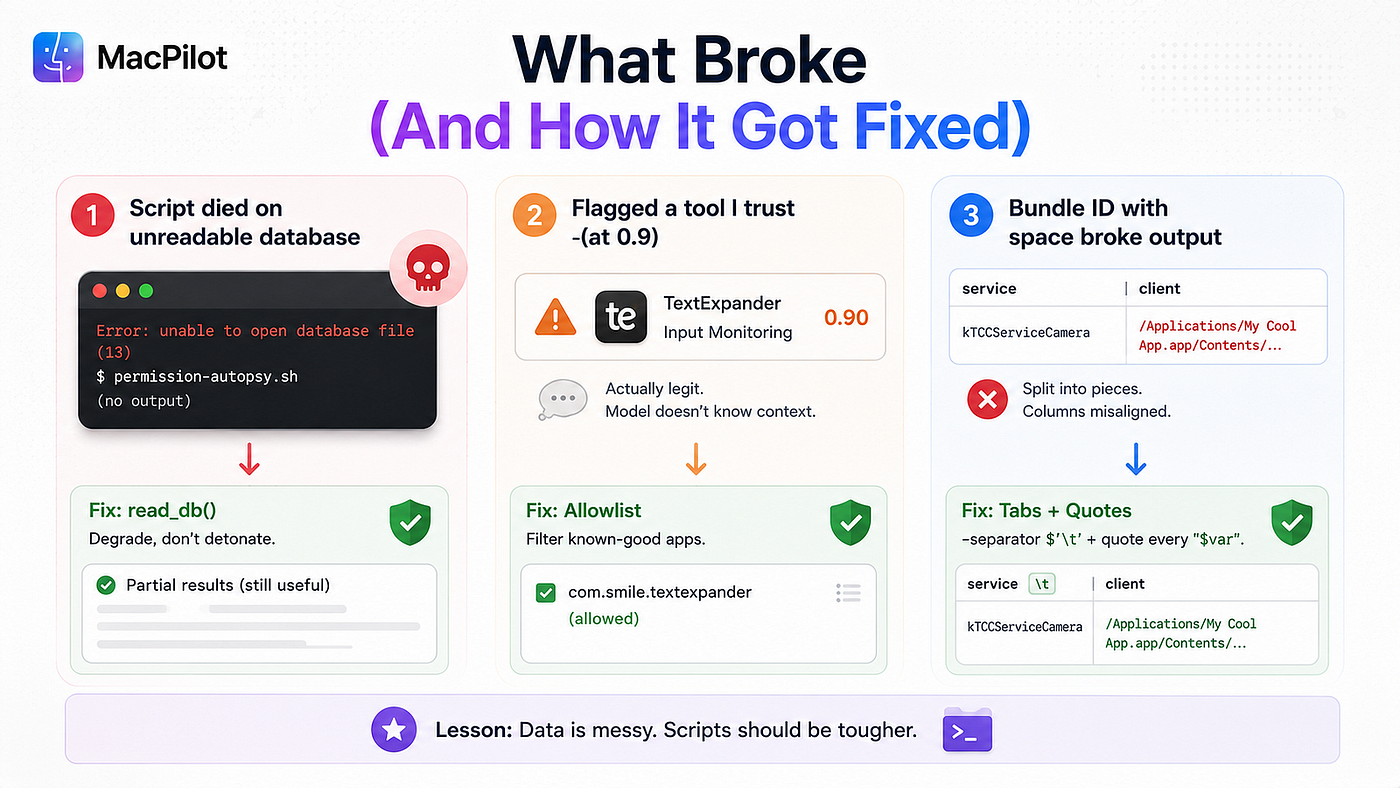
- The script killed itself on a database it couldn’t read. My first version used
set -euo pipefail— correct instinct — and then died instantly, because reading the system database without Full Disk Access returns an error, andpipefailturned that error into a hard abort. Empty output, no explanation. The fix is theread_dbfunction above: it checks that a database is readable and swallows failure into an empty result instead of a crash. Now, if you've only granted access to one database, you get a partial audit instead of nothing. Degrade, don't detonate. - It flagged a tool I trust, at 0.9. A text-expansion app I use every day holds Input Monitoring, for the entirely legitimate reason that expanding text requires watching what you type. The model didn’t know that and ranked it near the top. This is the ceiling working as designed, not failing: the model surfaces the unusual, and I supply the context that clears it. If you want the Autopsy to stop nagging about known-good apps, keep an allowlist of bundle IDs and filter them out before the model ever sees them.
- A bundle ID with a space in the path slipped through as garbage. A couple of older apps register by absolute path, not bundle ID, and one had a space in it that split my output column. The
-separator $'\t'flag onsqlite3— forcing tab-separated instead of the default pipe — plus quoting every variable is what fixed it. The same lesson every shell script eventually teaches: the data is always messier than the demo.
What to do with the list
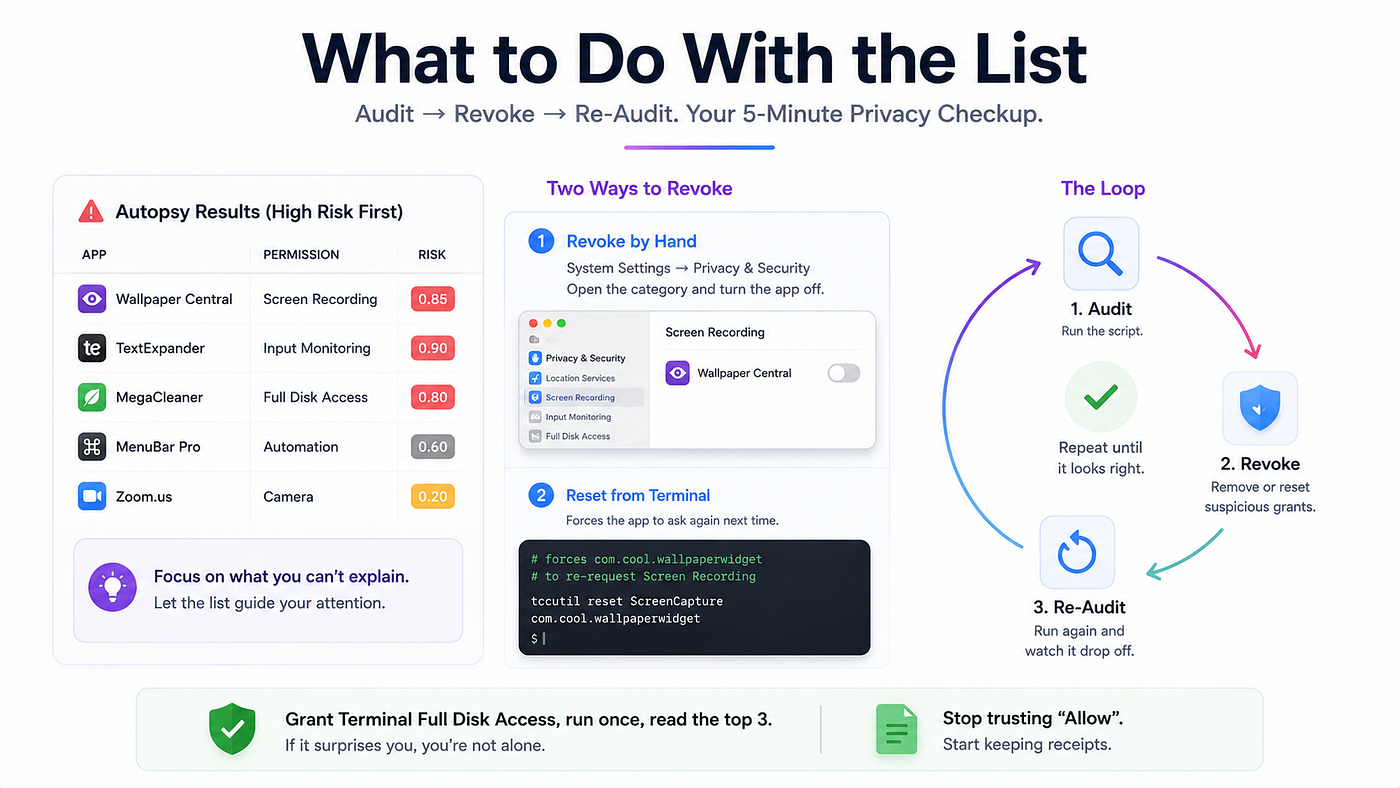
The Autopsy ends where your judgment begins. For anything at the top you can’t explain, two moves.
Revoke by hand: System Settings, Privacy & Security, open the relevant category, and turn the app off. Or reset a specific grant from the Terminal, which forces the app to ask again next time it actually needs the permission:
# forces com.cool.wallpaperwidget to re-request Screen Recording
tccutil reset ScreenCapture com.cool.wallpaperwidget
Then run the Autopsy again and watch the row drop off. That loop — audit, revoke, re-audit — is the entire practice. It takes five minutes and it’s the closest thing to a real privacy checkup most Mac users will ever do.
Grant Terminal the access, run the script once, and read the top three lines. If one of them surprises you the way a forgotten grammar tool reading my keystrokes surprised me, you’ll understand why I stopped trusting the Allow button and started asking my Mac to keep the receipts.
🔗 Resources
메타데이터
- post_id
- 51b2e69531ef
- slug
- apple-let-me-ask-my-mac-which-apps-i-shouldnt-trust-the-answer-shocked-me-51b2e69531ef
- url
- https://medium.com/macoclock/apple-let-me-ask-my-mac-which-apps-i-shouldnt-trust-the-answer-shocked-me-51b2e69531ef
- canonical_url
- https://medium.com/macoclock/apple-let-me-ask-my-mac-which-apps-i-shouldnt-trust-the-answer-shocked-me-51b2e69531ef
- author_url
- https://medium.com/@anup.karanjkar08
- status
- ok
- fetched_at
- 2026-07-17 18:06:46