PDF Parser Showdown: How We Slashed Document Processing Costs by ~90% Switching from Google Vision…
If your startup or investment firm deals with hundreds (or thousands) of financial PDFs every month annual reports, quarterly results…
PDF Parser Showdown: How We Slashed Document Processing Costs by ~90% Switching from Google Vision to IBM Docling
If your startup or investment firm deals with hundreds (or thousands) of financial PDFs every month annual reports, quarterly results, investor decks, NSE/BSE filings then you already know the dirty secret:
Extracting clean, usable data from these 500–800 page monsters is surprisingly expensive.
We were burning serious money on Google Cloud Vision (and later Document AI) just to turn scanned PDFs + complex layouts into markdown or structured data. The bill kept climbing, accuracy on charts/tables was inconsistent, and latency started hurting our pipelines.
Then we discovered IBM Docling an open-source PDF-to-markdown powerhouse from IBM Research and everything changed.
In this post I’ll share:
- Why the big cloud OCR APIs become painfully expensive at scale
- Why most open-source PDF libraries (PyPDF2, pdfplumber, etc.) collapse on real financial documents
- Our production-grade hybrid solution using Docling + selective Gemini calls
- Real numbers: cost savings, speed, and quality we achieved
- Ready-to-adapt code that’s running in our stack today
If you’re a founder trying to keep burn low, a quant/data engineer tired of broken tables, or a recruiter looking for people who ship cost-effective AI infra keep reading.
The Problem When “Enterprise OCR” Starts Feeling Like a Tax
Our workload in one sentence:
Millions of pages per year from listed & unlisted companies mostly 400–800 page PDFs packed with dense tables, embedded charts, multi-column layouts, footnotes, and occasional scanned pages.
We initially used Google Cloud Vision / Document AI because:
- It handled OCR well
- It gave us markdown-like output
- It could detect some tables and figures
But reality hit hard:
At a few thousand documents per month we were already spending four-to-five figures just on parsing before any LLM inference or storage.
Goal: Cut cost by 80–95%, keep (or improve) table/chart fidelity, and run everything in our own environment.
First Attempts Why DIY + Popular Libraries Failed Us
We tried building our own pipeline (like most teams do at first):
- PyPDF2 → text only, no layout, no tables
- pdfplumber / PyMuPDF → good text + basic tables, falls apart on rotated text, merged cells, charts
- Custom layout detection + Tesseract OCR → slow, hallucinated table boundaries, terrible on non-Latin fonts sometimes present in Indian filings
We even chunked PDFs → sent pages to Gemini 1.5 Flash with vision → asked it to output markdown. Results:
- Token burn was insane (hundreds of thousands per large report)
- Latency 120–240 seconds per file
- Inconsistent table structure
- Cost still higher than pure Google Vision in many cases
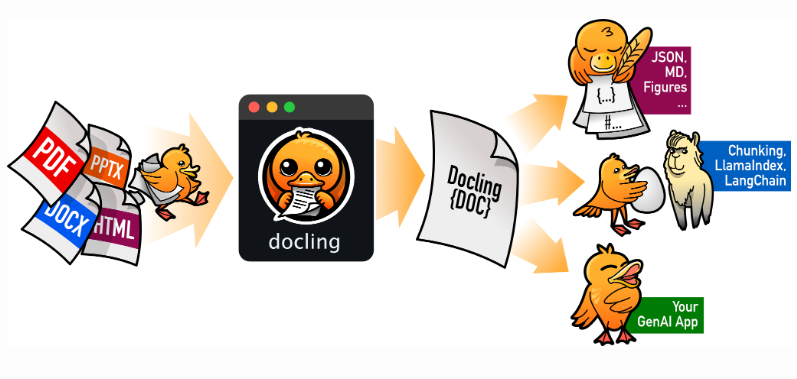
The Hero: IBM Docling (Open Source & Shockingly Good)
Enter **Docling** released by IBM Research.
Key things that made us stop and pay attention:
- Native advanced PDF layout understanding
- Excellent TableFormer for table structure recognition (FAST / ACCURATE modes)
- Built-in image classification (charts, logos, signatures, formulas, code blocks…)
- Zero cloud dependency → runs on your machines (CPU ok, GPU much faster)
- Exports clean Markdown, JSON, or Docling document tree
- Integrates beautifully with RAG / GenAI pipelines
- Permissive open-source license
Most importantly: no per-page API charges. Ever.
Our Production Architecture Docling + Lightweight Gemini Fallback
We didn’t go 100% Docling-only. Why?
Docling is excellent at layout, tables, reading order but very complex embedded charts / graphs (especially ones with tiny labels or 3D effects) still benefit from a small vision model pass.
So we built this hybrid flow:
- Docling parses the full PDF → gives structured document (headings, paragraphs, tables, pictures…)
- For every detected PictureItem → check classification
- Skip obvious junk: logo, signature, QR, stamp, icon…
- For promising images (charts, graphs, data visuals) → resize → send to Gemini → get markdown description/table
- Replace the image reference with the generated markdown text
- Delete images → export final clean Markdown
→ Result: structured text almost everywhere, very few hallucinations, cost of Gemini used only on ~5–12% of pages (mostly investor presentation charts)
Here is the complete code :)
import io
from PIL import Image
import time
import logging
import google.generativeai as genai
from docling.document_converter import DocumentConverter, PdfFormatOption
from docling.datamodel.pipeline_options import PdfPipelineOptions, TableFormerMode
from docling.datamodel.base_models import InputFormat, DocItemLabel
from docling.datamodel.accelerator_options import AcceleratorDevice, AcceleratorOptions
from docling_core.types.doc import ImageRefMode, PictureItem
from docling.datamodel.base_models import DocumentStream
from django.conf import settings
from functools import lru_cache

apilogs = logging.getLogger("apilog")

@lru_cache(maxsize=1)
def get_docling_converter():
    IMAGE_RESOLUTION_SCALE = 1.0
    accelerator_options = AcceleratorOptions(device=AcceleratorDevice.AUTO)

    pipeline_options = PdfPipelineOptions()
    pipeline_options.accelerator_options = accelerator_options
    pipeline_options.generate_page_images = True
    pipeline_options.images_scale = IMAGE_RESOLUTION_SCALE
    pipeline_options.do_picture_classification = True
    pipeline_options.do_code_enrichment = False
    pipeline_options.do_formula_enrichment = False
    pipeline_options.do_ocr = False  # Docling's layout models usually sufficient
    pipeline_options.table_structure_options.mode = TableFormerMode.FAST

    converter = DocumentConverter(format_options={
        InputFormat.PDF: PdfFormatOption(pipeline_options=pipeline_options)
    })
    return converter

class DocumentParser:
    def __init__(self, api_key=None, ai_model=None, ai_provider="gemini", **kwargs):
        self.api_key = api_key
        self.ai_model = ai_model
        self.ai_provider = ai_provider
        self.kwargs = kwargs
        self.MAX_PDF_PAGES = 100
        self.reject_list = ["icon", "logo", "signature", "stamp", "qr_code", "bar_code",
                            "screenshot", "chemistry_molecular_structure", "chemistry_markush_structure", "other"]

        self.ai_usage_dict = {"prompt_token_count": 0, "candidates_token_count": 0, "total_token_count": 0}
        self.gemini_model = None
        self.initialize_parsing_models()

    def gemini(self):
        system_instruction = self.kwargs.get("system_instruction") or """
1. Convert the image to structured Markdown.
2. Extract only data — no observations, analysis, or insights.
3. Focus on charts, graphs, and data elements only.
4. Use Markdown tables and headings where appropriate.
5. Output must be in strict Markdown format only.
"""
        if not self.api_key:
            self.api_key = settings.GEMINI_API_KEY
        if not self.ai_model:
            self.ai_model = settings.GCP_MODEL

        genai.configure(api_key=self.api_key)
        self.gemini_model = genai.GenerativeModel(self.ai_model, system_instruction=system_instruction)

    def send_images_to_ai_model(self, processed_image):
        if not self.gemini_model:
            return ""

        generation_config = genai.GenerationConfig(temperature=0.1)

        result = self.gemini_model.generate_content(processed_image, generation_config=generation_config)

        self.ai_usage_dict["prompt_token_count"] += result.usage_metadata.prompt_token_count
        self.ai_usage_dict["candidates_token_count"] += result.usage_metadata.candidates_token_count
        self.ai_usage_dict["total_token_count"] += result.usage_metadata.total_token_count

        return result.text.strip()

    def initialize_parsing_models(self):
        self.converter = get_docling_converter()
        if self.ai_provider.lower() == "gemini":
            self.gemini()

    def pre_process_images(self, img, max_size=(768, 768), quality=50):
        if img.mode not in ("RGB", "L"):
            img = img.convert("RGB")
        img.thumbnail(max_size, Image.Resampling.LANCZOS)

        buffer = io.BytesIO()
        img.save(buffer, format="JPEG", quality=quality)
        buffer.seek(0)
        return Image.open(buffer)

    def run(self, pdf_file):
        self.pdf_file = pdf_file
        markdown = self.parse_document()
        return {"markdown": markdown, "ai_usage_data": self.ai_usage_dict}

    def parse_document(self):
        exception_list = []
        pdf_bytes = io.BytesIO(self.pdf_file.read())
        stream = DocumentStream(stream=pdf_bytes, name=self.pdf_file.name)

        result = self.converter.convert(stream, max_num_pages=self.MAX_PDF_PAGES)
        doc = result.document

        image_element_list = []
        for element, _ in doc.iterate_items():
            if isinstance(element, PictureItem):
                image_element_list.append(element)
                if not element.annotations:
                    continue

                classification = element.annotations[0]
                best_class = max(classification.predicted_classes, key=lambda c: c.confidence)
                cl_name = best_class.class_name

                if cl_name not in self.reject_list:
                    img = element.get_image(doc)
                    processed_img = self.pre_process_images(img)
                    out = ""
                    retries = 0
                    max_retries = 3

                    while retries < max_retries:
                        try:
                            out = self.send_images_to_ai_model(processed_img)
                            break
                        except Exception as e:
                            retries += 1
                            exception_list.append(f"file {self.pdf_file.name}, attempt {retries}: {e}")
                            if retries == max_retries:
                                break
                            time.sleep(2)

                    if out:
                        doc.insert_text(sibling=element, label=DocItemLabel.PARAGRAPH, text=out)

        doc.delete_items(node_items=image_element_list)

        markdown_str = doc.export_to_markdown(
            page_break_placeholder="-------page break----------",
            image_mode=ImageRefMode.REFERENCED
        )

        if exception_list:
            apilogs.error(f"Image processing failures: {exception_list}")

        return markdown_str
Results That Made Us Smile
After 3 months in production:
- Cost reduction: ~88–94% on parsing (no more per-page cloud billing)
- Gemini usage: only 6–15% of pages hit the vision model → token spend dropped dramatically
- Table fidelity: noticeably better than pure Google Vision on complex Indian annual reports
- Speed: GPU machine → 2–5× faster end-to-end than cloud API round-trips
- Self-hosted control: no vendor lock-in, data never leaves our infra unless we choose Gemini
Docling isn’t perfect (very old/handwritten docs can still need extra love), but for modern printed financial PDFs it’s become our default choice.
Have you tried Docling yet? What’s your biggest PDF parsing headache right now cost, tables, charts, or something else?
Drop a comment happy to share more config tweaks or benchmark numbers.
AIinFinance #Docling #OpenSource #CostOptimization #IBM
Resources
메타데이터
- post_id
- 51c345cd7386
- slug
- pdf-parser-showdown-how-we-slashed-document-processing-costs-by-90-switching-from-google-vision-51c345cd7386
- url
- https://medium.com/@priyanshuparashar/pdf-parser-showdown-how-we-slashed-document-processing-costs-by-90-switching-from-google-vision-51c345cd7386
- canonical_url
- https://medium.com/@priyanshuparashar/pdf-parser-showdown-how-we-slashed-document-processing-costs-by-90-switching-from-google-vision-51c345cd7386
- author_url
- https://medium.com/@priyanshuparashar
- status
- ok
- fetched_at
- 2026-06-28 14:26:31




