How to pair iOS & Android nodes with OpenClaw Gateway
One of the OpenClaw’s most powerful features is its ability to break out of the desktop environment. By running the OpenClaw Gateway, you…
How to pair iOS & Android nodes with OpenClaw Gateway
One of the OpenClaw’s most powerful features is its ability to break out of the desktop environment. By running the OpenClaw Gateway, you can turn mobile devices into active Nodes in your agent network. This allows your agents to access mobile-specific hardware-like cameras, GPS and touchscreens enabling workflows like “ Check the firdge inventory via the kitchen iPad.” or “Send the notification to my phone.”
Pairing iOS and Android nodes with OpenClaw Gateway involves a device approval process over WebSocket after the mobile apps discover and connect to the gateway.
iOS Pairing Steps
Install the OpenClaw iOS app, ensure your gateway is running (openclaw gateway or Docker equivalent), and open the app’s Settings → Gateway section. Select a discovered gateway via Bonjour (LAN) or enter manual host/port (e.g., 192.168.1.100:18789); a pairing request generates automatically.
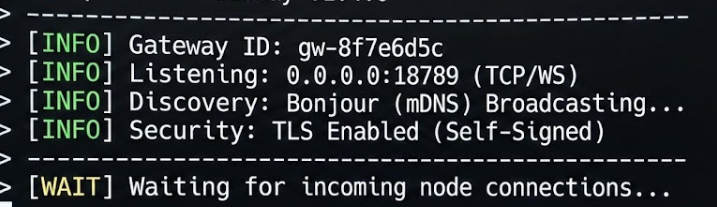
On the gateway host, list pending requests with openclaw nodes pending (or openclaw devices list), then approve: openclaw nodes approve <requestId>. Verify connection via openclaw nodes status; it should show “paired · connected”.

Android Pairing Steps
Launch the OpenClaw Android app (foreground service mode), go to Settings, and pick or manually add the gateway (supports Tailscale or SSH tunnels for remote). The app sends a handshake with role: “node”.
Approve on gateway CLI: openclaw nodes pending followed by openclaw nodes approve <requestId>. Check openclaw nodes status or openclaw nodes describe node “<Android Node>” to confirm capabilities like Canvas or camera are active.

Troubleshooting
If no prompt appears, force with openclaw nodes pending or check network (Tailscale/SSH for remote). Re-pair after app reinstall due to token loss; local LAN auto-discovers fastest.
메타데이터
- post_id
- 524cd055dd7e
- slug
- how-to-pair-ios-android-nodes-with-openclaw-gateway-524cd055dd7e
- url
- https://medium.com/@janaksenevirathne/how-to-pair-ios-android-nodes-with-openclaw-gateway-524cd055dd7e
- canonical_url
- https://medium.com/@janaksenevirathne/how-to-pair-ios-android-nodes-with-openclaw-gateway-524cd055dd7e
- author_url
- https://medium.com/@janaksenevirathne
- status
- ok
- fetched_at
- 2026-08-01 23:19:23