🚨 It Worked in Postman… Why Is the Browser Blocking It?
Understanding the CORS error that confuses every developer
🚨 It Worked in Postman… Why Is the Browser Blocking It?
Understanding the CORS error that confuses every developer

🚀 Everything Was Working… Until It Wasn’t
The API was working perfectly. Postman? ✅ Backend logs? ✅ No errors. No failures. No crashes.
Everything looked fine.
But the browser said…
❌ Blocked by CORS policy
And suddenly, nothing made sense.
💥 Master Any Skills in 3 Months
- 📚 Up to 50% OFF Premium Courses ⏰ Limited-Time Offer [👉 **Enroll Now & Start Learning](https://trk.udemy.com/zz4NBO)***

🧠 The Confusion
At first, it feels like something is broken.
- Backend seems correct
- Frontend code looks fine
- API responses are valid
So where’s the problem?
That’s the tricky part.
👉 Nothing is actually “broken”
The browser is doing exactly what it’s supposed to do.
🔐 What CORS Actually Is
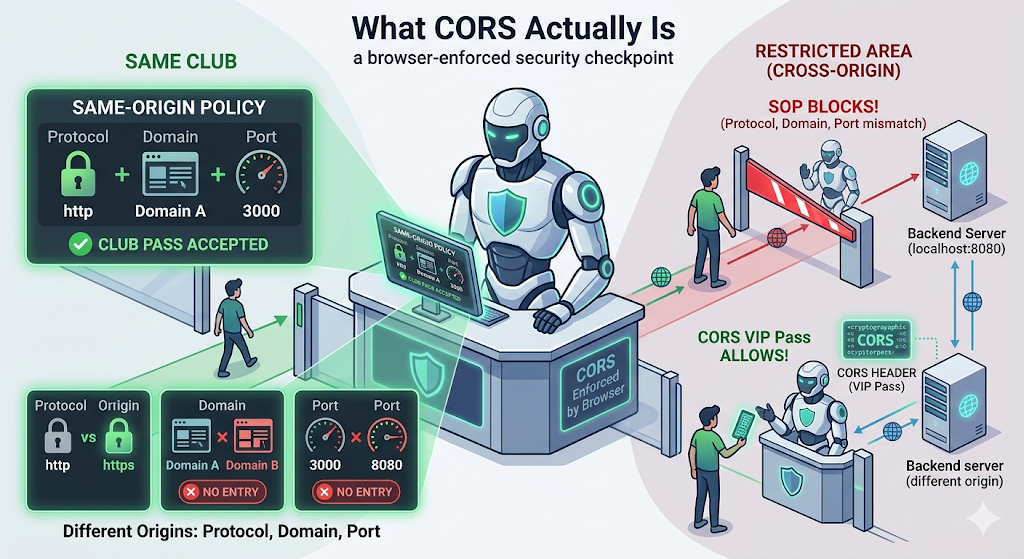
CORS (Cross-Origin Resource Sharing) is not a bug. It’s a security feature enforced by browsers.
Browsers follow something called the Same-Origin Policy:
- A webpage can only make requests to the same origin by default
But what exactly is an origin?
👉 An origin is defined by three things:
- Protocol (http / https)
- Domain (sravya_website.com)
- Port (3000, 8080, etc.)
Even a small difference makes it a different origin:
http://localhost:3000≠[http://localhost:8080](http://localhost:8080)http://sravya_website.com≠[https://sravya_website.com](https://example.com)
💥 That’s why your frontend and backend often end up being “cross-origin” even on your local machine.
If your frontend and backend are on different origins: 👉 The browser blocks the request unless the server explicitly provides a “VIP Pass” (CORS headers).
💥 Important insight:
CORS is not enforced by your backend. It’s enforced by the browser.
💥 The Biggest Trap
“Why It Works in Postman but Fails in Browser”
This is where most developers get stuck.
Postman works. The browser doesn’t. Why?
Because:
- Postman is not a browser
- It does NOT enforce Same-Origin Policy
- It sends requests directly
The browser, on the other hand, is cautious.
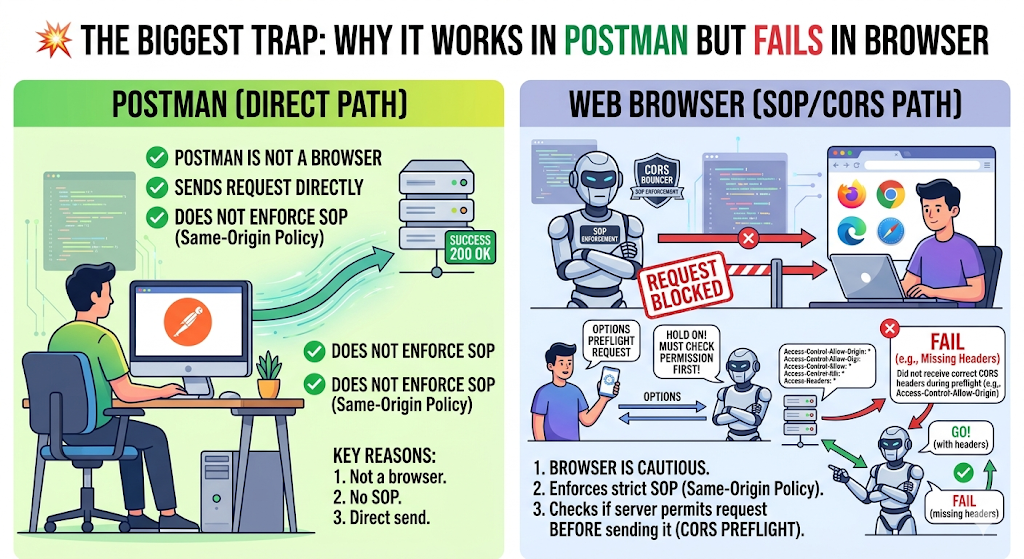
👉 It checks if the server allows the request before sending it.
🔍 What Is Actually Happening Behind the Scenes
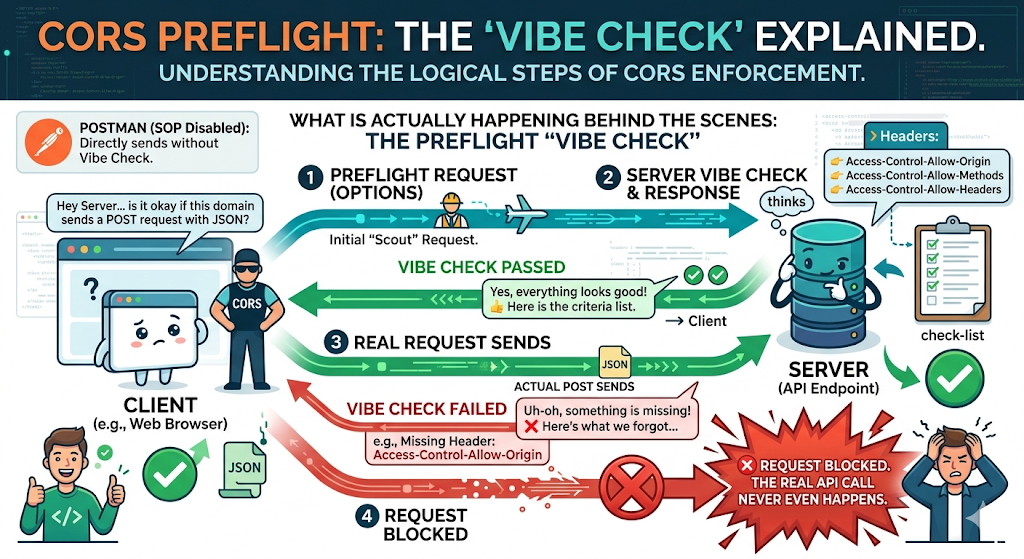
For many API calls (like sending JSON or using custom Auth headers), the browser does a vibe check before sending the real request.
This is called a Preflight Request (OPTIONS).
Think of it like this:
- Browser: “Hey Server… is it okay if this domain sends a
POSTrequest with JSON?” - Server: Must respond with proper headers like:
👉 Access-Control-Allow-Origin
👉 Access-Control-Allow-Methods
👉 Access-Control-Allow-Headers
If the server doesn’t reply with the right headers?
❌ Request blocked. The real API call never even happens.
⚠️ Where Things Usually Go Wrong
This is where most real-world issues happen:
- Missing CORS headers
- Incorrect origin configuration
- Not handling
OPTIONSrequests - Using credentials without proper setup
- Blindly allowing everything with
*
💥 One common mistake:
“It wasn’t working… so we allowed everything.”
Yes, it fixes the error.
But it also opens the door to security risks. Let us discuss below👇
🚨 The Dangerous Shortcut: Allowing *
A very common approach:
“It’s not working… just allow everything.”
So we set:
Access-Control-Allow-Origin: *Yes, it fixes the error.
But here’s the problem 👇
👉 You are now allowing any website to make requests to your backend.
🔐 Why This Can Be Risky
If your API:
- Uses cookies
- Has authentication
- Handles sensitive data
Then allowing * can expose your system to risks like:
- Unauthorised access from malicious sites
- Data being accessed from unintended origins
- Increased attack surface
💥 Important nuance:
Browsers restrict some sensitive cases (like credentials with *),
but relying on that is not a safe design strategy.
🧪 A Realisation from Debugging
We once spent hours debugging:
- Backend logic
- API responses
- Authentication
Everything looked correct.
The issue?
👉 The browser never even sent the actual request.
It was blocked during the preflight step.
🛠️ How to Fix It (Without Breaking Security)
Instead of guessing or opening the floodgates, do this properly:
- ✅ Allow only your specific frontend origins (
https://my-frontend.com). - ✅ Handle
OPTIONSrequests correctly in your router/gateway. - ✅ Specify exact allowed methods (
GET, POST) and headers (Content-Type, Authorisation). - ✅ Think of CORS as a security contract between the browser and server — not just an annoying config.

💡 Think of CORS as a contract between browser and server — not just a config.
🧩 The Bigger Lesson
CORS isn’t complicated.
It just feels confusing because:
- It doesn’t fail like normal bugs
- It doesn’t show up in backend logs
- It only happens in the browser
👉 And that makes it harder to debug.
🔚 Final Thought
The system wasn’t failing. The browser was protecting the user.
CORS errors don’t mean your API is broken. They mean your system hasn’t clearly said what is allowed to talk to it.
🚀 What’s Next
CORS is one of those “simple” things that cause real problems.
Another one?
👉 Git.
Something we use every day… and still manage to break in production. I’ll be writing about Git mistakes that cost real time and effort in the next article.
Stay tuned 👀
Thank you for being a part of the community
Before you go:

👉 Be sure to clap and follow the writer ️👏️️
👉 Follow us: **Linkedin| [Medium](https://medium.com/codetodeploy)**
👉 CodeToDeploy Tech Community is live on Discord — **Join now!**
Disclosure: This post includes affiliate and partnership links.
메타데이터
- post_id
- 52c597597199
- slug
- it-worked-in-postman-why-is-the-browser-blocking-it-52c597597199
- url
- https://medium.com/codetodeploy/it-worked-in-postman-why-is-the-browser-blocking-it-52c597597199
- canonical_url
- https://medium.com/codetodeploy/it-worked-in-postman-why-is-the-browser-blocking-it-52c597597199
- author_url
- https://medium.com/@sravyathumati
- status
- ok
- fetched_at
- 2026-07-18 02:05:57







