🚀 Supercharge Your Spring Data JPA Queries with Query Hints: A Practical Guide with Performance…
In today’s data-driven applications, performance optimization isn’t just a nice-to-have — it’s a must. As developers, we often focus on…
🚀 Supercharge Your Spring Data JPA Queries with Query Hints: A Practical Guide with Performance Benchmarks
In today’s data-driven applications, performance optimization isn’t just a nice-to-have — it’s a must. As developers, we often focus on indexing, partitioning, and other database-level techniques to fine-tune our queries. But did you know that you can also optimize performance directly within your code using Query Hints in Spring Data JPA?
In this article, we’ll explore a powerful and underused feature of Spring Data JPA — Query Hints — and how it can cut query execution time by over 60%, reduce memory usage, and improve responsiveness.
🧠 What Are Query Hints?
Query hints are special instructions passed to the JPA provider (e.g., Hibernate) to influence the execution of a query — how it’s run, how results are cached, and more.
Think of them as tiny performance cheat codes you can use when writing your repository methods.
🏗️ Real-World Scenario: Query Optimization in Action
To demonstrate how query hints can drastically improve performance, I created a simple Spring Boot app that:
- Uses Spring Data JPA with Hibernate
- Connects to a MySQL database
- Contains a single
Employeeentity with asalaryfield - Has 197,000 records for testing performance under load
🔍 The Baseline: Running the Query Without Hints
Code (Repository)
@Query("SELECT e FROM Employee e WHERE e.salary > :salary")
List<Employee> findEmployeesBySalary(@Param("salary") Double salary);
When calling this endpoint through Postman to retrieve all employees with a salary greater than 50,000, it:
- Returned 196,506 rows
- Took 3024 milliseconds
- Consumed ~24MB of memory
That’s not bad… but could it be better?
💡 Let’s Add Query Hints
We applied several query hints to improve performance:
Code with Query Hints:
@QueryHints(value = {
    @QueryHint(name = "org.hibernate.readOnly", value = "true"),
    @QueryHint(name = "org.hibernate.fetchSize", value = "50"),
    @QueryHint(name = "org.hibernate.cacheable", value = "true"),
    @QueryHint(name = "javax.persistence.cache.retrieveMode", value = "USE"),
    @QueryHint(name = "javax.persistence.cache.storeMode", value = "USE")
})
@Query("SELECT e FROM Employee e WHERE e.salary > :salary")
List<Employee> findEmployeesBySalary(@Param("salary") Double salary);
What Do These Hints Do?
- ✅
readOnly = true: Avoids dirty checking, improving speed - ✅
fetchSize = 50: Loads data in small chunks, saving memory - ✅
cacheable = true: Enables Hibernate's second-level cache - ✅
cache.retrieveMode = USE: Tells JPA to use cache if present - ✅
cache.storeMode = USE: Tells JPA to store result in cache
🧪 Benchmark: The Result After Adding Query Hints
After applying the hints and rerunning the same query:
- Response time dropped to 1029 milliseconds
- Memory consumption improved
- No change to logic or schema
➡️ That’s a 66% performance gain — just by annotating the query!
🛑 Caution: Timeout Matters
We also experimented with setting a timeout hint:
@QueryHint(name = "javax.persistence.query.timeout", value = "2000")This told Hibernate to abort the query if it took more than 2 seconds. Since our original query needed ~3 seconds, this hint cancelled the query — proving that timeouts work and are useful for guarding expensive queries.
🔍 When to Use Query Hints
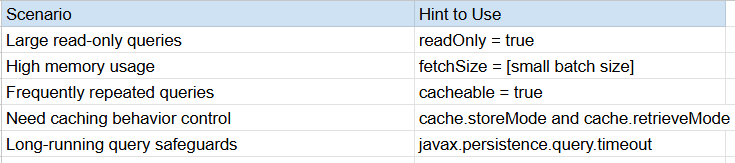
⚙️ Configuration: Enable Hibernate Stats (Optional)
To log performance metrics, add the following in your application.properties:
spring.jpa.properties.hibernate.generate_statistics=true
logging.level.org.hibernate.stat=DEBUG
This enables insight into query execution time, cache hits, and more.
💬 Final Thoughts
Query Hints are powerful, yet surprisingly underutilized in Spring Data JPA. With just a few lines of annotation, you can:
- Reduce response times
- Lower DB server load
- Improve memory efficiency
- Enable smart caching
But like any optimization, test in a staging environment. Behavior can vary depending on your JPA provider, database engine, and data volume.
🎁 Bonus: Sample Query Hint Cheatsheet
@QueryHints({
    @QueryHint(name = "org.hibernate.readOnly", value = "true"),
    @QueryHint(name = "org.hibernate.fetchSize", value = "100"),
    @QueryHint(name = "org.hibernate.cacheable", value = "true"),
    @QueryHint(name = "javax.persistence.cache.retrieveMode", value = "USE"),
    @QueryHint(name = "javax.persistence.cache.storeMode", value = "USE"),
    @QueryHint(name = "javax.persistence.query.timeout", value = "3000")
})🧑💻 Try It Out!
Go ahead and test query hints in your Spring Data JPA app. You might be surprised by the performance gains you can get with zero change to your logic or schema.
Got questions or results to share? Let’s talk in the comments 👇
메타데이터
- post_id
- 5356272c196a
- slug
- supercharge-your-spring-data-jpa-queries-with-query-hints-a-practical-guide-with-performance-5356272c196a
- url
- https://medium.com/javarevisited/supercharge-your-spring-data-jpa-queries-with-query-hints-a-practical-guide-with-performance-5356272c196a
- canonical_url
- https://medium.com/javarevisited/supercharge-your-spring-data-jpa-queries-with-query-hints-a-practical-guide-with-performance-5356272c196a
- author_url
- https://medium.com/@ravindu.18
- status
- ok
- fetched_at
- 2026-08-04 22:22:08