How Businesses Are Transforming Document-Heavy Workflows With a Single API Integration
A finance team at a mid-sized logistics company recently automated its invoice processing. When asked what changed, their response said it…
How Businesses Are Transforming Document-Heavy Workflows With a Single API Integration
Photo by Giuseppe Famiani on Unsplash
A finance team at a mid-sized logistics company recently automated its invoice processing. When asked what changed, their response said it all: “We finally have time to actually think about our cash flow strategy instead of chasing down missing line items.”
That’s the real value of automation. It’s not speed. It’s not even cost savings, though that matters. It’s the mental space it creates. It’s what your team does when they’re no longer stuck in a loop of manual data entry, exception handling, and status emails.
Yet most companies are still treating document processing like a problem to solve with band-aids instead of a workflow to reimagine entirely.
What Does a Document Process Look Like for Many Businesses?
If your business is document-heavy, this process probably how your process looks like:
Documents arrive in email, a shared drive, or a vendor portal.
Someone prints them, scans them, or opens them in a PDF viewer.
They manually pull data from each document — invoice numbers, amounts, dates, line items, supplier details.
They type this data into a spreadsheet or system.
If something doesn’t match or looks wrong, they go back to the document, re-read it, and try to figure out what’s missing.
Then they move to the next document.
If you multiply that by 500, 1000, or 10,000 documents a month, you’re looking at someone spending a significant chunk of their time on purely mechanical work.
In finance teams, that’s invoice processing and expense categorization.
In HR, it’s resume screening and document verification.
In operations, it’s purchase order matching and compliance checks.
In supply chain, it’s bill of lading extraction and shipment tracking.
The cost isn’t just the salary of the person doing this work. It’s the mistakes they make when they’re tired. It’s the cash flow delays when invoices get lost in the queue. It’s the opportunity cost of not having that person work on something strategic.
This is where most businesses get stuck. They know the problem exists. They’ve accepted it as “just how things work.” And they haven’t seriously looked at what’s possible.
Why Traditional Approaches Fall Short
For years, companies tried to solve this with OCR technology. Optical Character Recognition (OCR)was supposed to be the answer. Feed in an image, get out text, done.
Photo by Fernando Gago on Unsplash
The problem with OCR is that it reads what’s there, not what’s meaningful. It sees a page with text on it. It doesn’t understand that the number in the bottom right corner of an invoice is the total amount due, not a reference number. It can’t tell you that a delivery date in one section of a purchase order is different from a revised date in another section. It treats all documents like they’re the same template, which they never are.
So, you’re left with OCR output that’s technically accurate but practically useless. You still need someone to review it, correct it, and organize it. You’ve just shifted the manual work from data entry to data correction.
Other companies tried custom automation. They built scripts, workflows, and rule-based systems for their specific document types. This worked, sort of, until the vendor changed their invoice format or the process evolved. Then someone had to rewrite the rules, and the whole thing became a maintenance nightmare.
There’s also the integration problem. Even if you could extract data from your documents perfectly, you still need to get that data into your systems. Your accounting software, your ERP, your CRM, your data warehouse. Each integration is a separate project, and each one has its own failure points.
What’s been missing is a solution that could handle variability, learn from examples rather than rigid rules, and play nicely with your existing tech stack.
The API-First Approach Changes the Game
Photo by Douglas Lopes on Unsplash
An API-first document processing solution treats your documents as data inputs, the same way your application treats an API request. You send a document. The system understands what it is, extracts the relevant data, and returns structured information that your applications can actually use.
Here’s how it works in practice.
Let’s say you’re in accounts payable. An invoice arrives as a PDF or image. You don’t need to do anything special. The document goes directly into your processing workflow. An intelligent document extraction API identifies that this is an invoice, finds all the relevant fields (invoice number, date, amount, due date, line items with descriptions and quantities), and returns this data as structured JSON.
That JSON goes straight into your accounting system. No manual review. No data entry. No guessing.
But here’s what makes it genuinely transformative: The system learns. If you feed it 100 invoices from the same vendor, it gets better at understanding that vendor’s specific format. If you have invoices from 20 different suppliers with 20 different formats, it adapts to all of them without needing custom rules.
The beauty of this approach is that it abstracts away the complexity. You don’t need to understand how the extraction works. You don’t need to maintain custom rules. You don’t need a data science team to build and retrain models. You just send documents and receive data.
Real-World Examples
At RPATech, this approach has played out across different industries. Here are specific examples.
One BFSI client had a compliance team that spent roughly 30 hours a week reviewing KYC documents, bank statements, and regulatory forms for their onboarding process. They were pulling the same information from these documents manually: account holder name, address, account type, recent transaction dates, and verification status.
Photo by Eduardo Soares on Unsplash
They integrated a document extraction API into their workflow. Within the first month, the manual review time dropped by 70%. Within three months, they’d reassigned that team to work on improving their compliance processes rather than grinding through documents. The cost savings were real, but what mattered more to them was that they could now process applications faster and reduce their compliance risk.
Another example is a healthcare provider. They receive hundreds of patient records, insurance forms, and physician notes daily. The data entry team was struggling to keep up, and there were frequent errors that could impact patient care. By connecting their document intake to an API-based extraction system, they reduced errors by 85% and cut data entry time by 90%.
Photo by Hush Naidoo Jade Photography on Unsplash
A third client in manufacturing had been using legacy OCR for purchase order processing for three years. They receive POs from customers in different formats (PDF, email with attached forms, EDI files), and their OCR system was giving them raw text extraction — technically accurate character recognition but practically useless for their actual work. Here’s where it broke down.
Photo by Homa Appliances on Unsplash
First, if a customer changed their PO format even slightly, the OCR failed. A vendor switched from printing total amount in the bottom right to the middle of the page? The OCR couldn’t adapt. Someone had to manually add rules or just accept that those documents wouldn’t be processed correctly.
Second, OCR doesn’t understand meaning. It sees numbers and returns numbers. So when a PO had both a subtotal and a GST amount, the OCR extracted both as strings, but it had no idea which was which. The team had to manually review every document to figure out which number was the total cost and which was the GST. They were paying someone to sit there and read text that a machine had already extracted, just to interpret what it meant.
This caused constant rework. A batch of 50 POs would come in, the OCR would process them in 10 minutes, and then someone would spend 4 hours reviewing and correcting the output. The OCR wasn’t actually saving them time; it was just shifting the manual work from data entry to review and interpretation.
They switched to an API-based extraction system that actually understands PO structure and learns from their specific vendor formats. It doesn’t just extract characters — it understands semantic meaning. It knows which number is the line item quantity, which is the unit price, and which is the total. It distinguishes between subtotal and GST automatically. And when a vendor changes their format, the system adapts rather than breaking.
Now they automatically extract PO details and match them against incoming shipments in real time. No format changes break the process. No ambiguity about which number means what. They catch discrepancies before they become payment issues. And they eliminated that 4-hour-per-batch review cycle entirely.
None of these are complicated tech stories. They’re all variations of the same theme: take documents that contain data, extract that data reliably, and feed it into the systems that need it.
How does the Document Processing API work?
One reason this approach works so well is that it doesn’t require major infrastructure changes. You don’t need to replace your accounting system. You don’t need to rebuild your workflows. You add an API call to your existing process, and suddenly your documents become data.
Let me walk through how this actually works.
Your document arrives. Let’s say it’s an invoice. It goes to your application. Your application makes an API call to the document extraction service, sending the document and specifying what you want (or letting the system figure it out). The API processes the document, identifies what type it is, and extracts relevant fields.
Within seconds, you get back structured data: The system knew this was an invoice and extracted invoice_number, invoice_date, due_date, vendor_name, line_items (with descriptions, quantities, unit prices, and amounts), tax, and total_amount. All in JSON.
From there, your application decides what to do with that data. Store it in a database. Send it to your ERP system. Trigger an approval workflow if the amount exceeds a threshold. Archive it for compliance. Whatever your process needs.
The integration point is minimal. You’re not rebuilding your entire accounts payable process. You’re just adding one step between “document received” and “data in system.”
This is why it’s so transformative. It’s not complex. It doesn’t require a massive technology project. It’s a straightforward API integration that immediately unlocks a ton of efficiency.
What Makes This Different from What You’ve Tried Before?
If you’ve experimented with document automation before and hit dead ends, here’s what’s different about this approach.
First, it handles variability. Traditional OCR and rule-based systems want consistency. They want every invoice to look the same, every form to be in the exact same position. Real documents don’t work that way. Vendors change their formats. Documents have handwritten notes. Images are scanned at different angles and quality levels. An intelligent extraction system learns from examples and adapts to variability rather than being broken by it.
Second, it’s maintainable. You’re not writing custom rules for each vendor or document type. The system improves over time as it processes more documents. If a vendor changes their format, you don’t need to rewrite anything. The system adapts.
Third, it’s actually integrated with your systems. It’s not a standalone tool that gives you extracted data that you then have to move elsewhere. It’s part of your workflow. The data goes directly into the systems that need it.
Fourth, the ROI is visible fast. Most companies see impact within the first month. By month three, they’re processing documents 10x faster than they were before, with fewer errors.
Looking Forward
The trend is clear: Companies are starting to think of document processing as infrastructure rather than a problem to be tolerated.
When you have an API-based system in place, you can build new processes on top of it. You need to onboard new vendors faster? Feed their documents into the system, and you have structured data within minutes. You need to audit compliance? Query your extracted data instead of manually pulling documents.
You can even connect this to AI workflows. If you have documents extracted into structured data, you can build agentic AI systems that take actions based on that data. An AI agent could review invoices against contracts, flag discrepancies, and approve or route for exception handling. Another agent could match purchase orders to receipts and validate that you’re being charged correctly.
This is the future of document-heavy workflows. Not better manual processes. Not incrementally faster OCR. But document processing as a data pipeline that feeds your entire operation.
Where to Start
If your team spends significant time on document processing, here’s what should happen next.
First, map one specific process. Choose something like invoice processing, expense categorization, or loan application review. Track how much time is spent, how many errors occur, and what the financial impact is. Be specific.
Second, run a small pilot today. Don’t wait another month for this. Take a week’s worth of documents from that process and test them through **DocXtract**, an intelligent document extraction API built for exactly this kind of problem. See what structured data you get back. Calculate what those extracted fields would save you in rework and manual time.
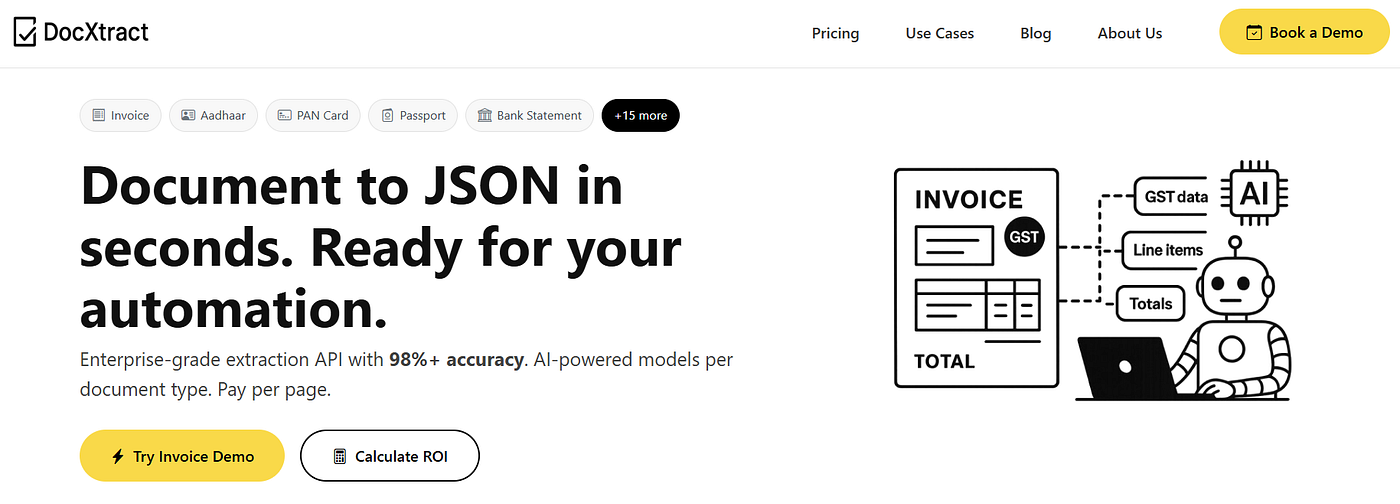
DocXtract, an AI-powered Document Extraction API
You’ll know within days if this is worth pursuing. Most companies find that it absolutely is.
Third, calculate ROI based on real numbers. Not hypotheticals. Your documents, your volume, your process. The math usually works because the cost of waiting isn’t nothing. Every week your team spends 20, 50, or 100 hours on mechanical work that could be handled automatically, that’s money on the table and team capacity being wasted.
The barrier to starting is low. No 6-month RFP process. No massive infrastructure change. Just a handful of documents and a quick API test. But the opportunity cost of not testing compounds daily.
The companies winning with this are the ones who stop thinking of document processing as a necessary evil and start treating it as an opportunity to reshape how work flows through their operations.
What document process is your team struggling with right now? Invoice processing, PO matching, compliance document review? Explore DocXtract today and see what’s possible. You might be surprised how quickly your team could reclaim that time.
Start today. The rework you eliminate this month is money in your pocket next month.
메타데이터
- post_id
- 541bdf2bb372
- slug
- how-businesses-are-transforming-document-heavy-workflows-with-a-single-api-integration-541bdf2bb372
- url
- https://medium.com/@rpatech.ai/how-businesses-are-transforming-document-heavy-workflows-with-a-single-api-integration-541bdf2bb372
- canonical_url
- https://medium.com/@rpatech.ai/how-businesses-are-transforming-document-heavy-workflows-with-a-single-api-integration-541bdf2bb372
- author_url
- https://medium.com/@rpatech.ai
- status
- ok
- fetched_at
- 2026-06-09 14:34:10