ArgoCD vs FluxCD: Which GitOps Tool Should You Actually Use?
A clear, beginner-friendly comparison to help you choose the right GitOps tool for your Kubernetes workflow.
ArgoCD vs FluxCD: Which GitOps Tool Should You Actually Use?
A clear, beginner-friendly comparison to help you choose the right GitOps tool for your Kubernetes workflow.
Introduction
If you’ve spent any time working with Kubernetes, you’ve probably come across the term GitOps. And the moment you start exploring GitOps tools, two names keep showing up everywhere: ArgocD and FluxCD.
Both tools solve the same core problem. Both are open source. Both are backed by the Cloud Native Computing Foundation (CNCF) and used by thousands of teams in production. So it’s natural to wonder:
“Which one should I actually use — ArgoCD or FluxCD?”
This article breaks down both tools in simple terms, compares them side by side, and helps you figure out which one fits your team’s workflow.
No bias, no hype — just a practical guide.
What Is GitOps, in Simple Terms?
Before comparing the tools, it helps to understand the idea behind them.
GitOps is a way of managing infrastructure and applications where your Git repository becomes the single source of truth. Instead of manually applying changes to a cluster, you update a file in Git, and a tool automatically detects that change and applies it to your Kubernetes environment.
A simple way to picture it: Git is the instruction manual, and the GitOps tool is the engineer who reads it and carries out the instructions exactly as written — consistently, and without guesswork.
ArgoCD and FluxCD are both “engineers” that do this job. The difference lies in how they do it.
What Is ArgoCD?
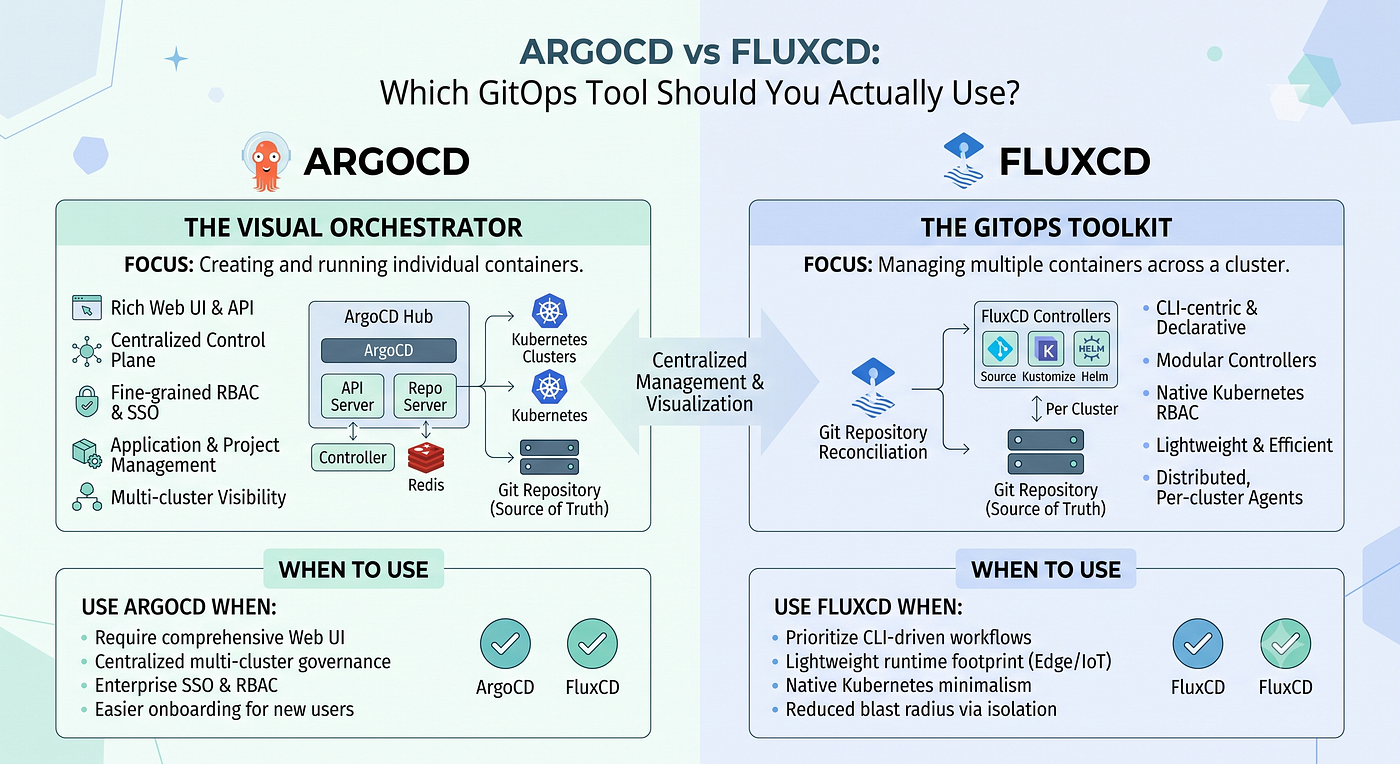
ArgoCD is a GitOps tool built around visibility and control. It’s known for its clean, visual dashboard that shows you exactly what’s happening in your cluster at any given moment.
Key strengths:
- Visual dashboard — see application status, sync history, and live differences between Git and your cluster in one place.
- Multi-cluster management — control deployments across several Kubernetes clusters from a single interface.
- App-of-Apps pattern — a structured way to manage large numbers of applications and environments.
- Flexible sync options — choose between automatic syncing and manual approval before changes go live.
ArgoCD tends to work well for teams that value transparency — especially when multiple engineers are collaborating and need a shared, real-time view of what’s deployed and what’s changed.
What Is FluxCD?
FluxCD takes a different approach. It’s built to be lightweight, modular, and deeply woven into the Kubernetes ecosystem itself, favoring automation over dashboards.
Key strengths:
- CLI and automation-first design — well suited for teams that prefer working through code, pipelines, and version-controller configuration rather than a UL.
- Modular architecture — made up of independent controllers, so you only run the components you actually need.
- Deep Kubernetes-native integration — feels less like an add-on and more like a natural extension of Kubernetes.
- Strong fit for fully automated pipelines, where deployments are meant to run with minimal manual intervention.
FluxCD tends ot appeal to teams that want simplicity, automation, and a setup that stays close to native Kubernetes conventions.
ArgoCD vs FluxCD: Side-by-Side Comparison
Interface
- ArgoCD: Rich visual dashboard
- FluxCD: Primarily CLI-based (UI available via add-ons)
Learning Curve
- ArgoCD: Slightly gentler, thanks to the UI
- FluxCD: Slightly steeper, more automation-oriented
Architecture
- ArgoCD: Single unified application
- FluxCD: Modular set of controllers
Multi-Cluster Support
- ArgoCD: Strong, built-in
- FluxCD: Possible, but requires more manual configuration
Best Suited For
- ArgoCD: Teams that want visibility and shared control
- FluxCD: Teams that want automation and a lightweight footprint
Community and Ecosystem
- ArgoCD: Large and active
- FluxCD: Large and active
Governance
- ArgoCD: CNCF graduated project
- FluxCD: CNCF graduated project
Which One Should You Choose?
There’s no single “better” tool here — the right choice depends on how your team likes to work.
Consider ArgoCD if:
- You want a visual, at-a-glance view of your deployments.
- Multiple teams need shared visibility into cluster state.
- You’re managing several clusters and want centralized control.
Consider FluxCD if:
- Your team prefers automation-first, code-driven workflows.
- You want a lightweight setup with only the components you need.
- You’re building a fully automated CI/CD pipeline with minimal manual steps.
It’s also worth noting that some teams use both — ArgoCD for visibility and reporting, FluxCD for automation-heavy tasks. No rule says you have to pick only one.
Final Thoughts
GitOps has changed how teams manage Kubernetes deployments, making the process more predictable, transparent, and less prone to human error. Both ArgoCD and FluxCD are mature, well-supported tools built around that same goal.
The most reliable way to decide? Set up a small test project with each tool. Get a feel for the workflow, the interface (or lack of one), and how naturally it fits your team’s habits. That hands-on experience will tell you more than any comparison article — including this one.
메타데이터
- post_id
- 543d91edd4cc
- slug
- argocd-vs-fluxcd-which-gitops-tool-should-you-actually-use-543d91edd4cc
- url
- https://medium.com/@parmardevendra23/argocd-vs-fluxcd-which-gitops-tool-should-you-actually-use-543d91edd4cc
- canonical_url
- https://medium.com/@parmardevendra23/argocd-vs-fluxcd-which-gitops-tool-should-you-actually-use-543d91edd4cc
- author_url
- https://medium.com/@parmardevendra23
- status
- ok
- fetched_at
- 2026-07-27 17:46:35


