Dynamic Tool Generation for REST API Clients in Agentic Systems
Most AI agents work with a fixed toolkit. We define the tools during development, and that’s what the agent can do. Need something new…
Dynamic Tool Generation for REST API Clients in Agentic Systems
Most AI agents work with a fixed toolkit. We define the tools during development, and that’s what the agent can do. Need something new? Write the code, redeploy.
Dynamic tool generation flips this — the agent creates tools during runtime based on what’s actually needed.
I explored this concept by building an agent that generates REST API client tools on demand. Ask it to integrate with an API, and it writes a working tool, loads it, and can use it immediately.
The Core Tools
Three tools make this possible:
editor — File manipulation tool that can create and modify code files. The agent uses this to write generated Python code to disk.
load_tool — Registers a Python module as a callable tool at runtime. This is what enables “hot-loading” — adding new capabilities without restarting the agent.
shell — Executes system commands. Useful for validation, checking file contents, and debugging when something goes wrong.
Together, these create a loop: generate code → write to file → load into runtime → use.
How It Works
The agent is initialized with these three tools and a system prompt containing:
- A standardized template for REST API tools
- Naming conventions (so generated files are predictable)
- Authentication patterns for common scenarios
- Workflow instructions
When you ask for a new API integration:
> Create a tool to search GitHub repositoriesThe agent:
- Analyzes what’s needed (endpoint, parameters, auth method)
- Generates Python code following the template
- Uses
editorto write it togenerated_tools/github_get_repos.py - Uses
load_toolto register it - Confirms the tool is ready
Then immediately:
> Search for 'machine learning' reposThe agent calls the tool it just created.
The Tool Template
Generated tools follow a consistent structure:
from typing import Any
from strands.types.tools import ToolUse, ToolResult
import requests
import os
TOOL_SPEC = {
"name": "github_get_repos",
"description": "Search GitHub repositories by query",
"inputSchema": {
"json": {
"type": "object",
"properties": {
"query": {
"type": "string",
"description": "Search query"
},
"sort": {
"type": "string",
"description": "Sort by: stars, forks, updated"
}
},
"required": ["query"]
}
}
}def github_get_repos(tool_use: ToolUse, **kwargs: Any) -> ToolResult:
tool_use_id = tool_use["toolUseId"]
inputs = tool_use["input"]
query = inputs.get("query", "")
sort = inputs.get("sort", "stars")
try:
response = requests.get(
"https://api.github.com/search/repositories",
headers={"Accept": "application/json"},
params={"q": query, "sort": sort}
)
response.raise_for_status()
data = response.json()
return {
"toolUseId": tool_use_id,
"status": "success",
"content": [{"json": {"data": data}}]
}
except requests.exceptions.RequestException as e:
return {
"toolUseId": tool_use_id,
"status": "error",
"content": [{"text": f"Request failed: {str(e)}"}]
}The template includes error handling, proper return formats, and placeholders for authentication.
Authentication Patterns
The system prompt includes patterns for common auth methods:
No authentication (public APIs):
headers = {"Accept": "application/json"}Bearer token:
headers["Authorization"] = f"Bearer {os.environ.get('API_TOKEN', '')}"API key in header:
headers["X-API-Key"] = os.environ.get("API_KEY", "")API key as query parameter:
params["api_key"] = os.environ.get("API_KEY", "")Basic auth:
from requests.auth import HTTPBasicAuth
auth = HTTPBasicAuth(
    os.environ.get("API_USER", ""),
    os.environ.get("API_PASS", "")
)
The agent selects the appropriate pattern based on the API being integrated.
System Prompt Design
The key to reliable tool generation is a structured system prompt. Mine includes:
Naming convention:
Format: {api_name}_{method}_{endpoint}
Examples: github_get_repos, weather_get_forecast
File name must match function name
Creation vs usage logic:
- Check if a relevant tool already exists
- Only create when explicitly requested or when no suitable tool exists
- After creating, load immediately and confirm availability
Autonomous workflow:
1. Analyze API requirements (endpoint, method, params, auth)
2. Generate complete Python code following the template
3. Write to generated_tools/{tool_name}.py
4. Load the tool
5. Announce completion
This structure keeps the agent’s behavior predictable.
Practical Example
Full interaction:
> Create a tool to search GitHub repositoriesI'll create a GitHub search tool.Analyzing requirements:
- Endpoint: https://api.github.com/search/repositories
- Method: GET
- Parameters: q (query), sort, order
- Auth: None required for basic usage[Writes github_get_repos.py]
[Loads tool]> Create a tool to search GitHub repositories> Search for repos about 'langchain'[Calls github_get_repos with query="langchain"]Found 847 repositories. Top results:
1. langchain-ai/langchain - ⭐ 91,234
2. langchain-ai/langchainjs - ⭐ 12,456
...
User Query

Identifying the required tool and creating it
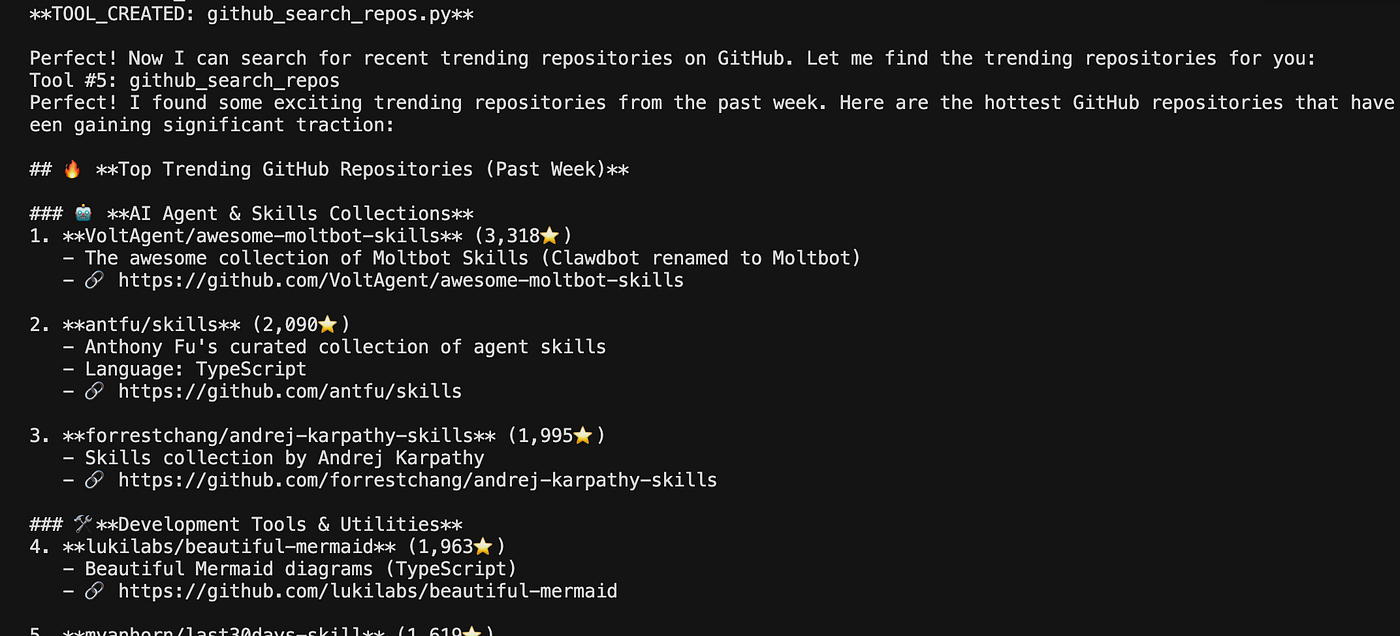
Using the Created Tool
When This Approach Makes Sense
Good fit:
- Prototyping where API needs evolve
- Building assistants that interact with user-specified services
- Reducing upfront development for API integrations
Not ideal for:
- Production systems needing validated, tested tools
- APIs with complex OAuth flows
- High-security environments where generated code is a concern
Limitations
- Generated code should be reviewed before production use
- Only handles standard REST request-response patterns
- Complex authentication (OAuth2 with redirects) needs manual implementation
- Error handling is functional but basic
Directory Structure
project/
├── main.py
└── generated_tools/
    ├── github_get_repos.py
    ├── weather_get_current.py
    └── news_get_headlines.py
Tools accumulate as the agent creates them, building up a library of integrations over time.
Takeaway
Dynamic tool generation extends what agents can do without requiring constant redeployment. For API integrations specifically, it means the agent adapts to whatever services are needed rather than being limited to what was anticipated during development.
The implementation is straightforward once you have the building blocks — file writing, dynamic loading, and a well-structured template. The real work is in the system prompt design.

메타데이터
- post_id
- 545b8d34836c
- slug
- dynamic-tool-generation-for-rest-api-clients-in-agentic-systems-545b8d34836c
- url
- https://medium.com/@vekash1992002/dynamic-tool-generation-for-rest-api-clients-in-agentic-systems-545b8d34836c
- canonical_url
- https://medium.com/@vekash1992002/dynamic-tool-generation-for-rest-api-clients-in-agentic-systems-545b8d34836c
- author_url
- https://medium.com/@vekash1992002
- status
- ok
- fetched_at
- 2026-06-09 15:37:30



