Notion After 8 Months: What Stuck, What I Moved, What I Rebuilt
I’ve abandoned Notion three times. Different years, different reasons, same outcome: I’d set it up with real enthusiasm, use it seriously…
Notion After 8 Months: What Stuck, What I Moved, What I Rebuilt

I’ve abandoned Notion three times. Different years, different reasons, same outcome: I’d set it up with real enthusiasm, use it seriously for a while, and then quietly stop opening it. By the time I noticed, I’d already moved everything important back to wherever it was before.
So when I went back a fourth time last October, I didn’t expect it to last. But I did something different. I started with almost nothing. No templates. No databases. No properties. Just blank pages and a decision to not build anything until I actually needed it.
Eight months later, Notion is still on my Mac. I open it most days. That’s the longest it’s ever survived.
But the version that survived looks nothing like the version I set up in month one. It’s uglier. It’s simpler. It’s missing most of the features that made me choose Notion in the first place. And I think that’s the entire lesson.
TLDR
I went back to Notion for the fourth time and lasted eight months (a personal record). Three things stuck: a flat project database, a running decisions log, and shared async docs. Three things got moved out: quick capture went to Tot, personal tasks went to Things 3, and longer documents went to Craft. Two things got rebuilt from scratch after they stopped working: a wiki (40 pages down to 12) and an onboarding doc (stripped a template back to plain text). The version that’s still alive is the one I’d be embarrassed to show a Notion influencer. No gallery views, no colour coded tags, no relation properties. Just plain pages that people actually open.
Note: The opinions here are my own. I’m not paid or incentivised by any tool mentioned here. No affiliate links, no sponsored placements.
Why I went back
Honestly, it was a practical decision, not a change of heart. I needed somewhere for my team to collaborate on documents, and I was tired of the Google Docs sprawl. Forty files with names like “Q3 planning FINAL v2 (use this one)” scattered across shared drives that nobody had organised since they were created.
Notion was the obvious candidate because everyone already knew what it was. No onboarding required. That mattered more than I would have admitted at the time.
But I’d also been thinking about why the previous three attempts had failed, and I’d started to notice a pattern. Every time, the failure started the same way: I spent more time building my Notion workspace than I spent working in it.
The building trap
This is the thing nobody tells you about Notion, and the thing I had to learn three times before it clicked. Notion rewards building. It’s genuinely fun to design a database, add properties, create linked views, set up templates with fields already filled in. The whole experience feels productive. You can spend an entire afternoon configuring a project tracker with status fields and priority tags and timeline views, and walk away feeling like you accomplished something.
You didn’t. You built a tool. Building a tool and using a tool are different activities, and Notion blurs the line between them better than anything I’ve ever used.
This time, I made a rule: no building anything until I’d needed it for at least two weeks. If I caught myself thinking “it would be nice to have a database for this,” I wrote it on a sticky note and waited. If I was still thinking about it fourteen days later, I’d build it. If I’d forgotten about the sticky note, that was my answer.
Most of the sticky notes got forgotten.
What stuck
Three things survived eight months. All of them are simpler than what I originally planned.
A flat project database
One database. No relations, no rollups, barely any properties. Just a project name, an owner, a status (three options: active, paused, done), and a last updated date that I change manually.
That’s it.
I know what you’re thinking, because I thought it too: this is a spreadsheet. You’re right. It’s basically a spreadsheet inside Notion. The only reason it works better than an actual spreadsheet is that each project row opens into a full page where I keep running notes. That’s the feature that earns its place. Not the database. The page behind the row.
I tried adding priority fields, timeline views, and a “blocked by” relation to other projects. Lasted about three weeks. Nobody updated the priority. Nobody used the timeline. The relation property was always empty because filling it in felt like homework. I deleted all of it in January and nothing broke.
The rule of thumb I landed on: if a property only gets filled in by the person who created the database, it’s not a property. It’s a wish.
A running decisions log
Every project page has a section at the top called “Decisions.” It’s a plain bulleted list. When we decide something, someone writes it down with the date. That’s the entire system.
No database. No template. No status field. Just a running list that answers the question “wait, did we actually decide that or did we just talk about it?”
This is the part of Notion I use most. Not because it’s impressive, but because it solves a problem I used to lose hours to. I’d be three weeks into a project and someone would say “I thought we agreed to do it the other way.” Now there’s a list. It takes ten seconds to check.
The key is that it’s low friction enough that people actually add to it. I tried a more structured version early on (a decisions database with fields for context, stakeholders, and reversibility). It was thorough and nobody used it. The bulleted list version gets updated because it costs nothing to update.
Shared async docs
This is where Notion quietly replaced Google Docs for me, and it’s the one I didn’t expect to last.
We use Notion pages for anything that needs input from more than one person: project briefs, retrospectives, planning docs, the occasional proposal. The editing experience isn’t as polished as Google Docs for raw word processing, but the fact that these documents live alongside our project pages instead of scattered across a shared drive makes them findable. That was the real problem. The documents were fine. Finding them three weeks later was the disaster.
I’ll be honest: the collaboration features aren’t why this works. It works because everything is in one place and search actually returns what I’m looking for. The bar was low. Notion cleared it.
What I moved out
Three things left Notion and went somewhere else. In each case, the replacement is a simpler, smaller tool that does one thing and doesn’t ask me to build anything.
Quick capture went to Tot
I tried using Notion as a scratch pad for fleeting thoughts. Phone numbers, links to check later, a sentence I wanted to remember for a meeting. It was terrible.
Notion takes too long to open for something you need to write down in five seconds. By the time the app loads and I navigate to the right page, the thought is either gone or I’ve already opened something else and typed it there. Tot is seven coloured scratchpads in my menu bar. Click, type, done. I’ve had it on my Mac for over a year now and it’s still the fastest way to capture something I’ll need for the next hour and then forget.
The lesson: Notion is a workspace, not a capture tool. Every time I tried to make it both, the workspace suffered and the capture didn’t happen.
Personal tasks went to Things 3
I built a personal task manager inside Notion. Twice. The first one had a Kanban board with swimlanes. The second one was simpler, just a table with due dates and checkboxes. Both times, I stopped checking it within a month.
The problem isn’t that Notion can’t handle tasks. It can. The problem is that a Notion task database is one more thing to maintain inside a workspace that already has plenty to maintain. And the interaction cost is too high for something you need to check twenty times a day. Open Notion, navigate to the right database, filter to your view, look at what’s due. Or: open Things 3, look at today’s list.
Things 3 costs $49.99 for the Mac app (one time, no subscription), and it’s been the steadiest tool in my stack for almost two years. It does one thing. It does it instantly. It never asks me to configure anything.
Notion databases as task managers are powerful to build and miserable to use daily. I’m done pretending otherwise.
Longer documents went to Craft
Some documents need to feel like documents. A proposal I’m sending externally. A planning doc I want to think through slowly. Something where the writing matters, not just the information.
Notion can do this, but everything in Notion feels like it lives inside a database, even when it doesn’t. There’s a sameness to every page. Craft gives documents their own weight. The writing experience is faster, the formatting is better, and when I share a link to a Craft doc, it looks like something I spent time on. Which I did.
I use Craft’s free plan. It has a block limit (1,000 blocks) that would be a problem if I were trying to use it as a knowledge base, but I’m not. I keep maybe six or seven active documents in there at any time. When they’re done, they either move into Notion as a shared reference or they get archived. Craft costs $5/month if you outgrow the free plan. I haven’t needed to.
The split: if a document is for me to think in, it goes to Craft. If a document is for collaboration, it goes to Notion. Took me about four months to figure that out.
What I rebuilt
Two things in my Notion workspace collapsed under their own weight and had to be rebuilt from scratch. Both times, the rebuild was the same move: delete almost everything and start with less.
The wiki
My original Notion wiki had 40+ pages. Nested pages inside pages, toggle blocks, callout boxes, a sidebar that felt like a textbook table of contents. It was comprehensive. It was well organised. Nobody could find anything in it.
The problem with a 40 page wiki is that search only works if people know what to search for. And the page structure only works if everyone shares the same mental model of where things live. They don’t. I’d put the vacation policy under “Operations.” Someone else would look under “HR.” Someone else would search for “time off” and get no results because the page was called “Leave Policy.”
In February I deleted everything except the twelve pages people actually opened (Notion’s analytics told me which ones). Then I renamed every page to match what someone would actually type into search. “Leave Policy” became “How to book time off.” “Reimbursement Process” became “How to expense something.”
The 12 page wiki gets used. The 40 page wiki was a monument to good intentions.
The onboarding doc
My original onboarding doc was a Notion template. Toggles for each section. A database of tasks the new person was supposed to work through. Callout blocks with tips. It looked beautiful. It was the kind of thing you’d screenshot for a “how I use Notion” thread.
Nobody finished reading it. I know this because I started asking new people during their first week, and the honest answers were some version of “I got through the first few sections and then it was a lot.” The toggle blocks were the worst offender. Each one looked like a small amount of content, but when you opened them all, the document was enormous.
I replaced it with a single page of plain text. No toggles. No database. No callout blocks. No tasks to check off. Just a page that a person could read top to bottom in twenty minutes.
The first person who got the new version read the whole thing on day one. That had never happened before.
What I actually pay
I’m on Notion’s Plus plan: $10/month per user, billed annually ($12 if you go month to month). For my team, that’s around $600 to $700 a year depending on how many people are on it at any given time.
Worth it? Probably. But I’ll be honest: the features I actually use could mostly live on the free plan. What I’m paying for is the longer version history and unlimited file uploads. If it were just me, I’d be on free.
The full stack for how I work now:
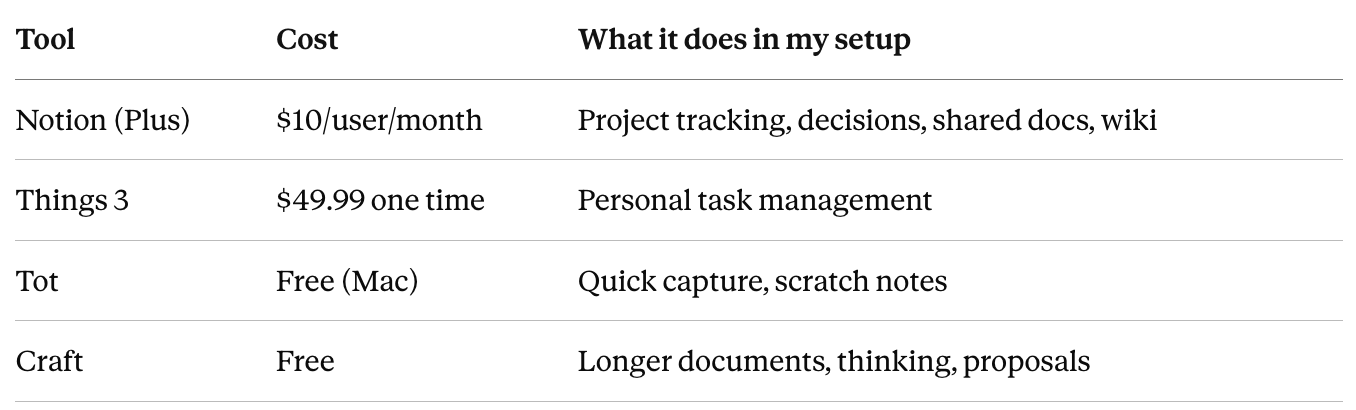
Total cost for everything outside Notion: under $50, once. No subscriptions. That matters more than I expected. The tools that don’t ask for your credit card every month are the ones you forget to evaluate, and forgetting to evaluate a tool is (I’ve learned) the highest form of adoption.
The adoption arc, honestly
Here’s what eight months with Notion actually looked like:
Month one. Excitement. Built too much. Created databases I didn’t need yet. Spent a Saturday designing a project tracker with seventeen properties.
Month two. Started noticing that nobody was updating the fields I’d created. Priority was always “Medium.” Status was always “In Progress.” Timeline was blank.
Month three. Deleted six databases and nine pages. Felt like failure at the time. Was actually the turning point.
Month four. Moved tasks to Things 3 after realising I’d stopped checking the Notion task database entirely. Started using Craft for documents I wanted to write properly.
Month five. Rebuilt the wiki. Went from 40 pages to 12. Renamed everything in plain language.
Month six. Rebuilt the onboarding doc. Stripped the template down to plain text.
Month seven. Stopped thinking about Notion. Used it without noticing I was using it.
Month eight. Wrote this article and realised the Notion that survived is the Notion that a Notion influencer would find boring. No screenshots worth sharing. No setup tour. Just pages people open.
What I’d tell someone starting with Notion today
Don’t build anything for the first month. Use blank pages. Write in them like you’d write in a Google Doc. Resist the urge to add properties, databases, views, and templates. That urge is Notion’s gravity. It pulls you toward building because building feels productive. It isn’t.
After a month, look at which pages you actually open. Build structure only around those. Everything else gets a blank page or doesn’t exist.
And if you find yourself spending more time in Notion than you spend on the work Notion is supposed to support, that’s not a sign that you’re getting organised. That’s a sign that the tool has become the project.
The best Notion setup is the one that looks like you barely tried.
FAQ
1. Is Notion worth paying for in 2026?
The free plan is genuinely generous. You get unlimited pages and blocks, which is more than most people need for personal use. You hit the wall when you need longer version history or larger file uploads. For a team, the Plus plan at $10/user/month is where it starts making sense. I wouldn’t jump to Business ($18/user/month annual) unless you need SSO or private teamspaces.
2. How does Notion compare to Google Docs for team collaboration?
For raw writing and editing, Google Docs is still better. The cursor tracking, commenting, and suggestion mode are more refined. But for keeping documents findable and organised alongside projects, Notion wins. My Google Docs problem was never the documents. It was finding them three weeks later. If that’s your problem too, Notion is the fix.
3. Why not just use Apple Notes?
Apple Notes is great for personal capture, but it doesn’t have shared workspaces, databases, or any of the structure that makes Notion work for a team. If you’re solo and you don’t need collaboration, Apple Notes might be all you need. I wouldn’t use it for anything involving more than one person.
4. Is Things 3 worth it when Notion has task management?
For me, yes. Notion’s task management is powerful to set up and slow to use daily. Things 3 opens instantly and shows me today’s tasks without navigating through a workspace. The $49.99 is a one time payment, and I’ve been using it for nearly two years. If you check your tasks twenty times a day, the speed matters.
5. Will other people on my account actually use Notion?
Depends on what you put in it and how much you ask of them. If you build a complex workspace and expect everyone to maintain it, probably not. If you keep it simple (shared docs, a flat project list, a decisions log) and don’t ask anyone to fill in properties they don’t care about, you have a better chance. The simpler the setup, the more likely it sticks.
6. How do I stop Notion from becoming a graveyard?
Check your analytics. Notion shows you which pages get visited and which don’t. Anything that hasn’t been opened in 60 days, delete it or archive it. Be ruthless. A 12 page workspace that gets used is worth more than a 100 page workspace that doesn’t.
7. Should I use Notion for meeting notes?
I don’t. Meeting notes need to be fast to create, fast to reference, and fast to share. Notion adds friction to all three. I’ve tried it, and the notes ended up orphaned in pages nobody revisited. Your mileage may vary, but I’d keep meeting notes somewhere faster and move only the decisions into Notion.
8. Is Craft a Notion replacement?
No. Craft is a document tool, not a workspace. It doesn’t have databases, wikis, or project tracking. I use it specifically for documents where the writing experience matters and I want the result to look polished. It complements Notion. It doesn’t replace it.
9. How long did it take for Notion to feel useful this time?
About three months. The first month was building too much. The second month was realising most of what I built wasn’t being used. The third month was the turning point: I stripped things back and started using Notion the boring way. It’s been steady since then.
10. Would you start with Notion again if you had to rebuild from scratch?
Yes. But I’d start with three blank pages (projects, decisions, docs) and nothing else. No templates. No databases. No properties. Just pages. I’d let the structure emerge from actual use instead of imagining what I might need. That’s the version that lasts.
메타데이터
- post_id
- 5464c0eb7977
- slug
- notion-after-8-months-what-stuck-what-i-moved-what-i-rebuilt-5464c0eb7977
- url
- https://medium.com/@oh-kayyyy/notion-after-8-months-what-stuck-what-i-moved-what-i-rebuilt-5464c0eb7977
- canonical_url
- https://medium.com/@oh-kayyyy/notion-after-8-months-what-stuck-what-i-moved-what-i-rebuilt-5464c0eb7977
- author_url
- https://medium.com/@oh-kayyyy
- status
- ok
- fetched_at
- 2026-06-09 15:37:30




