AWS Security Groups vs Network ACLs (NACLs): The Complete Beginner’s Guide
If you’ve just started learning AWS, you’ve probably wondered: “What’s the difference between Security Groups and Network ACLs?” At first…
AWS Security Groups vs Network ACLs (NACLs): The Complete Beginner’s Guide
If you’ve just started learning AWS, you’ve probably wondered: “What’s the difference between Security Groups and Network ACLs?” At first, they seem to do the same job — but they actually protect different parts of your network.
In this article, we’ll break down the differences in simple language, use real-world examples, and cover the key concepts you need for the AWS Certified Solutions Architect — Associate (SAA-C03) exam.
Think of It Like Apartment Security
Imagine you live in a gated apartment complex.
There are two levels of security:
- A security guard at the apartment gate checking everyone entering the building.
- A lock on your apartment door protecting your individual apartment.
In AWS:
- Network ACL (NACL) is like the security guard at the apartment gate. It protects the entire subnet.
- Security Group is like the lock on your apartment door. It protects the individual EC2 instance.
This simple analogy makes it much easier to understand how they work together.
What is a Security Group?
A Security Group is a virtual firewall attached to an EC2 instance.
Every network request must pass through the Security Group before reaching the instance.
Key Features
- Operates at the instance level
- Stateful
- Supports Allow rules only
- Can be attached to multiple EC2 instances
- Multiple Security Groups can be attached to the same EC2 instance
Example
Suppose your web server needs to allow HTTP traffic.
Inbound Rules:
TypePortSourceHTTP800.0.0.0/0HTTPS4430.0.0.0/0SSH22Your Office IP
Only these connections will be allowed.
What is a Network ACL (NACL)?
A Network ACL is a stateless firewall that protects an entire subnet.
Every resource inside that subnet is protected by the same Network ACL.
Key Features
- Operates at the subnet level
- Stateless
- Supports both Allow and Deny rules
- Rules are evaluated in numerical order
- Every subnet automatically has a Network ACL
Stateful vs Stateless
This is the most important difference.
Security Group (Stateful)
Imagine your laptop sends an SSH request to an EC2 instance.
Laptop
   │
   ▼
Security Group
   │
   ▼
EC2 Instance
If the inbound SSH request is allowed, the return traffic is automatically allowed.
You do not need to create an outbound rule for the response.
This is called Stateful.
Network ACL (Stateless)
Now imagine the same SSH request passing through a Network ACL.
Laptop
   │
   ▼
Network ACL
   │
   ▼
EC2 Instance
The request must be allowed by an inbound rule.
The response must also be allowed by an outbound rule.
If either rule is missing, communication fails.
This is called Stateless.
Security Group vs Network ACL
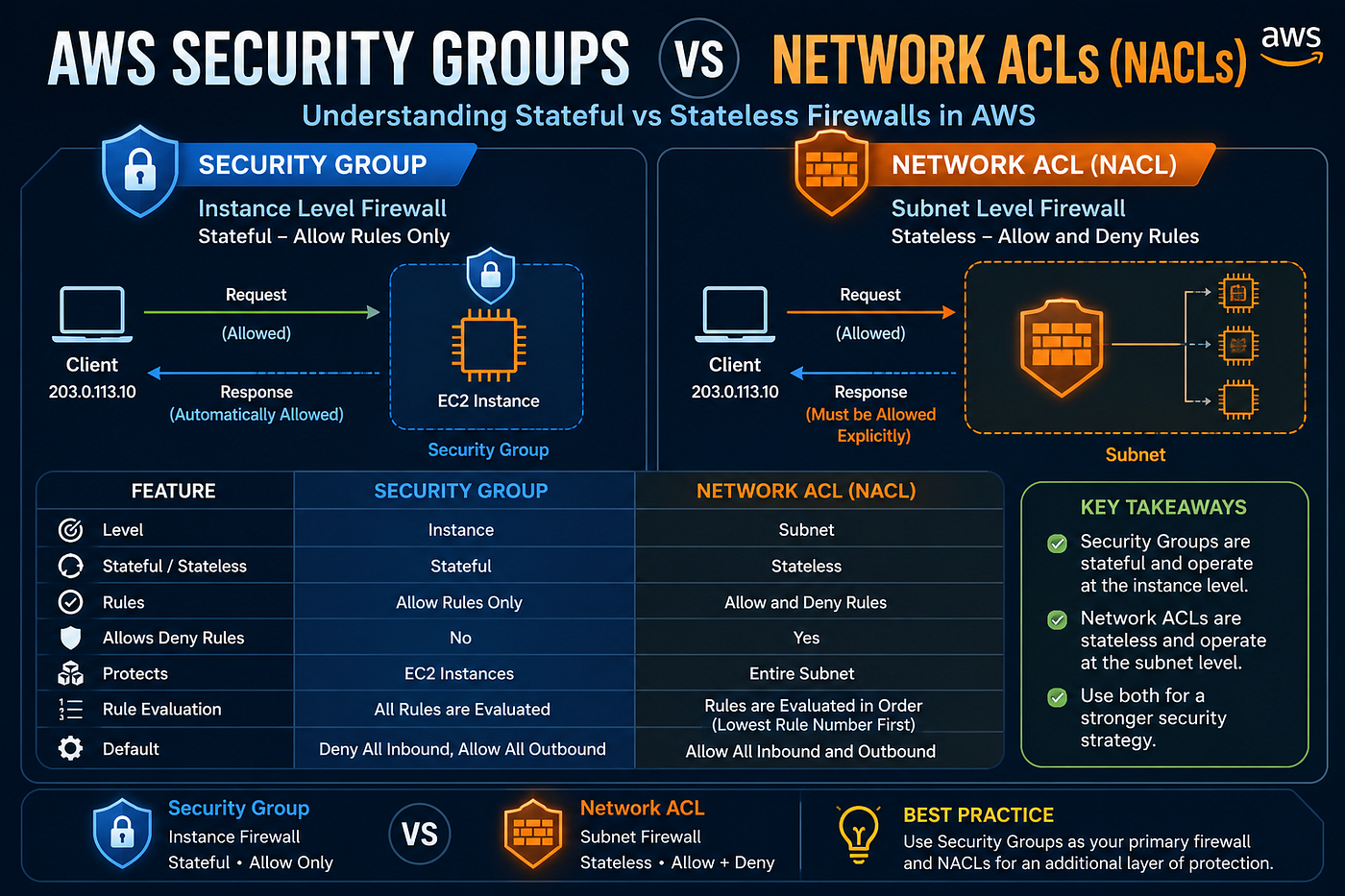
FeatureSecurity GroupNetwork ACLLevelInstanceSubnetStateful✅ Yes❌ NoAllow Rules✅ Yes✅ YesDeny Rules❌ No✅ YesProtectsIndividual EC2Entire SubnetRule EvaluationAll rulesLowest rule number first
Real-World Example
Imagine your architecture looks like this:
Internet
      │
      ▼
Internet Gateway
      │
      ▼
Public Subnet
      │
      ▼
Application Load Balancer
      │
      ▼
EC2 Instance
Security Group
Allow:
- HTTP (80)
- HTTPS (443)
- SSH (22) from your office IP
Network ACL
Allow:
- HTTP
- HTTPS
- Ephemeral Ports
Deny:
- Known malicious IP ranges
Together, they provide layered security.
When Should You Use Security Groups?
Use Security Groups when you want to:
- Protect EC2 instances
- Allow application traffic
- Control access between AWS resources
- Secure databases
Most AWS architectures rely primarily on Security Groups.
When Should You Use Network ACLs?
Use Network ACLs when you need:
- Subnet-level protection
- Explicit Deny rules
- Additional security layer
- Network-wide filtering
AWS Exam Tips
Whenever you see these keywords, remember:
Question:
Which AWS service is stateful?
✅ Security Group
Question:
Which AWS service supports explicit Deny rules?
✅ Network ACL
Question:
Which service protects an EC2 instance?
✅ Security Group
Question:
Which service protects an entire subnet?
✅ Network ACL
Question:
Which service evaluates rules in numerical order?
✅ Network ACL
Quick Memory Trick
Security Group✔ Instance Level
✔ Stateful
✔ Allow Only----------------------Network ACL✔ Subnet Level
✔ Stateless
✔ Allow + DenyCommon Mistakes Beginners Make
❌ Thinking Security Groups can deny traffic.
➡️ They cannot. Security Groups only allow traffic.
❌ Forgetting outbound rules in Network ACLs.
➡️ Since NACLs are stateless, both inbound and outbound rules are required.
❌ Using only one Security Group for everything.
➡️ Create separate Security Groups for web servers, application servers, and databases to follow the principle of least privilege.
Best Practices
- Use Security Groups as your primary firewall.
- Use Network ACLs for subnet-level filtering.
- Allow only the required ports.
- Restrict SSH access to trusted IP addresses.
- Avoid opening unnecessary ports to the internet.
- Follow the Principle of Least Privilege.
Final Thoughts
Security Groups and Network ACLs are both essential components of AWS networking, but they serve different purposes.
If you remember one thing from this article, let it be this:
- Security Groups protect instances.
- Network ACLs protect subnets.
Understanding this difference will help you build secure, scalable, and production-ready AWS architectures.
If you found this article helpful, consider following me on Medium. I’ll be sharing practical AWS, DevOps, Kubernetes, Terraform, and Cloud Architecture articles every week as I continue learning and building production-ready projects.
Happy Learning! ☁️🚀
Suggested Cover Image
Title: AWS Security Groups vs Network ACLs
Subtitle: Understand Stateful vs Stateless Firewalls with Real-World Examples
Visual Concept:
- Left side: EC2 instance with a shield icon labeled Security Group
- Right side: Subnet surrounded by a firewall labeled Network ACL
- Bottom: A comparison table with:
- Instance vs Subnet
- Stateful vs Stateless
- Allow Only vs Allow + Deny
- EC2 vs Subnet Protection
This combination of a clean cover image and the article above will look professional on Medium and is likely to be useful for readers preparing for AWS certifications or learning cloud networking.
메타데이터
- post_id
- 547535072e13
- slug
- aws-security-groups-vs-network-acls-nacls-the-complete-beginners-guide-547535072e13
- url
- https://medium.com/@sakthibazz/aws-security-groups-vs-network-acls-nacls-the-complete-beginners-guide-547535072e13
- canonical_url
- https://medium.com/@sakthibazz/aws-security-groups-vs-network-acls-nacls-the-complete-beginners-guide-547535072e13
- author_url
- https://medium.com/@sakthibazz
- status
- ok
- fetched_at
- 2026-07-27 17:09:37


