Behind Every AI Coding Assistant Is a Hidden System — Here’s How It Works
AI coding assistants have changed the way we write software.
Behind Every AI Coding Assistant Is a Hidden System — Here’s How It Works
AI coding assistants have changed the way we write software.
Today, instead of writing every line of code ourselves, we simply describe what we want:
“Create a REST API.”
“Fix this bug.”
“Refactor this module.”
Within seconds, tools like Claude Code, Codex CLI and Gemini CLI start reading our project, editing files, running commands, testing code and suggesting changes.
It almost feels like there’s another developer sitting beside us.
But have you ever wondered what actually happens after you press Enter?
Most people think the AI simply receives a prompt, generates some code and sends it back. In reality, a coding agent is doing far more than that. Understanding this hidden workflow is what eventually inspired me to build TokenPulse, a VS Code extension that tracks AI coding usage directly from your your local session logs.
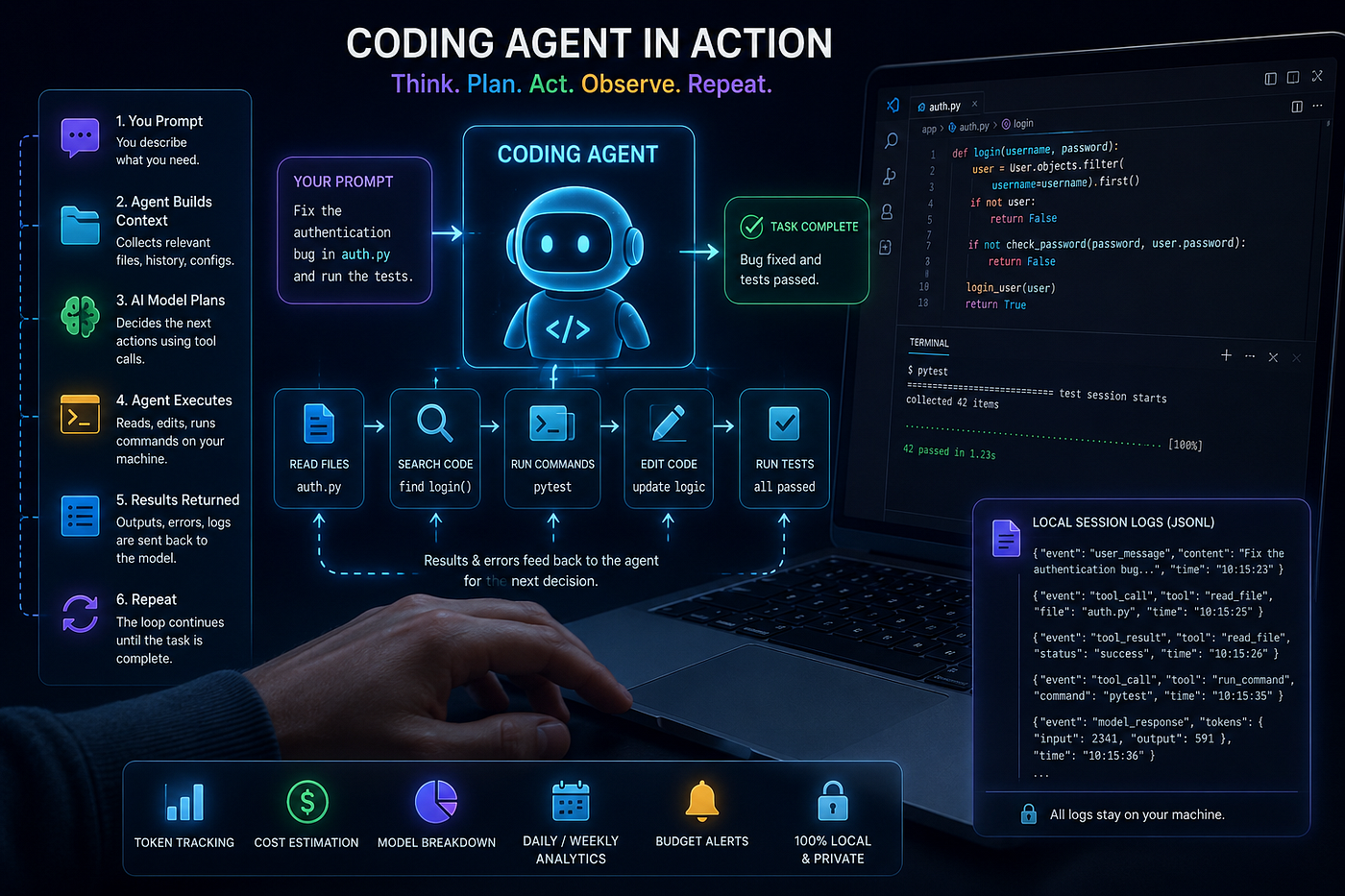
What Is a Coding Agent, Really?
A coding agent is much more than a chatbot.
Think of ChatGPT as someone answering your questions.
A coding agent, on the other hand, behaves more like a junior software engineer who has access to your project.
Instead of only generating text, it can:
- read project files
- search through folders
- execute terminal commands
- modify source code
- run tests
- inspect errors
- repeat this entire process until the task is complete
Rather than one conversation, it’s constantly making decisions about what to do next.
What Happens When You Ask It to Fix a Bug?
Imagine you type:
“Fix the authentication bug.”
It looks like a single prompt.
Behind the scenes, however, the agent performs many internal steps.
Step 1 — Understanding Your Project
Before contacting the AI model, the coding agent collects information.
It may gather:
- your prompt
- previous conversation history
- relevant project files
- README files
- open editors
- configuration files
- previous tool outputs
All of this becomes the context sent to the AI.
The model never sees your entire computer. It only sees the information the coding agent decides is important for that particular request.
Step 2 — The Model Makes a Plan, not just an answer
The AI doesn’t immediately return code.
Instead, it often replies with instructions like:
- Read this file.
- Search for this function.
- Run this command.
- Edit these lines.
- Execute the tests.
These are called tool calls — structured, machine-readable requests. The model itself has no hands on your computer; it can only generate text, so it asks the surrounding agent to act on its behalf, in a format the agent knows how to parse.
Step 3 — The Agent Executes Those Actions
Now the coding agent becomes active.
It may:
- open files
- read source code
- execute Git commands
- run Python scripts
- build the project
- execute tests
Whatever output is produced is collected.
Step 4 — The Results Go Back to the AI
Suppose the tests fail. The agent sends the actual error message back to the model in the next turn, not a summary of what it hoped would happen. Now the model reasons from reality: maybe another file needs changing, maybe a different command should run, maybe the tests need to run again. This is what makes the loop adaptive instead of a fixed, blind plan.
Step 5 — Repeat Until Finished
This cycle keeps repeating.
Prompt → Tool Call → Execution → Result → New Tool Call.
Sometimes this loop runs ten or twenty times before you ever see the final response. To you, it looks like: “Fixed the bug.” Internally, dozens of operations may have just happened.
Every One of Those Steps Uses Tokens
Each interaction with the AI model consumes tokens.
Every time the coding agent sends context to the model:
- input tokens are charged
Every time the model replies:
- output tokens are charged
Now imagine a coding agent reading ten files, editing three files, running five tests and making several corrections.
That single prompt may actually become twenty or thirty separate AI requests.
This is exactly why AI-assisted development can consume far more tokens than developers realize and why a session’s true usage is often much higher than the visible conversation suggests.
So How Does the Coding Agent Remember Everything?
Here’s something most developers don’t know. Every coding agent keeps a record of what happened.
Whenever you interact with Claude Code, Codex CLI, Gemini CLI and many similar tools, they continuously save the session locally on your computer. Usually, every interaction is written as a JSONL (JSON Lines) file. Claude Code writes to ~/.claude/projects/. Codex CLI writes to ~/.codex/sessions/. Gemini CLI writes to ~/.gemini/tmp/.
Each line is a snapshot of one step in the conversation, and it typically carries:
- The turn itself — your prompt or the model’s response, including tool calls made and the results they returned.
- Token accounting — input and output tokens for that turn, often with a cache-token breakdown. Anthropic-style logs report cache reads as additive on top of input tokens; OpenAI-style logs report cached tokens as a subset already folded into the input count. Same idea, opposite accounting — mixing the two silently doubles or drops tokens from any total that uses both.
- The model identifier — which exact model handled that turn, since some tools can switch models mid-session.
- Session and timestamp metadata, so the log can be reconstructed in order and usage can be sliced by day, week, or month.
- Occasionally, provider-side quota or plan data — some tools log a snapshot of your remaining plan usage or rate limits, because they fetched it to show inside their own UI, and it just happens to land in the same file.
As the conversation grows, new lines are simply appended. Nothing magical is happening. The coding agent is quietly maintaining a detailed log of everything it does.
Why Do Coding Agents Bother Saving All This?
A few real needs drive it, not logging for logging’s sake:
- Session recovery. If your terminal crashes or you close the tool mid-task, the agent needs a way to pick up exactly where it left off. The log is that record.
- Context management. Long conversations don’t fit inside a model’s context window forever. Agents use these logs to decide what to keep, summarize or drop as a session grows.
- Their own usage displays. Most of these CLIs show you some usage number in their own interface — a session cost, a rate-limit warning — and that number comes from the exact same log they’re already writing.
- Debuggability, both for the tool’s own developers and, as it turns out, for anyone building on top of the logs later.
Then I Started Wondering
While poking around in these logs, something became obvious: the information I actually wanted already existed on my computer. The agents were already recording token usage, models, timestamps and full usage statistics — turn by turn, session after session.
Yet if I wanted to understand my total AI spending, I had to open a different dashboard for every provider. Claude had one. OpenAI had another. Gemini had another. Everything scattered, none of it talking to the others.
So I asked myself: if all this information already exists locally, why can’t one tool just read it and show everything in one place?
That question became TokenPulse.
GitHub: https://github.com/Sanraj-Lachhiramka/Token-pulse
Introducing TokenPulse
TokenPulse is a VS Code extension that monitors AI coding usage directly from the local session files created by coding agents. Instead of connecting to billing APIs or requiring API keys, it simply watches the log files your coding tools already generate. Whenever the coding agent writes a new entry, TokenPulse immediately detects it.
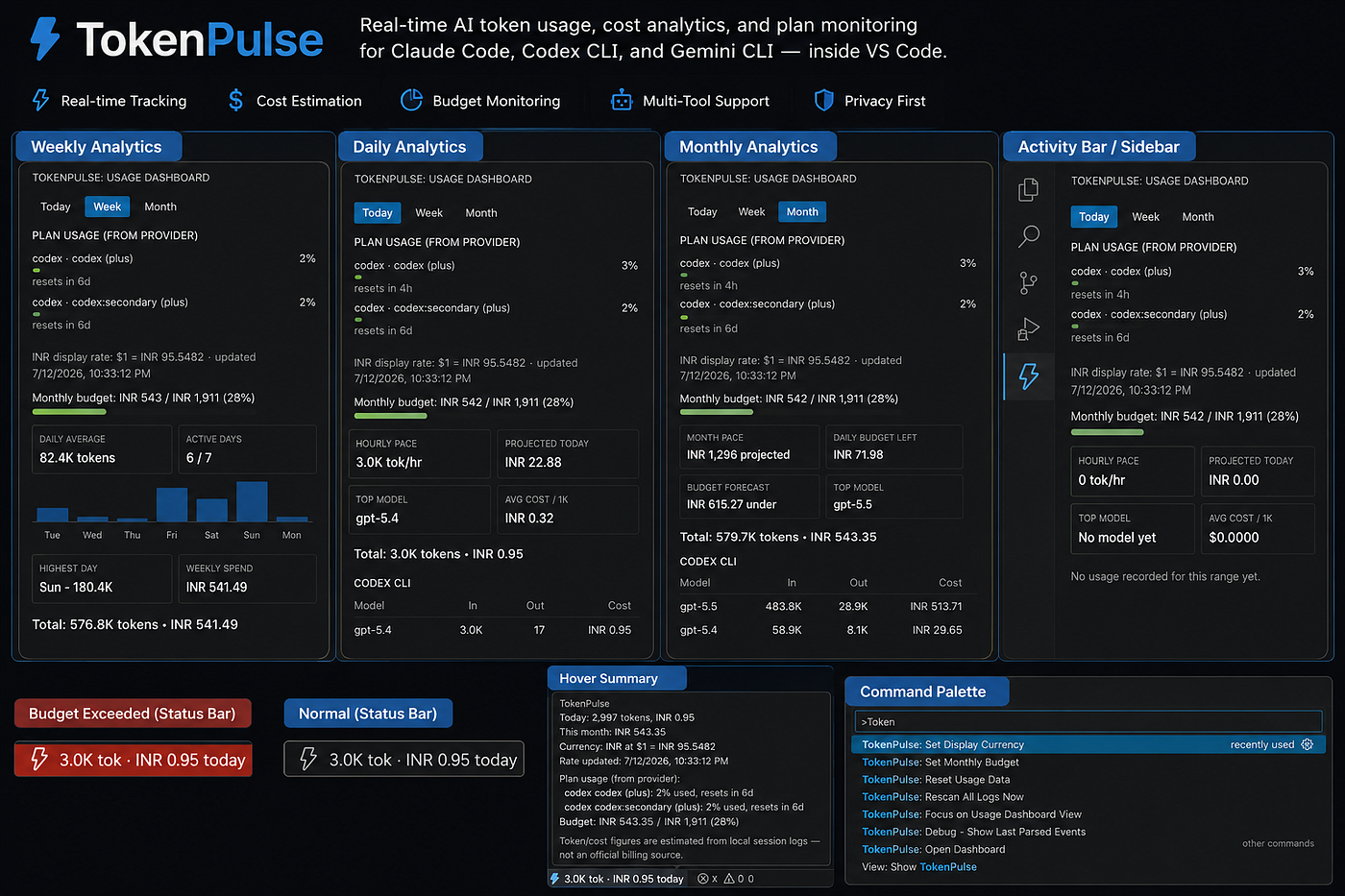
TokenPulse — My Vscode Extension (GitHub: https://github.com/Sanraj-Lachhiramka/Token-pulse)
It extracts useful information such as:
- token usage
- model name
- timestamps
- session details
- provider information
Since every coding agent stores data differently, TokenPulse normalizes these different formats into one common structure. From there it calculates estimated cost using built-in pricing data and presents everything inside VS Code. The effect is a single, always-on view: a status bar entry showing today’s token count and estimated spend, and a sidebar dashboard breaking usage down by tool, by model, and by day, week, or month.
What Can It Show?
Instead of checking multiple dashboards, TokenPulse provides one unified view.
It includes:
- Live token tracking
- Cost estimation
- Daily, weekly, and monthly analytics
- Model-wise usage
- Provider-wise statistics
- Budget monitoring
- Spending forecasts
- Status bar indicators
- Interactive dashboards
For developers working with multiple coding agents every day, this creates a single source of truth.
It also tracks a monthly budget you set yourself and doesn’t just wait until you cross it — it forecasts where you’re headed based on current pace, shows daily budget remaining and turns the status bar red once you actually exceed the number you set. When a provider happens to log its own plan quota locally — usage percentage, remaining allowance, reset timers — TokenPulse surfaces that too, kept clearly separate from its own estimates, since a provider-reported number is more trustworthy than anything TokenPulse calculates on its own.
There’s a smaller convenience on top: since everything is tracked internally in USD, TokenPulse can display totals in INR instead, fetching a live exchange rate and caching it locally so it isn’t phoning home on every dashboard refresh — one more small piece of “why send a request when the data can just sit on disk.”
Everything Stays Local
One design decision was especially important to me.
TokenPulse never uploads your conversations. It doesn’t need your API keys. It doesn’t depend on cloud services. It simply reads the local session files already present on your machine and builds useful analytics from them. Your data remains yours.
Built to Stay Honest
One thing I was careful about while building this: TokenPulse never pretends to be a billing system. These are best-effort estimates derived from local logs, not an official financial record — for anything that actually matters financially, the advice is to check the provider’s own billing dashboard. Log formats change between tool versions since they aren’t public APIs, so the project stays small and readable, with two commands built specifically for when things drift: Debug — Show Last Parsed Events, which dumps exactly what TokenPulse most recently extracted so you can spot a broken field mapping, and Rescan All Logs Now, which restarts every watcher and re-reads the logs from scratch. A plain Reset Usage Data command wipes only TokenPulse's own local history — a reminder that everything the extension knows lives in one small local store, not somewhere it has to be requested back from.
Under the Hood
The architecture mirrors the workflow: a watchers layer tails the raw log files byte by byte, a parsers layer turns inconsistent JSONL schemas into one normalized usage event, a pricing module estimates cost per model and a ledger persists everything locally. A status bar module and a dashboard panel handle the two layers of UI, from an always-visible glance to a full breakdown.
What I Took Away From Building This
Building TokenPulse taught me something I didn’t expect going in: a lot of developers assume the valuable data around AI coding tools is locked behind expensive, permissioned APIs. In reality, a surprising amount of it is already sitting on your own disk, in plain JSON, written the whole time whether you were looking or not.
The challenge isn’t collecting more data. It’s understanding how these tools work internally and using that knowledge to build something genuinely useful. That’s exactly what TokenPulse does. It takes information that coding agents already write every day and transforms it into insights that help developers understand their AI usage, control costs and make better decisions while coding.
TokenPulse is fully open source and I’d love to hear your feedback or contributions.
GitHub Repository: https://github.com/Sanraj-Lachhiramka/Token-pulse
If you found this article helpful, consider starring the repository. It helps others discover the project and motivates future development.
메타데이터
- post_id
- 55745c541808
- slug
- behind-every-ai-coding-assistant-is-a-hidden-system-heres-how-it-works-55745c541808
- url
- https://medium.com/@sanrajlachhiramka/behind-every-ai-coding-assistant-is-a-hidden-system-heres-how-it-works-55745c541808
- canonical_url
- https://medium.com/@sanrajlachhiramka/behind-every-ai-coding-assistant-is-a-hidden-system-heres-how-it-works-55745c541808
- author_url
- https://medium.com/@sanrajlachhiramka
- status
- ok
- fetched_at
- 2026-07-17 17:19:20