Supercharge Your ComfyUI Workflows with GCP GenMedia: A Deep Dive into Video Generation Workflow
Imagine giving an AI a simple prompt like “A guy in a leather jacket driving a sports bike in a desert during sunset,” and watching it…
Supercharge Your ComfyUI Workflows with GCP GenMedia: A Deep Dive into Video Generation Workflow
Imagine giving an AI a simple prompt like “A guy in a leather jacket driving a sports bike in a desert during sunset,” and watching it expand into a detailed, cinematic video with consistent characters and breathtaking environments. This isn’t magic; it’s the synergy between ComfyUI and Google’s Generative Media (GenMedia) models.
In this post, we explore the genmedia_video_generation_workflow.json from the **comfyui-google-genmedia-custom-nodes** repository. This workflow demonstrates how to leverage Google’s powerful models to automate prompt engineering and multi-modal video generation at a state-of-the-art level.

The Challenge: Prompt Engineering for Video
Generating high-quality AI video requires immense detail. You must specify camera angles, lighting, textures, and physics. Manually drafting these for every scene is a significant expertise barrier. The logical question arises: What if we could use AI to write the prompts for us?
The Solution: The GenMedia Workflow

GenMedia sample workflow
The GenMedia workflow solves this via a multi-step approach using subgraphs to organize advanced logic. It leverages different Google models for their specific strengths, orchestrating a complex pipeline into a seamless automated process.
Step 1: The AI Prompt Engineer (Gemini 2.5/3.1)
Starting with a core concept input, the workflow utilizes the scene_prompt_rewriter subgraph. Within this stage, a **Gemini 2.5/3.1** node transforms the idea into a structured JSON object, generating five distinct prompt categories: Character, Prop, Background, Storyboard, and Video Action.
To align with specific brand standards or bespoke workflow requirements, the system prompt for this subgraph can be further refined and optimized.

Prompt rewriter subgraph
Step 2: JSON Cleanup & Parsing
Large Language Models (LLMs) often wrap JSON in markdown code blocks. To make this data usable, the JSON Response Parser subgraph acts as a cleanup crew. It uses StringReplace and RegexReplace to strip markdown tags, ensuring the JSONParse node receives a valid string.

JSON parser subgraph
Step 3: The Multi-Modal Orchestra
The final phase occurs within the Video Generator Subgraph. Using **Nano Banana and [Veo 3.1](https://docs.cloud.google.com/vertex-ai/generative-ai/docs/models/veo/3-1-generate)**, the workflow generates individual components images (Character, Prop, Background), composes them into a single key storyboard frame, and finally animates that storyboard into a high-quality 4K video using Veo image to video functionality.
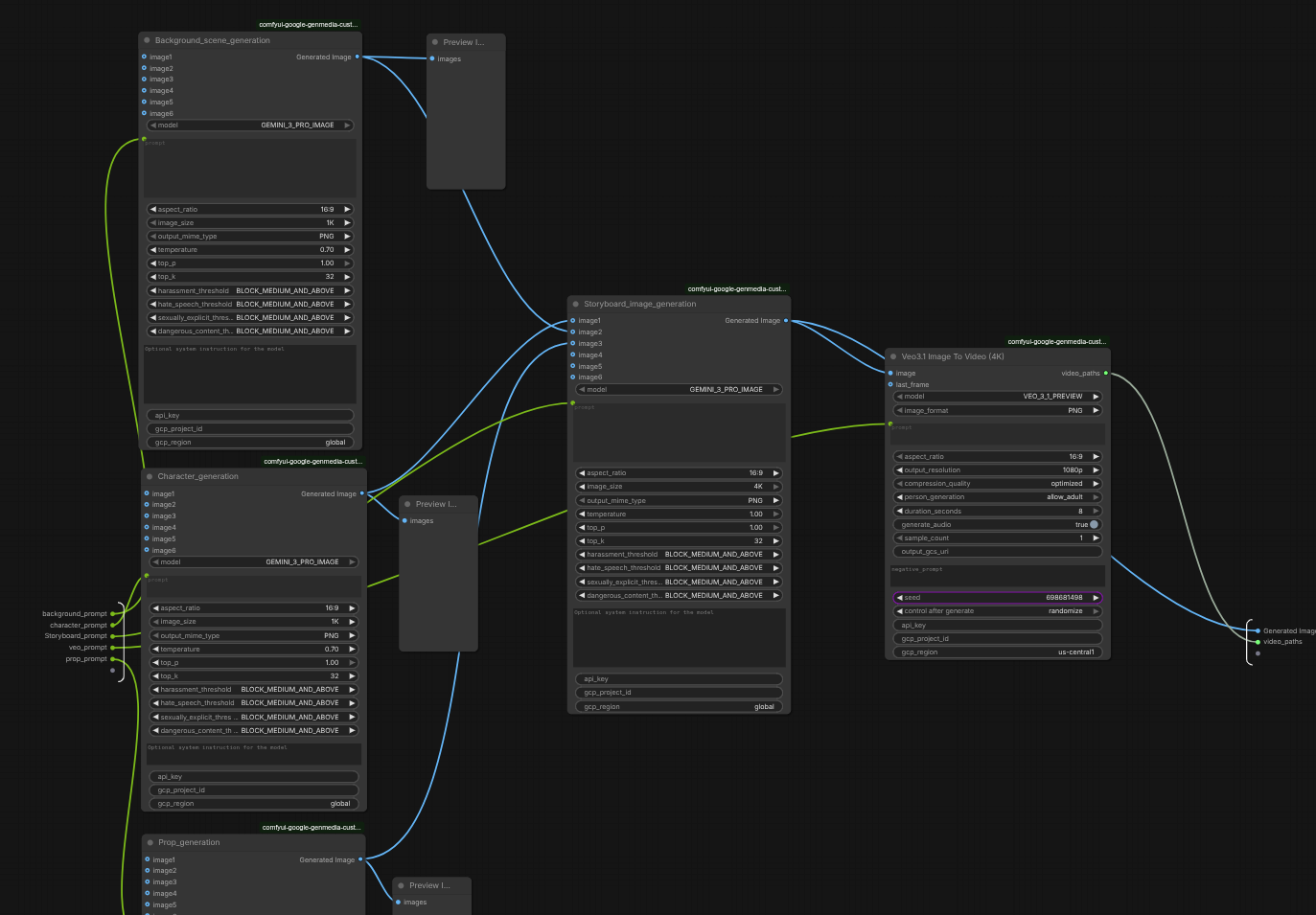
Video generation subgraph
Key Advantages of the Workflow
This demonstration underscores the critical roles of Automated Prompt Engineering, Multimodal Chaining, and Robust Data Handling. By converting Large Language Model outputs into high-quality visual assets, it enables the creation of complex video content. Beyond its current capabilities, the pipeline can be expanded to include LLM-based evaluation, advanced prompt rewriting, or the production of multiple 8-second segments to facilitate the generation of micro-dramas or short-form advertisements.
While the existing architecture illustrates the “art of the possible” by showcasing how a pipeline can be successfully orchestrated into subgraphs, it remains flexible enough for end users to customize and build according to their specific requirements.
How to Get Started
Install the Custom Nodes Start by installing the comfyui-google-genmedia-custom-nodes custom nodes into your ComfyUI environment.
Configure and Authenticate Your Google Cloud Project Before generating media, you must set your target project and authenticate your local environment so the nodes can access Google Cloud APIs. Open your terminal and run the following commands:
- Set your active project: Replace [YOUR_PROJECT_ID] with your actual Google Cloud project ID.
gcloud config set project [YOUR_PROJECT_ID]- Log in to authenticate: This command generates the Application Default Credentials (ADC) needed for the custom nodes to function.
gcloud auth application-default loginLoad the Workflow Once authenticated, launch ComfyUI and load the genmedia_video_generation_workflow.json file into your workspace.
Experience the Automation With the workflow loaded, you only need to provide your creative concept into the text prompt. Queue the prompt to sit back and experience the automated video generation process firsthand!
Explore the Full Series
Ready to dive into the rest of the workflow series? Find the foundational overview and all published posts below:
- Introductory Blog: Orchestrating Production Grade AI: Introducing the GCP GenMedia & ComfyUI Workflow Series: A foundational overview of the entire series and the vision for production-grade AI pipelines.
- Next Up: The Creative Archive: Building a Gemini Powered Asset Management System for ComfyUI: Demonstrating how to establish a context-aware Media Asset Management (MAM) system by leveraging Gemini Pro for automated tagging and Gemini Embedding for native semantic search.
We encourage you to explore the custom nodes, experiment with the workflows, and actively contribute to the development of next-generation creative infrastructure.
For detailed inquiries or to discuss specific enterprise implementation strategies, please contact us:
This is a Gemini use-case demonstration; it is not an official Google product or blog. “comfyui-google-genmedia-custom-nodes” repository is forked from GoogleCloudPlatform/comfyui-google-genmedia-custom-nodes
메타데이터
- post_id
- 55de36b8bdcd
- slug
- supercharge-your-comfyui-workflows-with-gcp-genmedia-a-deep-dive-into-video-generation-workflow-55de36b8bdcd
- url
- https://medium.com/google-cloud/supercharge-your-comfyui-workflows-with-gcp-genmedia-a-deep-dive-into-video-generation-workflow-55de36b8bdcd
- canonical_url
- https://medium.com/google-cloud/supercharge-your-comfyui-workflows-with-gcp-genmedia-a-deep-dive-into-video-generation-workflow-55de36b8bdcd
- author_url
- https://medium.com/@SunilKumarJB
- status
- ok
- fetched_at
- 2026-07-08 17:17:42