AWS SSM: Deploying with GitHub Actions
AWS Systems Manager (SSM) lets a GitHub Actions workflow run shell scripts on a private EC2 fleet without storing long-lived AWS access…
AWS Systems Manager: Deploying with GitHub Actions
AWS Systems Manager (SSM) lets a GitHub Actions workflow run shell scripts on a private EC2 fleet without storing long-lived AWS access keys in GitHub, without opening SSH, and without provisioning a self-hosted runner inside the VPC.
In this blog we will set up an IAM role that GitHub Actions can assume via OIDC, store an HTML template in Parameter Store, and write a workflow that uses Run Command to deploy the template to every tagged instance.
The post covers:
- Prerequisites
- The GitHub OIDC Trust Relationship
- The IAM Role for the Workflow
- The HTML Template in Parameter Store
- The Deploy Workflow
Prerequisites
Three things need to be in place:
- A GitHub repo where the workflow will live. Private is fine; OIDC trust works for both visibility levels.
- The GitHub OIDC identity provider added to AWS IAM. This is the AWS-side configuration that tells AWS to accept tokens signed by GitHub, added once per AWS account with provider URL
https://token.actions.githubusercontent.comand audiencests.amazonaws.com. - An EC2 fleet tagged
Purpose=ssm-demo, SSM-managed as in the first post in this series, with nginx already installed.
Full walkthrough of the OIDC provider setup in AWS is in the GitHub docs: Configuring OpenID Connect in Amazon Web Services
The GitHub OIDC Trust Relationship
OIDC is the mechanism that lets GitHub Actions prove its identity to AWS without storing any AWS credentials in GitHub. When the workflow runs, GitHub gives it a short-lived token that names the repo, the branch, and the workflow file, then AWS checks that token against the IAM role’s trust policy and hands back temporary credentials if the rules match. No long-lived AWS access key ever sits in GitHub.
We will be using the zAbuQasem/ssm-demo repository in this post.
Trust policy for the role
{
  "Version": "2012-10-17",
  "Statement": [
    {
      "Effect": "Allow",
      "Principal": {
        "Federated": "arn:aws:iam::666715258628:oidc-provider/token.actions.githubusercontent.com"
      },
      "Action": "sts:AssumeRoleWithWebIdentity",
      "Condition": {
        "StringEquals": {
          "token.actions.githubusercontent.com:aud": "sts.amazonaws.com"
        },
        "StringLike": {
          "token.actions.githubusercontent.com:sub": "repo:zAbuQasem/ssm-demo:*"
        }
      }
    }
  ]
}
The sub condition is the gate that restricts which GitHub workflow can assume this role, and a wildcard like repo:zAbuQasem/ssm-demo:* allows any branch and any workflow_dispatch run from the named repo.

To restrict to a specific branch use repo:zAbuQasem/ssm-demo:ref:refs/heads/main, or to restrict to a specific GitHub environment use repo:zAbuQasem/ssm-demo:environment:production.
Important: leaving the
subopen to all repos in your organization is the most common cause of accidental privilege escalation, so set it narrowly.
The IAM Role for the Workflow
The role’s permissions should be the minimum the workflow needs, which for this demo means reading one parameter and sending one Run Command to tagged instances.
Permissions policy for the role
{
  "Version": "2012-10-17",
  "Statement": [
    {
      "Sid": "ReadAppParameters",
      "Effect": "Allow",
      "Action": [
        "ssm:GetParameter",
        "ssm:GetParameters",
        "ssm:GetParametersByPath"
      ],
      "Resource": "arn:aws:ssm:us-east-1:666715258628:parameter/app/web/*"
    },
    {
      "Sid": "AllowSendCommandDocument",
      "Effect": "Allow",
      "Action": "ssm:SendCommand",
      "Resource": "arn:aws:ssm:*::document/AWS-RunShellScript"
    },
    {
      "Sid": "AllowSendCommandTaggedInstances",
      "Effect": "Allow",
      "Action": "ssm:SendCommand",
      "Resource": "arn:aws:ec2:us-east-1:666715258628:instance/*",
      "Condition": {
        "StringEquals": {
          "ssm:resourceTag/Purpose": "ssm-demo"
        }
      }
    },
    {
      "Sid": "ReadCommandOutput",
      "Effect": "Allow",
      "Action": [
        "ssm:GetCommandInvocation",
        "ssm:ListCommandInvocations",
        "ssm:DescribeInstanceInformation"
      ],
      "Resource": "*"
    }
  ]
}
The ssm:resourceTag/Purpose=ssm-demo condition restricts SendCommand to instances carrying that tag, since without it the role could deploy to any SSM-managed instance in the account, which is too broad for a deploy role.
The document ARN lives in a separate statement because AWS-managed documents do not carry user tags, so a tag condition on the same statement would block the call.
With both JSON blocks saved to local files (trust-policy.json and permissions-policy.json), the role can be created in two CLI calls:
Creating the role
aws iam create-role \
  --role-name GitHubActions-SSM-Demo \
  --assume-role-policy-document file://trust-policy.json
aws iam put-role-policy \
--role-name GitHubActions-SSM-Demo \
--policy-name SSMDemoDeploy \
--policy-document file://permissions-policy.jsonThe first call creates the role with the trust policy as its only entry point, so only a GitHub OIDC token that satisfies the sub condition can assume it, and the second call attaches an inline permissions policy that scopes what the role can do once assumed.
The HTML Template in Parameter Store
The deploy needs an artifact to ship, and for this demo it is a single index.html file with a __BUILD__ token that the workflow replaces with the commit SHA at deploy time, so every instance serves a page that names the exact build it is running.
index.html template
<!doctype html>
<html>
<head><title>SSM Demo</title></head>
<body style="font-family: sans-serif; max-width: 600px; margin: 2em auto; padding: 1em;">
  <h1>Deployed by GitHub Actions via SSM</h1>
  <p>Build: <code>__BUILD__</code></p>
  <p>This page was pushed to the fleet using AWS SSM!</p>
</body>
</html>
The template lives in Parameter Store rather than in the repo, so a copy edit to the page does not require a commit. Anyone with ssm:PutParameter on that path can ship a new template, and the next deploy picks it up.
Storing the template
aws ssm put-parameter \
  --name /app/web/index_html \
  --value file://index.html \
  --type String \
  --overwrite
Now the parameter exists at /app/web/index_html with the literal __BUILD__ token still in place. The workflow does the substitution at deploy time, not the writer of the template.
The Deploy Workflow
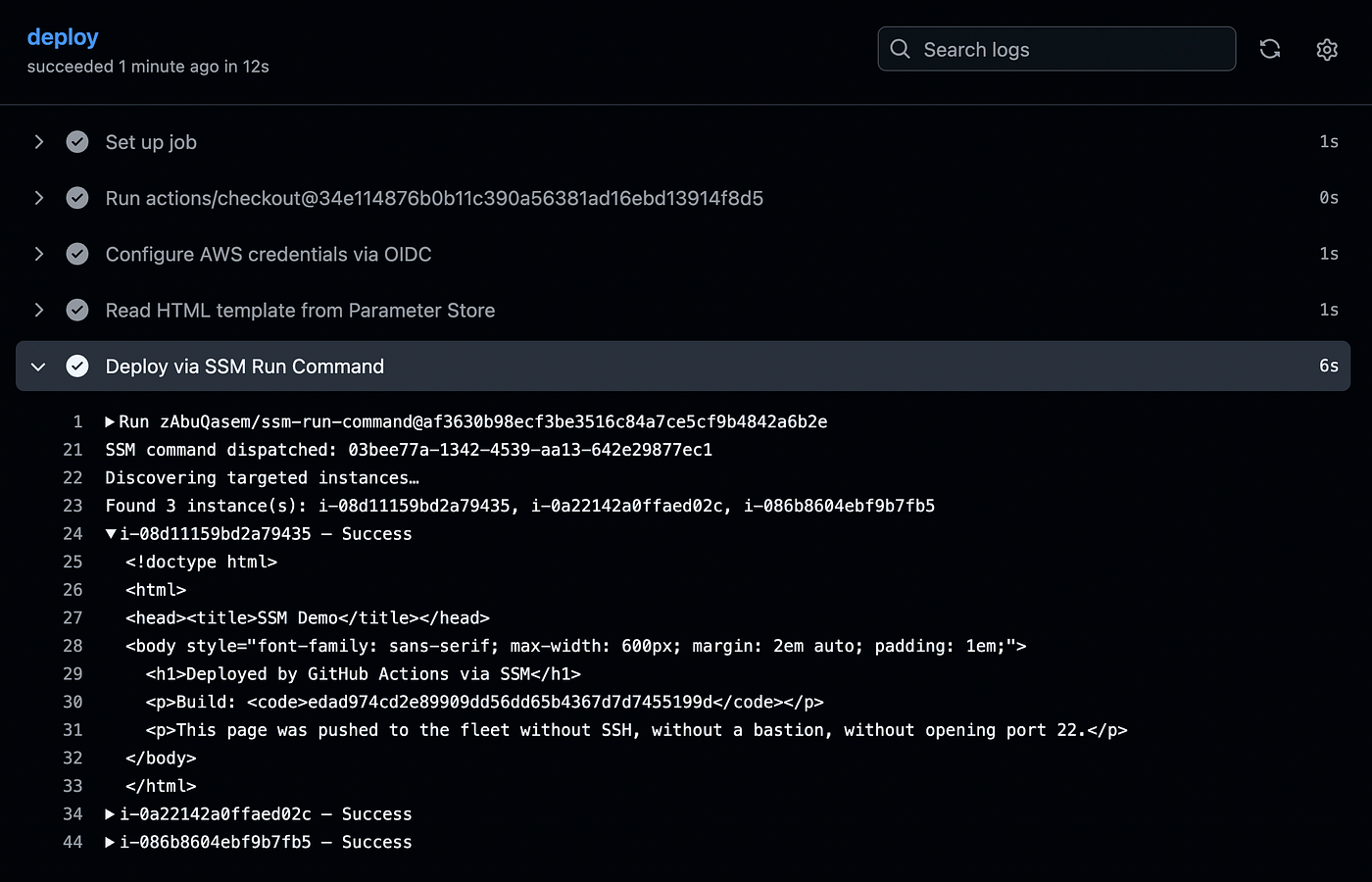
For the workflow we will use[zAbuQasem/ssm-run-command](https://github.com/zAbuQasem/ssm-run-command), a GitHub Action I built to wrap the exact send-command + poll-for-completion + collect-per-instance-output loop that the first post in this series walked through by hand with send-command, list-command-invocations, and get-command-invocation. It returns the per-instance stdout straight into the GitHub Actions job log, so a failure on one node is visible in the run summary rather than buried in CloudWatch.
.github/workflows/deploy.yml
name: Deploy nginx page via SSMon:
workflow_dispatch:
push:
branches: [main]permissions:
id-token: write
contents: readenv:
AWS_REGION: us-east-1
ROLE_ARN: arn:aws:iam::666715258628:role/GitHubActions-SSM-Demojobs:
deploy:
runs-on: ubuntu-latest
steps:
- uses: actions/checkout@34e114876b0b11c390a56381ad16ebd13914f8d5 # v4 - name: Configure AWS credentials via OIDC
uses: aws-actions/configure-aws-credentials@ff717079ee2060e4bcee96c4779b553acc87447c # v4
with:
role-to-assume: ${{ env.ROLE_ARN }}
aws-region: ${{ env.AWS_REGION }} - name: Read HTML template from Parameter Store
id: param
run: |
HTML=$(aws ssm get-parameter --name /app/web/index_html --query Parameter.Value --output text)
HTML=${HTML//__BUILD__/${{ github.sha }}}
printf '%s' "$HTML" > index.html
echo "html_b64=$(base64 -w0 < index.html)" >> "$GITHUB_OUTPUT" - name: Deploy via SSM Run Command
uses: zAbuQasem/ssm-run-command@af3630b98ecf3be3516c84a7ce5cf9b4842a6b2e # main @ 2026-04-12
with:
aws-region: ${{ env.AWS_REGION }}
targets: Key=tag:Purpose,Values=ssm-demo
comment: deploy ${{ github.sha }}
wait-for-output: 'true'
wait-timeout: '60'
command: |
echo '${{ steps.param.outputs.html_b64 }}' | base64 -d | tee /var/www/html/index.html > /dev/null
systemctl reload nginx
curl -s localhostThe permissions: id-token: write block at the top of the workflow is what lets the workflow request an OIDC token from GitHub in the first place. Without it the configure-aws-credentials step fails immediately with a token request error.
The Read HTML template from Parameter Store step pulls the template, swaps the __BUILD__ token for the current commit SHA, then base64-encodes the result. The base64 step is there so that HTML full of quotes, angle brackets, and newlines passes cleanly through the SSM command parameter, since passing raw HTML as a JSON value is the escaping trap that the first post in this series walks through.
The Deploy via SSM Run Command step targets every instance carrying Purpose=ssm-demo and runs three commands in order on each one
- Write the decoded HTML to
/var/www/html/index.html - Reload nginx so the new page is live
curllocalhost so the served page lands in the GitHub Actions job log as proof.wait-for-output: 'true'is what makes that proof visible in the log instead of in CloudWatch. Thecurloutput is small enough to print in full; for larger pages, pipe it throughhead -c <bytes>to stay well under SSM's 24 KB StandardOutput limit per invocation.
Conclusion
The pattern here is small and replaces a lot of operational rope. No SSH key in GitHub secrets, no long-lived AWS access key, no inbound port on the fleet, no self-hosted runner inside the VPC. The same workflow scales from two instances to thousands by tagging more instances, and the same OIDC-plus-IAM-role pattern works for any AWS API the workflow needs to call.
This is the third post in the SSM series. Part one covered Parameter Store and Run Command from the CLI, part two used Session Manager to reach EC2 and RDS from a laptop.
That’s all for now, thank you for reading and have a nice day :)
Further Reading
- GitHub: Configuring OpenID Connect in Amazon Web Services: https://docs.github.com/en/actions/security-for-github-actions/security-hardening-your-deployments/configuring-openid-connect-in-amazon-web-services
- aws-actions/configure-aws-credentials: https://github.com/aws-actions/configure-aws-credentials
- zAbuQasem/ssm-run-command: https://github.com/zAbuQasem/ssm-run-command
- SSM Run Command: https://docs.aws.amazon.com/systems-manager/latest/userguide/execute-remote-commands.html
- IAM resource tag conditions: https://docs.aws.amazon.com/IAM/latest/UserGuide/access_tags.html
- Companion repo: https://github.com/zAbuQasem/ssm-demo
Before you go
- Please take a moment to like the post and follow the writer!
- Did you know that over 400,000 developers share what they’re building, learning, and discovering across our platforms every month? Learn how you can contribute here
메타데이터
- post_id
- 56ae76ce45f6
- slug
- aws-ssm-deploying-with-github-actions-56ae76ce45f6
- url
- https://aws.plainenglish.io/aws-ssm-deploying-with-github-actions-56ae76ce45f6
- canonical_url
- https://aws.plainenglish.io/aws-ssm-deploying-with-github-actions-56ae76ce45f6
- author_url
- https://medium.com/@zeyad-abulaban
- status
- ok
- fetched_at
- 2026-07-14 12:43:20