React Forms: React Hook Form vs Formik — A Complete Comparison Guide
Forms are the backbone of user interaction in web applications. Whether you’re building a simple contact form or a complex multi-step…
React Forms: React Hook Form vs Formik — A Complete Comparison Guide
Forms are the backbone of user interaction in web applications. Whether you’re building a simple contact form or a complex multi-step wizard, choosing the right form library can significantly impact your development experience and application performance. In the React ecosystem, two libraries stand out: React Hook Form and Formik. Both solve similar problems but take different approaches.
React Hook Form
React Hook Form is a lightweight, performant library that leverages React hooks and uncontrolled components to minimize re-renders and maximize performance.
Key Features:
- Minimal re-renders
- Built-in validation
- Easy integration with UI libraries
- Small bundle size (~25KB)
- TypeScript support
- Uncontrolled components approach
Formik
It provides a comprehensive set of tools for building forms with validation, error handling, and submission logic. Formik follows a controlled components approach and offers more explicit form state management.
Key Features:
- Comprehensive form state management
- Built-in validation support
- Field-level validation
- Form-level validation
- Extensive documentation
- Large ecosystem and community
Performance Comparison
React Hook Form: The Performance Champion
React Hook Form’s biggest advantage is its performance optimization. By using uncontrolled components and refs, it minimizes re-renders significantly.
// React Hook Form - Minimal re-renders
import { useForm } from 'react-hook-form';

function OptimizedForm() {
  const { register, handleSubmit, formState: { errors } } = useForm();

  const onSubmit = (data) => console.log(data);

  return (
    <form onSubmit={handleSubmit(onSubmit)}>
      <input {...register('firstName')} />
      <input {...register('lastName')} />
      <button type="submit">Submit</button>
    </form>
  );
}
Performance Benefits:
- Only re-renders when necessary (on submit, error state changes)
- No re-renders on every keystroke
- Better performance with large forms
- Faster form validation
Formik: More Re-renders, More Control
Formik follows a controlled components approach, which means more re-renders but also more explicit control over form state.
// Formik - More re-renders but explicit control
import { Formik, Form, Field } from 'formik';

function FormikForm() {
  return (
    <Formik
      initialValues={{ firstName: '', lastName: '' }}
      onSubmit={(values) => console.log(values)}
    >
      <Form>
        <Field name="firstName" />
        <Field name="lastName" />
        <button type="submit">Submit</button>
      </Form>
    </Formik>
  );
}
Performance Characteristics:
- Re-renders on every field change
- More predictable state updates
- Better for complex form logic
- May require optimization for large forms
Validation: React Hook Form + Zod vs Formik + Yup
Both libraries excel when paired with schema validation libraries. Let’s explore the recommended combinations.
React Hook Form with Zod Schema Validation
Zod is a TypeScript-first schema declaration and validation library that pairs excellently with React Hook Form through the @hookform/resolvers package.
import { useForm } from 'react-hook-form';
import { zodResolver } from '@hookform/resolvers/zod';
import { z } from 'zod';

// Define Zod schema
const userSchema = z.object({
  email: z.string().email('Invalid email address'),
  password: z.string().min(8, 'Password must be at least 8 characters'),
  confirmPassword: z.string(),
  age: z.number().min(18, 'Must be at least 18 years old'),
}).refine(data => data.password === data.confirmPassword, {
  message: "Passwords don't match",
  path: ['confirmPassword'],
});

function ReactHookFormWithZod() {
  const {
    register,
    handleSubmit,
    formState: { errors, isSubmitting }
  } = useForm({
    resolver: zodResolver(userSchema),
    defaultValues: {
      email: '',
      password: '',
      confirmPassword: '',
      age: 18
    }
  });

  const onSubmit = async (data) => {
    try {
      // API call
      await submitUserData(data);
      console.log('Form submitted successfully');
    } catch (error) {
      console.error('Submission error:', error);
    }
  };

  return (
    <form onSubmit={handleSubmit(onSubmit)}>
      <div>
        <input
          type="email"
          placeholder="Email"
          {...register('email')}
        />
        {errors.email && <span>{errors.email.message}</span>}
      </div>

      <div>
        <input
          type="password"
          placeholder="Password"
          {...register('password')}
        />
        {errors.password && <span>{errors.password.message}</span>}
      </div>

      <div>
        <input
          type="password"
          placeholder="Confirm Password"
          {...register('confirmPassword')}
        />
        {errors.confirmPassword && <span>{errors.confirmPassword.message}</span>}
      </div>

      <div>
        <input
          type="number"
          placeholder="Age"
          {...register('age', { valueAsNumber: true })}
        />
        {errors.age && <span>{errors.age.message}</span>}
      </div>

      <button type="submit" disabled={isSubmitting}>
        {isSubmitting ? 'Submitting...' : 'Submit'}
      </button>
    </form>
  );
}
Benefits of React Hook Form + Zod:
- Excellent TypeScript integration
- Runtime and compile-time type safety
- Minimal boilerplate
- Great performance
- Composable validation schemas
Formik with Yup Schema Validation
Yup is a JavaScript schema builder for value parsing and validation that integrates seamlessly with Formik.
import { Formik, Form, Field, ErrorMessage } from 'formik';
import * as Yup from 'yup';

// Define Yup schema
const userSchema = Yup.object().shape({
  email: Yup.string()
    .email('Invalid email address')
    .required('Email is required'),
  password: Yup.string()
    .min(8, 'Password must be at least 8 characters')
    .required('Password is required'),
  confirmPassword: Yup.string()
    .oneOf([Yup.ref('password')], "Passwords don't match")
    .required('Please confirm your password'),
  age: Yup.number()
    .min(18, 'Must be at least 18 years old')
    .required('Age is required')
});

function FormikWithYup() {
  const handleSubmit = async (values, { setSubmitting, setStatus }) => {
    try {
      await submitUserData(values);
      setStatus({ type: 'success', message: 'Form submitted successfully' });
    } catch (error) {
      setStatus({ type: 'error', message: 'Submission failed' });
    } finally {
      setSubmitting(false);
    }
  };

  return (
    <Formik
      initialValues={{
        email: '',
        password: '',
        confirmPassword: '',
        age: 18
      }}
      validationSchema={userSchema}
      onSubmit={handleSubmit}
    >
      {({ isSubmitting, status }) => (
        <Form>
          <div>
            <Field
              type="email"
              name="email"
              placeholder="Email"
            />
            <ErrorMessage name="email" component="span" />
          </div>

          <div>
            <Field
              type="password"
              name="password"
              placeholder="Password"
            />
            <ErrorMessage name="password" component="span" />
          </div>

          <div>
            <Field
              type="password"
              name="confirmPassword"
              placeholder="Confirm Password"
            />
            <ErrorMessage name="confirmPassword" component="span" />
          </div>

          <div>
            <Field
              type="number"
              name="age"
              placeholder="Age"
            />
            <ErrorMessage name="age" component="span" />
          </div>

          {status && (
            <div className={status.type === 'error' ? 'error' : 'success'}>
              {status.message}
            </div>
          )}

          <button type="submit" disabled={isSubmitting}>
            {isSubmitting ? 'Submitting...' : 'Submit'}
          </button>
        </Form>
      )}
    </Formik>
  );
}
Benefits of Formik + Yup:
- Mature and stable validation library
- Extensive validation methods
- Good error handling
- Explicit form state management
- Great for complex forms with conditional logic
When to Choose React Hook Form
React Hook Form is the better choice when:
1. Performance is Critical
- Large forms with many fields
- Real-time validation requirements
- Mobile applications where performance matters
- Forms that need frequent updates
2. TypeScript Projects
- Excellent TypeScript integration
- Type-safe form handling
- Better IDE support and autocompletion
3. Minimal Bundle Size Requirements
- Performance-conscious applications
- Progressive web apps
- Applications with strict bundle size constraints
4. Modern React Patterns
- Hook-based architecture
- Functional components
- Uncontrolled components approach
When to Choose Formik
Formik is the better choice when:
1. Complex Form Logic
- Multi-step forms
- Conditional field rendering
- Complex form state management
- Forms with dynamic fields
2. Team Familiarity
- Team already familiar with Formik
- Existing codebase uses Formik
- Need for extensive documentation and community support
3. Explicit State Management
- Need for predictable state updates
- Complex form validation logic
- Forms that require fine-grained control
4. Legacy React Support
- Applications using older React versions
- Class components
- Existing form infrastructure
Migration Considerations
From Formik to React Hook Form
// Before (Formik)
<Formik
  initialValues={{ name: '' }}
  validate={values => {
    const errors = {};
    if (!values.name) {
      errors.name = 'Required';
    }
    return errors;
  }}
>
  {({ values, handleChange, errors }) => (
    <form>
      <input
        name="name"
        value={values.name}
        onChange={handleChange}
      />
      {errors.name && <div>{errors.name}</div>}
    </form>
  )}
</Formik>

// After (React Hook Form)
const { register, formState: { errors } } = useForm();

<form>
  <input
    {...register('name', { required: 'Required' })}
  />
  {errors.name && <div>{errors.name.message}</div>}
</form>
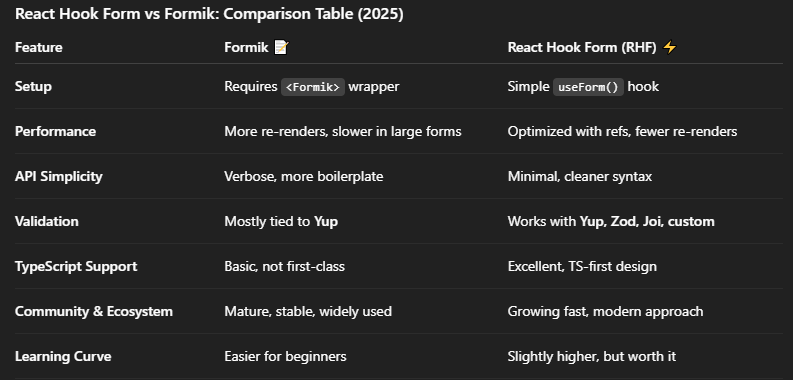
Recommendation: React Hook Form
Why React Hook Form:
- Superior Performance: Minimal re-renders lead to better user experience
- Smaller Bundle Size: 25% smaller than Formik
- Modern Architecture: Built for hooks and functional components
- Excellent TypeScript Support: First-class TypeScript integration
- Growing Ecosystem: Rapid adoption and active development
- Future-Proof: Aligns with React’s modern patterns
Conclusion
- Use Formik if you want simplicity and stability.
- Use React Hook Form if you care about performance, TypeScript, and flexibility.
메타데이터
- post_id
- 56c7d53cc835
- slug
- react-forms-react-hook-form-vs-formik-a-complete-comparison-guide-56c7d53cc835
- url
- https://medium.com/@jasminbhesaniya/react-forms-react-hook-form-vs-formik-a-complete-comparison-guide-56c7d53cc835
- canonical_url
- https://medium.com/@jasminbhesaniya/react-forms-react-hook-form-vs-formik-a-complete-comparison-guide-56c7d53cc835
- author_url
- https://medium.com/@jasminbhesaniya
- status
- ok
- fetched_at
- 2026-07-09 13:13:48





