Static Focus with Vertical Or Horizontal Scroll in Flutter TV App.
Overview
Static Focus with Vertical Or Horizontal Scroll in Flutter TV App.
Overview
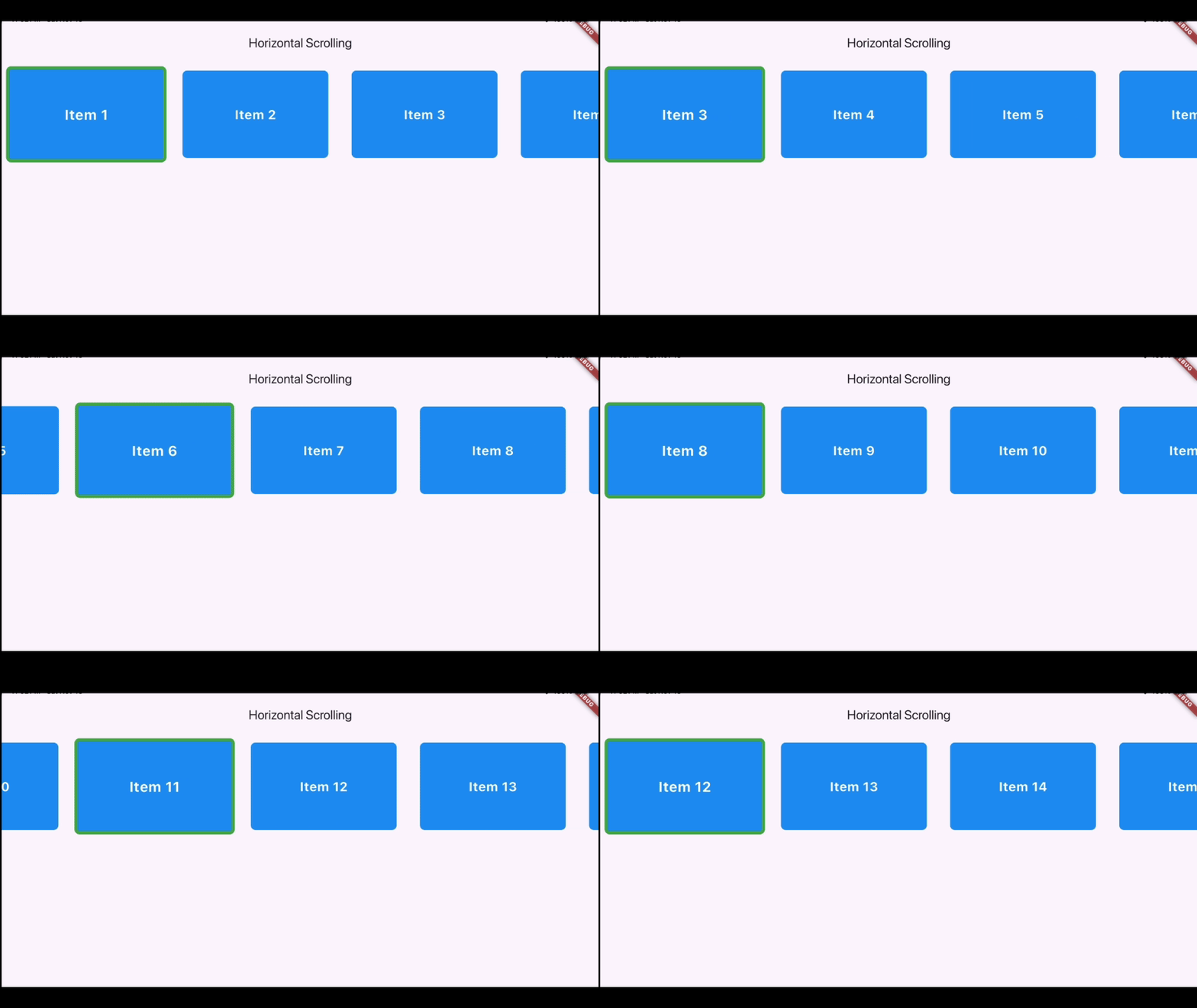
When developing TV applications, creating user-friendly interfaces that interact seamlessly with remote controls is crucial. In this article, we’ll explore how to build Focusable Vertical and Horizontal Scrolling Views in Flutter. These views automatically adjust focus and scroll to the currently selected item, providing an intuitive and polished user experience. The approach is perfect for TV applications, where users navigate content grids or lists using directional keys on their remotes. This tutorial demonstrates:
- Handling focus changes dynamically.
- Adding smooth animations for item scaling and scrolling.
Below is a demonstration (GIF) of the vertical and horizontal scrolling views in action.

Steps to Implement Focusable Scrolling
- Create
FocusNode: Each item in the list is assigned aFocusNodeto track focus changes.
Ensure the list count of *FocusNodes matches the count of items in the list.*
final List<FocusNode> _focusNodes = List.generate(25, (_) => FocusNode());- Smooth Scrolling on Focus: The
_scrollToPositionfunction smoothly scrolls the list to ensure the specified item (by itsindex) is visible on the screen. It usesScrollable.ensureVisiblefor smooth animation and waits until the current UI frame finishes rendering before executing.
 void _scrollToPosition(int index) {
    WidgetsBinding.instance.addPostFrameCallback(
      (_) {
        final context = _focusNodes[index].context;
        if (context != null) {
          Scrollable.ensureVisible(
            context,
            duration: const Duration(milliseconds: 300),
            curve: Curves.easeInOut,
          );
        }
      },
    );
  }
3. Implementing UI: This Flutter code creates a vertically scrolling list of 25 interactive items. Here’s how it works:
- Scaffold: Sets up a basic structure with an
AppBarand a scrollable body. - SingleChildScrollView: Enables vertical scrolling.
- Center + Column: Aligns all items in a vertical column.
- List.generate: Dynamically generates 25 items.
- InkWell: Makes each item interactive (focusable and tappable).
- AnimatedScale: Animates the item’s size when focused.
- Container: Represents each item with styling, showing its number.
- _scrollToPosition: Keeps the focused item visible.
- Focus Management:
- Focus nodes (
_focusNodes) handle item focus. - Focused items scale up slightly and show a green border.
  @override
  Widget build(BuildContext context) {
    return Scaffold(
      appBar: AppBar(title: const Text("Vertical Scrolling")),
      body: SingleChildScrollView(
        child: Center(
          child: Column(
            children: List.generate(
              25,
              (index) {
                return InkWell(
                  autofocus: index == 0 ? true : false,
                  focusColor: Colors.transparent,
                  focusNode: _focusNodes[index],
                  onFocusChange: (isFocused) {
                    if (isFocused) {
                      setState(() {});
                      _scrollToPosition(index);
                    }
                  },
                  onTap: () => print("Item $index tapped"),
                  child: AnimatedScale(
                    duration: const Duration(milliseconds: 200),
                    scale: _focusNodes[index].hasFocus ? 1.2 : 1,
                    child: Container(
                      margin: const EdgeInsets.all(20),
                      height: 150,
                      width: 250,
                      decoration: BoxDecoration(
                        color: Colors.blue,
                        borderRadius: BorderRadius.circular(8),
                        border: Border.all(
                          color: _focusNodes[index].hasFocus ? Colors.green : Colors.transparent,
                          width: 5,
                        ),
                      ),
                      child: Center(
                        child: Text(
                          'Item ${index + 1}',
                          style: const TextStyle(color: Colors.white, fontSize: 22, fontWeight: FontWeight.bold),
                        ),
                      ),
                    ),
                  ),
                );
              },
            ),
          ),
        ),
      ),
    );
  }
This code snippet demonstrates vertical scrolling, but horizontal scrolling is similar — just change the scrollDirection of SingleChildScrollView to Axis.horizontal and replace the Column widget with a Row.
Conclusion
With Flutter, creating focus-driven UI elements for TV apps is straightforward. By combining FocusNode, AnimatedScale, and Scrollable.ensureVisible, you can deliver a smooth and intuitive navigation experience. This example lays the foundation for building advanced interfaces where user interaction via remote controls is paramount.
Happy coding! 🚀
Fullcode: https://github.com/diwashrai469/flutter-scroll-focus/blob/main/lib/main.dart
메타데이터
- post_id
- 5752f2a01d65
- slug
- static-focus-with-vertical-or-horizontal-scroll-in-flutter-tv-app-5752f2a01d65
- url
- https://medium.com/@raidiwash30/static-focus-with-vertical-or-horizontal-scroll-in-flutter-tv-app-5752f2a01d65
- canonical_url
- https://medium.com/@raidiwash30/static-focus-with-vertical-or-horizontal-scroll-in-flutter-tv-app-5752f2a01d65
- author_url
- https://medium.com/@raidiwash30
- status
- ok
- fetched_at
- 2026-07-22 03:31:05




