Web Scraping Job Postings: A Detailed Guide for 2026
Job data moves fast. Roles go live and disappear within hours, salary bands shift, and the skills employers want are constantly evolving.
Web Scraping Job Postings: A Detailed Guide for 2026

Job data moves fast. Roles go live and disappear within hours, salary bands shift, and the skills employers want are constantly evolving.
Manually tracking all of this isn’t just tedious — it’s impossible at scale. Web scraping job postings solves that. It lets you collect structured, up-to-date hiring data from across the web, automatically and at volume.
This guide covers how job scraping works, what the data looks like, and how to do it reliably in 2026.
Web scraping job postings: challenges involved
Scraping job sites has never been straightforward — and in 2026, the technical barriers have only grown more sophisticated.
Most major job boards now deploy AI-driven bot detection, fingerprinting, and behavioural analysis on top of the usual CAPTCHAs and dynamic content. Getting blocked isn’t a matter of if, but how fast. That said, scraping tools and proxy infrastructure have kept pace — the cat-and-mouse dynamic is as active as ever.
The good news: there are legitimate ways to reduce your block rate without violating any site’s terms. It comes down to scraping responsibly and knowing your options.
How to get the data
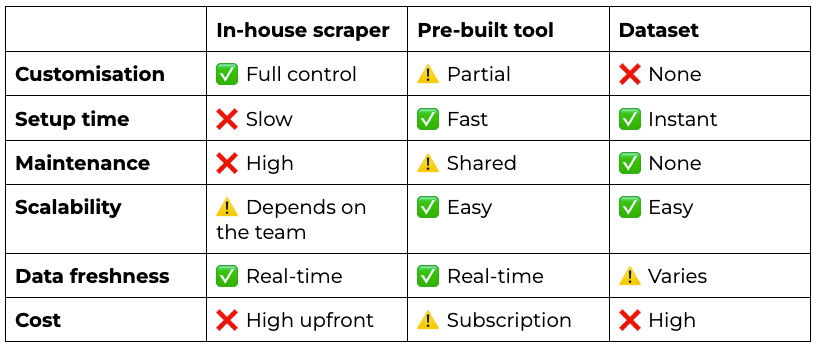
There are three main approaches, each with real trade-offs:
- Build an in-house scraper. You own the infrastructure, the logic, and the output. That’s a genuine advantage — but it comes with serious resource commitment. Development, maintenance, and keeping up with site changes all fall on your team.
- Use a pre-built scraping tool. Ready-made tools have matured significantly. Many now handle proxy rotation, CAPTCHA solving, and site-specific parsing out of the box — without needing a dedicated dev team.
- Buy a job dataset. Some data providers sell pre-scraped job posting datasets, refreshed on a regular cadence. It’s the lowest-effort option, but it can get quite costly.
Building a custom tool for web scraping job postings
Going the in-house route means owning every layer of the stack. Here’s what to get right from the start:
- Choose widely-adopted tools. Stick to languages, frameworks, and libraries with strong community support. When job sites update their structure — and they will — you want documentation, Stack Overflow threads, and maintainable code on your side.
- Build a proper testing environment. Job scrapers break in interesting ways. Set up a stable testing environment early, and keep a lightweight version of your scraper separate from production. Many of the key decisions will come from the business side, not engineering — so being able to demo and iterate quickly really matters.
- Plan for data storage upfront. Job posting data accumulates fast. Think about storage infrastructure, compression, and data lifecycle management before you’re drowning in unstructured records.
That said, building from scratch is a significant commitment in engineering time, ongoing maintenance, and cost. For many teams, a ready-made solution like a Web Scraper API is the more practical path: faster to deploy, built with anti-blocking in mind, and scalable across virtually any job site.
The next section walks through how to scrape job listings using Python and the Job Scraper API. For the sake of this tutorial, we’ll be using Oxylabs’ scraping solution, as it’s known as one of the most resilient tools on the market. Resilience to IPs and CAPTCHAs is certainly important when it comes to scraping complex targets like job ads. However, it can get quite pricey, and if you’re looking for a more budget-friendly solution, give these providers a look:
- Decodo
- Webshare
- ScrapingBee
- Setting up your environment
If you haven’t already, download and install Python from the official website. For your editor, any mainstream IDE works well — PyCharm and Visual Studio Code are both solid choices.
Once you’re set up, open your terminal and install the requests library via pip:
python -m pip install requestsNext, create a new Python file and import the following libraries:
import requests, json, csvThe requests library handles HTTP calls to the API, while json and csv take care of processing and storing the scraped data.
- Getting a free API trial
Web Scraper API (or Job Scraper API) includes a free trial — create a free account and get started.
Once you have your API username and password, store them as variables in your script:
API_credentials = ('USERNAME', 'PASSWORD')- Creating the API payload
Using a Stackshare jobs URL as the target, create a payload dictionary in your Python file — this is where you define all the scraping and parsing instructions for the API:
payload = {
    'source': 'universal',
    'url': 'https://stackshare.io/jobs',
    'geo_location': 'United States',
}
The geo_location parameter tells the API to route requests through a US-based proxy server — swap it for any other location or remove it entirely to use your own.
- Loading more listings
By default, Stackshare displays 15 job listings at a time, loading 15 more each time you hit “Load more”:
To get around this, simulate “Load more” clicks using the API’s Headless Browser. Add this instruction to your payload and repeat it 13 times to pull approximately 200 job postings:
payload = {
    'source': 'universal',
    'url': 'https://stackshare.io/jobs',
    'geo_location': 'United States',
    'render': 'html',
    'browser_instructions': [
        {
            'type': 'click',
            'selector': {
                'type': 'xpath',
                'value': '//button[contains(text(), "Load more")]'
            }
        },
        {'type': 'wait', 'wait_time_s': 2}
    ] * 13
}
To load more listings, simply increase the repetition count.
Fetching a resource
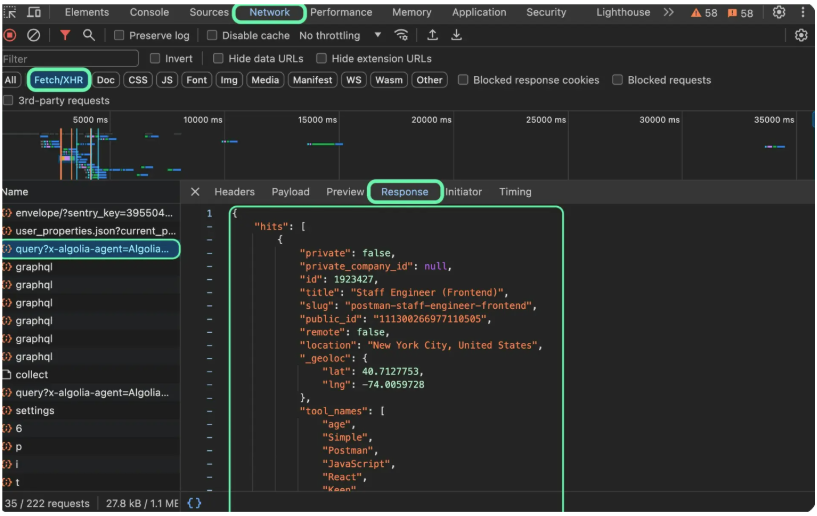
Rather than building custom selectors for each data point, you can fetch everything directly from a JSON-formatted resource. This simplifies the process considerably and surfaces additional data points not visible in the HTML — such as verified status, precise geolocation, and job listing IDs.
To find the resource, open the target URL in your browser and launch Developer Tools:
- Windows: F12 or Ctrl + Shift + I
- macOS: Command + Option + I
Navigate to the Network tab, filter by Fetch/XHR, and locate the first resource starting with query?x-algolia-agent=Algolia. Open its Response tab to see job postings in JSON format:
Then, open the resource’s Headers tab to see the request URL:
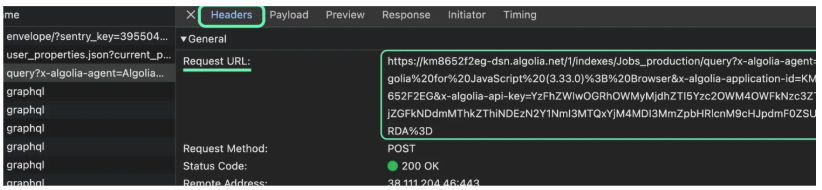
To access this resource via the API, define the fetch_resource function and specify a regex pattern to match the correct URL.
One thing to note: each time “Load more” is clicked, it triggers a new request to the same resource URL. To make sure you’re capturing all loaded job data, use a lookahead assertion to match the last occurrence of the resource starting with query?x-algolia-agent=Algolia. Here’s the complete payload:
payload = {
    'source': 'universal',
    'url': 'https://stackshare.io/jobs',
    'geo_location': 'United States',
    'render': 'html',
    'browser_instructions': [
        {
            'type': 'click',
            'selector': {
                'type': 'xpath',
                'value': '//button[contains(text(), "Load more")]'
            }
        },
        {'type': 'wait', 'wait_time_s': 2}
    ] * 13 + [
        {
            "type": "fetch_resource",
            "filter": "^(?=.*https://km8652f2eg-dsn.algolia.net/1/indexes/Jobs_production/query).*"
        }
    ]
}- Sending a request to the API
Next, create a response object that sends a POST request to the API, passing your credentials for authentication and the payload as a JSON object:
response = requests.request(
    'POST',
    'https://realtime.oxylabs.io/v1/queries',
    auth=API_credentials,
    json=payload,
    timeout=180
)
results = response.json()['results'][0]['content']
print(results)
data = json.loads(results)
Once the API returns a response, parse it by accessing the scraped content via the results > content keys, then use the json module to load the data as a Python dictionary:
- Parsing JSON results
Create an empty jobs list, then parse the JSON results using the .get() function to extract only the fields you need:
jobs = []
for job in data['hits']:
    parsed_job = {
        'Title': job.get('title', ''),
        'Location': job.get('location', ''),
        'Remote': job.get('remote', ''),
        'Company name': job.get('company_name', ''),
        'Company website': job.get('company_website', ''),
        'Verified': job.get('company_verified', ''),
        'Apply URL': job.get('apply_url', '')
    }
    jobs.append(parsed_job)
You can extend this logic to extract additional fields as needed — such as tool stack details, precise geolocation data, or any other available attributes.
- Saving results to a CSV file
To make the data easy to work with — including in Excel — save the output to a CSV file using Python’s built-in csv module:
fieldnames = [key for key in jobs[0].keys()]
with open('stackshare_jobs.csv', 'w') as f:
    writer = csv.DictWriter(f, fieldnames=fieldnames)
    writer.writeheader()
    for item in jobs:
        writer.writerow(item)
After running the script, a stackshare_jobs.csv file will appear in your working directory. Here’s what the data looks like opened in Excel or Google Sheets:
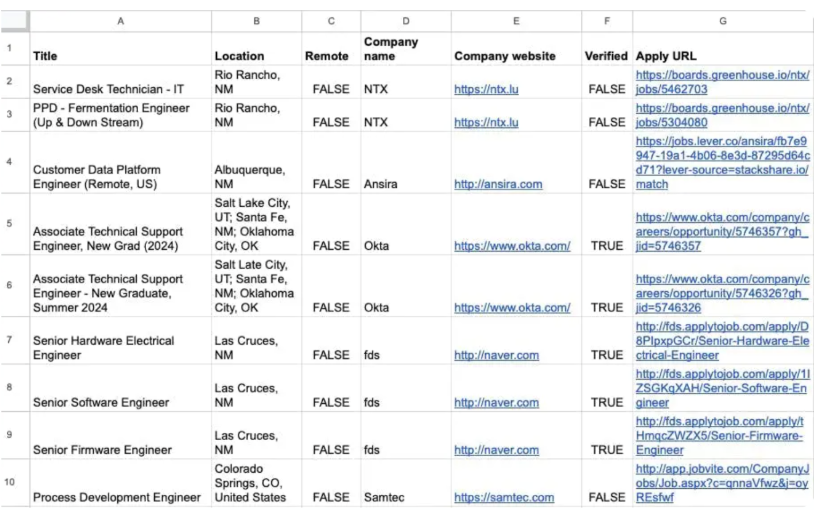
This approach works well for testing, but production environments typically write to cloud storage (S3, GCS, etc.) — where thousands of small files can create bottlenecks, inefficiencies, and unnecessary costs.
Full code for scraping job sites
Here’s our code for web scraping job postings in full:
import requests, json, csv

# Use your API username and password.
API_credentials = ('USERNAME', 'PASSWORD')

# Define your browsing and scraping parameters.
payload = {
    'source': 'universal',
    'url': 'https://stackshare.io/jobs',
    'geo_location': 'United States',
    'render': 'html',
    'browser_instructions': [
        {
            'type': 'click',
            'selector': {
                'type': 'xpath',
                'value': '//button[contains(text(), "Load more")]'
            }
        },
        {'type': 'wait', 'wait_time_s': 2}
    ] * 13 + [
        {
            "type": "fetch_resource",
            "filter": "^(?=.*https://km8652f2eg-dsn.algolia.net/1/indexes/Jobs_production/query).*"
        }
    ]
}

# Send a request to the API.
response = requests.request(
    'POST',
    'https://realtime.oxylabs.io/v1/queries',
    auth=API_credentials, # Pass your API credentials.
    json=payload, # Pass the payload.
    timeout=180
)

# Get the scraped content from the complete response.
results = response.json()['results'][0]['content']
print(results)
data = json.loads(results)

# Parse each job posting and append the results to a list.
jobs = []
for job in data['hits']:
    parsed_job = {
        'Title': job.get('title', ''),
        'Location': job.get('location', ''),
        'Remote': job.get('remote', ''),
        'Company name': job.get('company_name', ''),
        'Company website': job.get('company_website', ''),
        'Verified': job.get('company_verified', ''),
        'Apply URL': job.get('apply_url', '')
    }
    jobs.append(parsed_job)

# Create header names from the keys of 'jobs'.
fieldnames = [key for key in jobs[0].keys()]
# Save the parsed jobs to a CSV file.
with open('stackshare_jobs.csv', 'w') as f:
    writer = csv.DictWriter(f, fieldnames=fieldnames)
    writer.writeheader()
    for item in jobs:
        writer.writerow(item)
How does job scraping work with proxies
If you’re running your own infrastructure for scraping job sites and want proxy support, the two main options are datacenter proxies and residential proxies.
Datacenter proxies are the most common choice for this use case. They’re fast, stable, and reliable, making them a natural fit for job scraping at scale. Meanwhile, Residential proxies are also widely used for scraping job postings. With a large IP pool and country- and city-level targeting, they’re particularly useful when you need to pull job listings from very specific geographic locations.
Again, while providers like ScrapingBee, Decodo and Webshare offer residential proxy options, Oxylabs’ proxy servers pool size and targeting granularity make it a stronger fit for demanding, geo-specific scraping tasks.
In summation
Web scraping job postings at scale is no longer just a technical challenge — it’s a competitive advantage. Whether you’re tracking hiring trends, benchmarking salaries, or building recruitment tools, having reliable, fresh job data gives you a meaningful edge.
메타데이터
- post_id
- 57ae308bfc83
- slug
- web-scraping-job-postings-57ae308bfc83
- url
- https://medium.com/behind-the-firewall/web-scraping-job-postings-57ae308bfc83
- canonical_url
- https://medium.com/behind-the-firewall/web-scraping-job-postings-57ae308bfc83
- author_url
- https://medium.com/@lambert.watts.809
- status
- ok
- fetched_at
- 2026-06-14 11:28:49