The Kitten, the Tooth Fairy, and the Window Frame
What building a tiny AI film pipeline taught me about generative video
The Kitten, the Tooth Fairy, and the Window Frame
What building a tiny AI film pipeline taught me about generative video
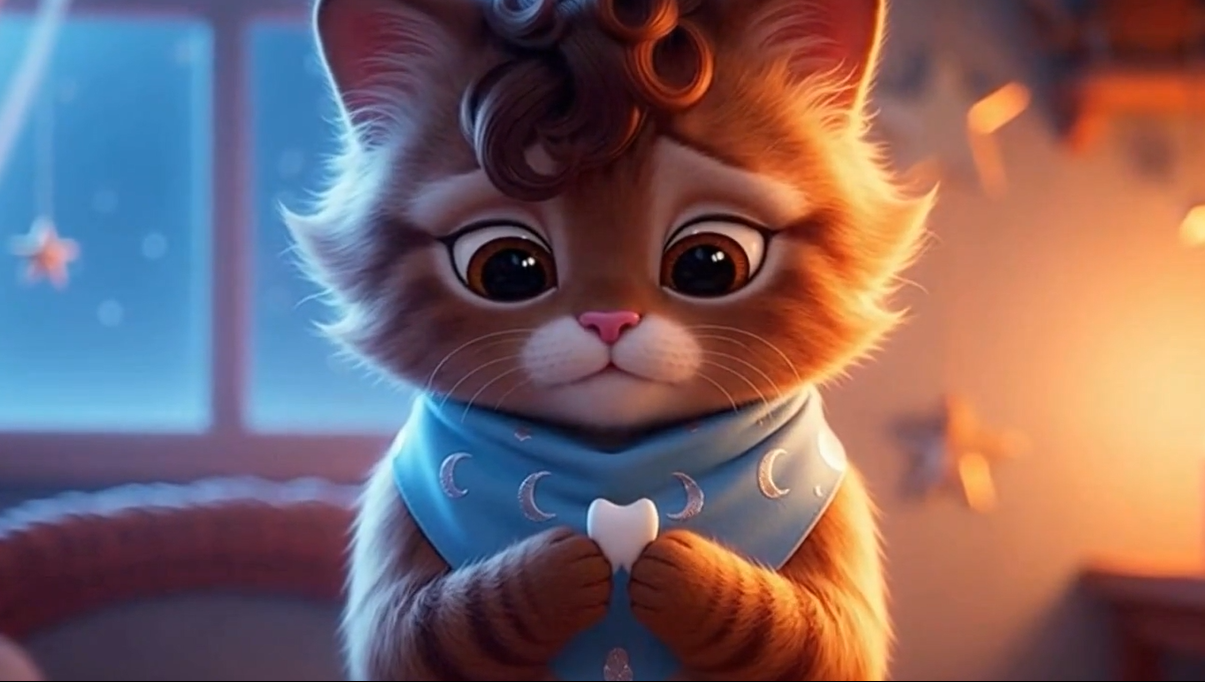
Milo looking at his tooth
The tooth fairy was supposed to fly out of the window.
Instead, she bumped her head on the frame.
I had not asked for slapstick. The prompt said nothing about comic timing. The storyboard imagined a graceful magical exit, all blue gown, dawn light, and tiny wings.
Sora disagreed.
There she was, a dainty tooth fairy with short white hair and a blue gown, making her way toward the morning sky and colliding with the architecture on the way out.
I laughed, then decided to keep it.
That small accident captured something I had been discovering throughout the project. Generative video sits somewhere between instruction and performance. You can design the pipeline, specify the characters, shape the shots, sanitize the prompts, and still end up with a fairy who has the timing of a silent-film comedian.
The project is called Moonlit Showrunner.
It began with a small magical premise: Milo, a kitten, loses his first tooth and discovers a moonlit doorway into a hidden fairy archive where tiny keepsakes become stars.
I wanted to see how far I could take that premise through a structured AI-assisted production workflow: story package, characters, script, storyboard, visual direction, continuity notes, reference cards, generated images, animatic, Sora clips, and final assembled video.
The result is cute, but the process quickly became more interesting than the cuteness.
A single prompt can produce an image, a paragraph, or a clip. A short film needs memory. Milo has to remain recognizably Milo. The tooth fairy has to keep her blue eyes, short white hair, silhouette, and blue gown. The world has to feel coherent from one shot to the next. The prompts have to be expressive enough for the model to act on, while staying controlled enough to avoid drift, moderation issues and wasted calls, and avoiding visual chaos.
Moonlit Showrunner became my way of testing that middle space: creative direction transformed into a sequence of reviewable steps.
The premise
The story itself is deliberately small.
Milo is a kitten who loses his first tooth. He worries that growing up means losing a little piece of himself. At night, the lost tooth opens a glowing silver doorway into a fairy archive, where tiny keepsakes are preserved and transformed into stars.
By morning, Milo finds a coin and a faint sparkle on the windowsill. The viewer sees the tooth fairy leaving at dawn.
In other words, this is not an epic. It is a compact, tender, whimsical story designed to test a production pipeline.
That choice mattered.
A small story makes it easier to observe the system. If a character drifts, you notice. If a prop disappears, you notice. If the emotional arc breaks, you notice. If the fairy suddenly behaves like a slapstick performer, you definitely notice.
From story idea to production package
The first design choice was to avoid treating video generation as a single prompt.
I wanted the app to behave more like a miniature production assistant. The user enters a premise, and the system expands it into a structured story package.
That package includes:
- a story brief
- a logline
- character descriptions
- a six-scene script
- a storyboard
- a visual style bible
- image prompts
- edit decisions
- continuity notes
- exports in JSON and Markdown

This structure matters because each stage gives the human creator something to inspect.
A generated paragraph disappears into itself. A structured package can be reviewed, compared, revised, saved, and reused. It also gives later stages a stronger foundation. The image-generation step does not have to invent the whole film from scratch. The Sora prompt layer does not have to infer the tone, characters, emotional arc, and visual style from a single vague instruction.
The pipeline gives the model a memory scaffold.
The first working version: a visual animatic
The earlier versions of Moonlit Showrunner generated still images and assembled them into an MP4 animatic.
This was a practical step. Full AI video generation is slower, more expensive, and less predictable than text or image generation. An animatic gives you a fast preview of the story before spending money on video calls.
The app generated scene images, added scene titles and captions, then assembled the frames with basic timing into a visual MP4.
That version already revealed useful design questions.
Was the story coherent? Did the scenes flow? Were the images close enough to the intended visual style? Could the output be understood as a short film outline?
The animatic did not pretend to be final animation. It acted as a production preview.
That remains useful even after adding Sora. A fast visual preview is still valuable when the final generation step is expensive or uncertain.
Adding Sora: one clip per shot
The next version added optional Sora video generation.
The workflow became:
premise → story package → storyboard → visual prompts → generated stills → animatic → Sora clip per storyboard shot → final assembled video
The app generates one video clip per shot and then concatenates those clips into a full MP4.
This worked. It also made the project more demanding.
A still image can tolerate some ambiguity. Video is less forgiving. A character may change face, size, costume, or movement style across shots. A background may shift. The camera may interpret a prompt in a way that feels plausible locally but strange in sequence.
When you put clips together, you see the seams.
That is where the project became less about generating assets and more about coordinating them.
The continuity problem
Character continuity became the central technical problem.
Milo needed a stable identity. He could not be a fluffy brown kitten in one shot, a long-haired orange kitten in the next, and a near-realistic adult cat a few seconds later.
The tooth fairy also needed consistency: blue eyes, short white hair, very dainty proportions, and a blue gown embroidered with tiny teeth.
The system needed to carry these details across multiple stages:
- story generation
- character descriptions
- visual prompts
- image generation
- Sora prompts
- final video assembly
So I added a continuity layer.
Moonlit Showrunner now generates character continuity profiles, a global continuity lock, and shot-level continuity notes. These act as reminders throughout the pipeline.
The continuity layer does not magically solve every visual drift problem, but it improves the structure of the workflow. It also makes the system more legible. If something drifts, there is a place to diagnose the drift.
Was the character profile weak? Was the visual prompt too vague? Did the Sora prompt omit an important trait? Did the reference image fail to anchor the character?
Those questions are easier to ask when the system is organized into explicit stages.
Character reference cards

The next improvement was character locking through reference cards.
Before generating scene images, Moonlit Showrunner creates reusable character reference cards for Milo and the tooth fairy.
These cards become visual anchors. They are not perfect production rigs, but they bridge the gap between textual continuity and visual generation.
The app asks for stable traits:
Milo: a small fluffy kitten with warm brown-and-cream fur, hazel eyes, soft curls in his forehead fur, tiny paws, and an optional pale blue moon-pattern neckerchief.
The Tooth Fairy: blue eyes, short white hair, very dainty, with a blue gown embroidered with tiny teeth.
The cards turn these descriptions into visual assets the user can inspect before the rest of the pipeline runs.
That step feels small, but it changes the workflow. It gives the creator a checkpoint before generating the scene images. If Milo looks wrong, you can catch it early. If the fairy design is off, you do not have to wait until the full video is assembled to notice.
In a larger version of this tool, this kind of reference step could become a proper character approval stage.
The moderation problem
The first version of the story had a human child protagonist losing her first tooth.
That sounded harmless as a narrative idea. It also created a practical problem when moving into video generation.
A young child, a bedroom, nighttime, pajamas, a pillow, and a close-up magical scene can become difficult territory for a video-generation moderation system, even when the intended story is innocent.
The lesson was immediate: a creative AI pipeline needs to distinguish between narrative intent and generation-safe execution language.
The story layer can hold the original emotional idea. The generation layer may need safer phrasing, different staging, or a different character choice.
That is how Lila became Milo the kitten.
The pivot solved several problems at once. It reduced moderation issues, made the story more visually distinctive, and gave the project a stronger identity. Milo also made the whole thing very charming.
A kitten losing his first tooth is absurdly cute enough to be memorable. The fairy archive still works. The emotional core remains intact. The project becomes safer and more playful without losing the original theme.
This is an important design lesson. Constraints can improve the concept.
Prompt sanitization
After the moderation issue, I added a safer Sora prompt layer.
The app can now sanitize certain sensitive combinations before sending prompts to video generation. It avoids risky phrasing around children, bedrooms, pajamas, pillows, and sleep-related staging.
In the current kitten version, the risk is lower, but the architecture remains useful.
The idea is simple: the system should preserve the creative intent while adapting the execution prompt to the requirements of the target model.
That means the same story package can feed different model layers with slightly different instructions.
A human-readable story brief can be warm and literary. A visual prompt can emphasize design, lighting, and composition. A video prompt can describe movement, camera, continuity, and safety-conscious staging.
Those layers should not be identical, because the models do different jobs.
This became one of the most interesting parts of the project. Prompting is not just writing clever sentences. In a production pipeline, prompting becomes translation between stages.
Cost controls and failure modes
Building the app also exposed practical issues that do not show up in a polished demo.
The OpenAI billing hard limit was reached during testing. Sora generation failed because of moderation. A missing Python import broke the sanitizer. Streamlit session state reset after restarting the app. Long-running generation calls made it unclear whether a step was still working or stuck.
These are normal prototype problems, but they are also important product signals.
If a tool generates expensive assets, it needs budget controls.
If a workflow may fail halfway through, it needs resumability.
If video generation takes time, the interface needs to communicate progress clearly.
If files already exist on disk, the app should detect and reuse them instead of forcing the user to regenerate everything.
The next version of Moonlit Showrunner needs stronger resume support: load an existing run, detect existing reference cards, skip already generated Sora clips, and continue from the last successful step.
That may sound less glamorous than video generation, but it is what turns a prototype into a usable tool.
The fairy and the window frame

The funniest moment in the final Sora output was also the best reminder that generative video is not fully controllable.
The tooth fairy was meant to exit gracefully.
Instead, she bumped into the window frame.
I could have treated that as an error. In another context, I probably would. But in this video, it worked. It gave the fairy personality. It made the ending feel oddly alive.
That raises an interesting creative question.
When should a model’s unexpected behavior be corrected, and when should it be kept?
Human creators make this kind of judgment constantly. A line reading, a visual accident, an animation quirk, a strange transition, or an unintended gesture can sometimes improve a piece.
Generative systems make this more visible because they produce both errors and surprises. The creator’s role becomes partly editorial: select, reject, regenerate, preserve, reinterpret.
In this case, the fairy hitting her head stayed.
Sora had a sense of humour, apparently.
What I learned
Moonlit Showrunner taught me that AI video is not only a generation problem. It is an orchestration problem.
The model calls are only part of the system. The interesting work happens around them:
- how the story is structured
- how character identity is preserved
- how visual style is carried across shots
- how prompts change between text, image, and video stages
- how the human creator reviews intermediate outputs
- how failures are handled
- how costs are contained
- how partial results are saved and resumed
- how accidental model behavior is evaluated creatively
That is the space I find most interesting: AI systems as structured creative workflows rather than novelty machines.
A good AI-assisted creative tool should not hide the process. It should expose enough of the process for the human creator to understand what is happening, intervene when needed, and make decisions with taste.
Moonlit Showrunner is still a prototype. It does not solve character consistency perfectly. It does not generate a seamless professional animated short. It does not yet have the full review and regeneration controls I want.
But it already demonstrates a useful pattern: take a creative task, decompose it into reviewable stages, generate intermediate artifacts, and keep the human creator inside the loop.
That pattern applies far beyond a kitten and a tooth fairy.
Short glossary
Animatic A rough video preview assembled from still images, captions, timing, and edit notes. It helps test the flow of a story before producing final video.
Character continuity The process of keeping a character visually and narratively consistent across scenes: appearance, clothing, proportions, personality, and emotional state.
Character reference card A reusable visual asset showing a character’s approved design. In this project, reference cards help anchor later image-generation steps.
Continuity bible A structured document that stores stable character details, world rules, visual style, and shot-level continuity notes.
Human-in-the-loop A workflow where the AI generates or assists, but a human reviews, edits, approves, rejects, or redirects the output.
Prompt sanitization The process of adapting prompts to reduce moderation risk, ambiguity, or unwanted model behavior while preserving the creative intent.
Sora clip A short AI-generated video clip produced for one storyboard shot, later concatenated with other clips into a full video.
Structured output A model response constrained into a predefined schema, such as JSON fields for characters, scenes, visual prompts, and edit decisions.
Current version
The current version of Moonlit Showrunner is a kitten-centered character-locking prototype.
It includes:
- Python and Streamlit interface
- OpenAI structured story generation
- character continuity profiles
- global continuity lock
- character reference-card generation
- scene image generation
- visual animatic MP4 assembly
- optional Sora video generation
- one Sora clip per storyboard shot
- final MP4 concatenation
- moderation-aware Sora prompt layer
- basic error handling for billing and moderation issues
The generated Sora video is available here.
The GitHub repository is here.
Next steps
The next improvements are mostly about control and usability.
I want to add resume support so the app can load an existing run after Streamlit restarts. I also want better controls for regenerating a single character card, image, or Sora clip without rerunning the whole pipeline.
Other useful improvements would include continuity scoring, side-by-side run comparison, prompt editing before each generation step, stronger reference-image handling, and optional sound design.
The long-term direction is a more complete AI-assisted creative production cockpit: playful on the surface, but serious about structure, reviewability, cost awareness, and human creative control.
TL;DR
I built Moonlit Showrunner, an AI-assisted short-film pipeline in Python and Streamlit.
It turns a magical kitten story into a structured production workflow with story generation, continuity notes, character reference cards, generated images, an animatic, Sora clips, and a final video.
The main lesson: AI video is less about one perfect prompt than about orchestration, review, and creative control.
Also, the fairy hit her head on the window frame. I kept it.
I write about whatever is fascinating me at the moment: AI, science, maths, speculative science, the occasional geeky coding project, and ideas that sit somewhere near sci-fi without completely leaving the ground.
I spend my time between consulting, teaching, and mentoring, usually around AI, data, and learning.
If anything here resonates with you, feel free to follow me on Medium or connect with me on LinkedIn.
메타데이터
- post_id
- 57d1ddb3c9bb
- slug
- the-kitten-the-tooth-fairy-and-the-window-frame-57d1ddb3c9bb
- url
- https://medium.com/@sabrina.jorgenson/the-kitten-the-tooth-fairy-and-the-window-frame-57d1ddb3c9bb
- canonical_url
- https://medium.com/@sabrina.jorgenson/the-kitten-the-tooth-fairy-and-the-window-frame-57d1ddb3c9bb
- author_url
- https://medium.com/@sabrina.jorgenson
- status
- ok
- fetched_at
- 2026-06-15 20:49:13