Unicode vs UTF-8 vs UTF-16: A Simple Guide
What UTF-8 and UTF-16 really mean, why “Unicode-8” is not the right term, and how text becomes bytes.
Unicode vs UTF-8 vs UTF-16: A Simple Guide
What UTF-8 and UTF-16 really mean, why “Unicode-8” is not the right term, and how text becomes bytes.
One of the most common mistakes in programming is saying “Unicode” when we really mean UTF-8.
Another common mistake is hearing terms like “Unicode-8” and “Unicode-16.” They sound reasonable, but they are not the correct names. The correct terms are UTF-8 and UTF-16.
This naming detail matters because Unicode and UTF are not the same thing.
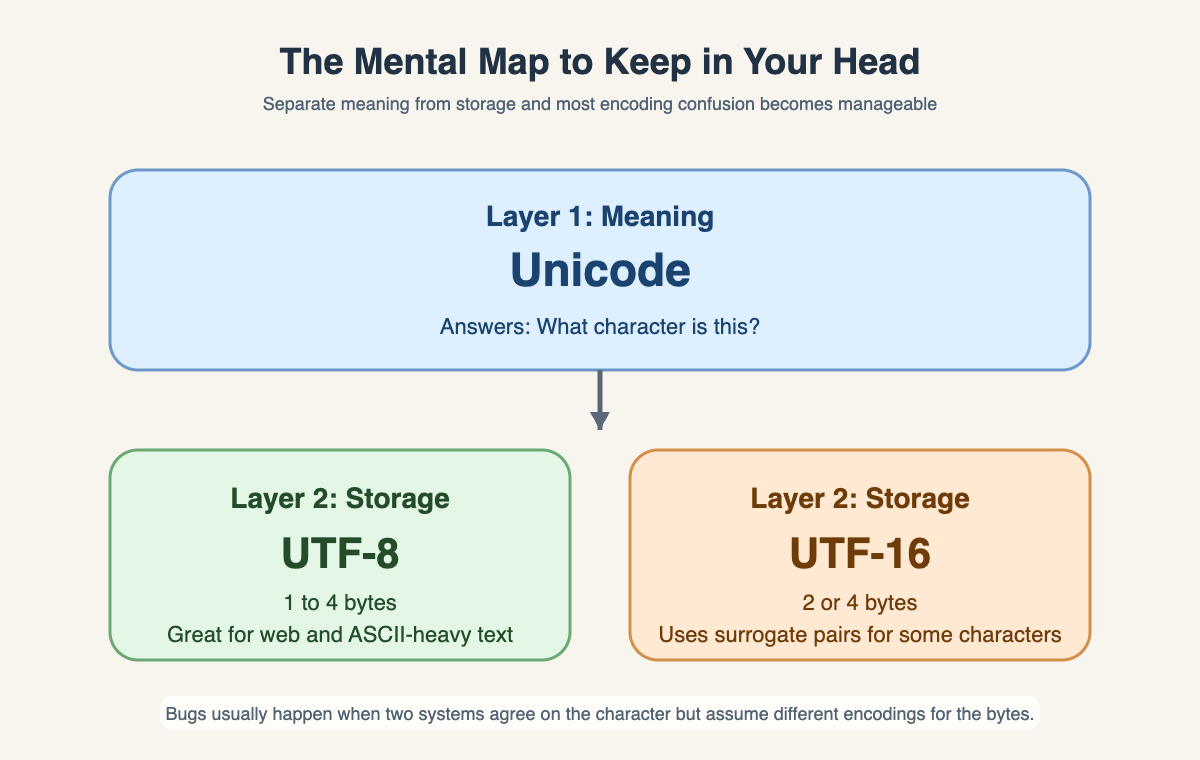
Unicode is the system that gives characters an identity. UTF-8 and UTF-16 are ways to store those characters as bytes.
That is the whole article in one sentence:
Unicode defines characters. UTF-8 and UTF-16 encode them.
If you keep that one line in mind, most of the confusion disappears.
What Unicode Actually Is ?
Unicode is a universal standard for characters.
It gives a unique number to each character, no matter which language or symbol set it belongs to.
English letters, accented characters, Hindi text, Chinese text, punctuation, currency symbols, and emoji can all live in the same system.
Those numbers are called code points.
A code point is just the official number assigned to a character inside Unicode.
For example:
- A is U+0041
- é is U+00E9
- ह is U+0939
- 😀 is U+1F600
You can think of Unicode as a giant master list.
It tells us that a character exists and what number represents it, but it does not automatically tell us how that number should be stored in a file, sent over a network, or kept in memory.
That next step is the job of an encoding.
What UTF-8 and UTF-16 Actually Do ?
An encoding answers a practical question:
How do we turn a Unicode code point into actual bytes?
This is where UTF-8 and UTF-16 come in.
They are two different encoding formats for the same Unicode characters. They do not change the meaning of the character. They only change how the character is represented in bytes.
An easy analogy is this:
- Unicode is the master list of products
- UTF-8 and UTF-16 are two different packaging formats
The product is the same. The packaging is different.
That means A is still the same character in both encodings. The difference is only in how a computer stores it.
Here is the short comparison:
- Unicode: the character standard
- UTF-8: an encoding that uses 1 to 4 bytes
- UTF-16: an encoding that uses 2 or 4 bytes
UTF-8 in Simple Words

UTF-8 in Simple Words
It is a variable-length encoding, which means different characters can use different numbers of bytes.
In UTF-8:
- common English characters often use 1 byte
- many other characters use 2 or 3 bytes
- emoji and some other characters use 4 bytes
That makes UTF-8 very space-efficient for English-heavy text.
For example, the letter A only needs 1 byte in UTF-8. So if your text is mostly plain English, UTF-8 stays compact.
This is one reason it became the default encoding for websites, APIs, and many modern tools.
Some example byte sequences in UTF-8:
- A -> 41
- é -> C3 A9
- ह -> E0 A4 B9
- 😀 -> F0 9F 98 80
You do not need to memorize those values. The important part is the pattern: UTF-8 can use more bytes when needed, but it stays small for basic ASCII text.
UTF-16 in Simple Words
UTF-16 is another way to encode the same Unicode characters.
It is also variable-length, but in a different way from UTF-8.
In UTF-16:
- many common characters use 2 bytes
- some characters use 4 bytes
So while UTF-8 works in units of 1 to 4 bytes, UTF-16 usually works in chunks of 2 bytes.
For simple Latin text, this means UTF-16 often uses more space than UTF-8. For example, A is 1 byte in UTF-8 but typically 2 bytes in UTF-16.
Some example values in UTF-16 are often shown as 16-bit hex units:
- A -> 0041
- é -> 00E9
- ह -> 0939
- 😀 -> D83D DE00
That last example needs a little extra explanation.
Some characters, especially many emoji and less common symbols, do not fit into one 16-bit unit in UTF-16. So UTF-16 uses two 16-bit units for them. This pair is called a surrogate pair.
You do not need to know the full math behind surrogate pairs to understand the main idea:
UTF-16 can store some characters in one 2-byte unit, but others need two units, which becomes 4 bytes total.
If you look at real files, the exact byte order can vary depending on endianness. For this article, the hex values above are just the simplest way to show the structure.
Examples You Can See
Let us compare the same characters across Unicode, UTF-8, and UTF-16.

Unicode and UTF-8 vs UTF-16
This table shows the key idea very clearly:
The character itself does not change. Its Unicode identity stays the same. Only the byte representation changes depending on the encoding.
That is why it is important not to mix up Unicode and UTF-8.
A Practical Way to Think About It
When someone says, “This file is Unicode,” they usually mean one of two things:
- the file contains Unicode characters
- the file is encoded in UTF-8
Most of the time, they really mean the second one.
That is why developers often get confused during debugging. A system may fully support Unicode characters, but if one part writes text in UTF-16 and another part expects UTF-8, the bytes will not line up correctly.
So the practical mental checklist is:
- What character is this?
- What is its Unicode code point?
- Which encoding is being used to store it?
If you separate those three questions, text handling gets much easier.
The Mental Model to Remember
Here is the simplest way to remember everything in this topic:
- Unicode is the identity of the character
- UTF-8 and UTF-16 are byte representations of that character
Or even shorter:
Unicode is about meaning. UTF-8 and UTF-16 are about storage.
That is why “Unicode-8” is not the right term. Unicode is not a storage format. UTF-8 and UTF-16 are.
If you remember that difference, you will understand why the same character can look identical on screen while having completely different byte sequences underneath.
And once that clicks, encodings stop feeling mysterious. They become what they really are: practical formats for packaging the same text in different ways.
happycoding #codebrace
메타데이터
- post_id
- 583d3f9c2ed3
- slug
- unicode-vs-utf-8-vs-utf-16-a-simple-guide-583d3f9c2ed3
- url
- https://medium.com/codebrace/unicode-vs-utf-8-vs-utf-16-a-simple-guide-583d3f9c2ed3
- canonical_url
- https://medium.com/codebrace/unicode-vs-utf-8-vs-utf-16-a-simple-guide-583d3f9c2ed3
- author_url
- https://medium.com/@ashishpatel0720
- status
- ok
- fetched_at
- 2026-07-08 14:06:06




