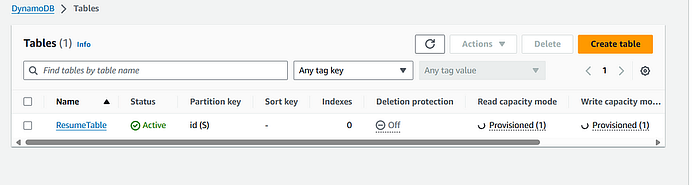
Build a Local ML Prediction Service with LocalStack + AWS SAM — Step-by-Step
I built a production-like ML prediction service that runs entirely on my laptop using LocalStack (local AWS emulator) and AWS SAM…
Build a Local ML Prediction Service with LocalStack + AWS SAM — Step-by-Step
I built a production-like ML prediction service that runs entirely on my laptop using LocalStack (local AWS emulator) and AWS SAM (Serverless Application Model). This setup lets you develop, test, and iterate on serverless ML endpoints without touching real AWS and without incurring cloud costs. Below is a detailed, step-by-step guide you can use to reproduce the project and share with others.
1 — What this project does (short)
You’ll create a serverless ML prediction API that:
- Trains a small scikit-learn model locally and saves it as
model.pklandscaler.pkl. - Packages an inference Lambda as a container image.
- Exposes the Lambda via API Gateway locally (SAM).
- Runs everything locally via LocalStack (emulates AWS services).
This is intended for development and prototyping (not optimized for production scale).
2 — Prerequisites (install before you start)
Install the following on your machine:
- Docker Desktop (must be running)
- Python 3.9+
- AWS SAM CLI
- Git (for Git Bash on Windows) or WSL (if on Windows)
- LocalStack CLI (optional) or we’ll run it via
docker-compose
If you’re on Windows, open Git Bash for smooth Linux-command compatibility; otherwise many Makefile commands will fail.
3 — Project layout
Create a project folder, then this structure:
localstack-project/
├── Makefile
├── template.yaml
├── docker-compose.yml
└── src/
    ├── Dockerfile
    ├── train.py
    ├── inference.py
    └── requirements.txt
I keep all Docker build context files inside src/ so SAM can build the container image with the DockerContext set to ./src.
4 — Dependencies
In src/requirements.txt (minimum for this project):
numpy
scikit-learn
joblib
Put that file inside src/ (important — Docker expects it in the build context).
5 — Training script (train.py)
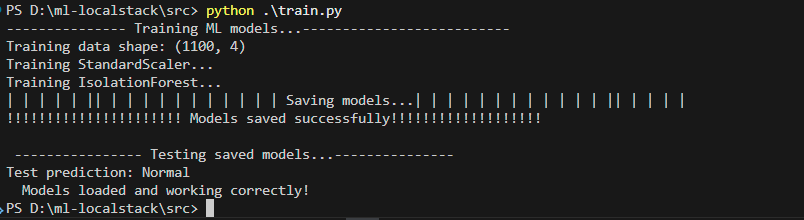
Create src/train.py. Its job is to generate sample data, train a StandardScaler and an IsolationForest outlier detector, and save both as .pkl files (scaler.pkl, model.pkl). Make sure you run this script before building the image so the model files exist to be copied into the Lambda container.
Example contents (core idea shown here):
# src/train.py
"""
Train and save ML models for the prediction service.
Run this script to generate model.pkl and scaler.pkl files.
"""
import joblib
import numpy as np
from sklearn.ensemble import IsolationForest
from sklearn.preprocessing import StandardScaler

def train_and_save_models():
    """Train models on sample data and save them."""
    print("--------------- Training ML models...--------------------------")
    # Generate sample training data
    # In production, this would be your actual training dataset
    np.random.seed(42)
    n_samples = 1000
    n_features = 4
    # Generate normal data
    X_train = np.random.randn(n_samples, n_features) * 2 + 5
    # Add some outliers
    n_outliers = int(n_samples * 0.1)
    X_outliers = np.random.uniform(-10, 20, size=(n_outliers, n_features))
    X_train = np.vstack([X_train, X_outliers])
    print(f"Training data shape: {X_train.shape}")
    # Train scaler
    print("Training StandardScaler...")
    scaler = StandardScaler()
    X_train_scaled = scaler.fit_transform(X_train)
    # Train outlier detector on scaled data
    print("Training IsolationForest...")
    outlier_detector = IsolationForest(
        contamination=0.1, random_state=42, n_estimators=100
    )
    outlier_detector.fit(X_train_scaled)
    # Save models
    print("| | | | | || | | | | | | | | | | | Saving models...| | | | | | | | | | | | || | | | | ")
    joblib.dump(scaler, "scaler.pkl")
    joblib.dump(outlier_detector, "model.pkl")
    print("!!!!!!!!!!!!!!!!!!!!!! Models saved successfully!!!!!!!!!!!!!!!!!!!")
    # Test the saved models
    print("\n ---------------- Testing saved models...---------------")
    loaded_scaler = joblib.load("scaler.pkl")
    loaded_model = joblib.load("model.pkl")
    # Test with sample data (should be normal)
    test_data = np.array([[1.0, 2.0, 3.0, 4.0]])
    test_data_scaled = loaded_scaler.transform(test_data)
    prediction = loaded_model.predict(test_data_scaled)
    print(f"Test prediction: {'Normal' if prediction[0] == 1 else 'Anomaly'}")
    print("  Models loaded and working correctly!")

if __name__ == "__main__":
    train_and_save_models()
Run it:
cd src
pip install -r .\requirements.txt
python train.py
ls  # should show scaler.pkl and model.pkl
cd ..
Press enter or click to view image in full size
6 — Inference Lambda (inference.py)
Create src/inference.py. This is the Lambda handler that loads scaler.pkl and model.pkl at cold start and responds to POST /predict with JSON payload {"features":[...4 numbers...]}. The handler returns predictions, scaled features, basic stats, feature importance and anomaly flag.
Simplified handler core:
# src/inference.py
import json
import joblib
import numpy as np
# Load pre-trained models (loaded once when Lambda initializes)
scaler = joblib.load("scaler.pkl")
outlier_detector = joblib.load("model.pkl")

def handler(event, context):  # pylint: disable=unused-argument
    """
    Lambda handler that makes predictions using a simple function
    Input event should contain 'features' key with list of 4 numbers
    """
    try:
        # Parse input data
        body = json.loads(event["body"])
        features = body.get("features", [])
        # Data validation
        if not features or not isinstance(features, list):
            return {
                "statusCode": 400,
                "body": json.dumps(
                    {"error": "Invalid input: features must be a non-empty array"}
                ),
            }
        # ML processing
        features_array = np.array(features).reshape(1, -1)
        features_scaled = scaler.transform(
            features_array
        )  # Use transform (not fit_transform)
        is_outlier = (
            outlier_detector.predict(features_scaled)[0] == -1
        )  # Use predict on scaled data (not fit_predict)
        # Calculate feature importance
        abs_features = np.abs(features_array[0])
        feature_importance = abs_features / (np.sum(abs_features) + 1e-10)
        # Generate prediction response
        prediction = {
            "base_prediction": float(np.mean(features_scaled) * 10),
            "confidence": float(1.0 / (1.0 + np.std(features_scaled))),
            "feature_importance": [float(x) for x in feature_importance],
            "is_anomaly": bool(is_outlier),
            "stats": {
                "mean": float(np.mean(features)),
                "std": float(np.std(features)),
                "min": float(np.min(features)),
                "max": float(np.max(features)),
            },
        }
        return {
            "statusCode": 200,
            "body": json.dumps(
                {
                    "prediction": prediction,
                    "features": features,
                    "features_scaled": features_scaled.tolist()[0],
                }
            ),
        }
    except json.JSONDecodeError as e:
        return {
            "statusCode": 400,
            "body": json.dumps({"error": f"Invalid JSON: {str(e)}"}),
        }
    except (KeyError, ValueError, TypeError) as e:
        return {
            "statusCode": 400,
            "body": json.dumps({"error": f"Invalid input: {str(e)}"}),
        }
    except Exception as e:
        return {
            "statusCode": 500,
            "body": json.dumps({"error": f"Internal server error: {str(e)}"}),
        }
Notes:
- Lambda expects
event["body"]to be JSON string when using API Gateway. - Use
transform()notfit_transform()on the scaler in inference.
7 — Dockerfile for Lambda image
src/Dockerfile uses the official AWS Lambda Python base image so Lambda runs in a realistic runtime:
FROM public.ecr.aws/lambda/python:3.9-arm64
# Copy requirements.txt
COPY requirements.txt ${LAMBDA_TASK_ROOT}
# Install dependencies
RUN pip install -r requirements.txt
# Copy function code
COPY inference.py ${LAMBDA_TASK_ROOT}
# Copy pre-trained models
# Note: These files must exist or Docker build will fail
# Run 'cd src && python train.py' before building
COPY model.pkl scaler.pkl ${LAMBDA_TASK_ROOT}/
# Set the CMD to your handler
CMD [ "inference.handler" ]
Remember: model files must exist when building, which is why you ran train.py first.
Press enter or click to view image in full size

curl http://localhost:4566/_localstack/healthPress enter or click to view image in full size
8 — SAM template (template.yaml)
Use container packaging and local API gateway. Key parts:
AWSTemplateFormatVersion: '2010-09-09'
Transform: AWS::Serverless-2016-10-31
Description: ML Prediction Service with LocalStack
Parameters:
  Stage:
    Type: String
    Default: test
    Description: Stage name for the API deployment
Globals:
  Function:
    Timeout: 30
    Environment:
      Variables:
        AWS_ENDPOINT_URL: http://localhost:4566
Resources:
  # Lambda Function
  PredictFunction:
    Type: AWS::Serverless::Function
    Properties:
      PackageType: Image
      MemorySize: 512
      Architectures:
        - arm64
      Events:
        PredictAPI:
          Type: Api
          Properties:
            Path: /predict
            Method: post
            RestApiId: !Ref PredictApi
    Metadata:
      Dockerfile: Dockerfile
      DockerContext: ./src
      DockerTag: python3.9-v1
  # API Gateway
  PredictApi:
    Type: AWS::Serverless::Api
    Properties:
      StageName: !Ref Stage
      EndpointConfiguration: EDGE
      Auth:
        DefaultAuthorizer: NONE
Outputs:
  PredictEndpoint:
    Description: API Gateway endpoint URL for Predict function
    Value: !Sub "http://localhost:4566/restapis/${PredictApi}/${Stage}/_user_request_/predict"

  TestCommand:
    Description: Curl command to test the endpoint
    Value: !Sub |
      # Test prediction endpoint
      curl -X POST ${PredictEndpoint} \
        -H 'Content-Type: application/json' \
        -d '{"features": [1.0, 2.0, 3.0, 4.0]}'
This tells SAM to build the container image from src/ using the Dockerfile there.
9 — LocalStack docker-compose
docker-compose.yml for LocalStack:
services:
  localstack:
    image: localstack/localstack:latest
    container_name: localstack
    ports:
      - "4566:4566"   # main edge port
    environment:
      - AWS_DEFAULT_REGION=us-east-1
      - DATA_DIR=/var/lib/localstack
      - LAMBDA_EXECUTOR=docker
      - DOCKER_HOST=unix:///var/run/docker.sock
    volumes:
      - ./localstack_data:/var/lib/localstack
      - /var/run/docker.sock:/var/run/docker.sock
Start LocalStack:
docker-compose up -d
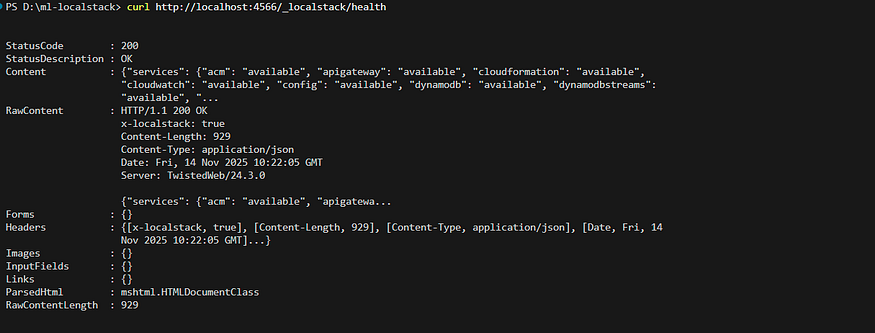
curl http://localhost:4566/_localstack/health
If health shows running, LocalStack is ready.
10 — Makefile (automation)
A Makefile can automate training, build, start, and test steps. On Linux/macOS, the Makefile can run sam build and sam local start-api. On Windows use Git Bash or WSL. Key targets you’ll want: install, train-models, build, start-api, test-endpoint, clean.
If you prefer not to use make on Windows, you can run the corresponding commands manually.
11 — Build with SAM
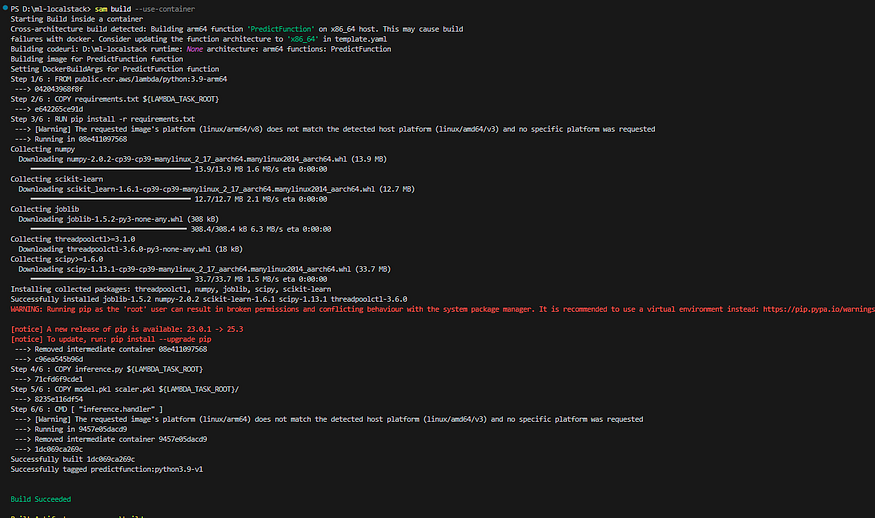
After training models and ensuring LocalStack is running, build the SAM app:
sam build --use-containerSAM will build the container image using the Dockerfile in src/.
Press enter or click to view image in full size
12 — Start local API
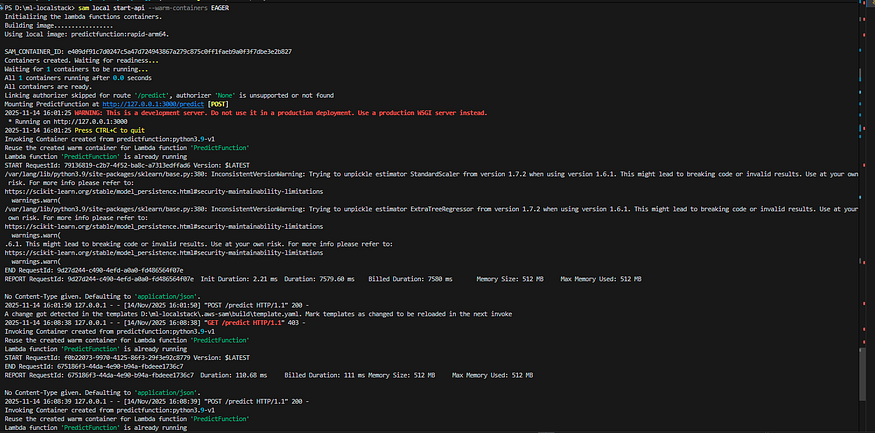
Start the API locally (SAM emulates API Gateway + Lambda):
sam local start-api --warm-containers EAGERThis binds to http://127.0.0.1:3000. Note: the /predict path is a POST endpoint — opening it in a browser will return a 403 since GET is not allowed.
Press enter or click to view image in full size
13 — Test the endpoint
Use curl (Linux/macOS or Git Bash) or PowerShell Invoke-WebRequest on Windows.
Linux/Git Bash:
curl -X POST "http://127.0.0.1:3000/predict" \
  -H "Content-Type: application/json" \
  -d '{"features":[1.0,2.0,3.0,4.0]}'
PowerShell:
Invoke-WebRequest -Uri "http://127.0.0.1:3000/predict" `
  -Method POST `
  -ContentType "application/json" `
  -Body '{"features":[1.0,2.0,3.0,4.0]}' | Select-Object -ExpandProperty Content
You should receive a JSON response with prediction, confidence, feature_importance, is_anomaly, and features_scaled.
Use Makefile for automated workflow
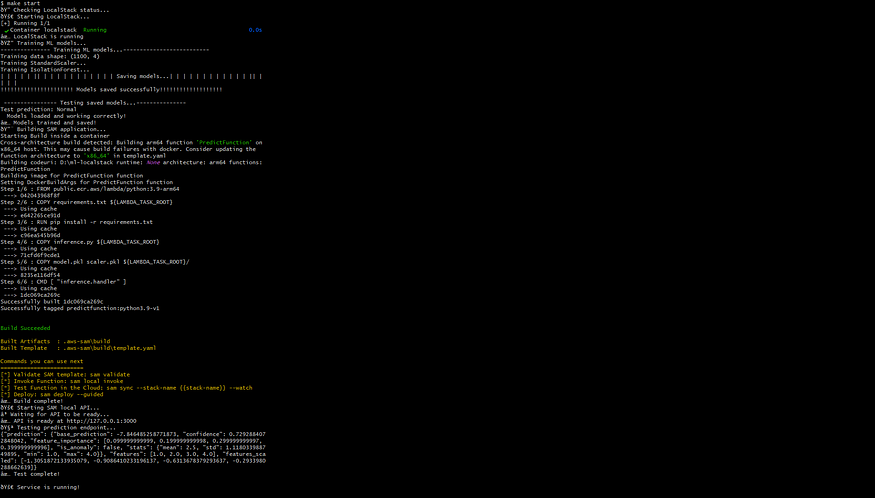
Instead of running everything manually, just type:
make startThis will:
- Start LocalStack
- Train models
- Build SAM
- Start API
- Test endpoint
Press enter or click to view image in full size
14 — Troubleshooting (common issues)
- Docker COPY failed: no such file — Ensure
requirements.txtand model files (.pkl) are insidesrc/(the Docker build context). - Makefile errors — Tabs required before each command. Use Git Bash or WSL on Windows to avoid missing Linux tools.
- PowerShell curl problems — Windows
curlmaps toInvoke-WebRequest. Usecurl.exeorInvoke-WebRequestwith proper flags. - LocalStack not running — Check
docker-compose logs localstackand ensure Docker socket is mounted (/var/run/docker.sock).
15 — Next steps & extensions
Once you have the basic flow running locally, you can:
- Add S3 or DynamoDB interactions via LocalStack.
- Replace scikit-learn with a small neural network or an ONNX model.
- Add authentication and logging.
- Add CI/CD: build and test in CI with LocalStack and push only after smoke tests pass.
- Deploy to real AWS: remove LocalStack references, run
sam deploy --guidedand ensure models are loaded from S3 (do not package model files inside image for large models — use S3 or EFS).
16 — Why this setup is useful
- Rapid iteration: test changes locally without cloud deployment cycles.
- Cost efficient: no AWS charges for development testing.
- Production fidelity: running Lambda containers locally and using API Gateway emulation helps catch runtime issues early.
17 — Wrap up
This walkthrough builds a simple but realistic local ML prediction service using LocalStack and SAM. It’s a great starting point for developing serverless ML features, integrating them into pipelines, and testing locally before deploying to the cloud.
Follow me:
LinkedIn: https://www.linkedin.com/in/harshaljethwa/
GitHub: https://github.com/HARSHALJETHWA19/
Twitter: https://twitter.com/harshaljethwaa
Thank You!!!
메타데이터
- post_id
- 585ec5d40a4e
- slug
- build-a-local-ml-prediction-service-with-localstack-aws-sam-step-by-step-585ec5d40a4e
- url
- https://medium.com/@harshaljethwaa/build-a-local-ml-prediction-service-with-localstack-aws-sam-step-by-step-585ec5d40a4e
- canonical_url
- https://medium.com/@harshaljethwaa/build-a-local-ml-prediction-service-with-localstack-aws-sam-step-by-step-585ec5d40a4e
- author_url
- https://medium.com/@harshaljethwaa
- status
- ok
- fetched_at
- 2026-07-08 02:40:31