Make a Comic Book with the Same AI Character on Every Page Using ChatGPT
A practical workflow for creating storybooks where characters remain visually identical from the first page to the last.
Make a Comic Book with the Same AI Character on Every Page Using ChatGPT
A practical workflow for creating storybooks where characters remain visually identical from the first page to the last.
Any AI image generator can create good looking images. The hard part is keeping characters consistent.
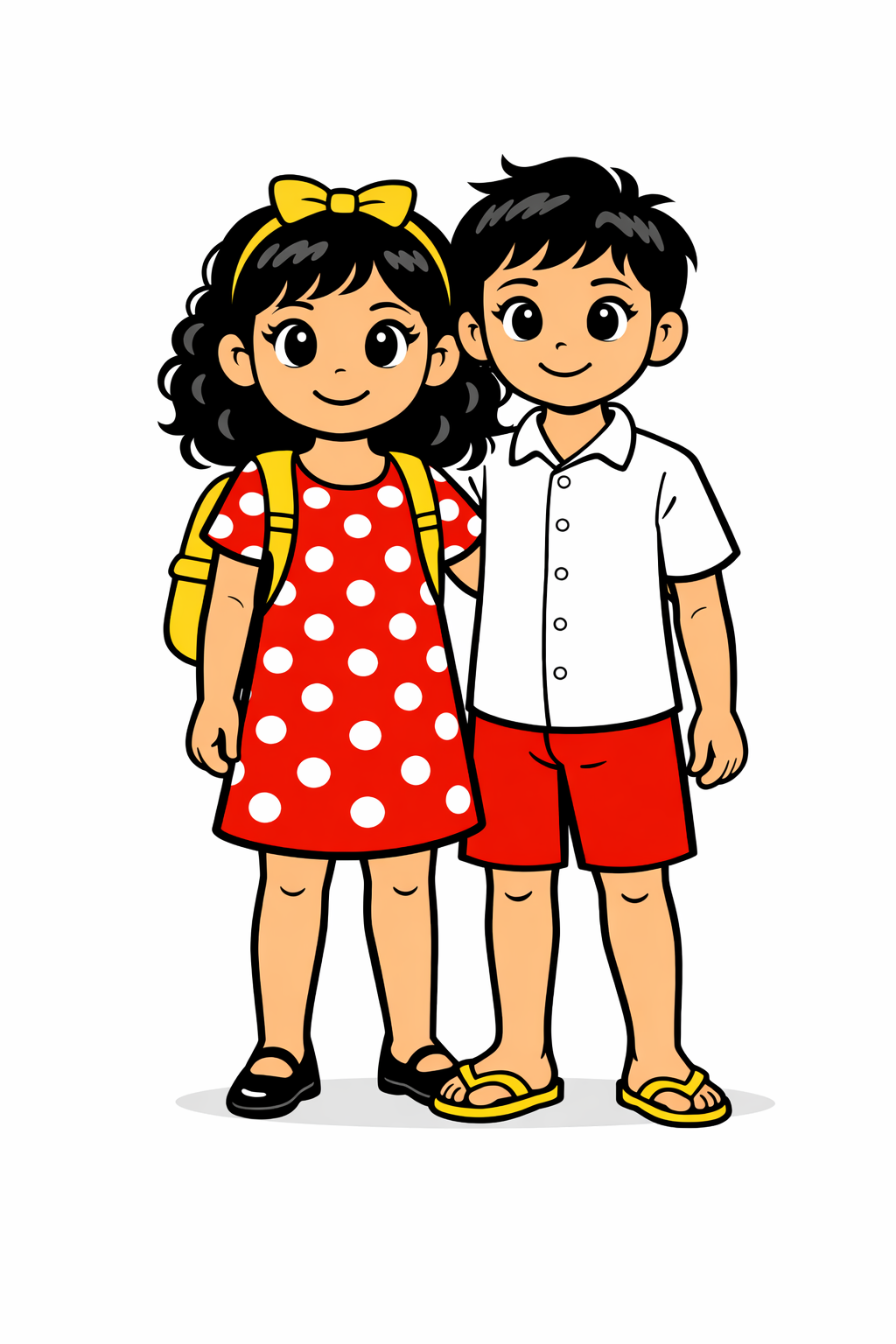
Maria and Arjun By TandA
If you have ever tried to create a comic, picture book, or illustrated story with AI, you already know the problem. Every new scene slightly changes the character. Faces drift. Hair shifts. Clothing details disappear. By page three, continuity is broken.
Let’s fix that.
This guide walks you through a repeatable, no-training, no-coding workflow using ChatGPT with image reference prompting to keep the same character across every page of a comic or storybook.
The Real Problem with AI Character Consistency
AI image models generate images from scratch every time. Even when prompts are similar, small variations appear.
Common issues include:
- Facial proportions shifting
- Hairlines and textures changing
- Clothing colors drifting
- Body shape inconsistencies
- Expressions mutating unintentionally
That breaks narrative immersion.
The solution is not longer prompts. The solution is reference-anchored prompting.
Modern versions of ChatGPT that support image input can reliably maintain character identity when you explicitly anchor each generation to the same reference image.
Step 1. Define Your Characters and Story First
Do not open ChatGPT yet.
Start with a short prep document. This saves time and prevents random output.
Characters
Write down the essentials.
Character example
Maria Age: 12 Gender: Female Hair: Black, curly, shoulder length Eyes: Large, brown Clothing: Red dress with white polka dots Accessories: Yellow backpack, yellow hair ribbon Shoes: Black covered shoes No freckles
Maria — Master Character Reference Prompt (Save This)
Full-body cartoon illustration of Maria, a 12-year-old girl. She has black, curly hair reaching her shoulders, large brown eyes, and a youthful face with no freckles. She wears a red dress with white polka dots, black closed shoes, and a bright yellow backpack. A yellow ribbon is tied neatly in her hair. Her proportions are age-appropriate and consistent, with a friendly, expressive look.
Style: clean comic illustration, thick outlines, simple shading. Color rules: only red and yellow are in color, everything else is black and white. Pose: neutral, front-facing, relaxed stance, gentle smile. Background: plain white. Lighting: even, soft, no dramatic shadows.
Arjun Age: 13 Hair: Black Eyes: Black Clothing: White shirt, red shorts Footwear: Yellow flip-flops
Arjun — Master Reference Image Prompt (Save This)
Full-body cartoon illustration of Arjun, a 13-year-old boy. He has short black hair, black eyes, and a friendly, youthful face with no facial hair or freckles. He wears a white short-sleeved shirt, red shorts, and yellow flip-flops. His proportions are realistic for a teenager and consistent.
Style: clean comic illustration, thick outlines, simple flat shading. Color rules: only red and yellow are colored, everything else black and white. Pose: neutral, front-facing, relaxed stance, gentle smile. Background: plain white. Lighting: even, soft, no dramatic shadows.
This image is the official reference image for Arjun and must remain visually unchanged across all scenes.
Visual Style
Pick one style and commit to it.
Examples:
- Comic panels
- Digital cartoon
- Hand-drawn sketch
- Soft watercolor
For this workflow, choose comic panel style.
Optional constraint example: Only red and yellow appear in color. Everything else is black and white.
Story Outline
Write one or two sentences per scene.
Example three-scene story:
Scene 1 Wide shot of a sunny courtyard. Maria enters with her yellow backpack. Arjun kicks a football and looks surprised.
Scene 2 Close-up of them sitting on steps. Maria opens her backpack. Arjun shields his eyes dramatically.
Scene 3 They high-five. Backpack spills books. Football rolls away.
Step 2. Create a Reference Image for Each Character in ChatGPT
Now open ChatGPT and use image generation.
Prompt example for Maria
Full body cartoon illustration of a 12 year old Indian girl named Maria. Black curly hair to shoulders. Large brown eyes. Red dress with white polka dots. Yellow backpack. Yellow hair ribbon. Black shoes. Simple comic style. Thick outlines. Only red and yellow are colored. Everything else black and white. White background. Front facing.
Generate multiple versions.
Pick the clearest, most neutral pose with a clean front view.
Save this image as: Maria_reference.png
Repeat the same process for Arjun and save: Arjun_reference.png
These images are now locked identity anchors.
Step 3. Use Reference Images to Maintain Consistency
This is the critical step.
For every scene, you must:
- Upload the reference image or images
- Explicitly instruct ChatGPT to reuse them
Scene generation workflow
Upload:
- Maria_reference.png
- Arjun_reference.png
Then prompt:
Use the uploaded reference images as the same characters Maria and Arjun. Keep their faces, hair, clothing, and proportions identical. Comic panel style. Only red and yellow in color. Everything else black and white.
Then describe the scene.
Example scene prompt:
Wide comic panel of a sunny courtyard. Maria walks in with her yellow backpack over her shoulder. Arjun is kicking a football and looking surprised. Same characters as reference.
ChatGPT will change pose, expression, and background, while preserving identity.
If you need emotional variation, say: Same face as Arjun but excited Same face as Maria but laughing
Do not redefine the character. Reference it.
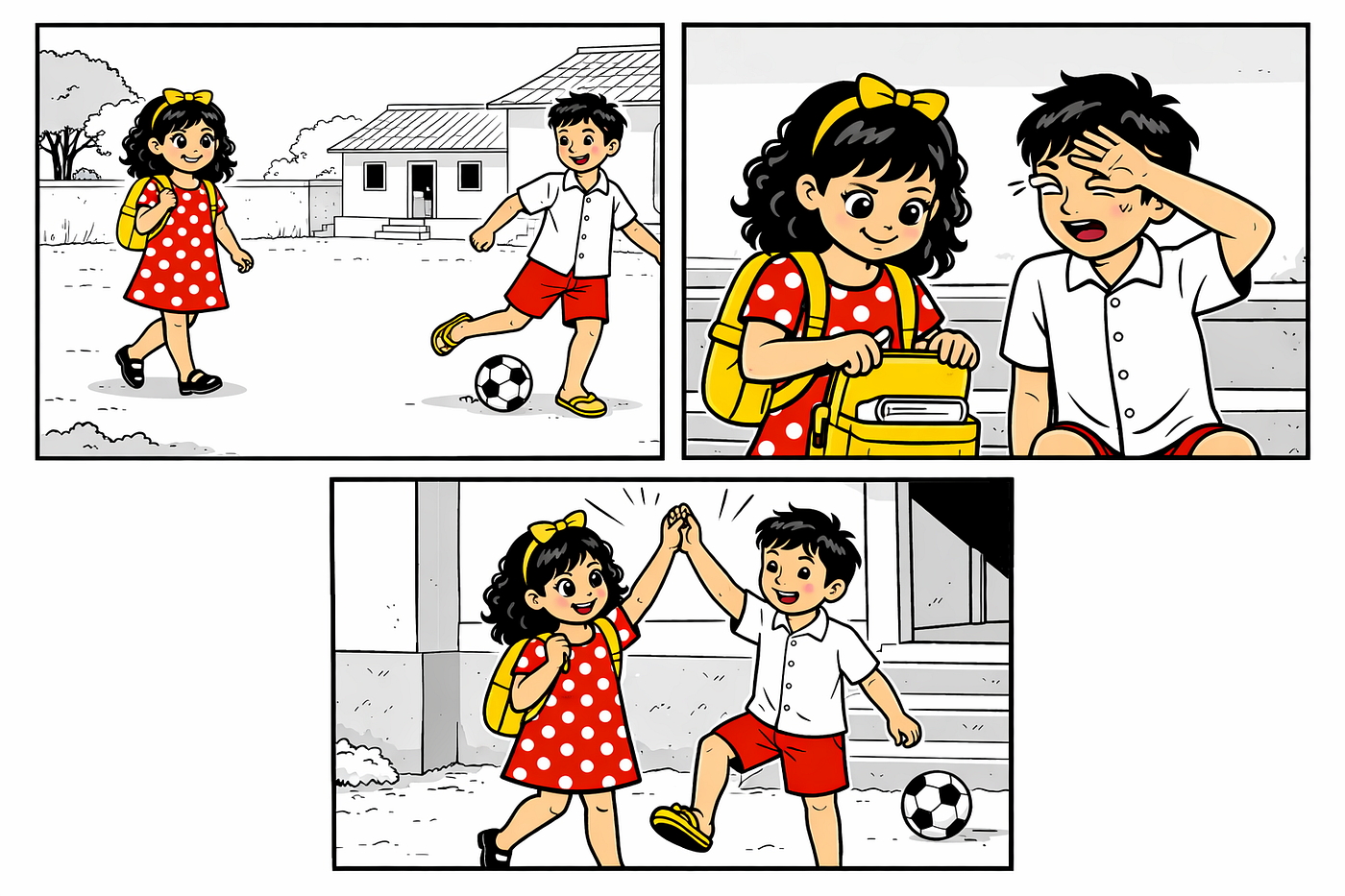
Example 3 Panel style By TandA
Step 4. Build Each Page Scene by Scene
Treat each scene as a separate image.
Always re-upload the same reference images.
Name files clearly: page1_scene1.png page1_scene2.png
Expect to regenerate occasionally. Minor iteration is normal.
Pro tip: Shorter prompts produce more stable results.
Step 5. Assemble the eBook
Once all scenes are generated, assemble the book manually.
Recommended tools:
- Google Docs
- Canva
- Kittl
Guidelines:
- One PDF page equals one book page
- Place images first
- Add dialogue text separately
- Use clean readable fonts
- Avoid overcrowding panels
Export as a PDF.
Create a matching cover using the same character reference images.
Step 6. Publish and Share
Your comic book is now complete.
Platforms:
- Amazon KDP
- Gumroad
- Buy Me a Coffee
- Personal website
Promotion ideas:
- Turn pages into short video slideshows
- Share previews on social media
- Post behind-the-scenes creation clips
A consistent visual identity dramatically increases perceived quality.
Pro Tips for Reliable Consistency
- Always start from the same reference images
- Explicitly say “same character as reference”
- Keep style keywords identical every time
- Do not change clothing unless the story requires it
- Structure prompts deliberately
- Consistency comes from discipline, not luck
Final Thoughts
You do not need custom training, coding, or expensive designers to create a professional looking AI comic book.
You need:
- Clear character definitions
- One solid reference image per character
- Consistent image-anchored prompting
- ChatGPT with image input
That combination works.
People are already creating full twenty-page comic books in a few evenings using this exact approach.
You can too.
Start tonight.
If you want to see the original creator and his article using Gemini, check out Tanmoy Das’ very helpful article.
메타데이터
- post_id
- 5877ed751fc0
- slug
- make-a-comic-book-with-the-same-ai-character-on-every-page-using-chatgpt-5877ed751fc0
- url
- https://medium.com/tanda-ai-art-library/make-a-comic-book-with-the-same-ai-character-on-every-page-using-chatgpt-5877ed751fc0
- canonical_url
- https://medium.com/tanda-ai-art-library/make-a-comic-book-with-the-same-ai-character-on-every-page-using-chatgpt-5877ed751fc0
- author_url
- https://medium.com/@ttrimm
- status
- ok
- fetched_at
- 2026-06-14 13:58:26