Audio Waveform: How I Made My Browser Process 5GB Videos Without Catching Fire
Extracting audio and rendering waveforms from massive video files — entirely client-side, because uploading 5GB to a server felt like…
Audio Waveform: How I Made My Browser Process 5GB Videos Without Catching Fire
Extracting audio and rendering waveforms from massive video files — entirely client-side, because uploading 5GB to a server felt like dial-up energy.
Watch the demo: a 3 GB MP4 processed entirely in the browser — youtu.be/nZe-znRpLik
So here’s the thing. I had a 4.7 GB MKV file. A 3-hour conference recording. I needed to find the exact timestamp where the speaker said “we’re pivoting to blockchain” so I could clip it and send it to everyone as evidence of corporate insanity.
Every online tool either had a 500 MB upload limit, wanted me to create an account, or uploaded my file to some random server. “Don’t worry, we delete it after processing!” Sure you do, random-video-converter.io. Sure you do.
So I did what any reasonable developer does. I opened VS Code and started typing indexedDB.open().
Two days later, I had a browser app that eats 5 GB video files for breakfast, extracts audio in seconds (not minutes), and renders interactive zoomable waveforms. All running in a browser tab. Zero server processing. Your files never leave your machine.
I call it Audio Waveform, and it’s the most over-engineered solution to a simple problem I’ve built this month.
(Disclosure: “This article was written with the assistance of an AI writing tool.”)
The Problem
“Just use ffmpeg” — yes, I know. And I do. On my machine. But I wanted something I could:
- Share with non-technical people — “open this URL and drag your file”
- Use from any device — no installation, no PATH variables, no “which ffmpeg”
- Keep private — no file uploads, no third-party processing
- Handle huge files — not “up to 200 MB”, actual big files
The pieces existed: ffmpeg.wasm runs ffmpeg in WebAssembly, IndexedDB can store gigabytes, Canvas can draw anything. Nobody had glued them together for large files though, because — as I discovered — “large files in the browser” is where things get spicy.
Architecture

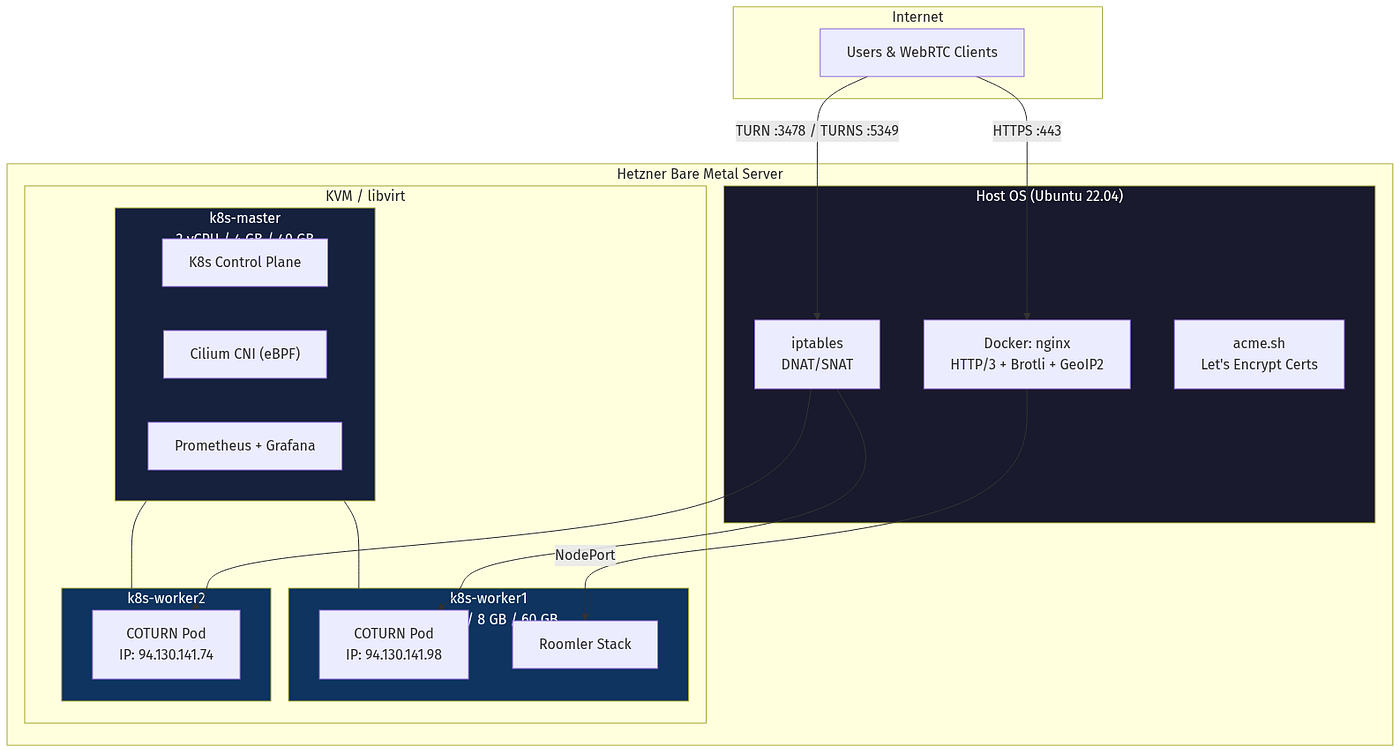
The “server” in this diagram is a liar. It serves static files. That’s it. HTML, JS, CSS, and WASM binaries. Your video data never touches it. The server’s only real job is setting two HTTP headers. Two. That’s its entire personality.
The Stack
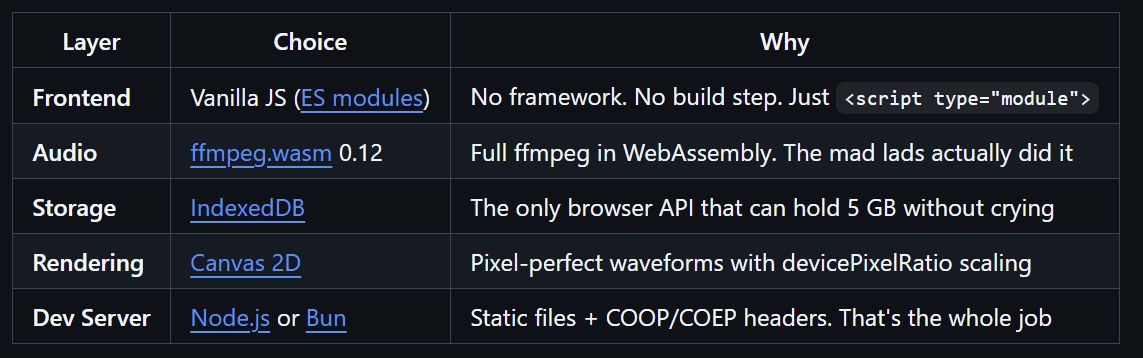
No React. No Vue. No Svelte. No bundler. No TypeScript. Just 5 JavaScript files, a CSS file, and an HTML page. The node_modules folder is bigger than my entire source tree. As god intended.
The 5 GB Problem: Chunked IndexedDB Storage
Here’s the first thing that goes wrong when you try to handle large files in a browser: memory.
A 5 GB File object is fine — the browser holds a reference to it on disk. But the moment you call file.arrayBuffer(), congratulations, you just tried to allocate 5 GB of contiguous memory. Chrome will look at you like you just asked it to solve world hunger.
The solution: don’t. Never load the whole file into memory. Instead, slice it into 50 MB chunks and stuff them into IndexedDB.
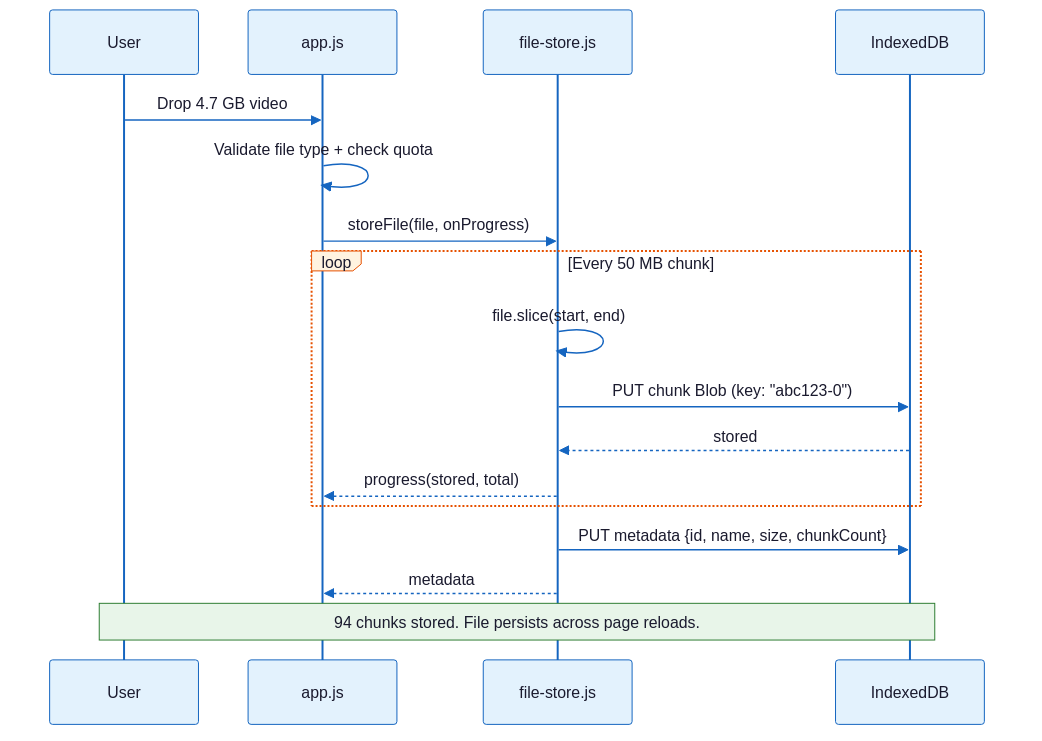
Why 50 MB chunks?
- 1 MB: too many IDB transactions. Storing 5 GB = 5,000 writes. Slow.
- 500 MB: some browsers choke on single IDB values this large.
- 50 MB: sweet spot. 100 transactions for a 5 GB file. Fast, reliable, tested everywhere.
The beautiful part: new Blob(chunks) is lazy. When we reassemble the file later, no data is copied. The browser just records "this Blob is the concatenation of these other Blobs." Zero memory overhead.
The ffmpeg.wasm Dance
ffmpeg.wasm is a marvel of engineering. Someone compiled the entire ffmpeg codebase to WebAssembly so it runs in a browser tab. It’s the software equivalent of putting a V8 engine in a shopping cart.
But using it with large files has… nuances.
Loading: Multi-Threaded With Fallback

Multi-threaded ffmpeg.wasm requires SharedArrayBuffer, which requires COOP/COEP headers. That's why the "server" exists — to set those two headers. Two headers. That's the entire reason there's a server.js file. I've written longer commit messages.
Input Mounting: The 1.5 GB Threshold
Here’s where it gets interesting. ffmpeg.wasm has a virtual filesystem. You can write files to it with writeFile(), which calls blob.arrayBuffer() internally. Remember what happens when you call arrayBuffer() on a 5 GB Blob? Right. Fire.
So for files > 1.5 GB, we use WORKERFS — an Emscripten virtual filesystem that mounts a browser Blob as a read-only file. ffmpeg reads from it on demand via file.slice(). No full copy into memory.

The 1.5 GB threshold is conservative. Some browsers handle arrayBuffer() up to 2 GB. But "some browsers" is not a reliability strategy. 1.5 GB gives us a safety margin.
Stream Copy: The Speed Hack
This is the most important optimization and it’s exactly three characters: -c:a copy.
When you run ffmpeg -i video.mp4 -vn -c:a copy output.aac, ffmpeg doesn't re-encode the audio. It just copies the audio stream out of the container. No decoding, no encoding, no DSP. Just byte shuffling.
The result:
- A 2-hour video’s audio extracts in 3–5 seconds
- Instead of the 2–3 minutes re-encoding would take
- With identical quality (it’s the same bits!)
This is the kind of optimization where you feel like you’re cheating. You’re not. It’s just that most tools re-encode by default because they assume you want format conversion. We don’t. We want speed.
Waveform Analysis: Math That Looks Cool
Once we have the audio, we need to turn it into something visual:

Downsampling
Peak Extraction
The algorithm is embarrassingly simple:
- Divide samples into N buckets (N = canvas width in pixels)
- For each bucket, find the minimum and maximum sample values
- Store as
{min, max}
That’s it. O(n) single-pass scan. No FFT. No windowing. No spectral analysis. Just “what are the loudest and quietest parts of this pixel column.”
The result is an array of ~2000 peak pairs. From 57 million samples to 2000 data points. A 28,500:1 compression ratio. Your GPU doesn’t even notice.
Canvas Rendering
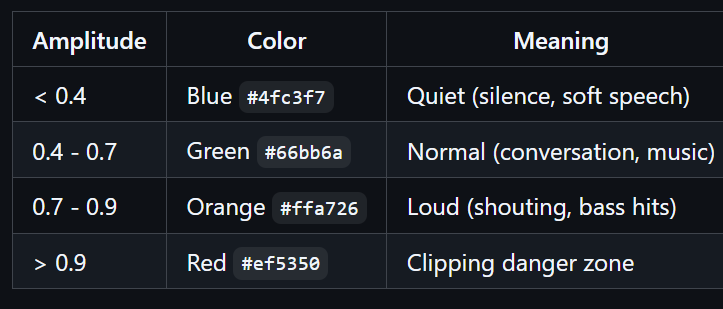
Each peak becomes a vertical bar, mirrored around the center line. The color depends on amplitude:
AmplitudeColorMeaning< 0.4Blue #4fc3f7Quiet (silence, soft speech)0.4 - 0.7Green #66bb6aNormal (conversation, music)0.7 - 0.9Orange #ffa726Loud (shouting, bass hits)> 0.9Red #ef5350Clipping danger zone
The renderer is device-pixel-ratio aware. On a 2x Retina display, the canvas is 2x the display size and scaled down, so every waveform bar is crisp.
The Playback Experience
You can zoom from 0.1x (entire track as a thin line) to 50x (individual peaks fill the screen). The red cursor follows playback at 60 FPS via requestAnimationFrame. Click anywhere on the waveform to seek. The container auto-scrolls to keep the cursor visible.

The zoom is multiplicative (1.5x per click). This feels natural — each zoom step shows roughly 50% more detail. Logarithmic zoom would be more mathematically elegant, but “click click click, oh there’s the bass drop” is the actual user experience I was designing for.
Memory Budget: How to Not OOM on a 5 GB File
This was the hardest engineering problem. Here’s the full memory breakdown:

Peak memory usage for a 5 GB file: ~510 MB (audio output + downsampled PCM at 16 kHz). For a 1 GB file: ~150 MB. For a 100 MB file: ~15 MB. The ffmpeg instance is terminated after analysis to free the WASM heap.
Without WORKERFS? A 5 GB file would need 5 GB in WASM heap memory. The browser would tab-crash faster than you can say “out of memory.”
The Two-Header Server
The entire server is ~30 lines (Bun version) including path traversal protection:
import { join, normalize, sep } from 'path';const ROOT = import.meta.dir;const server = Bun.serve({
port: parseInt(process.env.PORT || '3000'),
async fetch(req) {
const url = new URL(req.url);
const safePath = normalize(decodeURIComponent(url.pathname));
const filePath = join(ROOT, safePath === '/' ? '/index.html' : safePath); // Prevent path traversal
if (!filePath.startsWith(ROOT + sep) && filePath !== ROOT) {
return new Response('Forbidden', { status: 403 });
} const file = Bun.file(filePath);
if (!(await file.exists())) {
return new Response('Not found', { status: 404 });
}
return new Response(file, {
headers: {
'Cross-Origin-Opener-Policy': 'same-origin',
'Cross-Origin-Embedder-Policy': 'require-corp',
},
});
},
});Those two headers — COOP and COEP — are required for SharedArrayBuffer, which ffmpeg.wasm needs for multi-threading. Without them, everything still works, just 3-5x slower.
For production deployment (Netlify, Cloudflare Pages, Vercel), you’d put these in a _headers file and skip the server entirely. It's a static site. The server is a development convenience, not architecture.
Lessons Learned
1. Stream Copy is a Superpower
My first version re-encoded audio to WAV for simplicity. Extracting audio from a 2-hour video took 4 minutes. Switching to stream copy (-c:a copy) dropped it to 5 seconds. Same quality. 48x faster. I felt like I'd discovered fire.
The only catch: if the input audio is in an unusual codec (Vorbis in MKV, PCM in MOV), copy mode fails because the codec doesn’t fit the output container. The fix? Try stream copy first, check if the output is empty, and fall back to re-encoding (AAC 192k) automatically. The user never sees the fallback — it just takes a few extra seconds instead of failing.
2. new Blob() is Lazy, and That's Beautiful
When you do new Blob([chunk1, chunk2, chunk3]), the browser doesn't copy any data. It creates a virtual Blob that references the underlying chunks. This means reassembling a 5 GB file from 100 chunks uses ~0 bytes of additional memory.
I initially wrote a streaming reassembly function with ReadableStream and enqueue(). Then I discovered new Blob() already does what I wanted, better, in one line. I deleted 40 lines of code and went to get coffee.
3. WORKERFS is the Unsung Hero
WORKERFS is an Emscripten filesystem type that mounts browser File and Blob objects as read-only files. When ffmpeg reads from a WORKERFS-mounted file, Emscripten calls blob.slice(offset, offset + length) under the hood. No full copy. No arrayBuffer(). Just on-demand reading.
The documentation for WORKERFS is… sparse. The Emscripten docs mention it in one paragraph. The ffmpeg.wasm docs don’t mention it at all. I found the API by reading ffmpeg.wasm source code. The things we do for memory efficiency.
4. 50 MB is the Goldilocks Chunk Size
I tested chunk sizes from 1 MB to 500 MB across Chrome, Firefox, and Edge:
- 1 MB: 5000 IDB transactions for a 5 GB file. Chrome took 3 minutes just storing.
- 10 MB: Better, but still 500 transactions. Noticeable overhead.
- 50 MB: 100 transactions. Fast and reliable everywhere.
- 100 MB: Worked in Chrome. Firefox occasionally threw
QuotaExceededErroron individual puts. - 500 MB: Chrome says no. The IDB structured clone algorithm can’t handle it.
50 MB: big enough to minimize transaction overhead, small enough to never hit browser limits. Boring? Yes. Reliable? Also yes.
5. Canvas Rendering is Embarrassingly Fast
I initially worried about rendering performance. 2000+ vertical bars, color-coded, device-pixel-ratio scaled. Surely I’d need WebGL or at least OffscreenCanvas?
Nope. Canvas 2D fillRect() is absurdly fast for this workload. The entire waveform renders in under 5ms. Even at 50x zoom with 100,000+ bars, it's under 30ms. The GPU just eats rectangles for breakfast.
What’s Next
- Region selection — drag to select a time range, export just that audio segment
- Multiple tracks — some videos have multiple audio tracks (commentary, music, etc.)
- Spectrogram view — FFT-based frequency visualization alongside the waveform
- Offline support — Service Worker for full offline capability
Try It
Quick Start
git clone https://github.com/gjovanov/audio-waveform.git
cd audio-waveform
bun install
bun server.bun.js
Open http://localhost:3000, drop a video, and watch the waveform materialize.
Need a large test file? The Blender Reel 2013 is 2.4 GB (Creative Commons Attribution 3.0). The intro video on the repo uses a 3 GB version — same reel re-encoded to H.264 and concatenated 4x.
Or try it live at audio-waveform.roomler.live.
Audio Waveform is open source under the MIT license. No dependencies except ffmpeg.wasm.
PRs welcome, especially if you know how to make WORKERFS documentation less cryptic.
If you enjoyed this, check out my previous post on building ClawUI — a web dashboard to tame Claude Code sessions — same energy, fewer gigabytes.
메타데이터
- post_id
- 589e3c5f5e57
- slug
- audio-waveform-how-i-made-my-browser-process-5gb-videos-without-catching-fire-589e3c5f5e57
- url
- https://medium.com/@gjovanov/audio-waveform-how-i-made-my-browser-process-5gb-videos-without-catching-fire-589e3c5f5e57
- canonical_url
- https://medium.com/@gjovanov/audio-waveform-how-i-made-my-browser-process-5gb-videos-without-catching-fire-589e3c5f5e57
- author_url
- https://medium.com/@gjovanov
- status
- ok
- fetched_at
- 2026-06-20 20:29:01