Automated Presentation Analysis with Google Apps Script
Apps Script use case for automating presentation expectation analysis.
Automated Presentation Analysis with Google Apps Script
Apps Script use case for automating presentation expectation analysis.
Do you want to update your slide with a click?
This Apps Script workflow streamlines the process of analyzing participant expectations for your presentations, integrating seamlessly with Google Slides and Forms. With a single click, you can analyze feedback and display the results directly in your presentation, eliminating the need to switch between applications.
Workflow Breakdown
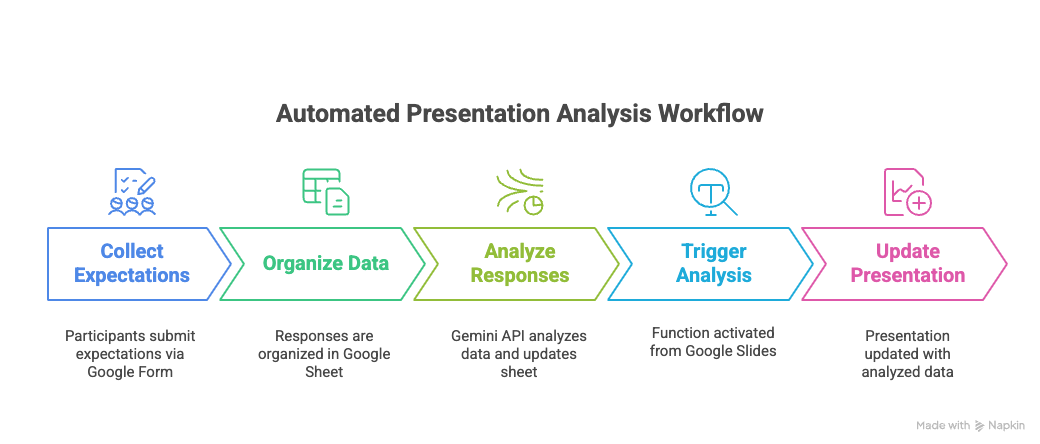
- Collecting Expectations: Participants submit their expectations for your presentation through a Google Form.
- Organizing Data: All submitted responses are automatically organized within a Google Sheet.
- Analyzing Responses with Gemini API: An Apps Script function, “Summarize data & Update Sheet,” resides in your Google Sheet. This function leverages the Gemini API to analyze the collected responses and then adds a summarized row to a separate sheet within the same Google Sheet. <Example code is below — Code for Sheet>
- Triggering Analysis from Google Slides: From your Google Slide, you can activate the “Summarize data & Update Sheet” function in your Google Sheet. This is made possible by exposing the Google Sheet’s Apps Script function via the Apps Script API, allowing it to be called from another application. <Example code is below — Code for Slide>
- Updating Your Presentation: Immediately following the data analysis, another Apps Script function in your Google Slide automatically updates a specific text box with the newly analyzed data from your Google Sheet. You’ve designated this text box using its Alt Text title, ensuring the correct element is updated.
Key Benefit
By activating this entire workflow with a button directly in your Google Slide, you can effortlessly share analyzed participant expectations during your presentation without ever leaving Google Slides. This prevents disruptions and keeps your audience engaged.
[embed]
Code for Sheet
/**
 * Processes data from 'Form Responses 1', calls the Gemini API,
 * and stores the summarized answer in the 'Answer' sheet.
 */
function processAndSummarizeData() {
  const SPREADSHEET = SpreadsheetApp.getActiveSpreadsheet();
  const INPUT_SHEET_NAME = "Form Responses 1";
  const OUTPUT_SHEET_NAME = "Answer";
  const INPUT_COLUMN_INDEX = 2; // Column B is index 2 (A=1, B=2, etc.)
  const PROMPT_TEMPLATE = "I collected physical education major college students' responses to this question: What challenges do you anticipate in assessing health-related fitness for young kids? Your output should be concise (under 80 words total, no bold or italic) and strictly based on the students responses below. The output structure will be as follows: (1) Overall Summary: Highlight the most common themes across all responses. (2) Key Insights for an instructor to address students' responses when teaching formative assessment of health-related fitness for elementary student (K-5).";

  const GEMINI_API_KEY = PropertiesService.getScriptProperties().getProperty('GEMINI_API_KEY');
  if (!GEMINI_API_KEY) {
    throw new Error("Gemini API Key not found in script properties. Please set it up.");
  }

  try {
    const inputSheet = SPREADSHEET.getSheetByName(INPUT_SHEET_NAME);
    if (!inputSheet) {
      throw new Error(`Sheet '${INPUT_SHEET_NAME}' not found.`);
    }

    // Get all data from the specified column, excluding the header
    const lastRow = inputSheet.getLastRow();
    if (lastRow < 2) { // Only header row or empty
      Logger.log("No data found in 'Form Responses 1' to process.");
      return;
    }
    const dataRange = inputSheet.getRange(2, INPUT_COLUMN_INDEX, lastRow - 1, 1);
    const dataValues = dataRange.getDisplayValues().flat(); // Get 2D array and flatten to 1D

    // Combine all data into a single string for the prompt
    const combinedData = dataValues.filter(String).join("\n"); // Filter out empty strings
    if (!combinedData) {
        Logger.log("No valid data found in column B to send to Gemini.");
        return;
    }

    const fullPrompt = `${PROMPT_TEMPLATE}\n\n\n${combinedData}`;
    Logger.log("Full prompt sent to Gemini:\n" + fullPrompt);

    // Call Gemini API
    const API_URL = `https://generativelanguage.googleapis.com/v1beta/models/gemini-3-pro-preview:generateContent?key=${GEMINI_API_KEY}`;
    const payload = {
      contents: [
        {
          parts: [
            { text: fullPrompt }
          ]
        }
      ]
    };

    const options = {
      method: "post",
      contentType: "application/json",
      payload: JSON.stringify(payload),
      muteHttpExceptions: true // Allows inspection of error responses
    };

    Logger.log("Calling Gemini API...");
    const response = UrlFetchApp.fetch(API_URL, options);
    const responseCode = response.getResponseCode();
    const responseBody = response.getContentText();
    Logger.log("Gemini API Response Code: " + responseCode);
    Logger.log("Gemini API Response Body: " + responseBody);

    if (responseCode !== 200) {
      throw new Error(`Gemini API Error (Code: ${responseCode}): ${responseBody}`);
    }

    const jsonResponse = JSON.parse(responseBody);
    const generatedText = jsonResponse.candidates[0].content.parts[0].text;
    Logger.log("Gemini Generated Text:\n" + generatedText);

    // Store the answer in the 'Answer' sheet
    const outputSheet = SPREADSHEET.getSheetByName(OUTPUT_SHEET_NAME);
    if (!outputSheet) {
      // Create the sheet if it doesn't exist
      outputSheet = SPREADSHEET.insertSheet(OUTPUT_SHEET_NAME);
    }

    // Clear previous content in 'Answer' sheet and write new content
    outputSheet.clearContents(); // Clear all data
    outputSheet.getRange("A1").setValue("Gemini Generated Summary and Insights:");
    outputSheet.getRange("A2").setValue(generatedText);
    outputSheet.autoResizeColumn(1); // Make column A wide enough
    Logger.log(`Generated answer saved to sheet '${OUTPUT_SHEET_NAME}'.`);

  } catch (e) {
    Logger.log("Error processing data: " + e.message);
    Browser.msgBox("Error", "An error occurred: " + e.message + " Check the Apps Script logs for details.", Browser.Buttons.OK);
  }
}

/**
 * Creates a custom menu in Google Sheets to trigger the process.
 */
function onOpen() {
  const ui = SpreadsheetApp.getUi();
  ui.createMenu('Gemini Automation')
      .addItem('Summarize Data & Update Sheet', 'processAndSummarizeData')
      .addToUi();
}
Code for Slide
// --- CONFIGURATION ---
const SHEET_ID = '1BmMM7b5AZsOXlH7I3JdycoNyzALLZbDiLsDrbf1SrYs'; // Update with your Google Sheet ID
const SCRIPT_ID = '1LoIsbXhVb7663unuiFN92wglxpk-ZXxak3ODs6Ah_BafXq_D2WoQOtA3'; // Update with your deployed Sheet Script ID
const TARGET_TEXTBOX_TITLE = 'summary_box'; // The Alt text title of your target textbox
// --- END CONFIGURATION ---

/**
 * Creates a custom menu in the Google Slides UI when the presentation is opened.
 */
function onOpen() {
  SlidesApp.getUi()
      .createMenu('Judy')
      .addItem('1. Run Sheet Process Only', 'runSheetProcess')
      .addItem('2. Update Textbox Only', 'updateTextboxFromSheet')
      .addSeparator()
      .addItem('Run Both in Sequence', 'runProcessAndUpdateText')
      .addToUi();
}

/**
 * Function 1: Calls and runs the 'processAndSummarizeData' function in your Google Sheet.
 * Returns true on success, false on failure.
 */
function runSheetProcess() {
  try {
    const url = `https://script.googleapis.com/v1/scripts/${SCRIPT_ID}:run`;
    const accessToken = ScriptApp.getOAuthToken();
    const payload = {
      'function': 'processAndSummarizeData',
      'devMode': true
    };
    const options = {
      'method': 'post',
      'contentType': "application/json",
      'headers': { 'Authorization': 'Bearer ' + accessToken },
      'payload': JSON.stringify(payload),
      'muteHttpExceptions': true
    };

    Logger.log('Calling Google Sheet script...');
    const response = UrlFetchApp.fetch(url, options);
    const responseCode = response.getResponseCode();

    if (responseCode === 200) {
      Logger.log('✅ Success: "processAndSummarizeData" function run in Google Sheet.');
      return true;
    } else {
      const responseBody = response.getContentText();
      Logger.log(`❌ Error calling script (Code: ${responseCode}): ${responseBody}`);
      return false;
    }
  } catch (e) {
    Logger.log('❌ Error during runSheetProcess: ' + e.toString());
    return false;
  }
}

/**
 * Function 2: Extracts data from the sheet and updates the specified textbox in the slide.
 * Returns true on success, false on failure.
 */
function updateTextboxFromSheet() {
  const slide = SlidesApp.getActivePresentation().getSelection().getCurrentPage();
  if (!slide) {
    Logger.log('❌ Error: No slide selected for updating textbox.');
    return false;
  }

  try {
    const sheet = SpreadsheetApp.openById(SHEET_ID).getSheetByName('Answer');
    if (!sheet) {
      Logger.log(`❌ Error: Sheet 'Answer' not found in spreadsheet ID: ${SHEET_ID}`);
      return false;
    }

    const dataRange = sheet.getRange('A2');
    const data = dataRange.getValue();

    let targetShape = null;
    const shapes = slide.getShapes();
    for (const shape of shapes) {
      if (shape.getTitle() === TARGET_TEXTBOX_TITLE) {
        targetShape = shape;
        break;
      }
    }

    if (targetShape) {
      targetShape.getText().setText(data.toString());
      Logger.log(`✅ Textbox "${TARGET_TEXTBOX_TITLE}" updated with data: ${data}`);
      return true;
    } else {
      Logger.log(`❌ Error: Could not find a shape with the Alt text title "${TARGET_TEXTBOX_TITLE}" on this slide.`);
      return false;
    }
  } catch (e) {
    Logger.log('❌ Error during updateTextboxFromSheet: ' + e.toString());
    return false;
  }
}

/**
 * Main Function: Runs the two functions above in the correct order.
 * Updates are logged to the console (View > Executions) instead of UI alerts.
 */
function runProcessAndUpdateText() {
  const sheetProcessSuccess = runSheetProcess();

  if (sheetProcessSuccess) {
    const updateTextboxSuccess = updateTextboxFromSheet();
    if (updateTextboxSuccess) {
      Logger.log('✅ Workflow Completed: Data analyzed and slide updated successfully.');
    } else {
      Logger.log('⚠ Workflow Partial Failure: Data analysis ran, but slide update failed.');
    }
  } else {
    Logger.log('❌ Workflow Failed: Could not run data analysis in the Google Sheet.');
  }
}메타데이터
- post_id
- 58cd1a91e93b
- slug
- automated-presentation-analysis-with-google-apps-script-58cd1a91e93b
- url
- https://medium.com/@yongjinL/automated-presentation-analysis-with-google-apps-script-58cd1a91e93b
- canonical_url
- https://medium.com/@yongjinL/automated-presentation-analysis-with-google-apps-script-58cd1a91e93b
- author_url
- https://medium.com/@yongjinL
- status
- ok
- fetched_at
- 2026-07-19 04:16:13


